Hey @Dhan @Bhavya_Jain @RahulDeshpande @GuruDev
I would req you to please make a change or give us an option to to made some changes on the dext terminal..
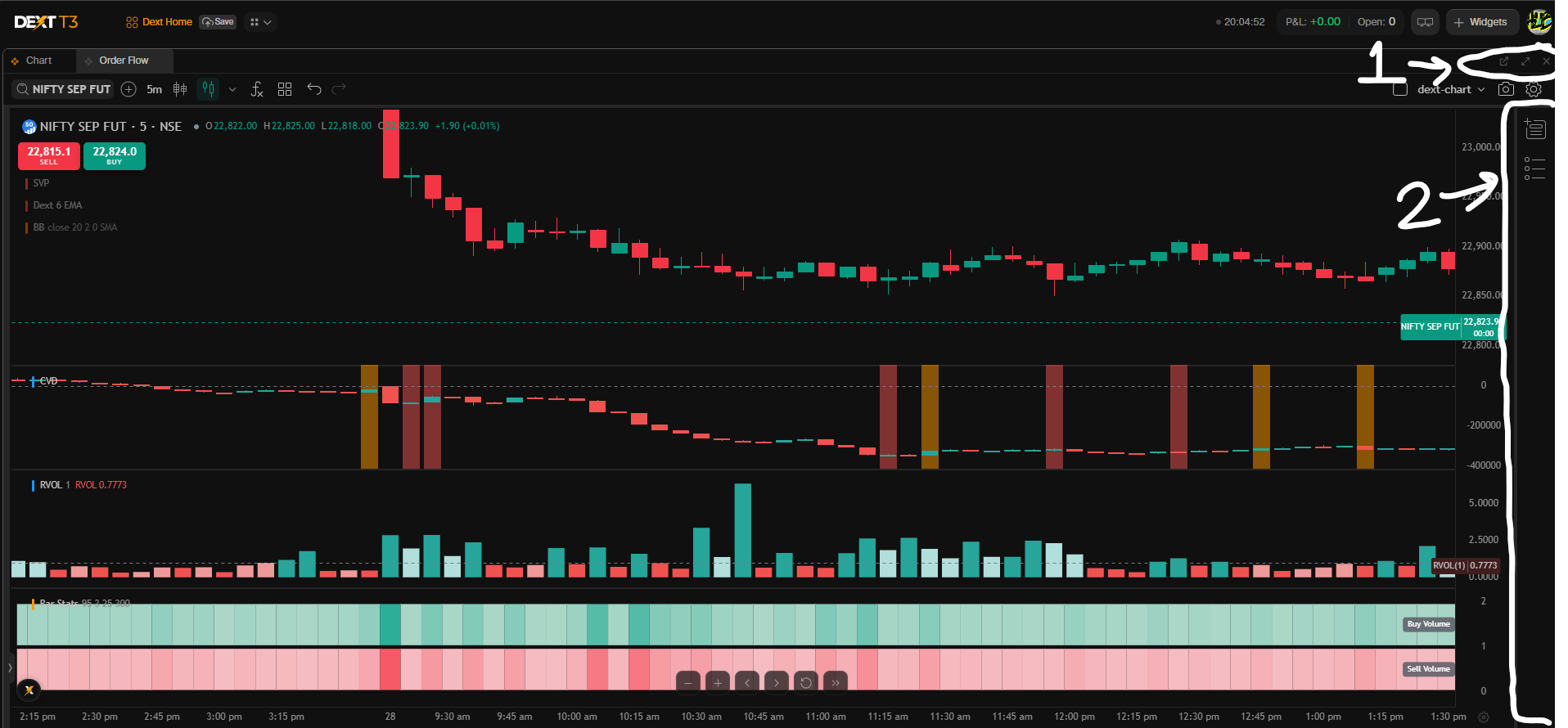
1- The expand button in the right hand corner doesn’t work, allow it to make it a full screen option, while hiding the PNL, widgets, dext home area.
2 - Give us an option to remove the data window and object tree as highlighted in the image.
3 - In the dext terminal give us the option traders a quick way yo add the option premium chart.
Right now we have to use the option chain link that with selected chart section and then add it too lengthy and time consuming.
@theinspired_Youth Thank you for sharing the detailed feedback.
-
Full-screen widget: You can pop out the widget, double-click on it, and select Full Screen. This will let you view the widget independently without the P&L, other widgets, or DEXT Home area.
-
Object Tree / Data Window: The option to hide the right-side panel, including the Object Tree, is already in progress.
-
Quick access to Option Premium Chart: Feedback noted. We understand that the current flow through the Option Chain and chart sync involves multiple steps, and we’ll evaluate a quicker way to open the option premium chart directly.
1 Like
Thank you for the response @Bhavya_Jain