Hi @saurabha213 ,
You can get the latest stock names of any index from the below link:
https://www.nseindia.com/market-data/live-equity-market?symbol=NIFTY%2050
Hi @saurabha213 ,
You can get the latest stock names of any index from the below link:
https://www.nseindia.com/market-data/live-equity-market?symbol=NIFTY%2050
Hi @Dev_Goswami ,
Refer the below code:
atm_Strike, option_chain = tsl.get_option_chain(Underlying= "ICICIBANK", exchange= "NSE", expiry= 0, num_strikes= 10)

strike = 1250.0
filtered_data = option_chain[option_chain['Strike Price'] == strike]
ce_oi = filtered_data['CE OI'].values[0]
pe_oi = filtered_data['PE OI'].values[0]
Hi @Dev_Goswami ,
Firstly do call the option chain as below:
atm_Strike, option_chain = tsl.get_option_chain(Underlying= "ICICIBANK", exchange= "NSE", expiry= 0, num_strikes= 10)
instead of :
option_chain = tsl.get_option_chain(Underlying= "ICICIBANK", exchange= "NSE", expiry= 0, num_strikes= 10)
Then convert it into a dataframe if required.
Thank you sir for details explanation.
I will read that document properly
I will try to do practical soon. Once I will do practical, will get proper idea. Then I will let you know my feedback.
Many thanks Sir.
Is there any easy way to convert it to watchlist format used in .py script?
Hi @Tradehull_Imran I have written below code for above strategy.. Is it correct? i feel some issue is there.
import time
import datetime
import pandas_ta as ta
from Dhan_Tradehull import Tradehull

# Initialize API Client
client_code = "1102790337"
token_id = "your_token_id_here"
tsl = Tradehull(client_code, token_id)

nifty_symbol = "NIFTY"  # NIFTY index symbol
reentry = "yes"  # Set this to "yes" or "no" for re-entry logic
bot_token = "your_bot_token_here"
receiver_chat_id = "your_receiver_chat_id_here"

single_order = {'name': None, 'date': None, 'entry_time': None, 'entry_price': None, 'buy_sell': None, 'qty': None, 'sl': None, 'exit_time': None, 'exit_price': None, 'pnl': None, 'remark': None, 'traded': None}
orderbook = {}

# Set the initial values
orderbook[nifty_symbol] = single_order.copy()

while True:
    print("Starting the VWAP strategy for NIFTY index...")

    current_time = datetime.datetime.now().time()

    # Wait for market open (example: after 9:15 AM)
    if current_time < datetime.time(9, 15):
        print(f"Wait for market to start", current_time)
        time.sleep(1)
        continue

    # Close market logic (example: after 3:30 PM)
    if current_time > datetime.time(15, 30):
        print(f"Market over. Closing all trades. Bye bye.")
        break

    try:
        # Fetch historical 5-minute data for NIFTY
        chart = tsl.get_historical_data(tradingsymbol=nifty_symbol, exchange='NSE', timeframe="5")

        # Calculate VWAP using pandas_ta
        chart['vwap'] = ta.vwap(chart['high'], chart['low'], chart['close'], chart['volume'])
        cc = chart.iloc[-2]  # Get the second-last data point

        print(f"Scanning NIFTY at {current_time}, Last Close: {cc['close']}, VWAP: {cc['vwap']}")

        # Buy condition: Price above VWAP
        if cc['close'] > cc['vwap'] and orderbook[nifty_symbol]['traded'] is None:
            print(f"Buy signal for NIFTY at {cc['close']}")

            # Place buy order logic
            margin_available = tsl.get_balance()
            margin_required = cc['close'] / 4.5  # Adjust as needed for margin

            if margin_available < margin_required:
                print(f"Not enough margin to take order: margin_available is {margin_available} and margin_required is {margin_required}")
                continue

            orderbook[nifty_symbol]['name'] = nifty_symbol
            orderbook[nifty_symbol]['date'] = str(current_time.date())
            orderbook[nifty_symbol]['entry_time'] = str(current_time.time())[:8]
            orderbook[nifty_symbol]['buy_sell'] = "BUY"
            orderbook[nifty_symbol]['qty'] = 1  # Adjust quantity as needed

            # Place the market order to buy NIFTY
            try:
                entry_orderid = tsl.order_placement(tradingsymbol=nifty_symbol, exchange='NSE', quantity=orderbook[nifty_symbol]['qty'], price=0, trigger_price=0, order_type='MARKET', transaction_type='BUY', trade_type='MIS')
                orderbook[nifty_symbol]['entry_orderid'] = entry_orderid
                orderbook[nifty_symbol]['entry_price'] = tsl.get_executed_price(orderid=entry_orderid)

                # Set stop loss and target profit
                orderbook[nifty_symbol]['sl'] = round(orderbook[nifty_symbol]['entry_price'] * 0.998, 1)  # 0.2% stop loss
                orderbook[nifty_symbol]['tg'] = round(orderbook[nifty_symbol]['entry_price'] * 1.002, 1)  # 0.2% take profit

                # Place stop loss order
                sl_orderid = tsl.order_placement(tradingsymbol=nifty_symbol, exchange='NSE', quantity=orderbook[nifty_symbol]['qty'], price=0, trigger_price=orderbook[nifty_symbol]['sl'], order_type='STOPMARKET', transaction_type='SELL', trade_type='MIS')
                orderbook[nifty_symbol]['sl_orderid'] = sl_orderid
                orderbook[nifty_symbol]['traded'] = "yes"

                # Send Telegram alert about the entry
                message = f"Entry done for NIFTY: {orderbook[nifty_symbol]}"
                tsl.send_telegram_alert(message=message, receiver_chat_id=receiver_chat_id, bot_token=bot_token)

            except Exception as e:
                print(f"Error in placing entry order: {e}")
                continue

        # Monitor for Stop Loss or Take Profit hit
        if orderbook[nifty_symbol]['traded'] == "yes":
            try:
                # Get the current LTP for NIFTY
                ltp = tsl.get_ltp_data(names=[nifty_symbol])[nifty_symbol]
                sl_hit = tsl.get_order_status(orderid=orderbook[nifty_symbol]['sl_orderid']) == "TRADED"
                tg_hit = ltp > orderbook[nifty_symbol]['tg']

                # If stop loss hit
                if sl_hit:
                    orderbook[nifty_symbol]['exit_time'] = str(current_time.time())[:8]
                    orderbook[nifty_symbol]['exit_price'] = tsl.get_executed_price(orderid=orderbook[nifty_symbol]['sl_orderid'])
                    orderbook[nifty_symbol]['pnl'] = round((orderbook[nifty_symbol]['exit_price'] - orderbook[nifty_symbol]['entry_price']) * orderbook[nifty_symbol]['qty'], 1)
                    orderbook[nifty_symbol]['remark'] = "Stop Loss Hit"
                    message = f"SL Hit for NIFTY: {orderbook[nifty_symbol]}"
                    tsl.send_telegram_alert(message=message, receiver_chat_id=receiver_chat_id, bot_token=bot_token)

                    # Optionally reentry logic
                    if reentry == "yes":
                        orderbook[nifty_symbol] = single_order.copy()

                # If take profit hit
                if tg_hit:
                    tsl.cancel_order(OrderID=orderbook[nifty_symbol]['sl_orderid'])  # Cancel the stop loss order
                    time.sleep(2)
                    square_off_buy_order = tsl.order_placement(tradingsymbol=nifty_symbol, exchange='NSE', quantity=orderbook[nifty_symbol]['qty'], price=0, trigger_price=0, order_type='MARKET', transaction_type='SELL', trade_type='MIS')

                    orderbook[nifty_symbol]['exit_time'] = str(current_time.time())[:8]
                    orderbook[nifty_symbol]['exit_price'] = tsl.get_executed_price(orderid=square_off_buy_order)
                    orderbook[nifty_symbol]['pnl'] = (orderbook[nifty_symbol]['exit_price'] - orderbook[nifty_symbol]['entry_price']) * orderbook[nifty_symbol]['qty']
                    orderbook[nifty_symbol]['remark'] = "Take Profit Hit"
                    message = f"TG Hit for NIFTY: {orderbook[nifty_symbol]}"
                    tsl.send_telegram_alert(message=message, receiver_chat_id=receiver_chat_id, bot_token=bot_token)

                    # Optionally reentry logic
                    if reentry == "yes":
                        orderbook[nifty_symbol] = single_order.copy()

            except Exception as e:
                print(f"Error in checking SL or TG: {e}")
                continue
Hello @Tradehull_Imran Sir,
Currently, is there any option for using the ‘trailing stop loss’ via Dhan API?
Overall code structure is good
When you calculate the technical indicators you need to import talib library
import talib
Example
chart_1['ema9'] = talib.EMA(chart_1['close'], timeperiod=9)
Import Necessary libraries and you good to go
import os
import pickle
import datetime
import time
import schedule


# === CONFIGURATION ===
PICKLE_FILE = "orderbook.pkl"    # File name to store orderbook data

# === PICKLE HANDLING FUNCTIONS ===
def load_orderbook(filename):
    """
    Load previous orderbook data from a pickle file.
    Returns an empty dictionary if the file does not exist or loading fails.
    """
    if os.path.exists(filename):
        try:
            with open(filename, "rb") as f:
                data = pickle.load(f)
                print("Loaded previous orderbook data.")
                return data
        except Exception as e:
            print("Error loading pickle file:", e)
    return {}

def save_orderbook(data, filename):
    """
    Saves the orderbook data to disk using Python's pickle.
    """
    try:
        with open(filename, "wb") as f:
            pickle.dump(data, f)
            print("Orderbook data saved successfully.")
    except Exception as e:
        print("Error saving orderbook:", e)

# === ORDERBOOK FUNCTIONS ===
def update_orderbook(orderbook_data):
    """
    Fetches the current orderbook from DhanHQ and updates the local data.
    """
    try:
        current_orderbook = client.get_orderbook()
        if isinstance(current_orderbook, dict):
            orderbook_data.update(current_orderbook)
            print("Orderbook updated with live data.")
        else:
            print("Unexpected orderbook format received:", current_orderbook)
    except Exception as e:
        print("Error retrieving orderbook data:", e)

    return orderbook_data

# === JOB FUNCTION FOR SCHEDULING ===
def scheduled_read_job():
    """
    Job to load the existing orderbook data at 9:00 AM before market opens.
    """
    orderbook = load_orderbook(PICKLE_FILE)
    print(f"Scheduled orderbook read executed at {datetime.datetime.now().strftime('%H:%M:%S')}")

def scheduled_save_job():
    """
    Job to update and save the orderbook at 3:30 PM.
    """
    orderbook = load_orderbook(PICKLE_FILE)
    orderbook = update_orderbook(orderbook)
    save_orderbook(orderbook, PICKLE_FILE)
    print(f"Scheduled orderbook save executed at {datetime.datetime.now().strftime('%H:%M:%S')}")

# === MAIN SCHEDULING FUNCTION ===
def main():
    # Schedule the orderbook read job at 9:00 AM daily.
    schedule.every().day.at("09:00").do(scheduled_read_job)

    # Schedule the orderbook update & save job at 3:30 PM daily.
    schedule.every().day.at("15:30").do(scheduled_save_job)

    print("Scheduler started. Awaiting scheduled tasks...")

    # Run the scheduler loop continuously.
    while True:
        schedule.run_pending()
        time.sleep(1)  # Sleep briefly to prevent high CPU usage.

if __name__ == "__main__":
    main()
@Tradehull_Imran sir,
After long hours of manual and as well as AI Chat studies, hope I got the starting point at least.
Sir when you have time please verify it going write direction or everything is wrong
lf it is OK also, still more things will be left like connect with excel and update the excel properly. there your help is definitely require
@Tradehull_Imran
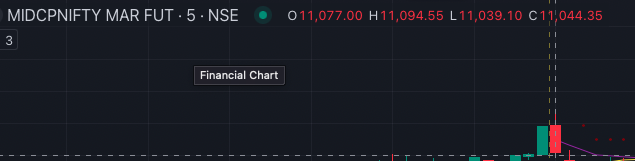
Still getting incorrect values MIDCPNIFTY MAR FUT High is 11122.55 and Low is 11011.1
    chart = tsl.get_historical_data(item['name'], item['exchange'], "5")
    today_date = datetime.datetime.now().date()
    today_data = chart[chart['timestamp'].dt.date == today_date]
    if today_data.empty:
        continue
    first_candle = today_data.iloc[0]
    firstHigh = first_candle['high']
    firstLow = first_candle['low']
Please check the chart for values
I still don’t understand how come it works for you each time.
CC: @Dhan
Hi @Swapnil_Sutar ,
Through the API it is currently unavailable, but you can use python code to implement it. Check the below reference code:
options_name                      = orderbook[name]['options_name']
				options_chart                     = tsl.get_historical_data(tradingsymbol = options_name,exchange = 'NFO',timeframe="5")
				options_chart['atr'] 			  = talib.ATR(options_chart['high'], options_chart['low'], options_chart['close'], timeperiod=14)
				rc_options                        = options_chart.iloc[-1]
				sl_points                         = rc_options['atr']*atr_multipler
				options_ltp                       = tsl.get_ltp_data(names = options_name)[options_name]
				tsl_level                         = options_ltp - sl_points

				if tsl_level > orderbook[name]['tsl']:
					trigger_price = round(tsl_level, 1)
					price         = trigger_price - 0.05
					tsl.modify_order(order_id=orderbook[name]['sl_orderid'],order_type="STOPLIMIT",quantity=25,price=price,trigger_price=trigger_price)
					orderbook[name]['tsl'] = tsl_level
Hi @Minakshi_Kuila ,
The code’s structure seems to be right.
Hi @Subhajitpanja ,
The code seems to be right, let me know if you are facing any issue.
Make sure the parameters which are passed are right, also do share the screenshot of what values you are getting with the terminal values also include what parameters are passed.
Hello @Tradehull_Imran
For the Session3 _ Codebase
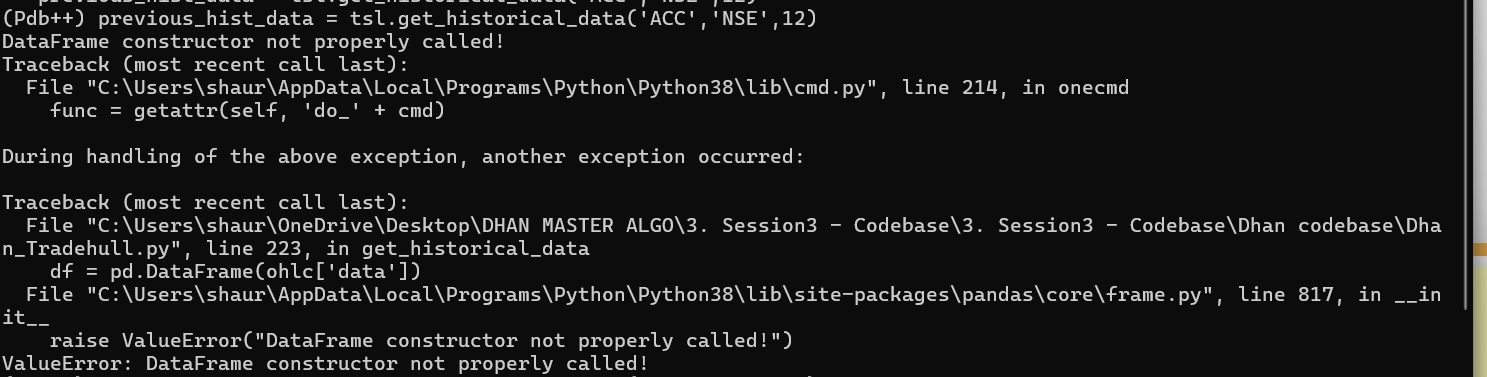
I am having trouble getting the output for historical and the intraday data.
Kindly help with this, it says Value Error, - DataFrame constructor not properly called.
Also i have not made any changes to the tradehull.py file
Hi @Tradehull_Imran many thanks Sir for your quick reply & help always.
Q: In advanced series episode 3 you had asked to write the sell condition script on our own. Please could you share the sell condition script or share link in case you have already shared sell condition script in this forum earlier?
Sincere thanks and gratitude to you for your efforts and way you taught to code algo until now, life long learning.
Hi @Tradehull_Imran ,
I’m working on Volume Profile,
       # Define window/length
        window = 24  # Analyze the last 24 data points

        # Apply the window to the data
        df_window = df.tail(window).copy()

        # Calculate the volume profile for the window
        df_window['volume_x_price'] = df_window['volume'] * df_window['close']
        total_volume = df_window['volume'].sum()
        POC = df_window.loc[df_window['volume'].idxmax(), 'close']

        # Bullish Volume Profile condition
        Volume_Profile_bull = df['close'].iloc[-1] > POC

        # Bearish Volume Profile condition
        Volume_Profile_bear = df['close'].iloc[-1] < POC
Is this the correct syntax to analyse it…?
Plz help me with any changes required in it.
TIA 
Hi @Tradehull_Imran sir,
practicing latest YouTube series on Advance Algo Trading, very informative videos, I appreciate your work, Everything working fine until re-entry.
the code copying data from Live Trading sheet to Competed Orders sheet then delete the data from Live Trading sheet. but when the algo try to re-entry that perticular stock it throws below error.
    if orderbook[script_name]['traded'] == "YES":
TypeError: 'NoneType' object is not subscriptable
can any one please help to create indicator name CPR with pivot level weekly in hourly chart. (only support 1&2 and resistance 1&2 value needed)
Please Help
@Tradehull_Imran