Learn Algo Trading with Python | Codes | Youtube Series

@Tradehull_Imran Sir, am getting the following error in Dhan Websocket execution,

Reading existing file all_instrument 2025-11-04.csv
Watchlist changed. Reconnecting the feed…
Disconnected from WebSocket feed.
WebSocket connection error: no close frame received or sent
Reconnecting Again…
Watchlist changed. Reconnecting the feed…

Please help in fixing the issue.

Getting the below error for a simple script:
This BOT Is Picking New File From Dhan
Got the instrument file
Exception at calling ltp as {‘status’: ‘failure’, ‘remarks’: {‘error_code’: None, ‘error_type’: None, ‘error_message’: None}, ‘data’: {‘data’: {‘806’: ‘Data APIs not Subscribed’}, ‘status’: ‘failed’}}

“Do We Need to Have the DATA API Subscription to utilize the codebase”

Hi @onlyshon ,

Yes you need DATA API subscription to utilize the codebase.
Follow below steps to Subscribe for Data API:

  1. Go to Profile Section
  2. Select “Dhan HQ Trading API”
  3. Switch to Data API tab
  4. Click Subscribe
  5. Revoke the access token and try
    Once you have active subscription you will be able to fetch historical and live data.

Do update to our latest codebase version 3.0.6:

  • Open Command Prompt: Press Win, type cmd, and press Enter.
  • Install Dhan-Tradehull: Run pip install Dhan-Tradehull
  • Confirm the installation by running pip show Dhan-Tradehull

Guide to use the updated codebase:
Refer the below pypi link for more details:

Video reference :

Hi @ddeogharkar ,

Currently there is no open interest indicator present in the tsl library.

Hello @Tradehull_Imran sir,
This is after updating of codebase in accordance with Episode 3.1.
Issue 1:
Code:

import pdb
import time
import datetime
import traceback
import talib
from Dhan_Tradehull import Tradehull
import pandas as pd


client_code = "xxxxxx"
token_id = "xxxxxx"
tsl = Tradehull(client_code,token_id) # tradehull_support_library

ltp1 = tsl.get_ltp_data('ACC')
print(ltp1)

I am getting empty output, like:

C:\Users\subud\Dhan Algo\3.2 Codebase & Websocket\To be used>"Dhan_codebase usage.py"
Codebase Version 3
-----Logged into Dhan-----
reading existing file all_instrument 2025-11-05.csv
Got the instrument file
{}

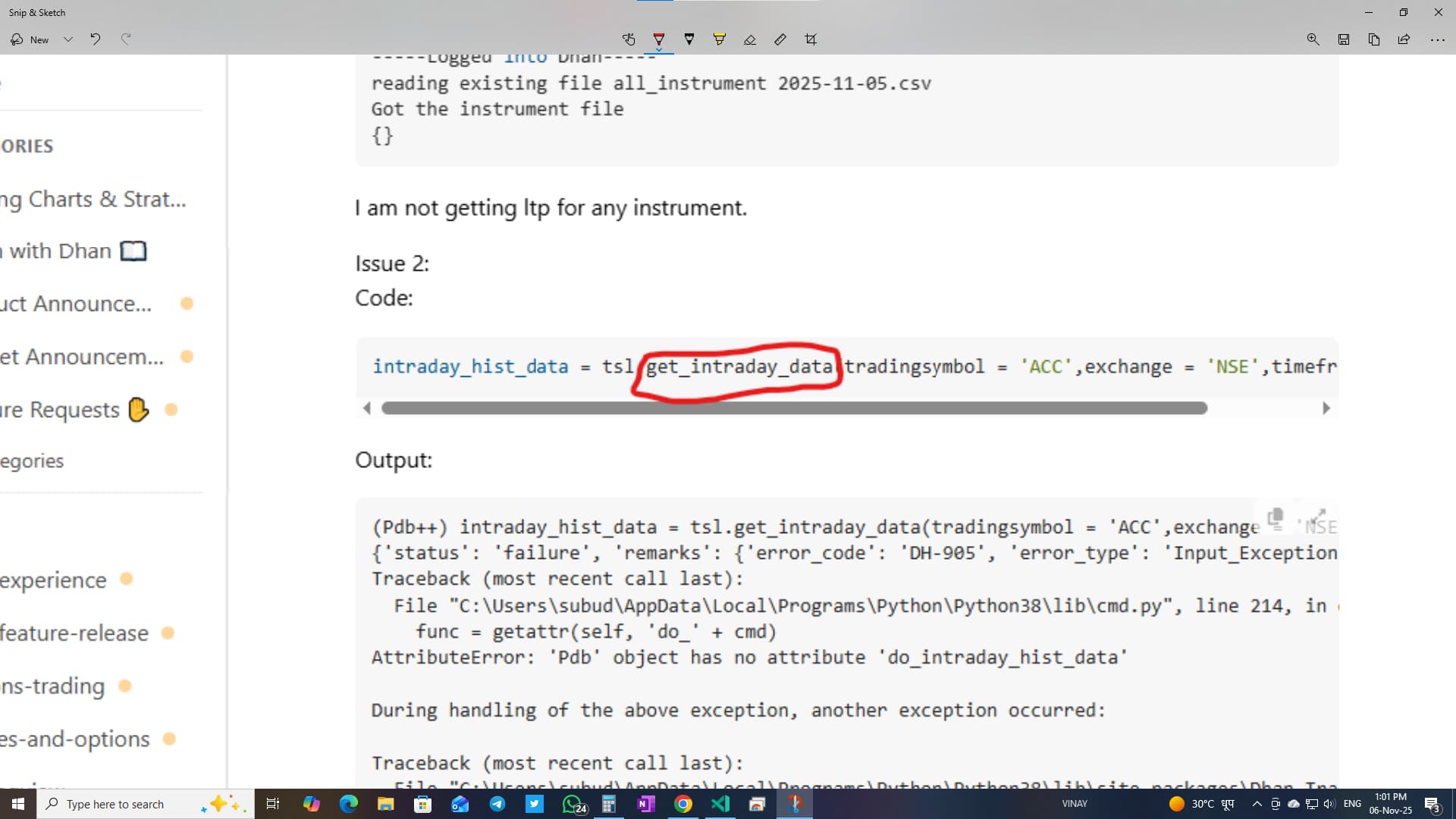
I am not getting ltp for any instrument.

Issue 2:
Code:

intraday_hist_data = tsl.get_intraday_data(tradingsymbol = 'ACC',exchange = 'NSE',timeframe = "1")

Output:

(Pdb++) intraday_hist_data = tsl.get_intraday_data(tradingsymbol = 'ACC',exchange = 'NSE',timeframe = "1")
{'status': 'failure', 'remarks': {'error_code': 'DH-905', 'error_type': 'Input_Exception', 'error_message': 'System is unable to fetch data due to incorrect parameters or no data present'}, 'data': {'errorType': 'Input_Exception', 'errorCode': 'DH-905', 'errorMessage': 'System is unable to fetch data due to incorrect parameters or no data present'}}
Traceback (most recent call last):
  File "C:\Users\subud\AppData\Local\Programs\Python\Python38\lib\cmd.py", line 214, in onecmd
    func = getattr(self, 'do_' + cmd)
AttributeError: 'Pdb' object has no attribute 'do_intraday_hist_data'

During handling of the above exception, another exception occurred:

Traceback (most recent call last):
  File "C:\Users\subud\AppData\Local\Programs\Python\Python38\lib\site-packages\Dhan_Tradehull\Dhan_Tradehull.py", line 525, in get_intraday_data
    raise Exception(ohlc)
Exception: {'status': 'failure', 'remarks': {'error_code': 'DH-905', 'error_type': 'Input_Exception', 'error_message': 'System is unable to fetch data due to incorrect parameters or no data present'}, 'data': {'errorType': 'Input_Exception', 'errorCode': 'DH-905', 'errorMessage': 'System is unable to fetch data due to incorrect parameters or no data present'}}

Issue 3:
Code:

ce_name, pe_name, strike = tsl.ATM_Strike_Selection(Underlying='NIFTY',Expiry=0)

Output:

 exception got in ce_pe_option_df 'NIFTY'

Issue 4:
Code:

otm_ce_name, otm_pe_name, ce_OTM_strike, pe_OTM_strike = tsl.OTM_Strike_Selection(Underlying='NIFTY',Expiry=0,OTM_count=3)

Output:

Getting Error at OTM strike Selection as 'NIFTY'

Issue 5:
Code:

itm_ce_name, itm_pe_name, ce_ITM_strike, pe_ITM_strike = tsl.ITM_Strike_Selection(Underlying='NIFTY',Expiry=0,ITM_count=4)

Output:

Error at OTM strike Selection as 'NIFTY'

can you help me on this sir? I couldn’t proceed further.
Thank you in advance.

@Tradehull_Imran sir please provide sample code for get the strike delta value from option chain

any update? @Dhan @shraddha @Pratham_Gada @PravinJ @RahulDeshpande @Tradehull_Imran

Hi @Surendra_Singh1 ,

Refer the below code -

atm_strike,option_chain = tsl.get_option_chain("NIFTY", "INDEX",0,10)
strike = 25400
ce_delta = option_chain.loc[option_chain["Strike Price"] == strike, "CE Delta"].values[0]
pe_delta = option_chain.loc[option_chain["Strike Price"] == strike, "PE Delta"].values[0]

Issue 2:
Try this Code:

intraday_hist_data =tsl.get_historical_data(tradingsymbol = 'ACC',exchange = 'NSE',timeframe = "1")

Issue 3:
Try this Code:

ce_name, pe_name, strike_price = tsl.ATM_Strike_Selection(Underlying='NIFTY',Expiry=0)

Issue 4:
Try this Code:

ce_name, pe_name, ce_OTM_price, pe_OTM_price = tsl.OTM_Strike_Selection(Underlying ='NIFTY', Expiry=0, OTM_count=1)

Issue 5:
Try this Code:

ce_name, pe_name, ce_ITM_price,pe_ITM_price = tsl.ITM_Strike_Selection(Underlying ='NIFTY', Expiry=0, ITM_count=1)

@vinay_kumaar
Thank you very much :love_letter:, it is working now.

Now I checked previous codes also, they are working. Why these codes didn’t work yesterday?
If you can give little explanation, I would be really happy.

Got it. Thank you once again @vinay_kumaar ji.

@Dhan @RahulDeshpande @Tradehull_Imran @Pratham_Gada
I have deployed my algo on cloud. earlier I had to update the token once in 30 days. Now that you have updated the expiry time to 24 hr, I had to update the token everyday. Do you see any alternative solution?

I have been asking the question since 3-4 days but no response. unfortunately, no response :angry:

1 Like

Facing the same issue. Everyday i need to update the token. Need solution as soon as possible.

Hi @Tradehull_Imran sir,
While trying to get strike based on ltp in option, getting error:
Code:

for number in range(1,11):
	otm_ce_name, otm_pe_name, ce_OTM_strike, pe_OTM_strike = tsl.OTM_Strike_Selection(Underlying='NIFTY',Expiry=0,OTM_count=number)
	ce_ltp = tsl.get_ltp_data(otm_ce_name)
	if ce_ltp < 5:
		print("Found the strike which is less than Rs 5 LTP",otm_ce_name, ce_ltp)
		break

Error:

Traceback (most recent call last):
  File "C:\Users\subud\Dhan Algo\5 Python Part 2\5. Session5- Python Part 2\Ltp Based Strike Selection\Dhan_codebase usage.py", line 36, in <module>
    if ce_ltp < 5:
TypeError: '<' not supported between instances of 'dict' and 'int'

Kindly help me on it.

I tried a couple of ready-made algos. Platform is really well developed.
However, I did not feel comfortable with these algos as it does not provide sufficient information about algos high level strategy (entry critera, exit criteria), performance.

Currently it only shows how much ROI it generated in last one year. However, it does not show other KPIs like Hit Ratio, Max Drawdown, Max Profit etc.

Thanks!

I would also be interested to know solution about this challenge.

Watch Episode 3.1, there he bypassed websocket. You will get clarity.

Hi @nitinsubudhi ,

Replace with below code–

for number in range(1,11):
	otm_ce_name, otm_pe_name, ce_OTM_strike, pe_OTM_strike = tsl.OTM_Strike_Selection(Underlying='NIFTY',Expiry=0,OTM_count=number)
	ce_ltp = tsl.get_ltp_data(otm_ce_name)
	ce_ltp = ce_ltp[otm_ce_name]
	if ce_ltp < 5:
		print("Found the strike which is less than Rs 5 LTP",otm_ce_name, ce_ltp)
        break
1 Like
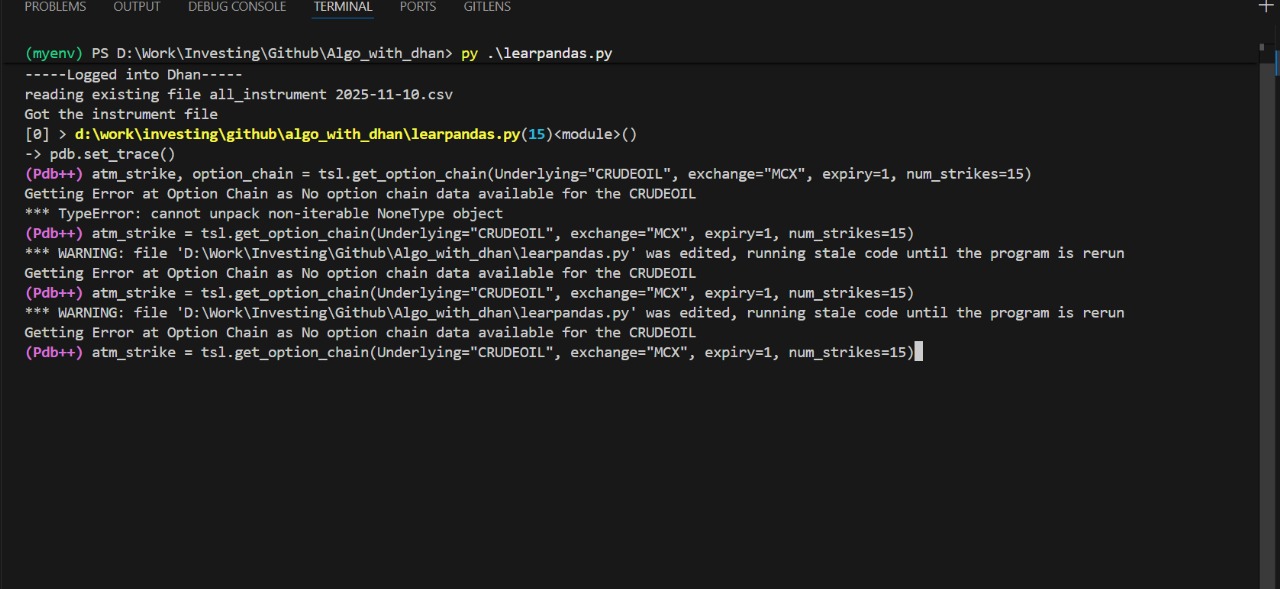
chart = tsl.get_historical_data(tradingsymbol = 'CRUDEOIL',exchange = 'MCX',timeframe="15")
atm_strike, option_chain = tsl.get_option_chain(Underlying="CRUDEOIL", exchange="MCX", expiry=1, num_strikes=15)

@Tradehull_Imran sir,
In the code provided, what exactly do we get as the spot price for the commodity? Also, could you please guide me on how to properly fetch the option chain data? I tried fetching option chain data but encountered an error. Your guidance would be highly appreciated.

Thank you!

API key is the solution

1 Like