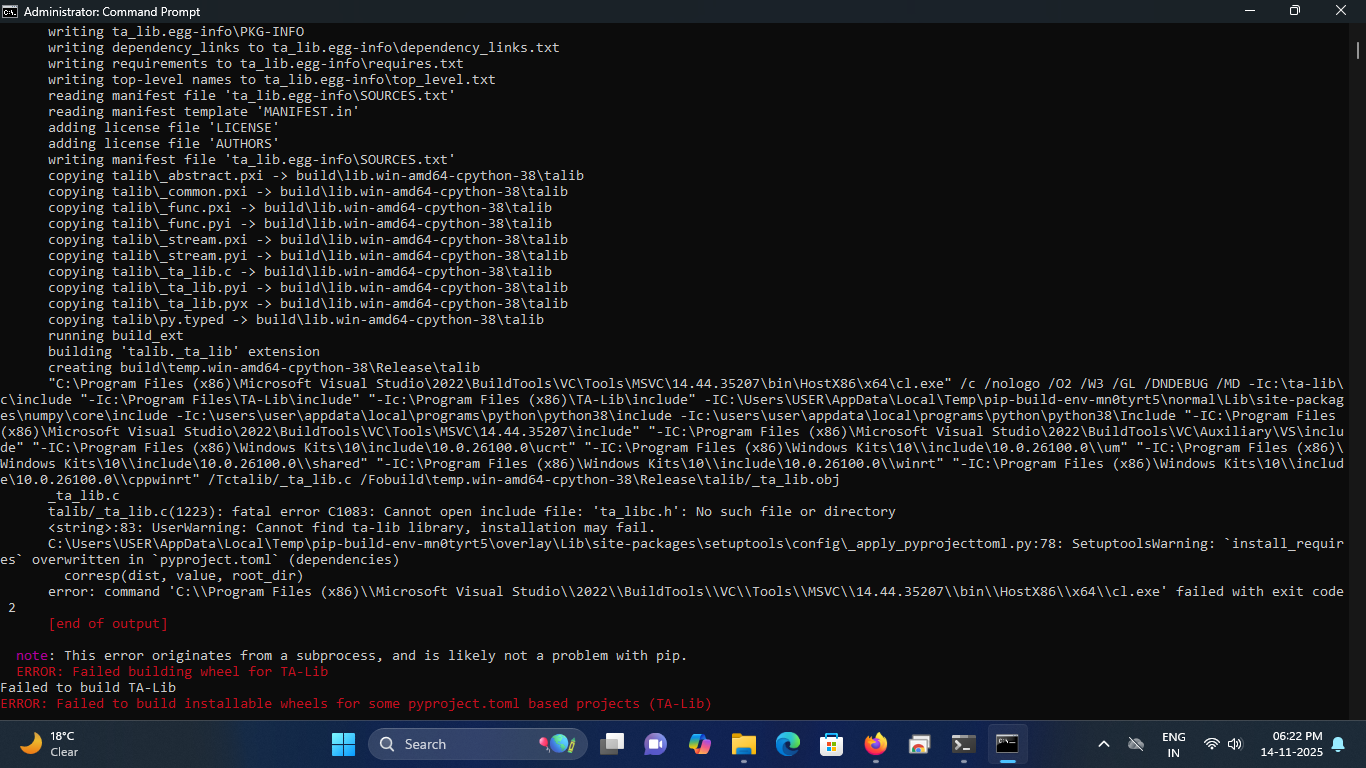
@Tradehull_Imran Sir During TA-Lib package installation i am getting error. attaching the screenshot please help.
csv file not downloading
Hello,
This error usually comes when TA-Lib is installed on an unsupported Python version. TA-Lib works only up to Python 3.8.
Please check your Python version using:
python --version
If your version is 3.8 or below, just run:
pip install TA-Lib
If your Python version is higher (3.9+), TA-Lib won’t build. In that case, install Python 3.8 and then try the above command again.
Hello @LAVAKUSH_VISHWAKARMA, Can you elaborate more about issue please?
@Tradehull_Imran - The files seems to have be removed from the link .. could you please share the updated link where I can find the API upgrade fill which we are suppose to use now instead of older method ?
Hi @Dhan & @Tradehull_Imran ,
Do you have any plan of creating some content about back testing.
I was able to build some code for Option Selling Neutral strategy or got an idea how to scan data, calculate indicator, evaluate conditions and order placement using algorithmic trading approach.
However, I am not getting confidence since logic is not back tested. In advanced algorithmic series you explained about brute force methodology for generating all possible combinations of conditions.
Can you please share some references or sample code with at least basic strategy to get some idea about flow?
Looking forward for your response n this.
Thank you!
kindly reply imran sir, earlier what used to happen is while fetching option historical data only 5 trading data were used to appear , does tradehull current version 3.0.6 provides option historical data for 90 days or not .
@Tradehull_Imran Sir, I’m new to this coding and all, but trying do the steps you taught, but getting error, Kindly help
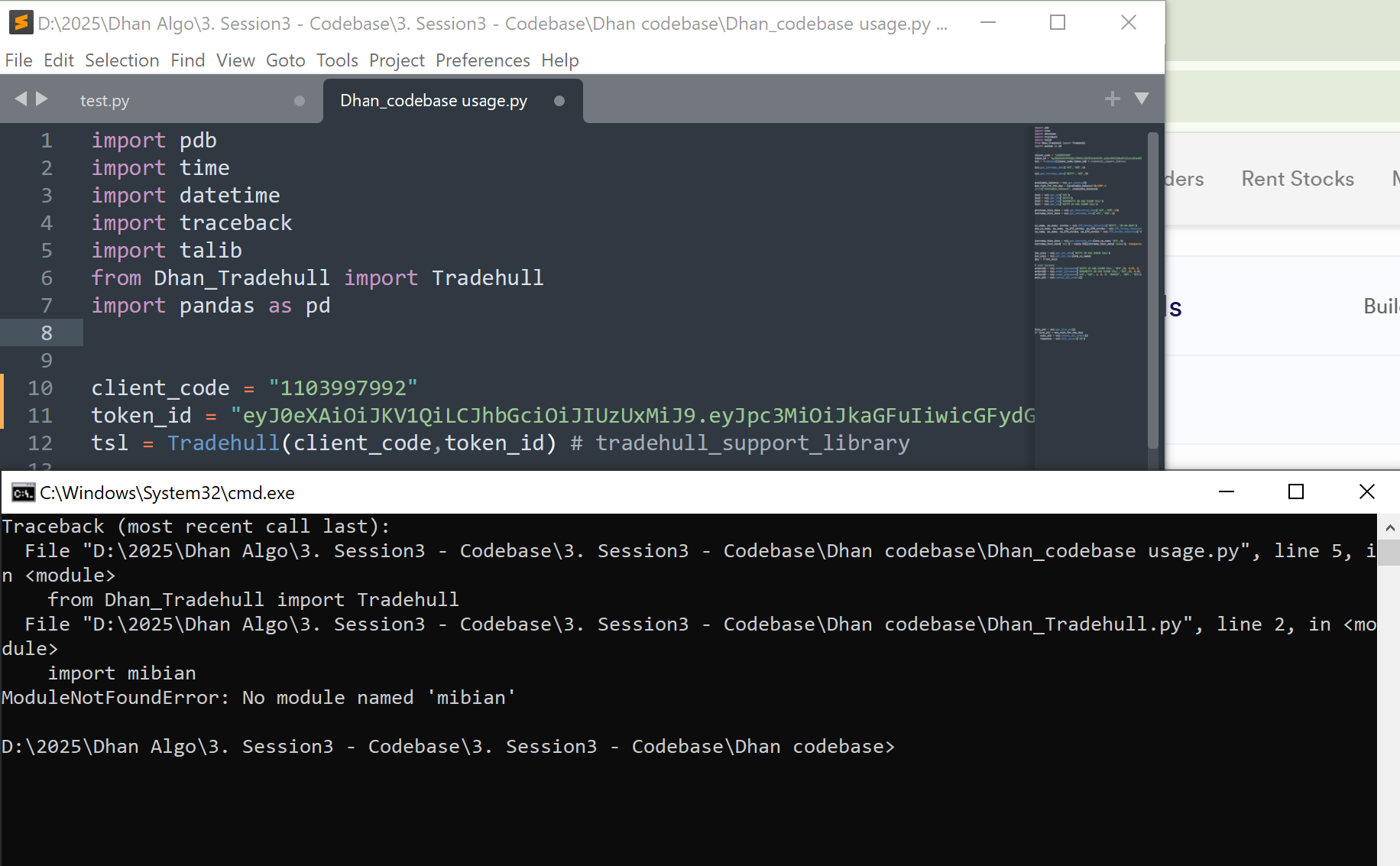
Dear Team,
Provided code link not able to access
Kindly provide new link
Hi @JKK62 ,
To get the latest files, do update to our latest codebase version 3.0.6:
- Open Command Prompt: Press Win, type cmd, and press Enter.
- Install Dhan-Tradehull: Run
pip install Dhan-Tradehull - Confirm the installation by running
pip show Dhan-Tradehull
Guide to use the updated codebase:
Refer the below pypi link for more details:
Video reference :
Hi @ROCKY2 ,
Currently in 3.0.6 version historical data for 90 days is not available. But you can make small modifications as below–
Open your command prompt
- Run the following command to find where the
Dhan_Tradehull.pyfile is located:
pip show Dhan-Tradehull
- Look for the line starting with
Location:in the output. - Example:
Location: C:\Users\<username>\AppData\Local\Programs\Python\Python311\Lib\site-packages
- Inside that folder, navigate to:
Dhan_Tradehull.py
- Scroll or search (Ctrl + F) for:
def get_start_date():
- Inside the function, locate this line:
start_date = df.iloc[-2]['timestamp']
- Replace it with:
start_date = df.iloc[-90]['timestamp']
- Save the file after making the change.
- Restart your Python script or application that imports
Dhan_Tradehull.py.
Hi @Uma_Jagadeesan ,
Do update to our latest codebase version 3.0.6:
- Open Command Prompt: Press Win, type cmd, and press Enter.
- Install Dhan-Tradehull: Run
pip install Dhan-Tradehull - Confirm the installation by running
pip show Dhan-Tradehull
Hi @Siddhesh_Amrute ,
We will be conducting a backtesting session with Dhan soon.
1 Like
will it surely work if u have not updated at your end how will it work ok let see
i have tried mam but its not working by changing from 2 to -90 please check at your end if its working
Hi @Tradehull_Imran Sir, I am facing the below error regularly. Pls give your comments.
NIFTY is in uptrend, Buy this Script
'Got exception in place_order as {‘status’: ‘failure’, ‘remarks’: {‘error_code’: ‘DH-905’, ‘error_type’: ‘Input_Exception’, ‘error_message’: ‘Invalid Price’}, ‘data’: {‘errorType’: ‘Input_Exception’, ‘errorCode’: ‘DH-905’, ‘errorMessage’: ‘Invalid Price’}}
Message sent successfully
Error at getting order status as Check the order id, Error as None
[NIFTY] ERROR checking SL status: local variable ‘response’ referenced before assignment
error in sl order cheking
[0] > e[33;01mc:\users\administrator\desktop\2. session2 - installation\nce.pye[00m(e[36;01m210e[00m)()
→ e[94mcontinuee[39;49;00me[90me[39;49;00m
Hi@this is krishna
I am getting below error while running my algo with rsi indicator

watchlist = ['360ONE','ABB','ABCAPITAL','ADANIENSOL','ADANIENT','ADANIGREEN']

traded_wathclist = []


while True:
	for stock_name in watchlist:
		print(stock_name)

		chart = tsl.get_intraday_data(stock_name, 'NFO', 1)
		chart['rsi'] = talib.RSI(chart['close'], timeperiod=14) #pandas

		bc   = chart.iloc[-2] #pandas  breakout candle
		ic   = chart.iloc[-3] #pandas  inside candle
		ba_c = chart.iloc[-4] #pandas  base candle

		uptrend = bc['rsi'] > 30
		downtrend = bc['rsi'] < 60
		inside_candle_formed = (ba_c['high'] > ic['high']) and (ba_c['low'] < ic['low'])


		upper_side_breakout = bc['high'] > ba_c['high']
		down_side_breakout  = bc['low']  < ba_c['low']

		no_repeat_order = stock_name not in traded_wathclist
		max_order_limit = len(traded_wathclist) <= max_trades
D:\Dhan\6. Session6- 1st Live Algo>py “Dhan_codebase usage.py”
Codebase Version 2.8 : Solved - Strike Selection Issue
-----Logged into Dhan-----
reading existing file all_instrument 2025-12-10.csv
Got the instrument file
360ONE
{‘status’: ‘failure’, ‘remarks’: {‘error_code’: ‘DH-905’, ‘error_type’: ‘Input_Exception’, ‘error_message’: ‘System is unable to fetch data due to incorrect parameters or no data present’}, ‘data’: {‘errorType’: ‘Input_Exception’, ‘errorCode’: ‘DH-905’, ‘errorMessage’: ‘System is unable to fetch data due to incorrect parameters or no data present’}}
Traceback (most recent call last):
File “D:\Dhan\6. Session6- 1st Live Algo\Dhan_Tradehull_V2.py”, line 569, in get_intraday_data
raise Exception(ohlc)
Exception: {‘status’: ‘failure’, ‘remarks’: {‘error_code’: ‘DH-905’, ‘error_type’: ‘Input_Exception’, ‘error_message’: ‘System is unable to fetch data due to incorrect parameters or no data present’}, ‘data’: {‘errorType’: ‘Input_Exception’, ‘errorCode’: ‘DH-905’, ‘errorMessage’: ‘System is unable to fetch data due to incorrect parameters or no data present’}}
Traceback (most recent call last):
File “D:\Dhan\6. Session6- 1st Live Algo\Dhan_codebase usage.py”, line 26, in
chart[‘rsi’] = talib.RSI(chart[‘close’], timeperiod=14) #pandas
~~~~~^^^^^^^^^
TypeError: ‘NoneType’ object is not subscriptable
Hi @ROCKY2 ,
Do check this thread-
Hi @vinothsaravanan ,
In the error itseems the price that was passed is incorrect. Do cross check the price required for the order.
Hi @Krushna_Rout ,
tsl.get_intraday_data() function is deprecated. To fetch historical data do use the below code-
data = tsl.get_historical_data(tradingsymbol='ACC', exchange='NSE', timeframe="1")