@Tradehull_Imran sir, I am unable to fetch the details for tsl.ATM_Strike_Selection() for NaturalGasMini with all combination of names of NaturalGasMini. Is commodity having different way to get it ?
After upgrading Dhan_Tradehull to the latest release, I am able to fetch for NATURALGAS at least. it is still not working for NATURALGASM. Somehow, I have managed it by replacing strings. 
Sir, if you have any better solution, please let me know.
Hi @aanand1008 ,
We have updated the Dhan-Tradehull .
Do run the below commands in cmd terminal-
pip install dhanhq==2.2.0
pip install Dhan-Tradehull==3.3.1
Follow the remaining steps :
Step 1: Run the following command:
pip show Dhan_tradehull
Step 2: Copy the location path shown in the output, similar to the example below:
c:\users\Test\appdata\local\programs\python\python310\lib\site-packages
Step 3: Paste the copied path into File Explorer.
Step 4: Search for the Dhan_Tradehull folder and open it.
Step 5: Locate the Dhan_Tradehull.py file and open it.
Step 6: Search for the following line (CTRL + F) will find the dictionary:
self.commodity_step_dict = {'GOLD': 100,'SILVER': 250,'CRUDEOIL': 50,'NATURALGAS': 5,'COPPER': 5,'NICKEL': 10,'ZINC': 2.5,'LEAD': 1, 'ALUMINIUM': 1, 'COTTON': 100, 'MENTHAOIL': 10, 'GOLDM': 50, 'GOLDPETAL': 5, 'GOLDGUINEA': 10, 'SILVERM': 250, 'SILVERMIC': 10, 'BRASS': 5, 'CASTORSEED': 100, 'COTTONSEEDOILCAKE''CARDAMOM': 50, 'RBDPALMOLEIN': 10,'CRUDEPALMOIL': 10,'PEPPER': 100, 'JEERA': 100, 'SOYABEAN': 50, 'SOYAOIL': 10, 'TURMERIC': 100, 'GUARGUM': 100, 'GUARSEED': 100, 'CHANA': 50, 'MUSTARDSEED': 50, 'BARLEY': 50, 'SUGARM': 50, 'WHEAT': 50, 'MAIZE': 50, 'PADDY': 50, 'BAJRA': 50, 'JUTE': 50, 'RUBBER': 100, 'COFFEE': 50, 'COPRA': 50, 'SESAMESEED': 50, 'TEA': 100, 'KAPAS': 100, 'BARLEYFEED': 50, 'RAPESEED': 50, 'LINSEED': 50, 'SUNFLOWER': 50, 'CORIANDER': 50, 'CUMINSEED': 100 }
Step 7: Replace the following line and save the file to use the NATURALGASMINI data(CTRL +S):
self.commodity_step_dict = {'GOLD': 100,'SILVER': 250,'CRUDEOIL': 50,'NATURALGAS': 5,'NATGASMINI' : 5 ,'COPPER': 5,'NICKEL': 10,'ZINC': 2.5,'LEAD': 1, 'ALUMINIUM': 1, 'COTTON': 100, 'MENTHAOIL': 10, 'GOLDM': 50, 'GOLDPETAL': 5, 'GOLDGUINEA': 10, 'SILVERM': 250, 'SILVERMIC': 10, 'BRASS': 5, 'CASTORSEED': 100, 'COTTONSEEDOILCAKE''CARDAMOM': 50, 'RBDPALMOLEIN': 10,'CRUDEPALMOIL': 10,'PEPPER': 100, 'JEERA': 100, 'SOYABEAN': 50, 'SOYAOIL': 10, 'TURMERIC': 100, 'GUARGUM': 100, 'GUARSEED': 100, 'CHANA': 50, 'MUSTARDSEED': 50, 'BARLEY': 50, 'SUGARM': 50, 'WHEAT': 50, 'MAIZE': 50, 'PADDY': 50, 'BAJRA': 50, 'JUTE': 50, 'RUBBER': 100, 'COFFEE': 50, 'COPRA': 50, 'SESAMESEED': 50, 'TEA': 100, 'KAPAS': 100, 'BARLEYFEED': 50, 'RAPESEED': 50, 'LINSEED': 50, 'SUNFLOWER': 50, 'CORIANDER': 50, 'CUMINSEED': 100 }
After these steps refer the code provided below -
Refer the code -
from Dhan_Tradehull import Tradehull

client_code = ""
tsl = Tradehull(client_code, mode="pin_totp", pin="", totp_secret="")

ce_strike, pe_strike, strike = tsl.ATM_Strike_Selection('NATGASMINI',0)
print(f"NATGASMINI : {ce_strike},{pe_strike},{strike}")
Output -

1 Like
@Tradehull_Imran Hi, i tried to test dhanhq cloud today and found that
- Each time i run my script it reinstalls all dependencies again and again, why?
- If i try to write file for my yesterday trades like buy or sell (for positional trading), its temporary after i save and run again it says file does not exist.
- what is the location for writing and reading files? which all file formats are allowed to read and write?
- I have multiple python script can i run single master script which call other child scripts? also Subprocess/multiprocessing allowed?
- What is the configuration of 1vCPU?
- How can we utilize upload zip file feature? Do we need to manually create all files for read and write.
Thanks. pls write asap.
1 Like
Hi @Shahid_Shahid ,
-
Ideally, all dependencies should not be reinstalled each time. The same has been raised with @Dhan team for clarification.
-
Yes, the files are deleted after execution. For persistent storage, the data can be stored in an online database such as Supabase. This allows the data to be retained and accessed later through the Supabase API whenever required.
-
Could you please elaborate on this question once again?
-
As per the current understanding, subprocesses and multiprocessing are likely not supported.
-
The current configuration of Dhan Cloud is 1 vCPU and 3 GB RAM.
-
If your project is ready on your local machine, you can upload the ZIP file to Dhan Cloud and proceed with the deployment.
Hi @Tradehull_Imran ,
Very disappointed as without these features dhan cloud becomes useless to me.
I run multiple scripts from single master scripts and also log the console output for many strategy for months. The log file size becomes more than 50MB. Also without reading or writing the trade file or any external file its difficult run my scripts as some space will be required for these files, @Dhan should have provided at least 500 MB hard disc space.
Request @Dhan to provide Subprocess/multiprocessing and some hard disc space may be 500MB and also file reading writing permissions.
Thanks
sir can u please tell me i have subscribed for dhan api can i get monthly data as i want to algo trade and place order via api but i need monthly historical candle to use indicator for algo
Hi @kanhaji ,
Currently, there is no specific function available to retrieve historical data in a monthly timeframe. However, historical data can be obtained using the daily timeframe and then resampled to a monthly timeframe as required.
The codebase has been updated. Please run the following command in the Command Prompt (CMD) terminal.
Refer the command -
pip install dhanhq==2.2.0
pip install Dhan-Tradehull==3.3.1
Refer the code for the resampling -
from Dhan_Tradehull import Tradehull
import pandas as pd

def resample_daily_to_monthly(df):
    df = df.copy().assign(timestamp=lambda x: pd.to_datetime(x["timestamp"])).sort_values("timestamp").set_index("timestamp")
    agg_dict = {"open": "first", "high": "max", "low": "min", "close": "last"}

    if "volume" in df.columns:
        agg_dict["volume"] = "sum"

    if "open_interest" in df.columns:
        agg_dict["open_interest"] = "last"
    elif "oi" in df.columns:
        agg_dict["oi"] = "last"

    monthly = df.resample("MS").agg(agg_dict).dropna(subset=["open", "high", "low", "close"]).reset_index()
    monthly["month"] = monthly["timestamp"].dt.strftime("%Y-%m")
    return monthly

client_code = ""
tsl = Tradehull(client_code, mode="pin_totp", pin="", totp_secret="")

hist = tsl.get_long_term_historical_data('NIFTY','INDEX','DAY','2026-01-01','2026-06-05')
monthly_hist = resample_daily_to_monthly(hist)
print(monthly_hist)
Output -
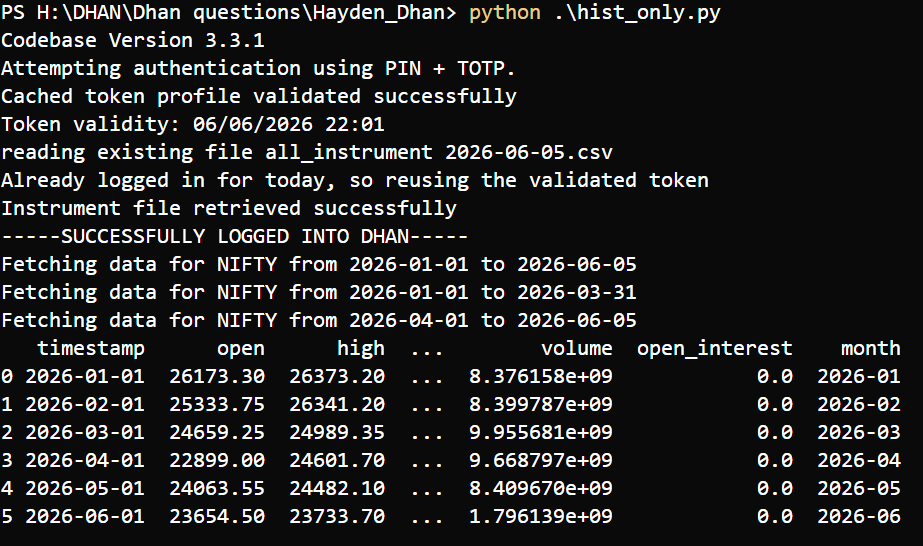
Refer this link for the codebase -
1 Like
Relating to this kindly guide mereko entire NSE & BSE stocks pe run karna hai ek strategy ko which might covered around 2500-3000 stocks is it possible to scan entire stocks every second or every minute and if yes suggest the fastest way
Hi @kanhaji ,
Yes, it is possible to scan 2500–3000 NSE/BSE stocks, but we should not use normal REST API polling for every-second scanning.
For live LTP, the fastest method is Dhan WebSocket Live Market Feed. In WebSocket, we subscribe to all required security IDs once, then Dhan keeps pushing live ticks. Our system stores the latest LTP in memory and runs the strategy from that local data. Dhan’s Python MarketFeed is made for WebSocket subscription and real-time updates, and it supports functions like connect, run_forever, get_data, subscribe_symbols, and unsubscribe_symbols. (dhanhq.co)
For REST Market Quote, Dhan allows up to 1000 instruments per request with 1 request per second, so 3000 stocks may take around 3 seconds per full scan. This is okay for 1-minute scanning, but not ideal for every-second scanning. (dhanhq.co)
For historical data also, we should not call API repeatedly for all stocks during live market. Dhan historical API provides daily and minute candles; intraday supports minute intervals, and Dhan recommends storing large historical data at our end. (dhanhq.co)
So the best architecture is:
- Fetch historical data once and store locally.
- Resample daily candles to weekly/monthly locally if needed.
- Use WebSocket for live LTP/ticks.
- Build current 1-minute candle locally from WebSocket data.
- Run the strategy from local cache, not repeated API calls.
You are a gem of a person thanks for your guidance 
1 Like

i am getting this error. even basic commands are not running.
Please help. I run Codebase -that landed up in error. i run Dhan_websocket that landed up in error by saying not able to recognize “Websocket.xlsx” file. AND now i tried from the basic that too landed up in error. Please let me know Tradehull is still recognize by Dhan platform or they discarded this code by now @66/6/2026
I am using 3.12 . but i do not think this is a issue here.
Hi @Shyamalendu
The codebase has been updated, do run the following command in the Command Prompt (CMD) terminal.
pip install Dhan-Tradehull==3.3.1
pip install dhanhq==2.2.0
Refer this below link for codebase -
Also we have upgraded from websocket to simple rest api calls.
do watch this video
Than k so much , it gives me great knowledge to start with algo trading. when i run the code first issue is unable to connect.
I have dhan account
subscribe the data API.
Generated the access keys.
now when i run to check if it is connected to dhan. i am getting this erroe”from dhanhq import dhanhq
ModuleNotFoundError: No module named ‘dhanhq’”
kindly help to resolved this
Thank you Imran sir, can you provide the link to the updated code
Hi @Tradehull_Imran ,I am facing this issue
C:\Users\darsh\PycharmProjects\PythonProject.venv\Scripts\python.exe C:\Users\darsh\PycharmProjects\PythonProject\main.py
Mibian requires scipy to work properly
Codebase Version 3.3.1
Attempting authentication using ACCESS TOKEN.
Cached token profile validated successfully
Token validity: 10/06/2026 20:52
reading existing file all_instrument 2026-06-10.csv
Already logged in for today, so reusing the validated token
Instrument file retrieved successfully
-----SUCCESSFULLY LOGGED INTO DHAN-----
Traceback (most recent call last):
File “C:\Users\darsh\PycharmProjects\PythonProject\main.py”, line 7, in
result = tsl.ATM_StrikeSelection(Underlying=‘NIFTY’, Expiry=0)
^^^^^^^^^^^^^^^^^^^^^^^
AttributeError: ‘Tradehull’ object has no attribute ‘ATM_StrikeSelection’. Did you mean: ‘ATM_Strike_Selection’?
Process finished with exit code 1
use below code for atm strike selection
CE_symbol_name, PE_symbol_name, strike = tsl.ATM_Strike_Selection(Underlying='NIFTY', Expiry=0)
also here is the document link for other codebase calls as well
@Tradehull_Imran,please help me to resolve ,I am facing same issue
C:\Users\darsh\PycharmProjects\PythonProject.venv\Scripts\python.exe C:\Users\darsh\PycharmProjects\PythonProject\main.py
Mibian requires scipy to work properly
Codebase Version 3.3.1
Attempting authentication using ACCESS TOKEN.
Cached token profile validated successfully
Token validity: 10/06/2026 20:52
reading existing file all_instrument 2026-06-10.csv
Already logged in for today, so reusing the validated token
Instrument file retrieved successfully
-----SUCCESSFULLY LOGGED INTO DHAN-----
Exception at getting Expiry list as {‘status’: ‘failure’, ‘remarks’: {‘error_code’: None, ‘error_type’: None, ‘error_message’: None}, ‘data’: ‘’}
Unable to find the correct Expiry for NIFTY
Traceback (most recent call last):
File “C:\Users\darsh\PycharmProjects\PythonProject\main.py”, line 8, in
CE_symbol_name, PE_symbol_name, strike = tsl.ATM_Strike_Selection(Underlying=‘NIFTY’, Expiry=0)
^^^^^^^^^^^^^^^^^^^^^^^^^^^^^^^^^^^^^^
TypeError: cannot unpack non-iterable NoneType object
Process finished with exit code 1