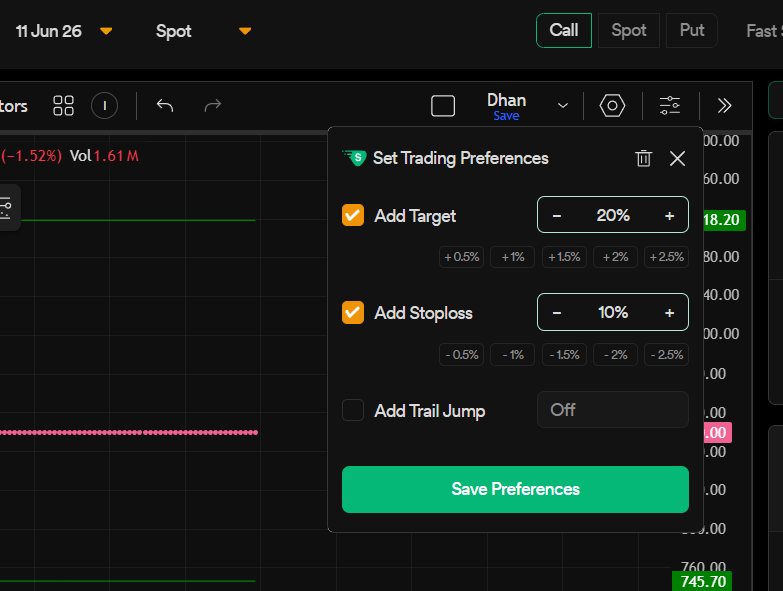
Requesting the addition of a feature to allow users to specify fixed point values in the Trading Preferences for Power Scalper mode. This enhancement would enable conditions to remain constant and prevent automatic adjustments based on the Last Traded Price (LTP), providing greater consistency and control over trading strategies.
For example, instead of specifying a Stop Loss (SL) of 10% and a Take Profit (TP) of 20%, users should have the option to define fixed values such as 10 points for SL and 20 points for TP.
This enhancement would provide greater flexibility, allowing users to choose between percentage-based and fixed point-based configurations depending on their trading requirements and strategy preferences.
@Dhan@Mohseen_Usmani look into this post. Instead of adding new boxes and cluttering the UI, you can just add a simple toggle switch between [ % | Points ] right next to the target/stoploss options. If we select points, it takes points; if we select %, it takes %. This will keep the Power Scalper mode clean and fast without loading the feature too much.
I think ATR based Profit Target & Stop Loss are best because they adjust for volatility of the underlying symbol. % based Targets & Stops doesn’t take into account the Volatility. Some Symbols move just 2-3 % daily while others may move more than 7-8% daily. As far as Points are concerned they are least preferred due to wide variation of underlying. A 10 Point move in a Symbol priced around 100 means very big move, while for a 10000 rupees Symbol it means nothing. ATR takes care both of these shortcomings.
Automated calculations like ATR don’t work for high-speed scalping or precise structural setups. As traders, we place our stop-loss at very specific areas based on price action, breakout failures, or operator trapping psychology, not at random numbers calculated by ATR.
Traders universally use the Long/Short position tool on charts because it simultaneously displays both Points and Percentages for a critical reason. Points are required to instantly calculate precise position sizing and exact chart invalidation levels, while Percentage helps track the Risk/Reward ratio (1:2, 1:5, 1:10, etc.) relative to capital.
When executing fast trades in Power Scalper mode, forcing traders to only use percentage is a major bottleneck. If a trapping setup on an ₹80 stock shows the best structural SL at ₹75, I need the flexibility to instantly type ‘5’ in Points or ‘6.25%’ in Percentage depending on how I planned the trade on the chart. Letting a dynamic value like ATR auto-adjust the SL completely breaks this logical risk management, often triggering the SL prematurely right before hitting the actual target.
The requested toggle [ % | Points ] is exactly what bridges the gap between chart planning and lightning-fast execution without cluttering the UI.