Hi Dhan Team,
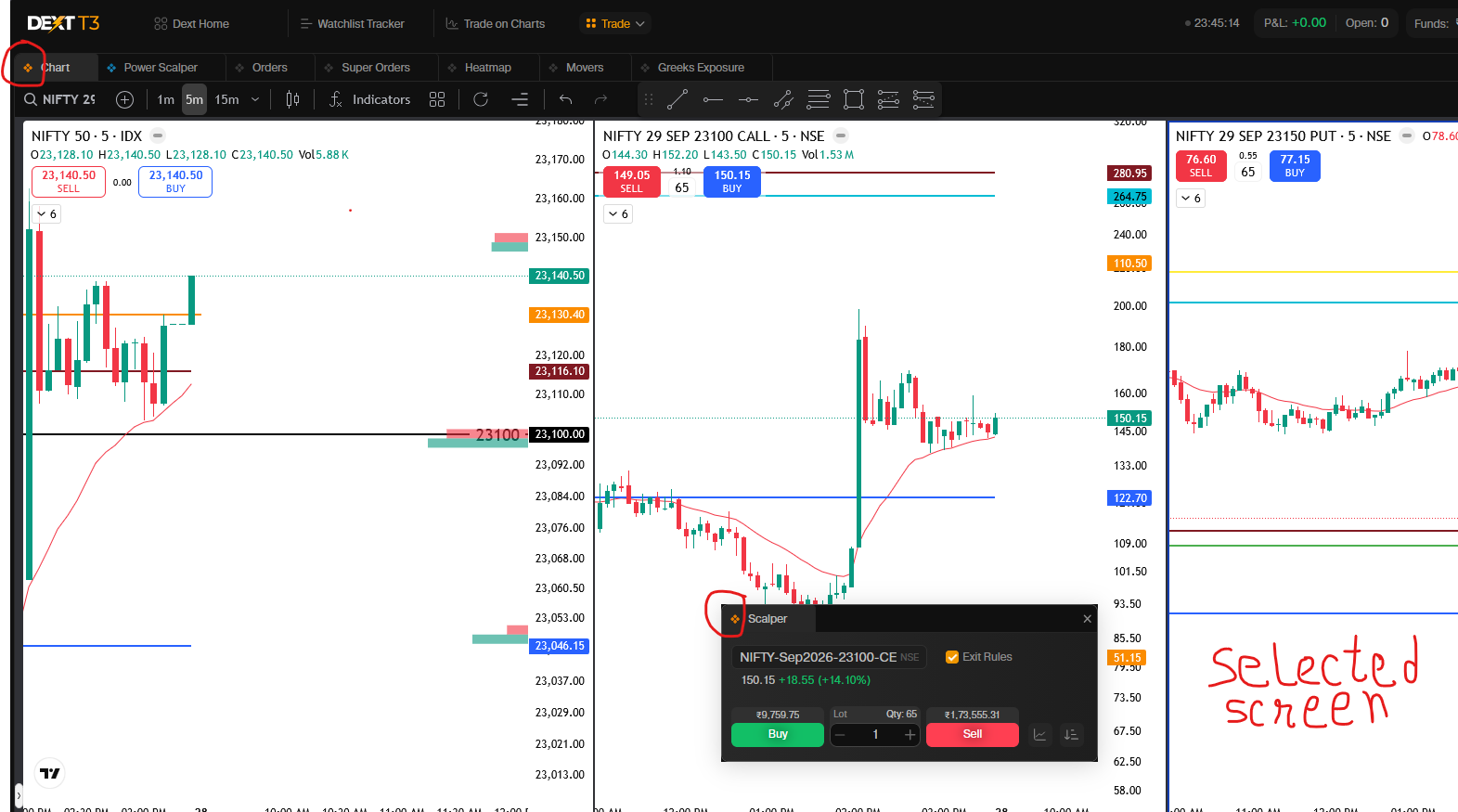
As a scalper, every second counts. Currently, the Dhan Web scalper widget seamlessly auto-updates its contract details whenever a user switches between different charts in a multi-split layout. However, this same intuitive behavior is missing when using the Floating Scalper Widget alongside a split-screen chart layout on the Dext Terminal.
I am requesting that the Floating Scalper Widget automatically update its contract details based on whichever specific chart layout is currently active/selected within a multi-split screen, provided they share the same widget color link.
The Current Problem
When using a 3-chart split layout in the chart widget linked to a Floating Scalper Widget by color:
- Layout 1: Nifty Index
- Layout 2: Nifty CE Contract
- Layout 3: Nifty PE Contract
When I click on Layout 2 (CE) or Layout 3 (PE), the Floating Scalper does not dynamically update to match the selected sub-chart. Instead, it requires manual entry of the contract details into the floating window. For a scalper, manually typing or selecting contracts mid-trade wastes critical time and defeats the purpose of having a fast, floating scalper execution tool.
Why this matters to Traders
- Speed: Eliminates manual data entry entirely, allowing lightning-fast order execution.
- Reduced Error: Scalpers won’t accidentally execute trades on the wrong strike price due to a mismatched floating window.
- Better Dext Experience: Truly unlocks the power of a multi-monitor/floating layout setup for active option buyers.
Proposed Solution & Behavior
- Dynamic Active-Screen Linking: Keep the standard color-linking mechanism between the Chart Widget and the Floating Scalper Widget.
- On-Click Auto-Update: When multiple charts are open in a split layout (e.g., 2, 3, or 4 splits), the Floating Scalper should instantly listen to the active clicked chart.
- If I click on the CE chart split, the Floating Scalper instantly updates to that CE contract.
- If I click on the PE chart split, the Floating Scalper instantly switches to that PE contract.
- Consistency: This mirrors the excellent behavior already present in the standard Dhan Web scalper panel, bringing much-needed UI parity to the Dext floating setup.
As shown in the image below, even though I have selected the third split-screen (which contains the PE contract), the Floating Scalper continues to display the CE contract from the second screen.