sir what is this invalid syntax
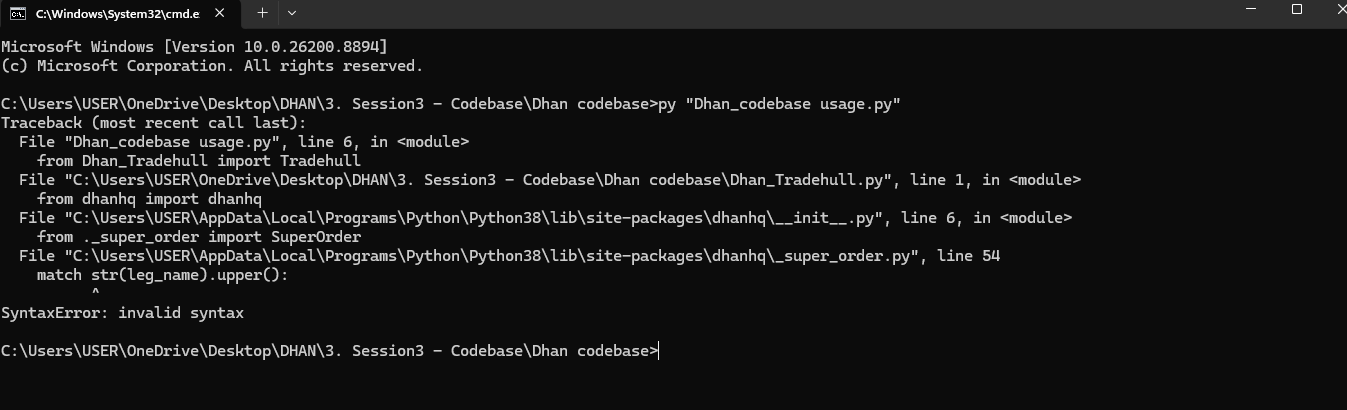
sir what is this invalid syntax
Hi @Shreeshant_Chikane ,
Do run the following commands to check python version -
python --version
If its version is less than 3.12 then follow the steps in this link to upgrade -
Dhan_Tradehull Library Update: Python 3.12 & Authentication Improvements
Sir for testing demo algo login is failing getting this output
Codebase Version 3.3.2
Attempting authentication using PIN + TOTP.
Auto-generated TOTP.
PIN + TOTP login failed once, retrying with a fresh TOTP in 18 seconds: Access token not found in response: {‘message’: ‘Invalid TOTP’, ‘status’: ‘error’}
Auto-generated TOTP.
Login failed: Access token not found in response: {‘message’: ‘Invalid TOTP’, ‘status’: ‘error’}
Traceback (most recent call last):
Login failed. Please retry with valid credentials.
I am scanning for BEL
Exception in Getting OHLC data as ‘Tradehull’ object has no attribute ‘instrument_df’
File “C:\Users\USER\AppData\Local\Programs\Python\Python312\Lib\site-packages\Dhan_Tradehull\Dhan_Tradehull.py”, line 374, in get_login
access_token = self.extract_access_token(resp)

               ^^^^^^^^^^^^^^^^^^^^^^^^^^^^^^^
File “C:\Users\USER\AppData\Local\Programs\Python\Python312\Lib\site-packages\Dhan_Tradehull\Dhan_Tradehull.py”, line 113, in extract_access_token
raise Exception(f"Access token not found in response: {resp}")
Exception: Access token not found in response: {‘message’: ‘Invalid TOTP’, ‘status’: ‘error’}
Traceback (most recent call last):
File “C:\Users\USER\AppData\Local\Programs\Python\Python312\Lib\site-packages\Dhan_Tradehull\Dhan_Tradehull.py”, line 61, in _init_
raise Exception("Login failed. Please retry with valid credentials.")
Exception: Login failed. Please retry with valid credentials.
I am scanning for TATACONSUM
Exception in Getting OHLC data as ‘Tradehull’ object has no attribute ‘instrument_df’
I am scanning for BAJAJ-AUTO
Exception in Getting OHLC data as ‘Tradehull’ object has no attribute ‘instrument_df’
I am scanning for NESTLEIND
Exception in Getting OHLC data as ‘Tradehull’ object has no attribute ‘instrument_df’
I am scanning for BAJFINANCE
Exception in Getting OHLC data as ‘Tradehull’ object has no attribute ‘instrument_df’
I am scanning for HINDALCO
Exception in Getting OHLC data as ‘Tradehull’ object has no attribute ‘instrument_df’
I am scanning for NTPC
Exception in Getting OHLC data as ‘Tradehull’ object has no attribute ‘instrument_df’
I am scanning for HDFCLIFE
Exception in Getting OHLC data as ‘Tradehull’ object has no attribute ‘instrument_df’
I am scanning for SBILIFE
Exception in Getting OHLC data as ‘Tradehull’ object has no attribute ‘instrument_df’
I am scanning for HINDUNILVR
Exception in Getting OHLC data as ‘Tradehull’ object has no attribute ‘instrument_df’
I am scanning for MARUTI
Exception in Getting OHLC data as ‘Tradehull’ object has no attribute ‘instrument_df’
I am scanning for ITC
Exception in Getting OHLC data as ‘Tradehull’ object has no attribute ‘instrument_df’
I am scanning for TMPV
Exception in Getting OHLC data as ‘Tradehull’ object has no attribute ‘instrument_df’
I am scanning for ADANIPORTS
Exception in Getting OHLC data as ‘Tradehull’ object has no attribute ‘instrument_df’
I am scanning for DRREDDY
Exception in Getting OHLC data as ‘Tradehull’ object has no attribute ‘instrument_df’
I am scanning for WIPRO
Exception in Getting OHLC data as ‘Tradehull’ object has no attribute ‘instrument_df’
I am scanning for ONGC
Exception in Getting OHLC data as ‘Tradehull’ object has no attribute ‘instrument_df’
I am scanning for SBIN
Exception in Getting OHLC data as ‘Tradehull’ object has no attribute ‘instrument_df’
I am scanning for EICHERMOT
Exception in Getting OHLC data as ‘Tradehull’ object has no attribute ‘instrument_df’
I am scanning for COALINDIA
Exception in Getting OHLC data as ‘Tradehull’ object has no attribute ‘instrument_df’
I am scanning for BAJAJFINSV
Exception in Getting OHLC data as ‘Tradehull’ object has no attribute ‘instrument_df’
I am scanning for MAXHEALTH
Exception in Getting OHLC data as ‘Tradehull’ object has no attribute ‘instrument_df’
I am scanning for KOTAKBANK
Exception in Getting OHLC data as ‘Tradehull’ object has no attribute ‘instrument_df’
I am scanning for APOLLOHOSP
Exception in Getting OHLC data as ‘Tradehull’ object has no attribute ‘instrument_df’
I am scanning for CIPLA
Exception in Getting OHLC data as ‘Tradehull’ object has no attribute ‘instrument_df’
I am scanning for JSWSTEEL
Exception in Getting OHLC data as ‘Tradehull’ object has no attribute ‘instrument_df’
I am scanning for HCLTECH
Exception in Getting OHLC data as ‘Tradehull’ object has no attribute ‘instrument_df’
I am scanning for TCS
Exception in Getting OHLC data as ‘Tradehull’ object has no attribute ‘instrument_df’
I am scanning for INDIGO
Exception in Getting OHLC data as ‘Tradehull’ object has no attribute ‘instrument_df’
I am scanning for BHARTIARTL
Exception in Getting OHLC data as ‘Tradehull’ object has no attribute ‘instrument_df’
I am scanning for ETERNAL
Exception in Getting OHLC data as ‘Tradehull’ object has no attribute ‘instrument_df’
I am scanning for LT
Exception in Getting OHLC data as ‘Tradehull’ object has no attribute ‘instrument_df’
I am scanning for SHRIRAMFIN
Exception in Getting OHLC data as ‘Tradehull’ object has no attribute ‘instrument_df’
I am scanning for GRASIM
Exception in Getting OHLC data as ‘Tradehull’ object has no attribute ‘instrument_df’
I am scanning for AXISBANK
Exception in Getting OHLC data as ‘Tradehull’ object has no attribute ‘instrument_df’
I am scanning for POWERGRID
Exception in Getting OHLC data as ‘Tradehull’ object has no attribute ‘instrument_df’
I am scanning for ADANIENT
Exception in Getting OHLC data as ‘Tradehull’ object has no attribute ‘instrument_df’
I am scanning for TECHM
Exception in Getting OHLC data as ‘Tradehull’ object has no attribute ‘instrument_df’
I am scanning for ICICIBANK
Exception in Getting OHLC data as ‘Tradehull’ object has no attribute ‘instrument_df’
I am scanning for JIOFIN
Exception in Getting OHLC data as ‘Tradehull’ object has no attribute ‘instrument_df’
I am scanning for TATASTEEL
Exception in Getting OHLC data as ‘Tradehull’ object has no attribute ‘instrument_df’
I am scanning for TITAN
Exception in Getting OHLC data as ‘Tradehull’ object has no attribute ‘instrument_df’
I am scanning for INFY
Exception in Getting OHLC data as ‘Tradehull’ object has no attribute ‘instrument_df’
I am scanning for TRENT
Exception in Getting OHLC data as ‘Tradehull’ object has no attribute ‘instrument_df’
I am scanning for ASIANPAINT
Exception in Getting OHLC data as ‘Tradehull’ object has no attribute ‘instrument_df’
I am scanning for ULTRACEMCO
Exception in Getting OHLC data as ‘Tradehull’ object has no attribute ‘instrument_df’
I am scanning for HDFCBANK
Exception in Getting OHLC data as ‘Tradehull’ object has no attribute ‘instrument_df’
I am scanning for RELIANCE
Exception in Getting OHLC data as ‘Tradehull’ object has no attribute ‘instrument_df’
I am scanning for M&M
Exception in Getting OHLC data as ‘Tradehull’ object has no attribute ‘instrument_df’
I am scanning for SUNPHARMA
Exception in Getting OHLC data as ‘Tradehull’ object has no attribute ‘instrument_df’
Hi @Shreeshant_Chikane ,
The issue appears to be caused by invalid credentials. Kindly verify the Client ID , PIN , and TOTP , and then run the code again. It should work without any errors once the correct credentials are provided.
@Tradehull_Imran I know generic issue but stil lface issue File “C:\Users\Dell\AppData\Roaming\Python\Python314\site-packages\Dhan_Tradehull\Dhan_Tradehull.py”, line 61, in init
raise Exception(“Login failed. Please retry with valid credentials.”)
Exception: Login failed. Please retry with valid credentials.
client_code = “Taken from Dhan”
pin = “we know 6 digits password to login”
totp_secret = “Enabled with Authenticator code and copied the same line under scanner”
Hi @Alok_Kulkarni ,
Change the totp key again. Try it with new totp key.
Thanks! I was getting that error — looks like I need to enable the API for this. However, I just wanted to confirm: why do we need to instruct Cursor to build this for me? Can we run any Python script to produce output like the one below, in the same terminal?
Login succeeded for client xyz, but every stock still fails with DH-902 — Data APIs are not active on this account.

No share prices were returned. Confirm the Data API plan is active on this client ID at web.dhan.co → My Profile → DhanHQ Trading APIs, or put the subscribed account’s credentials back in the file and I’ll run again.
Hi @Alok_Kulkarni ,
Yes, Cursor AI can create a Python script that reads the Dhan API error and displays a clear message like this in the same terminal. The output will be generated based on the actual API response.
not find dependencies code for option buying scalping algo
Mibian requires scipy to work properly
Codebase Version 3.3.2
Attempting authentication using PIN + TOTP.
Auto-generated TOTP.
PIN + TOTP login failed once, retrying with a fresh TOTP in 9 seconds: HTTPSConnectionPool(host=‘auth.dhan.co’, port=443): Max retries exceeded with url: /app/generateAccessToken?dhanClientId=XYZ&pin=XYZ_PIN&totp=xyz (Caused by SSLError(SSLCertVerificationError(1, ‘[SSL: CERTIFICATE_VERIFY_FAILED] certificate verify failed: unable to get local issuer certificate (_ssl.c:1010)’)))
Auto-generated TOTP.
Login failed: HTTPSConnectionPool(host=‘auth.dhan.co’, port=443): Max retries exceeded with url: /app/generateAccessToken?dhanClientId=XYZ&pin=XYZ_PIN&totp=XYZ (Caused by SSLError(SSLCertVerificationError(1, ‘[SSL: CERTIFICATE_VERIFY_FAILED] certificate verify failed: unable to get local issuer certificate (_ssl.c:1010)’)))
Traceback (most recent call last):
File “D:\Alok_Study_2024\Dhan_Algo\1. Algo Trading for beginners with AI\1. Algo Trading for beginners with AI\2. Installtion and AI IDE\venv\Lib\site-packages\urllib3\connectionpool.py”, line 464, in _make_request
self._validate_conn(conn)
File “D:\Alok_Study_2024\Dhan_Algo\1. Algo Trading for beginners with AI\1. Algo Trading for beginners with AI\2. Installtion and AI IDE\venv\Lib\site-packages\urllib3\connectionpool.py”, line 1106, in _validate_conn
conn.connect()
When I run command manually on cursor terminal i.e. python Demo Algo.py then I am getting above error. However, when I gave commnd on Cursor right pane i.e. “Please build code for me” then its connecting and showing buy and sell signals as you have shown in vedio. Just wanted to know why there such difference ? Am I missing out anything here…
Hi @Alok_Kulkarni ,
This is mainly due to an SSL/certificate configuration difference between the Python environments. The manual terminal and Cursor may be using different Python interpreters.
Refer this command and try running this -
python -m pip install --upgrade certifi requests urllib3 scipy
Also make sure Cursor and the terminal are using the same Python interpreter.
i dont find backtesting code
where is backtesting code
Hi @Abbas ,
Refer this link -
Can you tell us how to install in mac.
Hi @Muthu_Mani ,
The updated Dhan_Tradehull codebase requires Python 3.10 or higher. Python 3.12 is recommended for this version.
Note: These steps are specifically for macOS. No virtual environment is required.
Use the original Google Drive shared by Tradehull:
Installation Files:
Google Drive — Dhan_Tradehull Files
The original MadeForTrade post provides this Drive for the required installation files.
Download the required files to your Mac.
Open Terminal and run:
python3 --version
Also run:
which python3
If Python 3.8 or another older version is being used, install Python 3.12 as described below.
If Homebrew is already installed, run:
brew update
brew install python@3.12
Homebrew currently provides Python 3.12.14 for both Apple Silicon and Intel Macs.
Verify the installation:
python3.12 --version
Expected:
Python 3.12.x
You can install Python directly from the official Python website:
Python 3.12 for macOS — Official Downloads
The official Python macOS downloads include Python 3.12 releases with a 64-bit universal2 installer, suitable for supported Intel and Apple Silicon Macs.
Run:
echo 'export PATH="/opt/homebrew/opt/python@3.12/bin:$PATH"' >> ~/.zshrc
source ~/.zshrc
Run:
echo 'export PATH="/usr/local/opt/python@3.12/bin:$PATH"' >> ~/.zshrc
source ~/.zshrc
Now verify:
python3 --version
and:
which python3
Make sure Python 3.12 is being used.
Run:
python3 -m pip install --upgrade pip
Verify:
python3 -m pip --version
Install the updated library using:
python3 -m pip install Dhan-Tradehull
Verify the installation:
python3 -m pip show Dhan-Tradehull
You can also check the installed DhanHQ dependency:
python3 -m pip show dhanhq
The original post points users to the Dhan-Tradehull PyPI package for the updated functions and usage.
If the Google Drive contains an install libraries.bat file, do not try to execute the .bat file on Mac.
.bat is a Windows batch file.
Instead, if your project contains a requirements.txt, open Terminal in the project folder:
cd /path/to/your/project
Then run:
python3 -m pip install -r requirements.txt
If the shared Drive contains a list of required libraries but no requirements.txt, install those packages manually using:
python3 -m pip install <package-name>
Run:
python3 -c "from Dhan_Tradehull import Tradehull; print('Dhan_Tradehull installed successfully')"
Expected:
Dhan_Tradehull installed successfully
The original Tradehull post provides a separate Google Drive file called:
login_methods.py
login_methods.py — Google Drive
Download the login_methods.py file from the Drive provided in the original post and place it in your project according to the structure used by the updated codebase. The post specifically identifies this file as the reference for the new login methods.
The updated library introduces additional authentication methods.
The important new method is:
PIN + TOTP authentication
This allows the application to generate the access token during login instead of requiring the user to manually provide a new access token every day.
Use the login_methods.py file provided by Tradehull as the reference for implementing this method.
Navigate to your existing algo project:
cd /path/to/your/algo
Run it using Python 3.12:
python3 your_algo.py
For example:
python3 main.py
Run these commands:
python3 --version
python3 -m pip show Dhan-Tradehull
python3 -c "from Dhan_Tradehull import Tradehull; print('Tradehull OK')"
If all three work correctly, your macOS setup is ready.
The key point is: you can use the same Google Drive files from the original post on Mac, but you cannot use the Windows .bat installer directly. The Drive is just the file source; the installation commands need to be adapted for macOS.
Sir,
I want to backtest Index Options strategies which involve deep otm strikes.
How to download Hysterical options data for more than ATM+10 (deep OTM).
How to store the large data efficiently.
Please guide.
Hi @anjalik ,
For expired contracts, the Expired Options Data API supports ATM -10 to ATM +10 for index options on a rolling basis, while other contracts and expiries are limited to ATM -3 to ATM +3. Therefore, deeper OTM historical data beyond these ranges cannot currently be retrieved through the API.
The retrieved data can be stored in CSV files, organized by date, symbol, expiry, strike, or option type. For larger datasets, other storage formats or databases can also be considered.
i am getting following error when trying to save file in DhanHQ after updating the dependencies
“Security violation in requirements.txt: line 2: no safe version found for package ‘scipy’ (checked 10 most recent versions)”