We’re grateful for the overwhelming response to our previous algo trading series
Continuing the same momentum, we’ve now created the 2026 version of the Beginner Algo Trading series.
Below are the code files that were created during Beginner Algo Trading 2026. We’ll keep updating the codes and scripts as new videos are released. You can also use this thread to post any questions or queries related to the videos.
its possible to trade from python algo without any static IP with Dhan. My service provider dont give static IP for home internet connection so i am unable to connect with all other broker. its possible with Dhan ?
sir apna reply nahi diya or ya app bahut confuction ha is ma aap sa bath kaha kara kuch pata nahi chalta .app ka pass kuch dusra msg app ha kya app sa bath karna ka liya .mujhe ake algo bana ha 15 min candel hgh or low pa brake ka badh 5 min candle retest conformation or do pattern hamer or bullish engulfing for buy side or sell side ulta can u do or gide me in nifty only
Hello sir mujhe guide karo please me python kis episode se sikna suru Karu first part me same code likh ne par bhi errors are hen kya kuchh changes huehen kya or second lecture ka installation expire ho gya he ?
START

ref_15m_high = None
ref_15m_low = None

breakout_side = None
breakout_level = None

waiting_for_retest = False
trade_taken = False

previous_5m_candle = None


ON EVERY NEW 15-MINUTE CANDLE CLOSE:

    ref_15m_high = 15m_candle.high
    ref_15m_low  = 15m_candle.low

    breakout_side = None
    breakout_level = None

    waiting_for_retest = False
    trade_taken = False


ON EVERY TICK / LTP UPDATE:

    IF trade_taken == False AND waiting_for_retest == False:

        IF ltp > ref_15m_high:

            breakout_side = "BUY"
            breakout_level = ref_15m_high
            waiting_for_retest = True


        ELSE IF ltp < ref_15m_low:

            breakout_side = "SELL"
            breakout_level = ref_15m_low
            waiting_for_retest = True


ON EVERY NEW 5-MINUTE CANDLE CLOSE:

    current_5m_candle = latest closed 5m candle

    IF previous_5m_candle is None:

        previous_5m_candle = current_5m_candle
        SKIP


    IF waiting_for_retest == True AND trade_taken == False:


        --------------------------------
        BUY SIDE
        --------------------------------

        IF breakout_side == "BUY":

            retest_confirmed =
                current_5m_candle.low <= breakout_level
                AND current_5m_candle.close > breakout_level

            hammer =
                current_5m_candle has small body
                AND lower wick is at least 2 times body
                AND upper wick is small
                AND candle closes bullish

            bullish_engulfing =
                previous_5m_candle is bearish
                AND current_5m_candle is bullish
                AND current candle body engulfs previous candle body

            IF retest_confirmed == True AND (hammer == True OR bullish_engulfing == True):

                BUY SIGNAL

                entry_price = current_5m_candle.close
                stoploss = current_5m_candle.low

                trade_taken = True
                waiting_for_retest = False


        --------------------------------
        SELL SIDE
        --------------------------------

        ELSE IF breakout_side == "SELL":

            retest_confirmed =
                current_5m_candle.high >= breakout_level
                AND current_5m_candle.close < breakout_level

            shooting_star =
                current_5m_candle has small body
                AND upper wick is at least 2 times body
                AND lower wick is small
                AND candle closes bearish

            bearish_engulfing =
                previous_5m_candle is bullish
                AND current_5m_candle is bearish
                AND current candle body engulfs previous candle body

            IF retest_confirmed == True AND (shooting_star == True OR bearish_engulfing == True):

                SELL SIGNAL

                entry_price = current_5m_candle.close
                stoploss = current_5m_candle.high

                trade_taken = True
                waiting_for_retest = False


    previous_5m_candle = current_5m_candle
token_id – I couldn’t find any place to paste the token_id. Is there a specific line or option where it should be added?
9. Dhan_Tradehull.py
client_code – I couldn’t find any place to paste the client_code.
token_id – I couldn’t find any place to paste the token_id.
Dhan Data API Monthly Plan (₹499/month) – Purchased
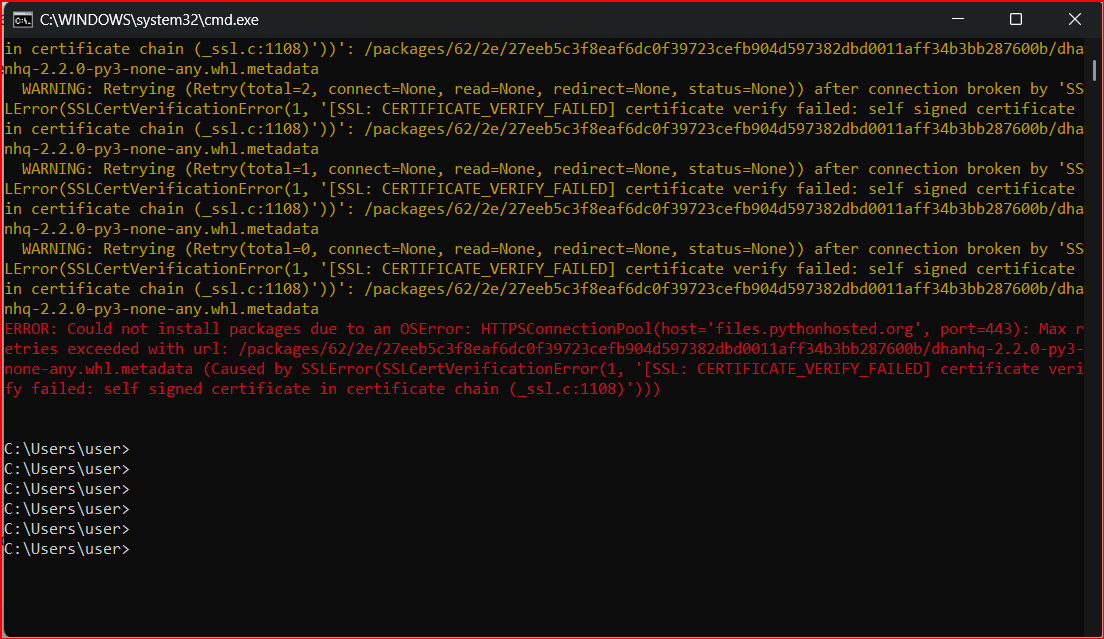
1 Ran the command:
pip install dhanhq==2.2.0
but it shows some errors.
Issue- Excel data is not updating.
Issue- Excel is not opening.
Could you please check the attached screenshots and help me identify what is causing these issues? I would appreciate your guidance on how to fix them.
Hello Imran Sir
I want the code to take the watchlist from Excel or csv file
can we store the excel or csv file on dhan cloud ?
I would appreciate your guidance on how to achieve the above
No, CSV and Excel files cannot be stored or used within Dhan Cloud. As an alternative, the required data can be stored in memory during runtime and accessed as needed.
The approach depends on the type of data you want to store. During runtime, the data can be stored in memory using suitable data structures such as a DataFrame, dictionary or list, based on the nature of the data and the application requirements.
Hello Sir
My requirement is pretty simple I have a list of stocks that change every week from cash equity segment, I can change the watchlist every week so as to trade only those stocks provided in watchlist. dhan cloud doesnt support storing csv or excel files however manualy running the algo from standalone PC fulfills it.
Was looking an alternate solution for it
Thanks


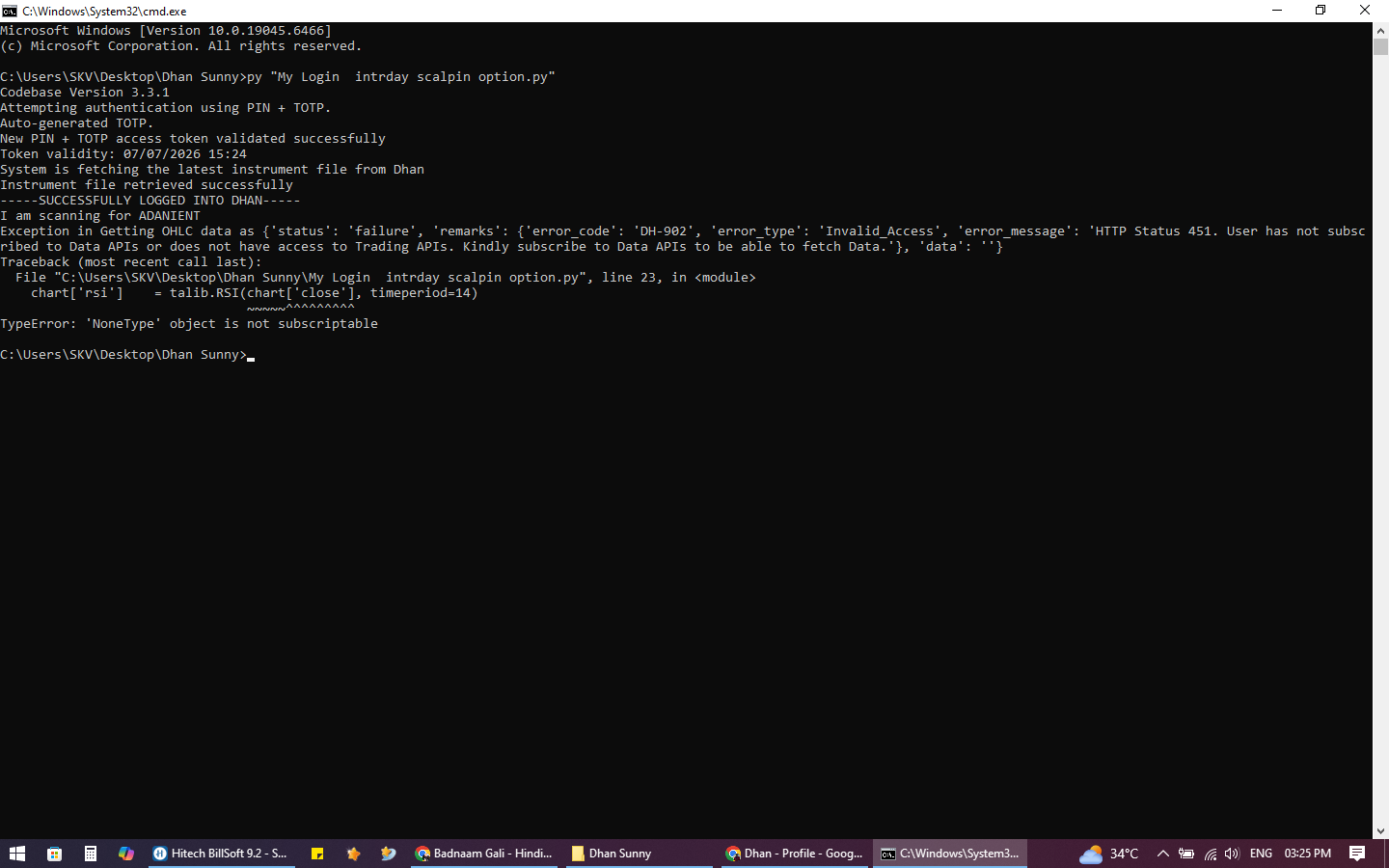 sir i am fasing this issue