Yes I got DEXT T3, First of all Thank you so much for Bringing actual Terminal. we can now Install on Mac & Windows which will bring more good trading experience Thank you team Dhan
1 Like
Does it have Point & Figure Charting setting of Box sizr in % of LTP , These people are have not replied to me when i asked about it in the past , its free in Trading but dont know what happened Dhan they havent upgraded it
Please give me DEXT T3 Terminal beta access
@PravinJ Thanks for providing it for mac too. I guess it is the only terminal available rn on mac
2 Likes
Hi @thetribaltrader, can you please elaborate on this so we can understand your suggestion better.
From where can I get the access of this terminal for mac ? Can you share the link?
they’re made a post on x (twitter), try there. i’ve tried waiting for their reply.
This is really nice! there are already feedback on what i also want to say so i’ll write up when i have something more to add!
just sharing a glance for other members to see how it looks on Expiry/Options trader Page:
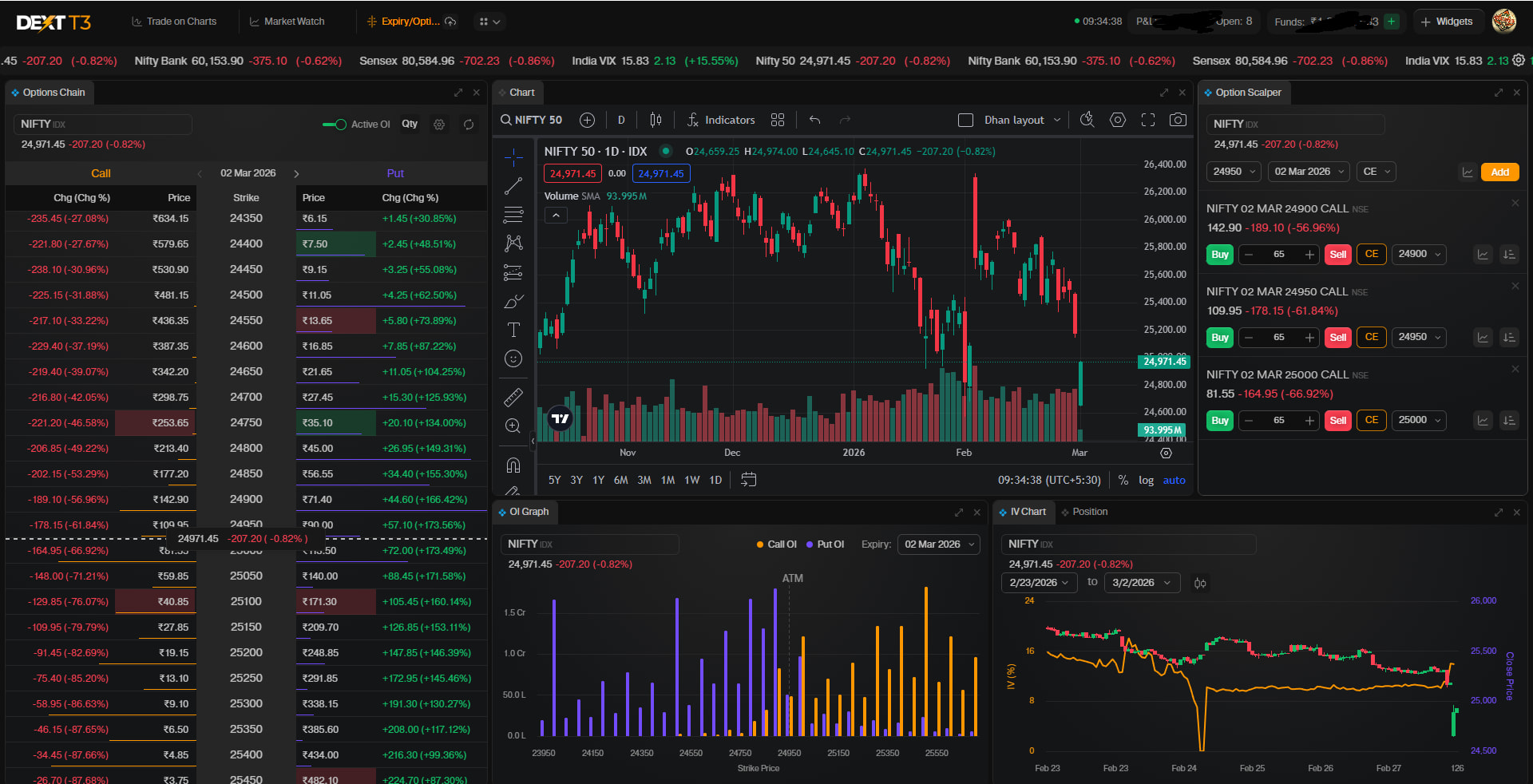
3 Likes
Thanks for the DEXT link - I know it is a work in progress, but
- can you do something about the amount of space that Market Watch is taking up on the screen - almost 1/3.
- how do we get the floating Scalper button?
3 Likes
where is the early beta access link? @RahulDeshpande
Hi , Dext is good, can you please add the Up arrow and Down arrow key from watchlist to load chart like Tradingview

- Alt + A is not there to add alert on symbol. Any probability of implementing that shortcut?
- If given Rolling Atm Straddle chart with IV chart then probably more happy.
- I used to screen stock from watchlist via space bar or arrow key which is not working to apply on chart. I have to press enter key one more time to take into effect.
I have’t checked in live market. I will give more feedback after live testing. Bdw great leap for this improvement especially for person like me who likes to trade from terminal.
The best part is this is first terminal i have seen on mac os. No one has made it. Idk why..
1 Like
Thanks @Achchha_Bachcha for noticing the small things.
looks sleek & comprehensive.
1 Like
Sab ko mab milega ?
We aim to open it to all in coming days @Awnishsingh365, most likely by end of March or early April. We are still actively incorporating feedbacks and suggestions from early users. Some from this thread as well.
1 Like
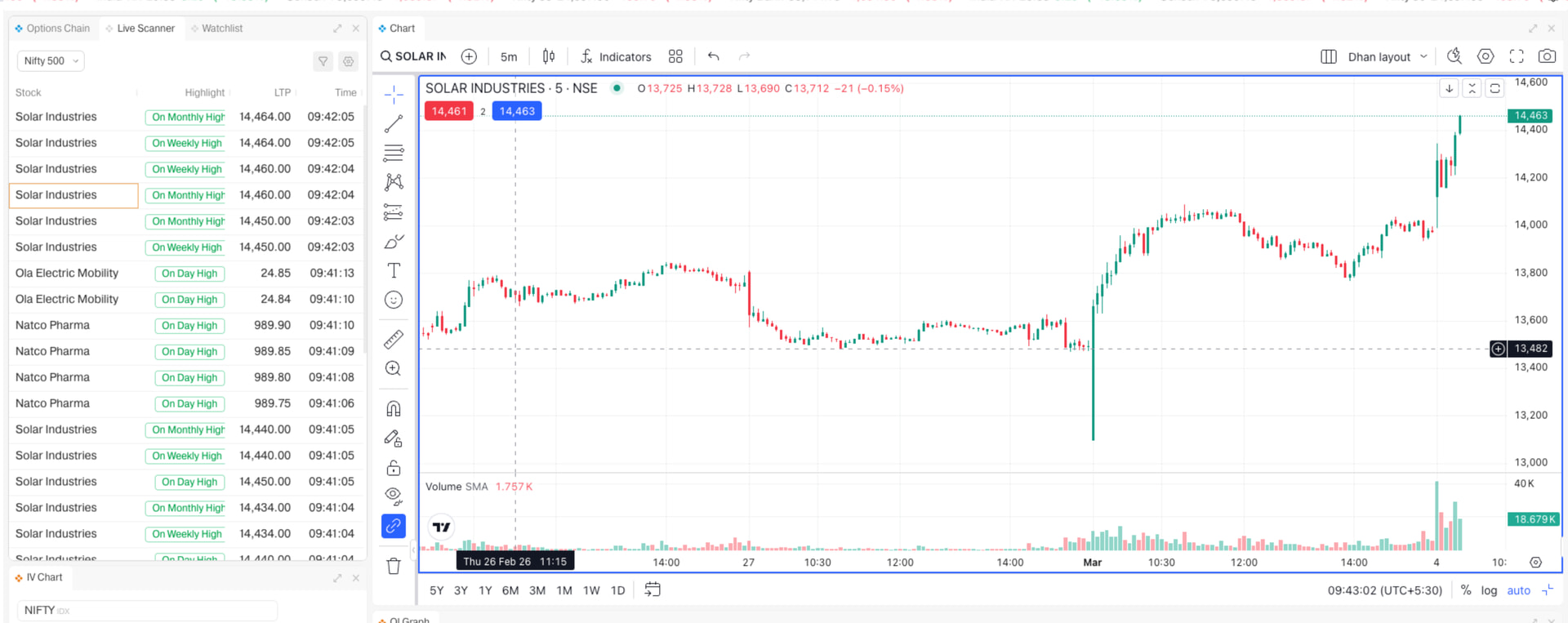
This is screenshot of DEXT T3:
Here in the live scanner,
- I can add the symbol on the chart via F8 key. But if stock looks good then i want to add to the watchlist too. Usually i add via Alt+W (add to watchlist) but this option disappeared here. So I have to write that name in watchlist and then add to that watchlist. Please try to add this shortcut here. It’s lot easier. In short what i think is anywhere from terminal if i want to add to watchlist then i just have to press Alt+W. Just like F1 to buy and F2 to sell.
- Live scanner result doesn’t show more than 30-40 entries. It should show all the result which gave me indication that it hit the day high or week high or anything. You can implement it on local computer if space or memory is the issue.
This is the most important feature for me 90% of my work depends on live scanner. So the more you make this better the more convenient and easy for me.
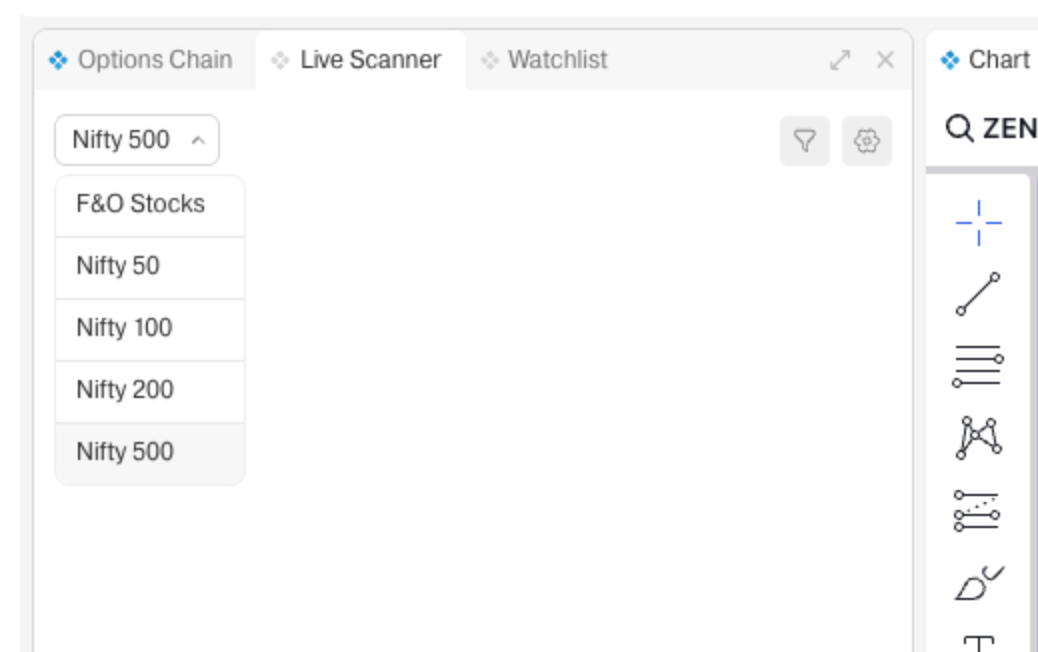
This is window of live scanner in DEXT T3:
- When i change the area of search from NIfty 500 to F&O Stocks, the result disappears. So it should not happen.
Why?: suppose i got some result without going through all the result if i change it to another area of search then it will not give me past result which i have remained to check. I have to wait till that stock makes another high if i am breakout trader. - Area of search should be increased from this list. Even you should add option to select my watchlist.
Why: I have searched few stocks and sortlisted the stocks in my watchlist. Now i have to wait till my entry. Entry could be any high or prev day high or weekly high etc. that is dynamic. I could have use alert but that is static, it is fixed to price. so adding option of my watchlist will make more useful to breakout trader. - This is an idea: If you can do this then it will be game changer.
If you allow us to put 2 windows of live scanner then it is more easier.
why: In one window i will use it to scan only and then i will add to my watchlist. The second window will be used to check only entries only if you put area of search to my watchlist. this window will be given more priority to be watched.
I guess you will have a ton of videos explaining how to navigate DEXT T3 - for now:
- How to remove the ticker tape? Any toggle available - it is not smooth for me and quite distracting. Maybe allow us to keep it down rather than right on top
- Important - Market Watch - when searching to add (for eg. Nifty 10 March Options), the Date is not visible on the Market Watch. It just shows NIFTY-Mar2026-25000-CE. We have to add it to Market Watch then open every single Option in a chart to check with the correct weekly is added.
- Searching on TV Chart shows the date - issue is only with the Market Watch
- As mentioned by others - market watch and chart are not connected - arrow key not working, also arrow key and enter is also not working to change the chart. How do I change the Chart? Right now I am using: Market Watch - right click - Chart to open
Kindly help