I want to suggest multiple monitors compatible where user can drag and drop to other monitor screen with option to sync with scrip and timeframes where any scrip name is changed then it should also changed in all screens.
2 Likes
@PravinJ @RahulDeshpande @Mohseen_Usmani
Is Algo Integration planned in Dext T3? Also hope Users can choose Convenient Font & Font Size (Will help users using Laptop or Single Monitors).
Hi,
I just opened DEXT and the layouts I had saved yesterday are missing.
- I named them and saved them, so is there a way of getting my custom layouts back?
- Noob question - how do I update DEXT T3, if an update is required to get the custom layouts back?
1 Like
Hi @MBP1, yes we are working on optimizing the saved layout feature.
For update your will see and Update button, whenever we release an upgrade T3.
@yogesh86k @vinbhat We have noted your suggestions.
@RahulDeshpande Just noticed beta access is being shared via Instagram outreach. Since madefortrade is a dedicated trader community, it would be great if active members here also get access for meaningful feedback.
Hi @Siddharth_24 agreed, we have shared early access links to active users via DM.
Early thoughts
- There is Chart Pattern Scanner. But it not chart patterns, But Candlestick Patterns. Wish you had Actual Chart Pattern Scanner. Will be boon.
- And Why not a Tie-up with Https://ewaves.com for Elliott Wave Scan and offer their Services at Discount. Will be Win-Win All - them, Dhan (More Customers) & Your Customers (as we get At Discount
 ).
).
F11 is mapped to both Basket as well as Toggle Full Screen - so what is happening for me is that F11 helps get to Full Screen but not get back to normal because Basket keeps coming up - What should I do?
Thanks for sharing.
Good initiative for those who like desktop app.
How to place an ATO from chart (say from NIFTY Spot)?
Another Suggestion: Allow users to Define Own Shortcut keys. Among Desktop Platforms, the only platform that allows users to do it is - Sharekhan’s TradeTiger.
DEXT T3 currently feels like a Chrome wrapper rather than a true trading terminal. It lacks the native capabilities expected from a professional trading environment.
The team should reconsider the terminal design to provide a clean, adaptive UI focused on decision-making rather than compressed information blocks. At present, the interface feels squeezed, resource-heavy, and suffers from lagging data feeds, which directly impacts trading efficiency and clarity.
More importantly, the terminal is missing essential capabilities required by systematic traders, including:
-
Script-based automation
-
Algorithmic strategy support
-
Integrated data workflows
-
Performance tracking and decision journaling
-
Customizable trader dashboards
There are strong examples in the market that demonstrate how a professional terminal should function:
-
Interactive Brokers – Trader Workstation, which provides deep order management, portfolio analytics, and automation.
-
OpenBB Terminal, which integrates analytics, research, and scripting into a unified environment.
-
ArthaChitra, a charting and trading platform that allows traders to trade directly from charts, run automated strategies, build custom indicators, and even design custom views through scripting and templates. (arthachitra.com)
Platforms like ArthaChitra demonstrate that a trading terminal can be programmable, extensible, and trader-centric, allowing users to code strategies, create custom scanners, and integrate multiple data sources for real-time analysis. (arthachitra.com)
A professional trading terminal should help traders think clearly and act confidently, supporting systematic decision-making rather than forcing them to juggle multiple tools.
Today, traders typically rely on many disconnected tools—analytics platforms, spreadsheets, journaling systems, brokerage terminals, scanners, and automation scripts—just to execute and manage a single high-quality trade.
The vision for DEXT T3 should be to unify this entire workflow into one integrated environment:
-
Trading execution
-
Portfolio and accounting tracking
-
Strategy automation
-
Decision journaling and review
-
Data analytics and research
-
Scanner and alert systems
In other words, the terminal should become a unified trading operating system, not simply a browser interface for Dhan.
Sharing this as a constructive feedback.
Thank you for build products for better trading.
2 Likes
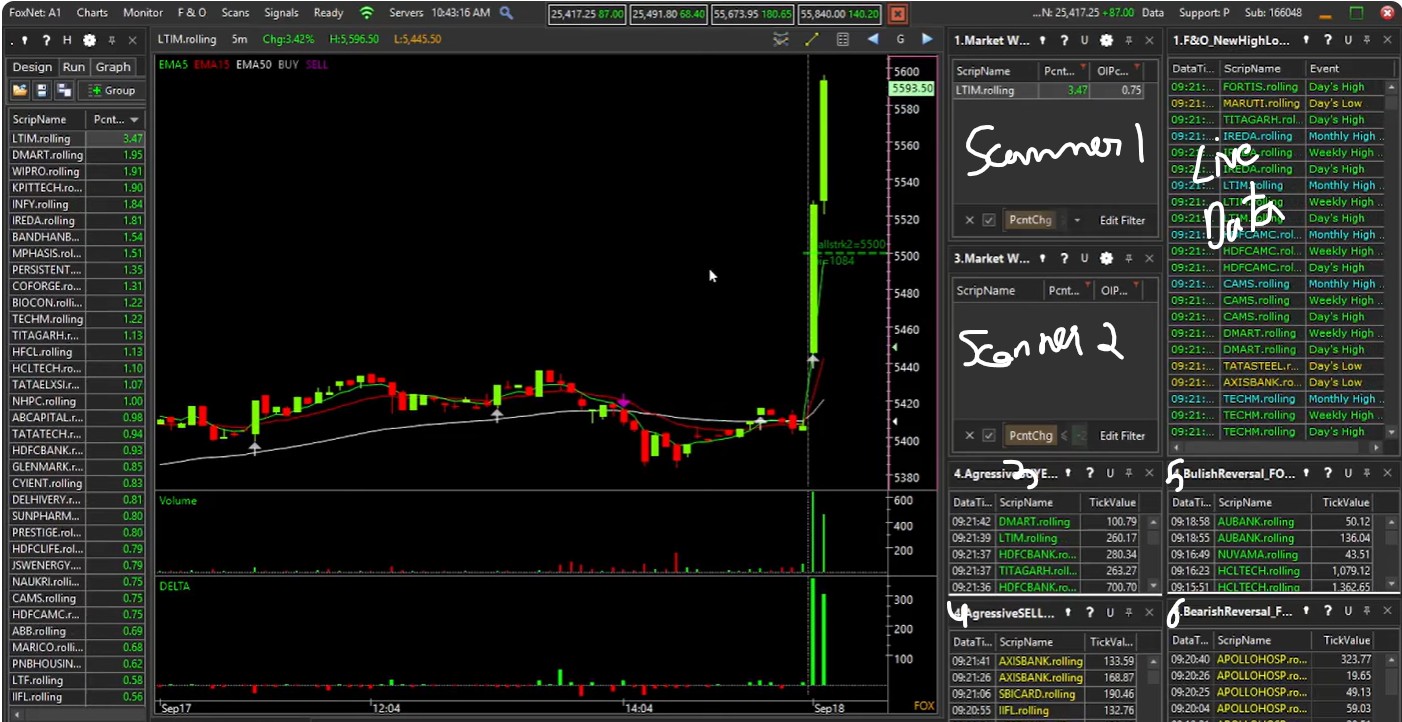
please add the multiple scanners option in one display , example , stocks gapup , gapdown , live market scanner , stocks above moving average , multiple scanners , etc , i share a screen shot of a terminal ( fox trader ) which provide all these features , please add these , it would be very helpful for intraday traders
Agree, When Quality time is lost, FOMO sets in & we start losing.
To Gain the thing lost, we make mistakes one after the other & then, end up in Negative P&L …
Color change in Candlestick or Back Ground dont auto save , tried saving the charts
ewave is more of subjective trading , They lack Objective based Trading , Trading platform is used as tool to trade Objective based Entry & Exit
Technical Analysis Trading itself is Subjective (forget Candlestick & Chart Patterns) - if not, why use SL??
Hi @arunkushwaha Bit harsh feedback, but let me respond here - we are building terminals as they were earlier in form and structure + integrating them to our core trading engine DEXT.
We have wrappers - Dhan Web is available on a browser wrapper. That’s not the point here, we tried to build DEXT and were to launch it last year, were not happy with the performance and worked on it again for nearly 4 months now and pushing it to live again based on lot of feedback + keeping speed and performance ahead of everything. Simply look at the amount of data we stream in real-time + faster than ever on DEXT vs our own Web.
Your requirements seem to be specific to your own requirements for automation, of which customizable trader dashboards + performance traction + Analytics + Scanners + Alerts + few more are available. Journal on Dhan will have all reports, and Automation will be via DhanHQ.
Many users have biased towards the existing products they use for a long time, we have seen this in our journey of building Dhan as well and this is natural. At Dhan - we build over a period of time and continuously improve things across platforms for better experience.
We moved from - will never build terminals, to being close to shipping one. DEXT T3, will continue to get better everyday, just as we do for Dhan.
4 Likes
Also, Wish there is
- Auto Update option Available &
- A Accompanying PDF to with info on Changes made at Each Newer Version - So far, only Seen Relyon Tax Products , only having such PDF. Easy for users to track changes made.
1 Like
Hi @PravinJ ,
What is the tentative timeline for DEXT general Availability?
- How to select and sort individual script in Market Watch? - can see sort Ascending and Descending
- How to refresh? Ctrl + R and Ctrl+Shift+R are not working for me, so for getting back the custom layouts, I log in, exit and open again!
Kindly help
first of all the look and feel of the terminal is great
its quite fast,gr8
Some suggestions
price alert is must in terminal
top gainers,top lossers does not have any filter like top gainers from nifty 500 or nifty 50 other widget have those options, we end up looking at illiquid stocks on top as it covers all nse stocks
basic scanner like open=low,open=high,recovery from low ,fall from high doesnt exist,this is must
custom formula in watchlist doesnt work most of time
most of us might shift to terminal from web or tv so i guess atleast features available there should be there on terminal ,otherwise we just have to keep switching between browser and terminal
like price alerts,indices detail,my trade plan
1 Like