Hi @Everyone,
In short:
tradehull-dhan-live-algo-skillsis aSKILL.md-based knowledge pack that teaches AI coding agents (Claude Code, Cursor, Codex) how to write correct Indian algo-trading code against the Dhan broker’s API — with the right function signatures, the right order types, and India’s SEBI rules baked in.
1. Introduction
What is this skill?
tradehull-dhan-live-algo-skills is an agent skill — a folder of Markdown documentation, written for an AI agent rather than a human — that plugs into Claude Code, Cursor, Codex, or any other agent that understands the open SKILL.md format. It doesn’t add new trading functionality by itself. Instead, it teaches an AI coding agent how to correctly use the Dhan-Tradehull Python library (a wrapper around the Dhan broker’s dhanhq API) to build live algo-trading systems for Indian markets (NSE/BSE equities, F&O, and options).
Think of it less like a library and more like an onboarding manual for your AI pair-programmer — one written by people who have spent years answering the same student support questions about this exact API.
Why was it created?
APIs are bit easy to miunderstand. A general-purpose AI coding agent, working only from its training data, will happily:
- Hardcode a lot size that changes every few months
- Use a deprecated data-fetching method
- Place a
MARKETorder on an options contract that regulators have banned since April 2026 - Miss that
get_option_chain()returns two values, not one
None of these are exotic edge cases — the README for this skill calls them out explicitly as recurring mistakes its authors kept seeing in real student code. The skill exists to bake those hard-won lessons directly into the AI agent’s context, so the agent doesn’t have to relearn them from scratch on every project.
What problem does it solve?
It solves the “my AI agent doesn’t know today’s rules” problem. A large language model’s training data has a cutoff date. Regulations, deprecations, and library versions move faster than that. This skill keeps a living, versioned set of reference files — authentication rules, order-placement rules, SEBI compliance notes, common coding mistakes — that the agent reads at the time of the task, not from stale memory.
Why is it useful?
- It turns “the AI wrote code that looks right” into “the AI wrote code that matches the broker’s actual current rules.”
- It encodes an opinionated, consistent coding style (vertical alignment,
bc/scnaming for buy/sell conditions, block comments) so generated code reads like it was written by one disciplined team, not by whatever the model felt like doing that day. - It gives beginners a shortcut to production-grade patterns (state machines for order tracking, trailing stop-loss logic, JSON persistence) instead of ad-hoc scripts.
Where is it used in AI?
It lives inside the tool-use / context layer of an AI coding agent. When you ask an agent like Claude Code to build a trading script, the agent doesn’t just rely on its own training — it can load this skill’s files into its context window on demand, the same way it might read a project’s own README before writing code.
Where this skill fits inside an AI application:
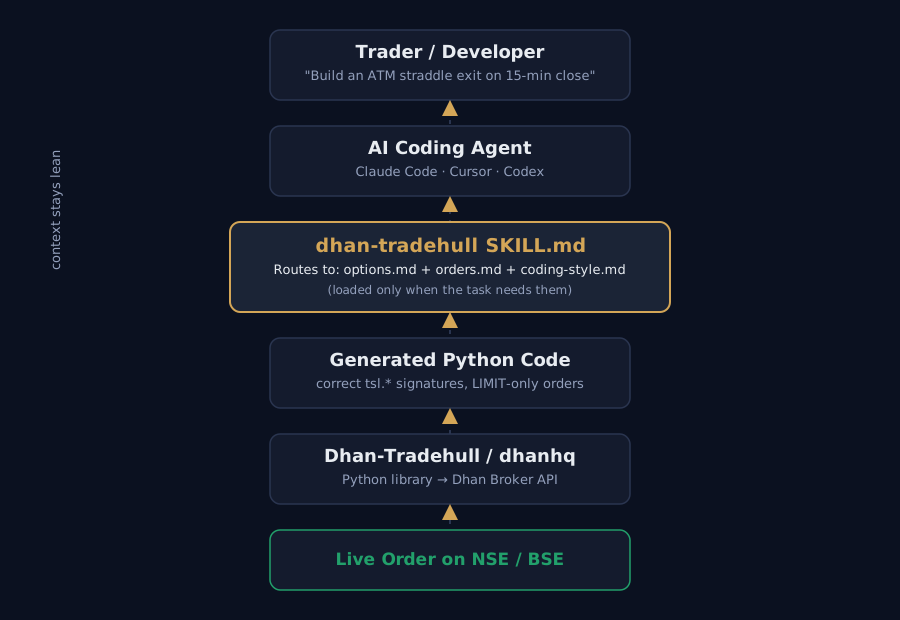
Trader → AI coding agent → dhan-tradehull skill → generated Python → Dhan-Tradehull/dhanhq library → live order on the exchange.
2. Installation
How to Install
Step 1 — Run the install command
Open Cursor → Terminal → New Terminal, then run:
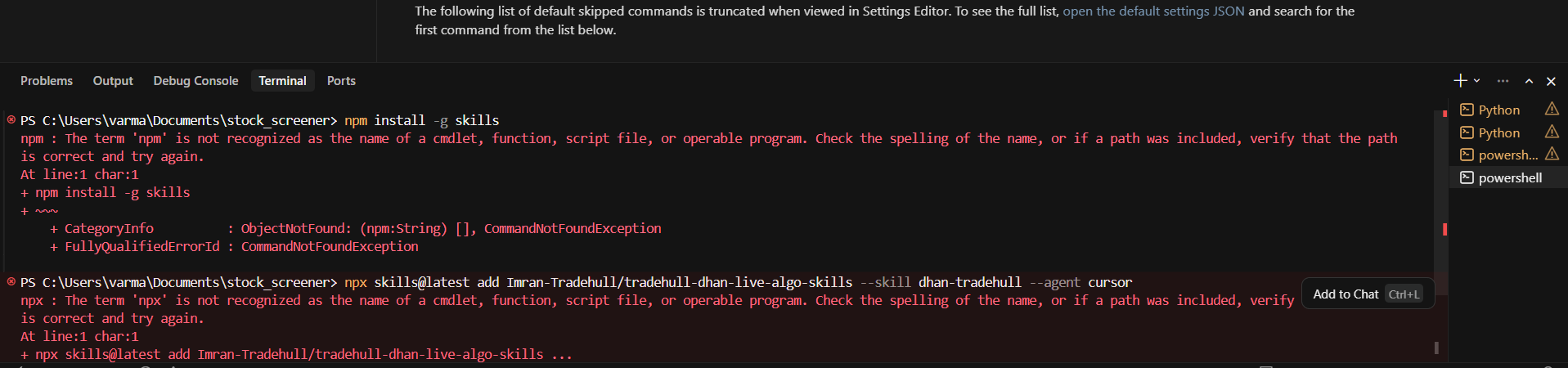
npx skills@latest add Imran-Tradehull/tradehull-dhan-live-algo-skills --skill dhan-tradehull --agent cursor
Step 2 — Allow the CLI to install
The terminal will ask for permission the first time. Type y and press Enter.

Step 3 — Confirm the skill and choose scope
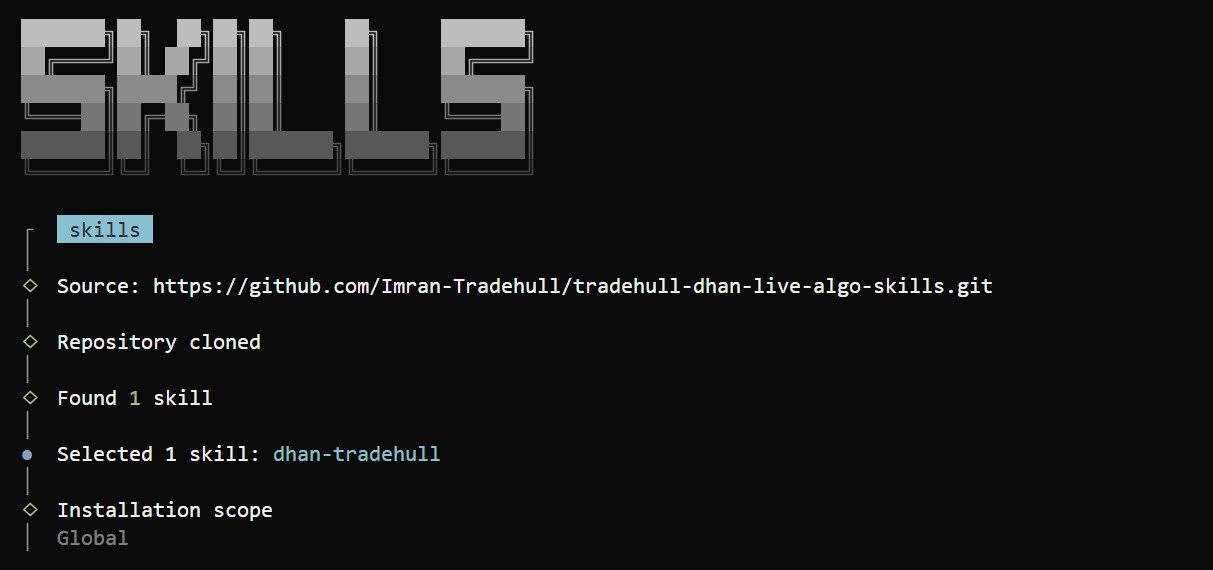
The installer clones the repo, finds the skill, and asks for an installation scope — select Global.
Step 4 — Finish the install
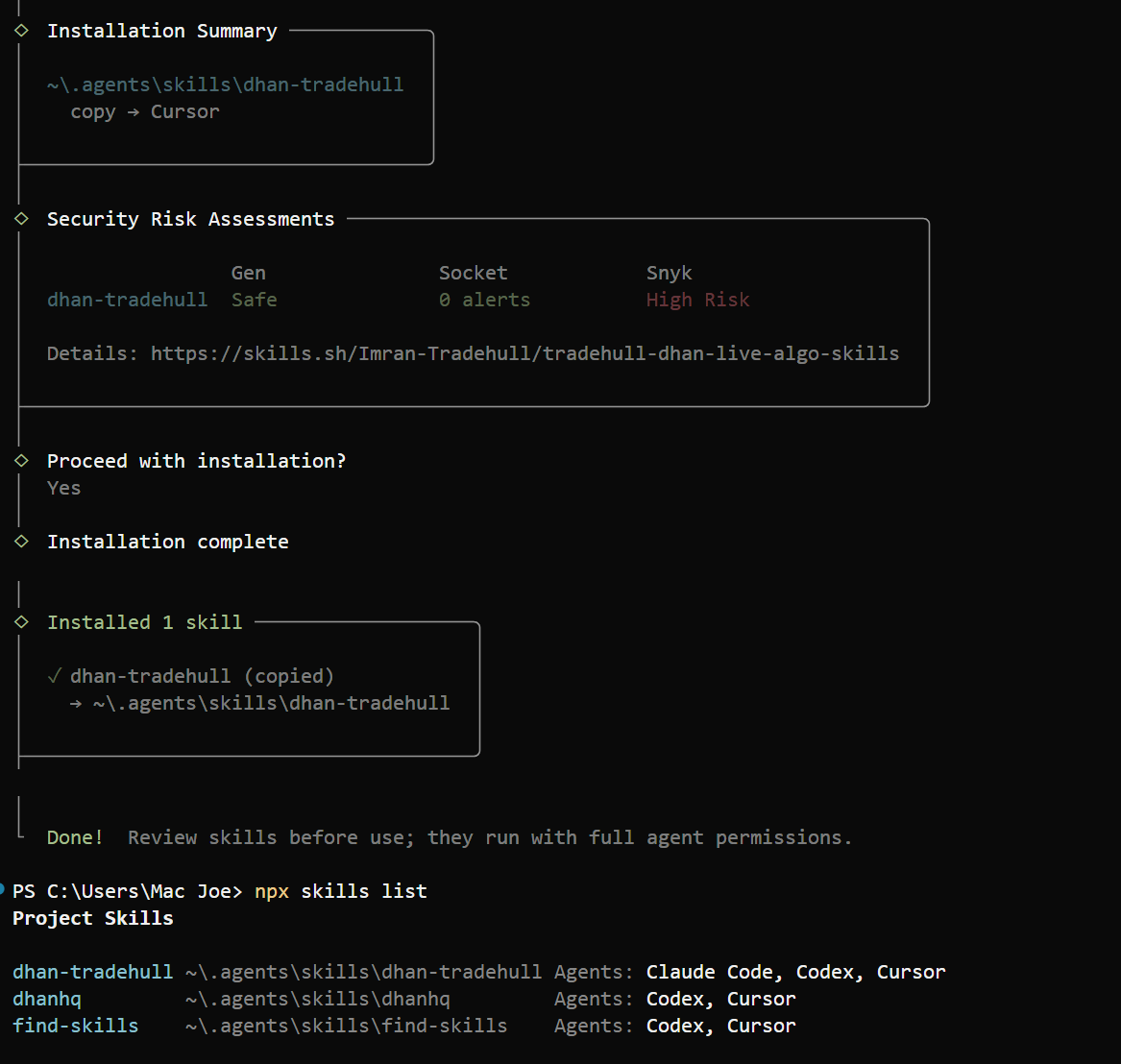
Confirm Yes when asked to proceed. You’ll see “Installation complete” and “Done!”
Step 5 — Reload Cursor
Press Ctrl+Shift+P → search Developer: Reload Window → select it. (Closing and reopening Cursor also works.)
How to Use
Step 1 — Open a new Agent chat and type /
Cursor shows the available skills — you’ll see dhan-tradehull under Skills.
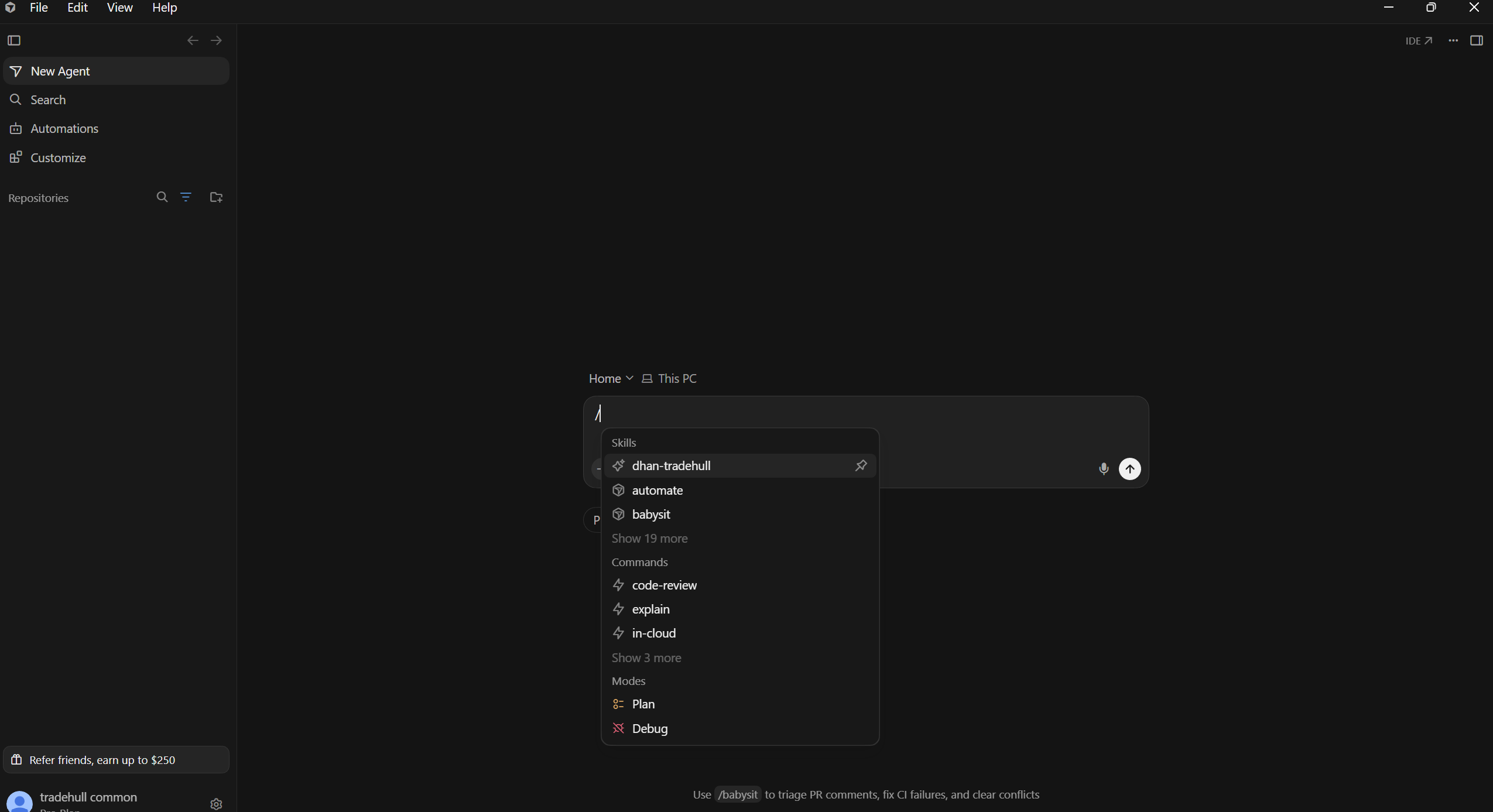
Step 2 — Click dhan-tradehull
Cursor inserts /dhan-tradehull into the message box.
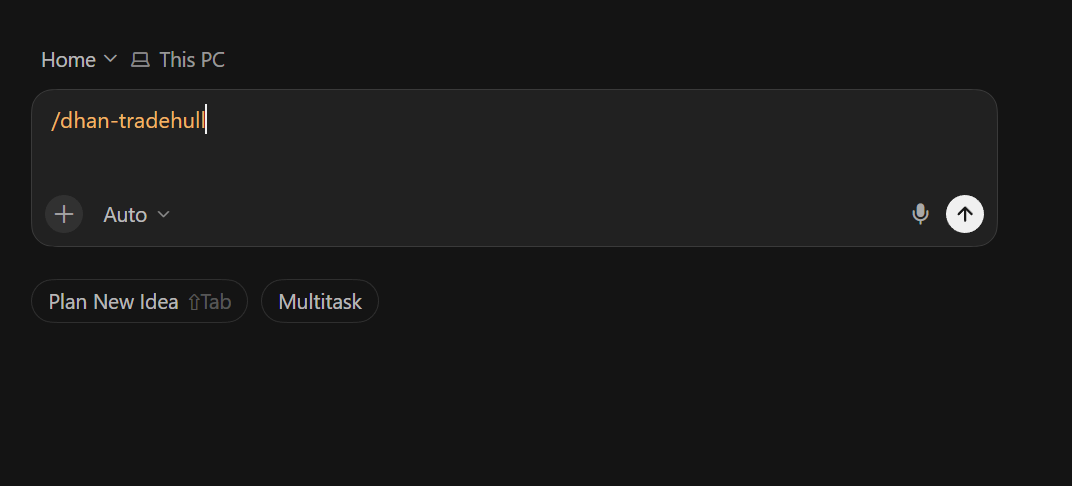
Step 3 — Type your request after it
/dhan-tradehull Explain the available Dhan TradeHull login methods. Do not create or modify any files.
/dhan-tradehull Create a simple Python example to log in and fetch the NIFTY LTP. Do not place any order.
/dhan-tradehull Read the current Python project and explain the complete entry, exit and order-management flow. Do not change any files.
3. Initial Setup / Configuration
Once installed, the skill doesn’t require a build step or a config file of its own — it activates automatically when your AI agent recognizes a relevant task. What does need configuration is the trading connection your generated code will use.
Authentication modes
According to the skill’s references/auth.md, the Dhan-Tradehull library supports multiple login modes, and the skill teaches the agent to pick the right one and respect token validity rules (Dhan access tokens are not permanent — they expire and need to be reissued). The documented modes are:
access_token— a pre-generated Dhan API access tokenpin_totp— PIN + time-based one-time password login flowapi_key— API key-based authentication
Required imports and initialization (typical pattern)
The exact call signatures live inside the skill’s reference files, but the shape of a correctly-generated setup looks like this:
from Dhan_Tradehull import Tradehull

client_code = "YOUR_DHAN_CLIENT_CODE"
access_token = "YOUR_DHAN_ACCESS_TOKEN"

tsl = Tradehull(client_code, access_token)
Important: Never hardcode real credentials into a script you might commit to version control. Load
client_codeandaccess_tokenfrom environment variables or a secrets manager, and keep aDependencies/folder (as the skill’sauth.mdreference recommends) out of your repository.
Project setup checklist
- Latest versions of
dhanhqandDhan-Tradehullinstalled (pip install --upgrade) - Dhan API access token generated from your Dhan account
- Credentials stored outside source control
- Skill installed into your agent’s skills directory
- Instrument master file available (the skill references a ~225,000-row instrument CSV used for security ID lookups)
4. How It Works
The core idea: progressive disclosure
This is the most important concept to understand about the skill, and it has nothing to do with trading — it’s about how AI agents manage context efficiently.
SKILL.md is the single entry point. It’s always loaded. But it doesn’t contain everything — it contains a routing table that tells the agent which of the thirteen deeper reference files (market-data.md, options.md, orders.md, portfolio.md, and so on) to pull in, and only when the current task actually needs them.
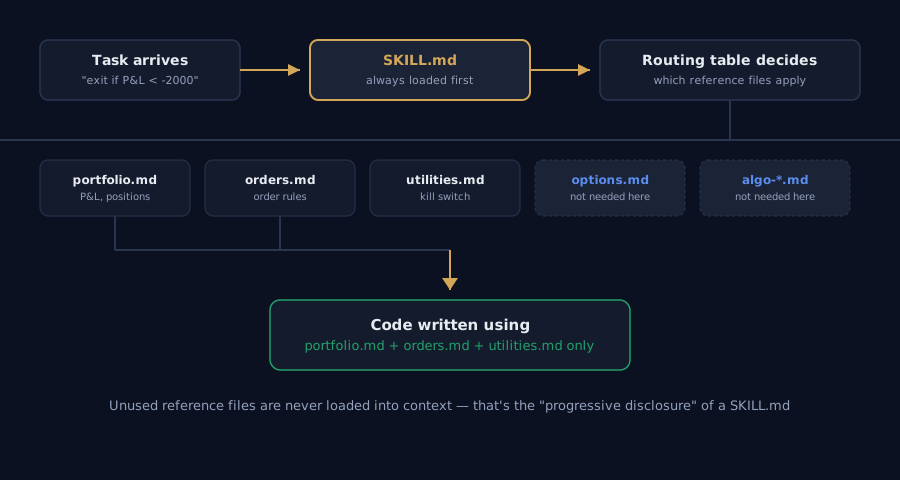
Execution flow, step by step:
- The agent receives a task (“build an options straddle exit that checks live P&L”).
- It loads
SKILL.md— always, unconditionally. SKILL.md’s routing table matches the task’s keywords (“P&L”, “exit”) to the relevant reference files — here,portfolio.md(P&L, positions) andorders.md(order rules) — while leaving unrelated files likeoptions.mduntouched.- The agent reads only those reference files into context.
- It writes Python code using the conventions, function signatures, and rules found in those files — including the TradeHull coding style described in
coding-style.md.
Why this matters
Loading all thirteen reference files for every single task would waste context space and slow the agent down. Progressive disclosure keeps the working context small while still giving the agent access to deep, specific knowledge exactly when it’s relevant — the same principle behind good documentation information architecture, applied to an AI agent’s memory.
The reference files at a glance
| File | Covers |
|---|---|
coding-style.md |
TradeHull’s code conventions — read before writing any code |
auth.md |
Login modes, token validity, credentials folder |
market-data.md |
LTP, OHLC, quotes, historical and long-term data |
options.md |
Option chain, ATM/OTM/ITM selection, greeks, expired data |
orders.md |
Order placement, SEBI rules, super orders, forever orders |
portfolio.md |
Holdings, positions, orderbook, balance, P&L |
utilities.md |
Lot size, margin, Telegram alerts, kill switch |
instruments.md |
The 225k-row instrument file schema and security IDs |
common-patterns.md |
Real code patterns drawn from actual support sessions |
answer-patterns.md |
Common mistakes, FAQ, and answer style |
algo-intraday-options.md |
Anatomy of an intraday Supertrend + support/resistance algo |
algo-positional-spread.md |
Anatomy of a delta-based positional spread algo |
dhanhq-raw.md |
Fallback to raw dhanhq calls (position conversion, eDIS, exit-all) |
error-log.md |
Known errors and SEBI regulation notes |
5. Basic Usage
You don’t “call” this skill directly the way you’d call a function — you simply ask your AI agent (inside Claude Code, Cursor, or Codex) to build something trading-related, and the agent pulls in the skill’s guidance automatically.
Example prompt
“Write an intraday options algo on Nifty that enters on a Supertrend + support/resistance signal on the 15-minute chart, and exits with a trailing stop-loss.”
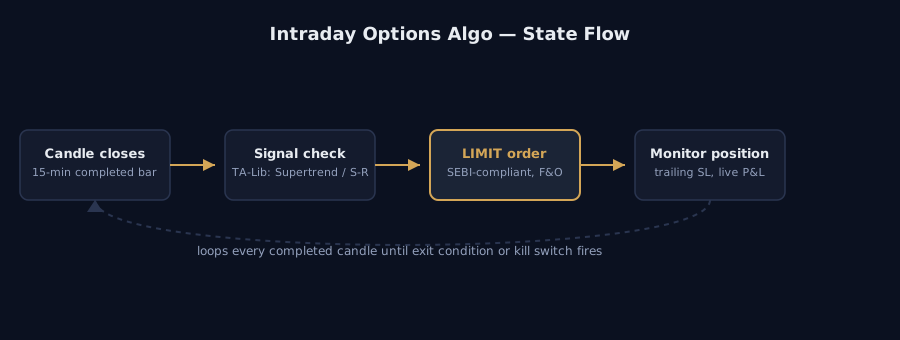
What the agent produces (illustrative pattern)
Based on the conventions the skill documents, the generated code follows a repeating state-machine shape:
from Dhan_Tradehull import Tradehull
import time

tsl = Tradehull(client_code, access_token)

# Lot size is fetched dynamically — never hardcoded, since SEBI revises it periodically
lot_size = tsl.get_lot_size("NIFTY")

# get_option_chain() returns TWO values: the ATM strike and the full chain
atm_strike, option_chain = tsl.get_option_chain(
    exchange="NSE",
    symbol="NIFTY",
    expiry=0
)

def on_completed_candle(candle):
    bc = candle["close"] > candle["supertrend"]   # buy condition
    sc = candle["close"] < candle["supertrend"]    # sell condition

    if bc:
        # F&O orders must be LIMIT, never MARKET (SEBI rule, effective Apr 2026)
        tsl.place_order(
            tradingsymbol=option_chain["CE"][atm_strike]["symbol"],
            security_id=option_chain["CE"][atm_strike]["security_id"],
            quantity=lot_size,
            order_type="LIMIT",
            transaction_type="BUY",
            price=option_chain["CE"][atm_strike]["ltp"]
        )
Explaining the output
get_lot_size("NIFTY")is called at runtime instead of hardcoding50or75, because NSE periodically revises lot sizes — a hardcoded value silently breaks the algo months later.get_option_chain()returning two values is one of the skill’s explicitly documented “gotchas” — the skill exists precisely to stop an agent from writingchain = tsl.get_option_chain(...)and then getting confused whenchainis a tuple.bc/sc(buy condition / sell condition) is the exact naming convention the skill’scoding-style.mdteaches agents to use, so generated scripts read consistently across projects.order_type="LIMIT"is enforced for F&O instruments because of the SEBI rule banningMARKETorders on Futures & Options from April 2026 — the skill makes sure the agent never forgets this.
6. AI Integration
This section is specifically about this skill’s role in an AI system — not a general tour of agents or LLMs.
Where it fits in an AI coding agent’s workflow
- Trigger: The agent detects a task related to Dhan, Tradehull, Indian options/F&O, or algo trading.
- Context injection: The agent loads
SKILL.md, then selectively loads only the reference files relevant to the current request. - Code generation: The agent writes Python using the loaded conventions and API signatures.
- Fallback: If a needed capability isn’t covered by the high-level
Dhan-Tradehullwrapper, the skill’sdhanhq-raw.mdtells the agent how to drop down to the rawdhanhqlibrary for things like position conversion, eDIS, or “exit all positions.”
How AI developers typically use it
Developers don’t interact with the skill’s files directly during normal use — they interact with their agent (Claude Code, Cursor, Codex), and the skill silently shapes what that agent produces. The typical loop is:
- Install the skill once per project.
- Describe a trading task in plain language.
- Review the generated code (still essential — this is live trading capital).
- Iterate with the agent, which keeps consulting the same reference files for consistency.
Which part of an AI application uses this skill
It operates entirely in the agent’s context/tool-use layer — before code execution, before the broker API is ever called. It shapes what code gets written, not how that code runs afterward.
7. Best Practices
- Always run the latest versions of
dhanhqandDhan-Tradehull. Both are actively maintained to track exchange and SEBI rule changes — an outdated install is the most common cause of broken or non-compliant orders. Runpip install --upgrade dhanhq Dhan-Tradehullregularly. - Keep credentials in a
Dependencies/or.env-style folder, excluded from version control, as the skill’s ownauth.mdrecommends. - Always use
get_lot_size()and margin-check utilities at runtime rather than hardcoding numbers that regulators or exchanges can revise. - Respect the LIMIT-only rule for F&O orders. Even if you’re prototyping, build the habit now —
MARKETorders on NFO/BFO are banned under SEBI’s April 2026 rule. - Use
get_historical_data(), notget_intraday_data()— the latter is explicitly marked deprecated in the skill’s documentation. - Keep the flat, vertically-aligned coding style the skill teaches (
bc/scconditions, block comments) if you’re maintaining code alongside AI-generated scripts — consistency makes review far easier. - Use Super Orders for intraday strategies and Forever Orders for positional strategies — this is the pairing the skill enforces, matching how each order type actually behaves on Dhan.
- Wire in the kill switch utility documented in
utilities.mdfor any live-money algo — a manual, fast “stop everything” path is not optional for real capital.
8. Common Mistakes
The skill’s own answer-patterns.md and error-log.md exist specifically because these mistakes kept recurring in real support sessions:
| Mistake | Why it’s wrong | Fix |
|---|---|---|
Placing MARKET orders on F&O |
Banned by SEBI regulation from April 2026 | Always use LIMIT orders for NFO/BFO |
chain = tsl.get_option_chain(...) |
The method returns two values (atm, chain), not one |
Unpack as atm, chain = tsl.get_option_chain(...) |
| Hardcoding lot size | Exchanges revise lot sizes periodically; a hardcoded value goes stale | Always call tsl.get_lot_size() |
Using get_intraday_data() |
Deprecated method | Use get_historical_data() instead |
| Building custom “conditional trigger” logic | Not how TradeHull-style algos are built | Use TA-Lib for signal logic, as the skill documents |
| Ignoring token expiry | Dhan access tokens are not permanent | Follow the token validity rules in auth.md and refresh proactively |
| Skipping the kill switch | No fast manual stop for a live algo is a real risk-management gap | Implement the kill switch pattern from utilities.md |
9. Summary
tradehull-dhan-live-algo-skills isn’t a trading library — it’s a knowledge layer for AI coding agents that sits on top of the Dhan-Tradehull Python library. It works by progressively loading a SKILL.md entry point and only the specific reference files a task needs (authentication, market data, options, orders, portfolio, utilities, instruments, and two full algo blueprints), so an AI agent like Claude Code, Cursor, or Codex writes Python that:
- Uses the correct, current function signatures
- Follows India’s SEBI order-type rules
- Fetches lot sizes and margins dynamically instead of hardcoding them
- Follows a consistent, readable coding style
- Falls back gracefully to raw
dhanhqcalls when needed
Install it once per project with a single npx skills add command, make sure you’re running the latest versions of dhanhq and Dhan-Tradehull, set up your Dhan credentials securely, and your AI agent is ready to build live algo-trading systems for Indian markets with far fewer of the mistakes that come from working off stale, general-purpose training data alone.
Source: Imran-Tradehull/tradehull-dhan-live-algo-skills · MIT License · Built by TradeHull