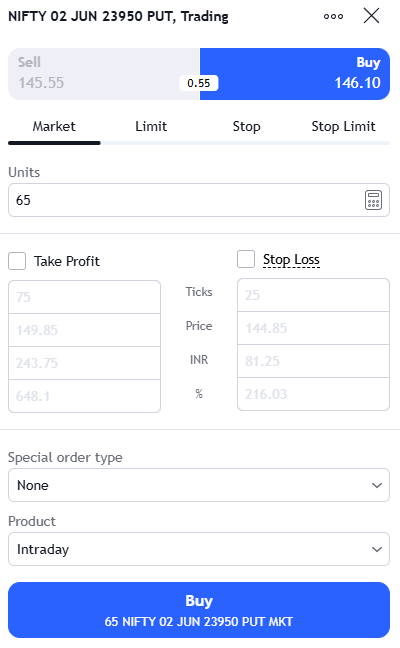
Add a “+” button next to the “Target” field in the Super Order window.
Clicking “+” should open a second target field (Target 2).
Allow users to specify Quantity % or Exact Quantity for each target (e.g., Target 1: 50%, Target 2: 50%).
2. Execution Logic:
Shared Stop Loss: A single Stop Loss price that applies to the total remaining quantity.
Partial Exit: When the price hits Target 1, the system should automatically sell the defined 50% quantity.
Remaining Leg: The Stop Loss for the remaining 50% must stay active.
Auto-Trail Option (Bonus): An optional checkbox: “Move SL to Break-even when Target 1 is hit.”
Allow users to set Multiple Targets within a single Super Order. Specifically:
Target 1: Option to book a specific percentage (e.g., 50%) of the quantity.
Target 2: The remaining quantity continues to run until the final target.
Stop Loss: A single Stop Loss that applies to the entire position (with an option to “Auto-Trail to Break-Even” once Target 1 is hit).
Why this is useful: This “Scaling Out” strategy is a standard practice for many traders to lock in partial profits while letting the rest of the trade run for a bigger move. Currently, we have to place two separate orders to achieve this, which is cumbersome and doubles the margin requirement for some segments.
3. Why this is needed: Currently, to achieve a 50/50 split target, I have to place two separate Super Orders. This uses double the margin (for some segments) and is difficult to manage during fast-moving markets. Integrated partial booking would make Dhan the first choice for professional price-action traders.
Hi Ayush, the idea of a Multi-target Super Order is great for scaling out profits. However, adding a ‘Time-based’ exit seems risky for practical trading. The market doesn’t move by the clock; it moves by price and volatility.
A fixed time limit could force a trader out of a good position if the market goes Sideways, even if the target is about to hit. I suggest we should focus on Price-based Multiple Targets rather than time. What are your thoughts on this?
Appreciate your perspective — and I largely agree with you.
Markets are fundamentally driven by price and volatility, not time, so relying on a fixed time-based exit as a primary mechanism can indeed be restrictive and, in some cases, counterproductive—especially during consolidation phases where the move is still developing.
My core focus with the Multi-Target Super Order is to enable efficient price-based scaling out, including:
Partial profit booking at defined levels
A shared stop loss for risk control
Optional break-even trailing after the first target
The idea of a time-based exit was intended more as an optional utility, mainly for specific use cases like intraday traders managing end-of-day exposure or strategies sensitive to time decay.
That said, I completely agree that price-based multi-target execution should remain the priority, and any time-based feature should be strictly optional and secondary
Hi @AYUSH, coming back to this thread today with some good news.
The “+” button next to Target, the quantity split per target level, the multi-target execution logic you’d laid out here — a version of it has shipped today. Super Orders now support up to four target levels in a single order, with your stop loss holding firm across all of them.
It’s not a one-to-one of the spec you wrote (the time-based exit isn’t in this round, and @U.S caution on that point was fair), but the structural piece you cared about most is live.
Threads like this one where a member writes something close to a product brief — genuinely shape what gets built. Thank you for taking the time to put it down in this much detail.