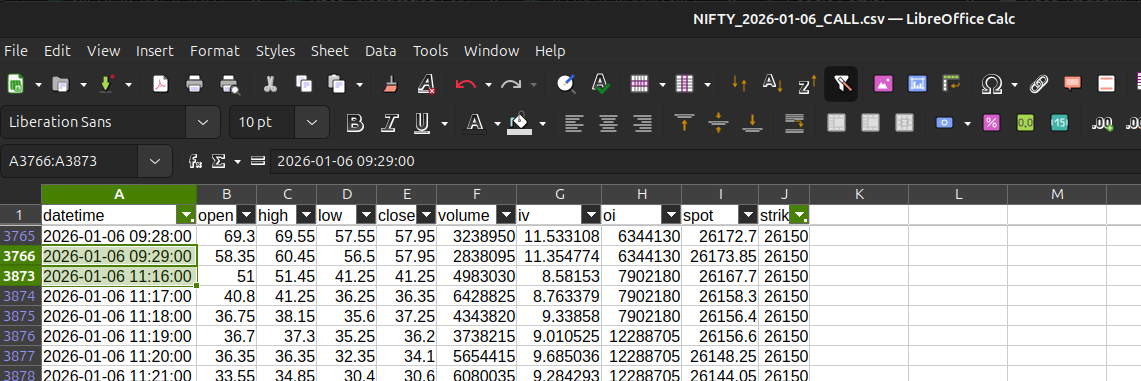
Expired options data plays a crucial role in options research and strategy development. It is commonly used to study expiry behaviour, analyze option price decay, observe OI shifts near expiry, and build reliable backtesting datasets.
With Dhan_TradeHull, expired options data can now be fetched programmatically and stored in a structured format, making large-scale analysis simple and repeatable.
Downloading Expired ATM Options Data in Bulk
The example below demonstrates how expired ATM CALL option data can be fetched for multiple symbols and multiple monthly expiries.
For each expiry:
• The last 30 days of data before expiry is fetched
• Data is stored symbol-wise and expiry-wise
• Files are saved automatically as CSV
from Dhan_Tradehull import Tradehull
import datetime
import os

client_id    = "YOUR_CLIENT_ID"
access_token = "YOUR_ACCESS_TOKEN"

tsl = Tradehull(client_id, access_token)

watchlist = ["NIFTY", "BANKNIFTY", "TCS", "INFY", "RELIANCE"]
expiries  = ["2024-01-25", "2024-02-29", "2024-03-28"]

for name in watchlist:
    for expiry in expiries:
        try:
            from_date = (
                datetime.datetime.strptime(expiry, "%Y-%m-%d")
                - datetime.timedelta(days=30)
            ).strftime("%Y-%m-%d")

            data = tsl.get_expired_option_data(
                tradingsymbol=name,
                exchange="NSE",
                interval=1,
                expiry_flag="MONTH",
                expiry_code=1,
                strike="ATM",
                option_type="CALL",
                from_date=from_date,
                to_date=expiry
            )

            path = f"Options data/{name}/ATM"
            os.makedirs(path, exist_ok=True)

            file_name = f"{name}_{expiry}.csv"
            data.to_csv(f"{path}/{file_name}", index=False)

            print(f"{name} {expiry} : Download completed")

        except Exception as e:
            print(f"{name} {expiry} : Error {e}")
            continue
Folder Structure Generated
The script automatically creates a clean and organized structure:
Options data/
 └── RELIANCE/
     └── ATM/
         ├── RELIANCE_2024-01-25.csv
         ├── RELIANCE_2024-02-29.csv
         └── RELIANCE_2024-03-28.csv
This makes it easy to load data later for analysis or backtesting.