Dear Investors,
At Dhan we loved to keep building products and features for you based on the suggestions or feedback that we get from you, or based on the usage of the features by our users.
Today, we are introducing a whole new way to apply for IPOs - as many of you now know, unlike the older times IPOs are no longer one-off events. As the IPO market continues to gain momentum year after year, the IPO experience at Dhan is once again in focus.
Over the years, we’ve introduced several highly requested enhancements to elevate your IPO investing experience - like enabling SME IPO applications, exploring key details before the listing of the IPO. We even introduced applying for IPOs across all categories available - Retail, HNI, Shareholding and Employee. In parallel, we’ve strengthened the experience with data-driven insights, such as detailed subscription status across investor categories for every IPO, helping you make informed and confident application decisions.
With these continued innovations, we have also seen the number of IPO applications that are filed via Dhan shoot up over the past 2-3 years. As IPO activity continues to gather pace over time, investors are likely to see multiple issues open for subscription at the same time. In this situation, evaluating which IPOs to apply to can quickly become time-consuming, as investors track several inputs such as fundamentals, valuations, and subscription trends to gauge demand.
While no single metric tells the full story, subscription data remains a widely used signal of market interest in any IPO, especially as issues progress through the bidding period. However, tracking these changes in real time and acting consistently can be challenging.
Introducing Super IPOs on Dhan

To bridge this gap, we’re taking the first step towards automating IPO applications by using real-time subscription data, helping reduce manual effort while keeping the decision process transparent and controlled.
Super IPO is built to automatically apply to popular Mainboard IPOs for you, based on subscription data defined by you. You need to set your bidding preferences once, and it will apply to all IPOs that meet your preferences going forward.
How to set up Super IPO?
-
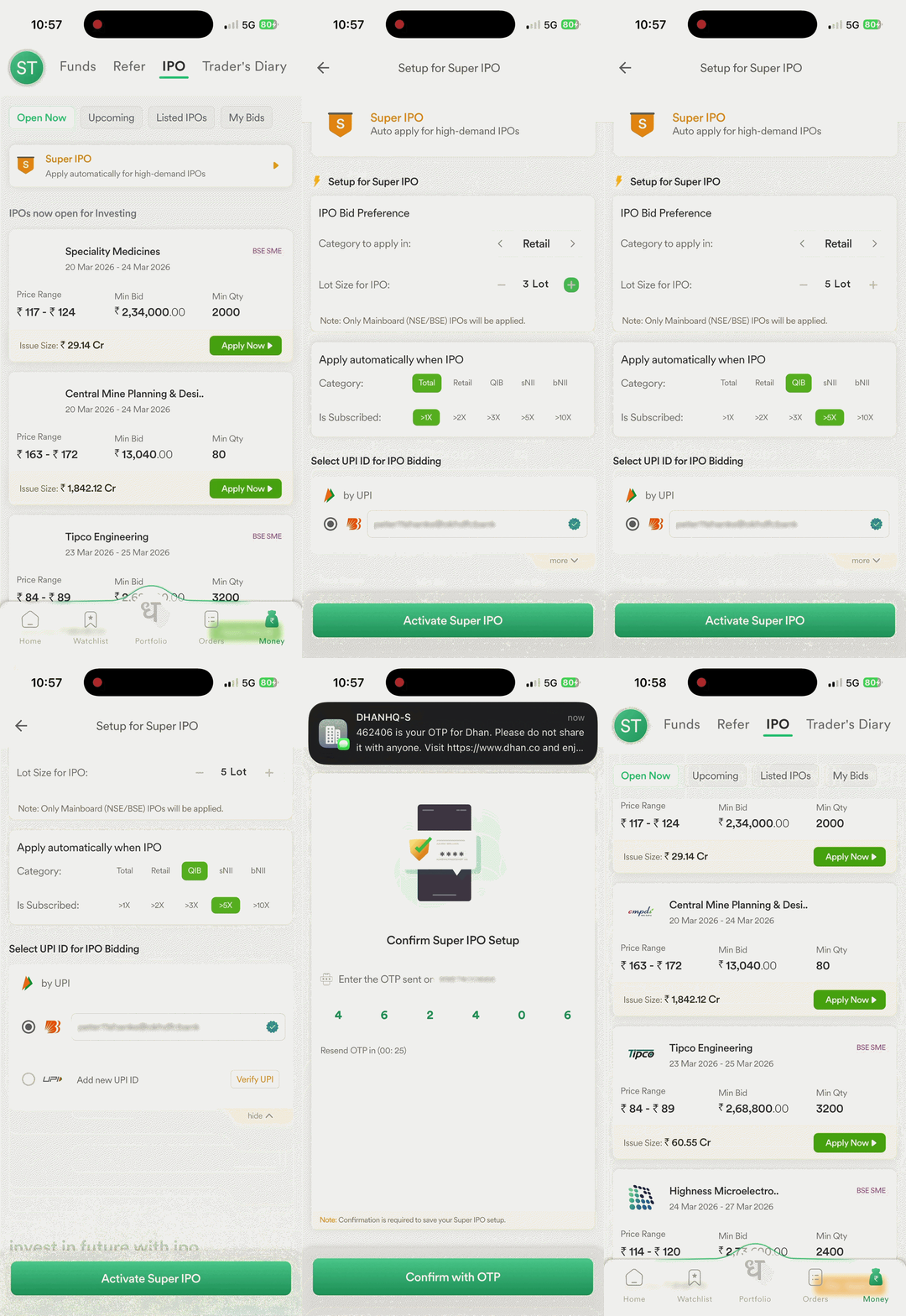
On Dhan App, go to Money > IPO > Open Now and tap on the Super IPO banner to access the set-up screen.
-
Select the segment you want to apply in - Retail or HNI and your preferred lot size.
-
Choose the IPO subscription category and the subscription you want that category to cross.
-
Select the UPI ID to place your bid.
-
Confirm your setup via OTP. You only need to confirm your setup via OTP once.
-
You can access the Super IPO setting anytime at the bottom of the IPO ‘Open Now’ page to edit your settings or turn it off.
Once set up, applying to IPOs becomes straightforward:
- When an IPO crosses your selected subscription, your application is placed automatically at the cut-off price and you’re notified.
- All you need to do is approve the UPI mandate from your payment app before 5 PM on the IPO’s closing date to complete the application.
- Every application placed is completed only after you approve the UPI mandate, ensuring you stay in charge of your investment.
- To make changes such as editing or cancelling your bid, go to My Bids, select the IPO, and tap Modify.
Super IPO is built to reduce manual effort in IPO applications and help you participate in high-demand IPOs with greater ease. We hope this feature helps you to participate in IPOs simpler and more consistent. As always, we’d love to hear your feedback on this feature, so do let us know what you think!
Disclaimer: Advertisement Disclaimer & Information | Dhan