Hi @Everyone,
ChatGPT predicts the next word. Kronos predicts the next candle. In this guide you will learn what Kronos is, how it turns 360 past candles into 30 possible futures, how to read its forecast honestly, and how the complete Kronos Forecast app for Indian markets was built with Claude Code and the Dhan API.
Resources
| Resource | Link |
|---|---|
| YouTube video (full walkthrough) | https://youtu.be/3P6mDO_pVsI?si=UwCNJ6VgPwwJR-CO |
| Google Drive (prompts, source files, application for all OS) | https://drive.google.com/drive/folders/1APCEOCdMQGfBBxNjWUFaZ5KWPctqkYDF?usp=drive_link |
What you will find in the Drive folder:
- The software: KronosForecast for Windows (
KronosForecast.exe), plus Mac and Linux launchers in the app source. - The app source code:
kronos_app.py,service.py,kronos_paths.py, the chart page and the Kronos model code (MIT licence). - The research code: data fetch, forecast service and the backtests used to test the model honestly.
- The prompts: every prompt given to Claude Code to build the app (
PROMPT.docx). - The reading list: the Kronos paper, GitHub repository, Hugging Face model and DhanHQ API docs.
Disclaimer: This article is educational only. It is not investment advice and not a recommendation to buy or sell anything. Up/down figures are counts of the model’s own runs, not a promise of what a stock will do. Past results do not guarantee future results. Investments in securities markets are subject to market risks; read all related documents carefully before investing.
Table of Contents
- State Machine vs Prediction Machine
- What Is Kronos?
- How Kronos Forecasts: 360 Candles In, 30 Futures Out
- Reading the Forecast: Direction, Range and Volatility
- Kronos on Indian Stocks: Live Model Charts
- Testing It Honestly: Step Back and Reveal
- How the App Was Built with Claude Code
- Install and Run the Kronos Forecast App
- Common Pitfalls
- Summary
1. State Machine vs Prediction Machine
Almost every tool traders use today is a state machine. A state machine tells you what the market is doing right now.
Take Supertrend as an example. If the price is above the Supertrend line, the state is “bullish”. That is useful, but it says nothing about what comes next.
A prediction machine answers a different question: where may the market go next, and how far?
| State machine | Prediction machine | |
|---|---|---|
| Question it answers | What is the market doing now? | Where may it go next, and how far? |
| Example | Supertrend, moving averages, RSI | Kronos (AI forecasting model) |
| Output | Current state: bullish or bearish | A range of possible future candles |
| Looks forward? | No | Yes |
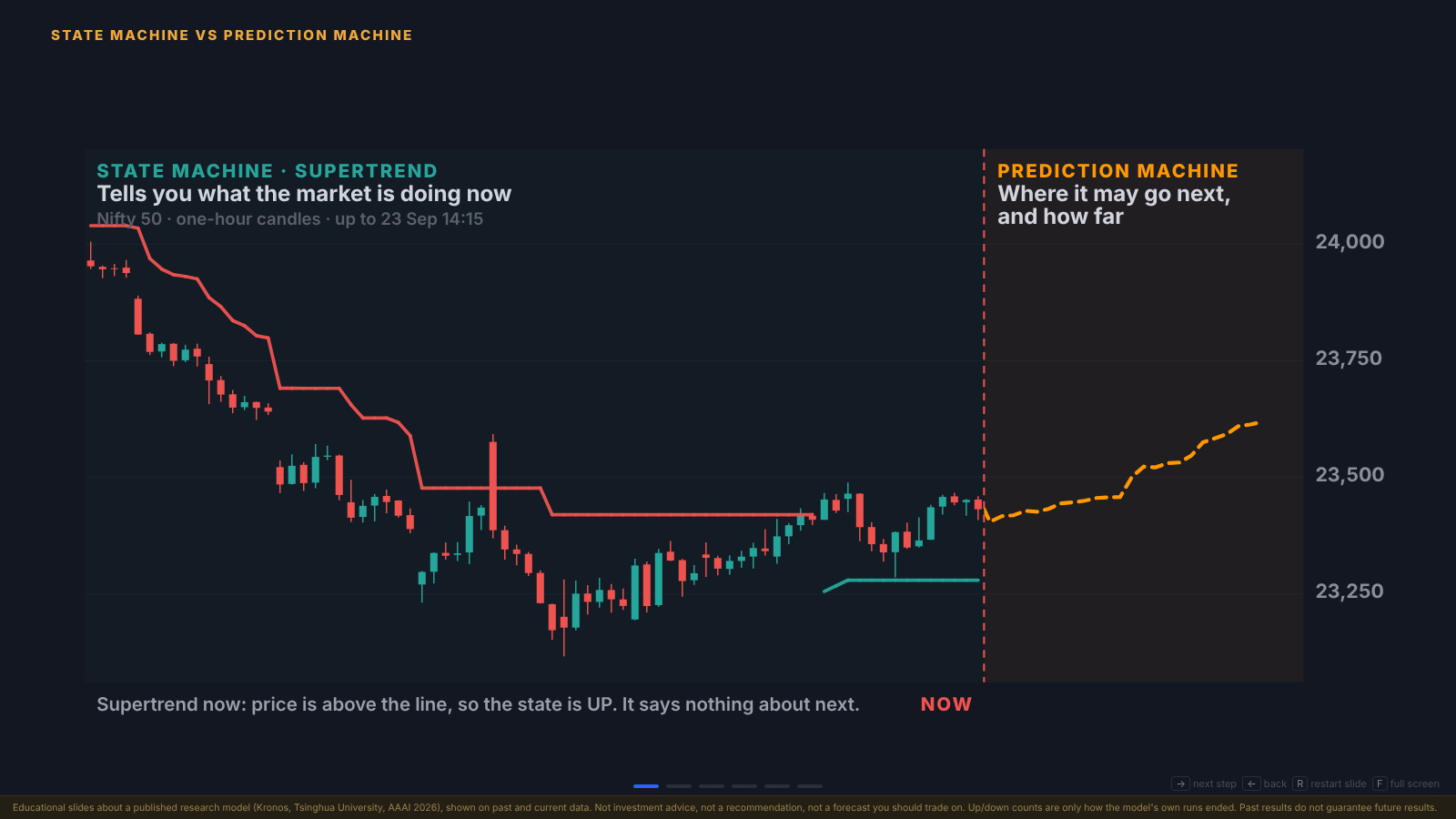
Figure 1: On Nifty 50 one-hour candles, Supertrend (left) says the state is UP but says nothing about what happens next. The prediction machine (right) draws where price may go after “now”.
2. What Is Kronos?
Kronos is an AI foundation model built specifically for financial candles (also called K-lines). It was created at Tsinghua University, often described as China’s equivalent of an IIT, and was accepted at AAAI 2026, one of the world’s biggest AI conferences. It is free and open source under the MIT licence.
How it differs from ChatGPT or Claude
ChatGPT, Claude and other chat AIs are trained on text: Wikipedia, blogs, books and websites. They learned English (or Hindi) by reading words.
Kronos was not built by “attaching ChatGPT to the stock market”. It was trained from the ground up on candles:
- Each candle becomes a token, a word in the market’s own language.
- ChatGPT predicts the next word; Kronos predicts the next candle.
- That is why it is sometimes called “the ChatGPT of the stock market”.
What it learned from
| Fact | Detail |
|---|---|
| Training data | About 12 billion candles |
| Markets | 45 stock exchanges worldwide (US, China, Singapore, India and more) |
| Built by | Tsinghua University |
| Published | AAAI 2026 |
| Licence | Open source (MIT) on GitHub: shiyu-coder/Kronos |
| Model used here | NeoQuasar/Kronos-base on Hugging Face (~400 MB) |
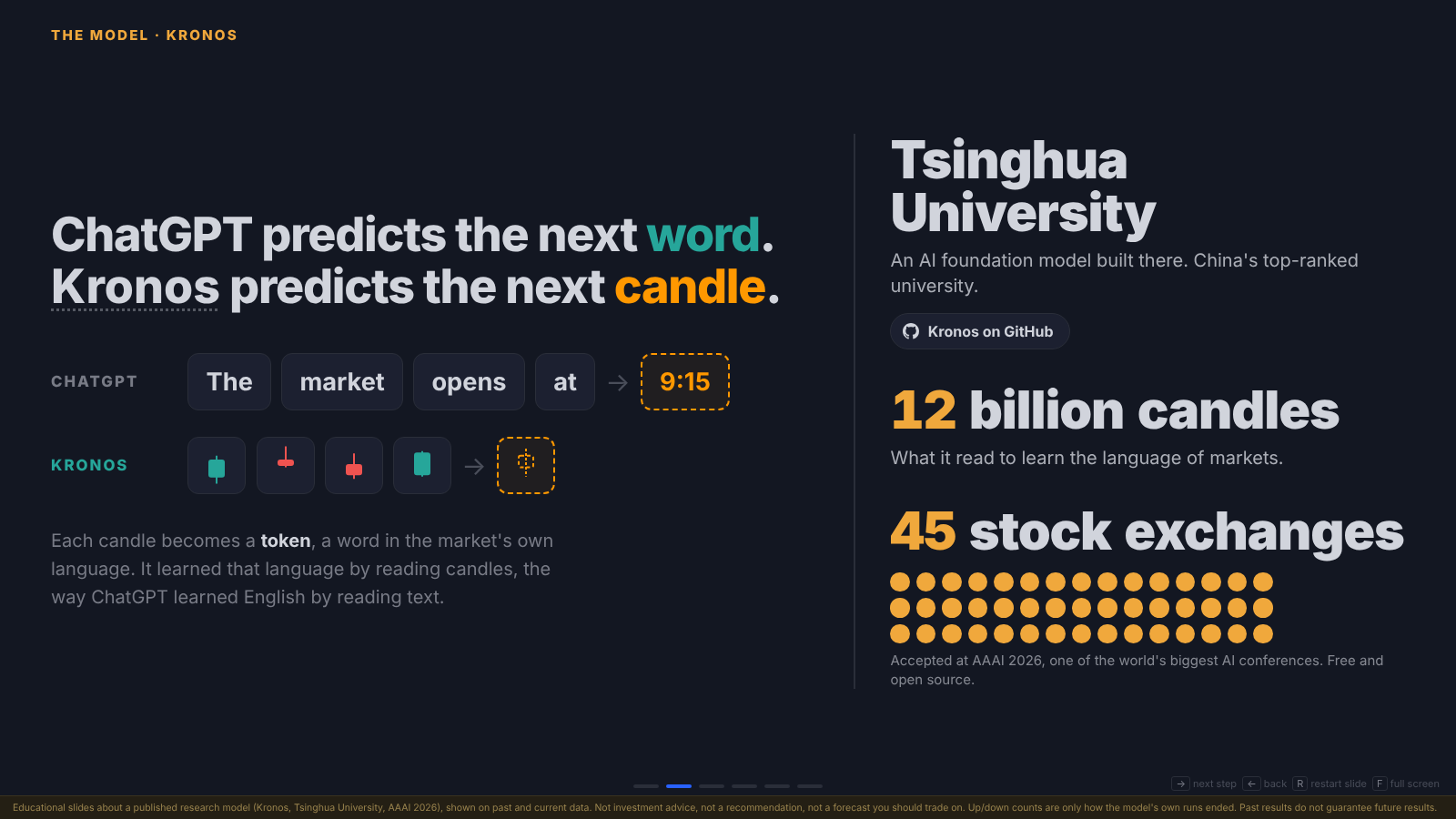
Figure 2: ChatGPT turns words into tokens; Kronos turns candles into tokens. It read 12 billion candles from 45 exchanges to learn the “language” of markets.
Note: Because it has seen such a wide variety of markets, Kronos can be used on Indian stocks as released. No extra training was done for the app in this guide.
3. How Kronos Forecasts: 360 Candles In, 30 Futures Out
This is the core workflow. It happens every time you open a stock in the app.
Step 1: Feed it the last 360 candles
What: The app gives Kronos the last 360 one-hour candles (about 60 trading days) with open, high, low, close and volume.
Why: Kronos needs enough history (context) to recognise the pattern it is in, just as a language model needs the earlier sentence to guess the next word.
Step 2: Kronos turns candles into tokens
What: The Kronos Tokenizer converts every candle into discrete tokens.
How: These tokens are the model’s vocabulary. The transformer then writes the next token, then the next, until it has written 24 new candles (roughly the next 10% beyond the history it read, about four trading days of one-hour candles).
Step 3: Run it 30 times (Monte Carlo simulation)
What: Kronos does not forecast once. It forecasts 30 separate times.
Why: Its sampling has built-in randomness, so each run produces a slightly different future path. Trying many paths and studying them together is called a Monte Carlo simulation.
Result: From the 30 paths the app calculates:
- the mean forecast (orange line): the average of all 30 runs
- the full range (shaded band): from the lowest run to the highest
- the direction count: how many runs ended higher vs lower
- the expected volume for the next 24 candles
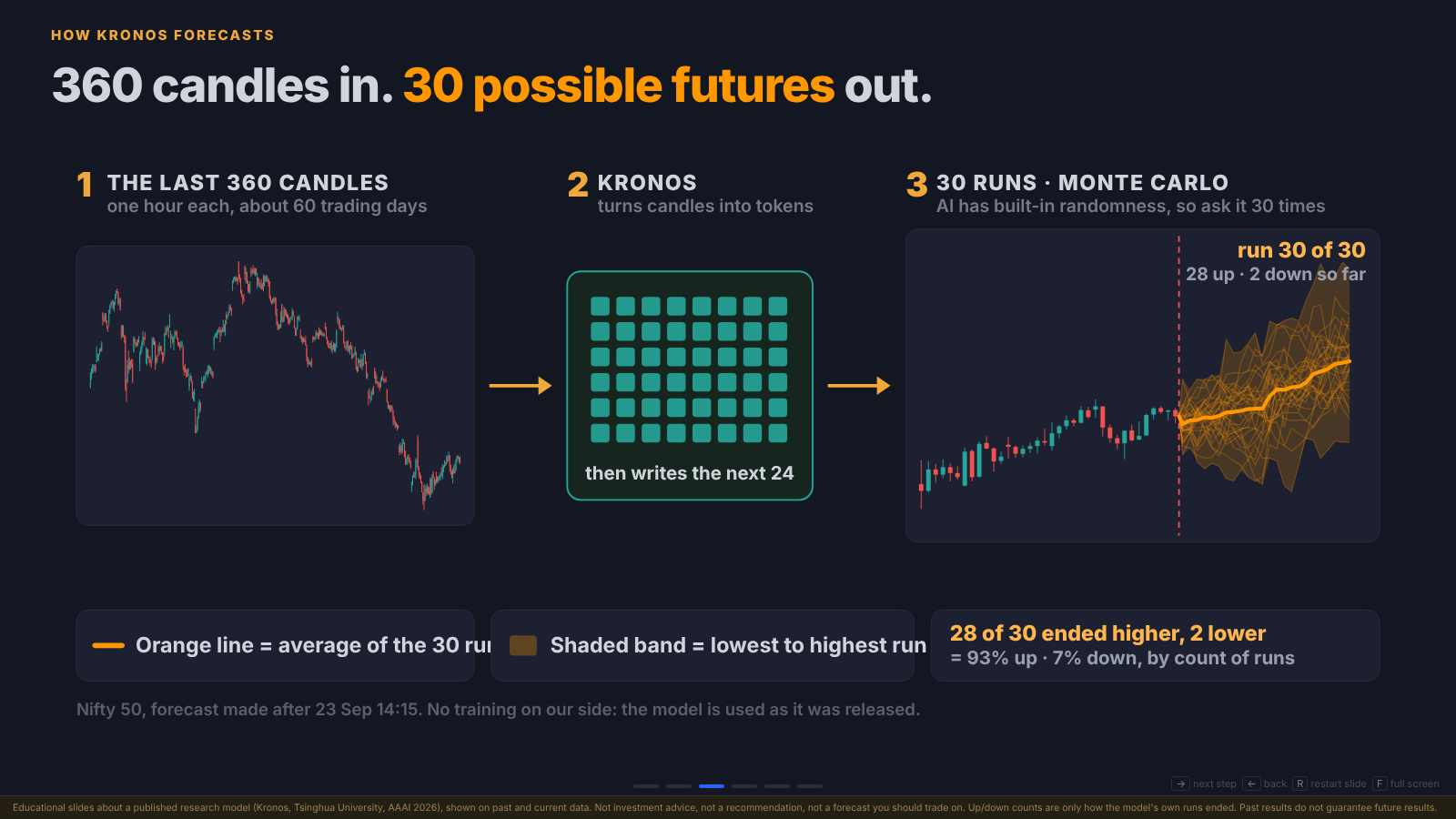
Figure 3: The three stages. The last 360 candles go in, Kronos turns them into tokens and writes the next 24, and this is repeated 30 times. Here, on Nifty 50, 28 of 30 runs ended higher and 2 lower.
The full data flow, from your Dhan account to the chart, looks like this:
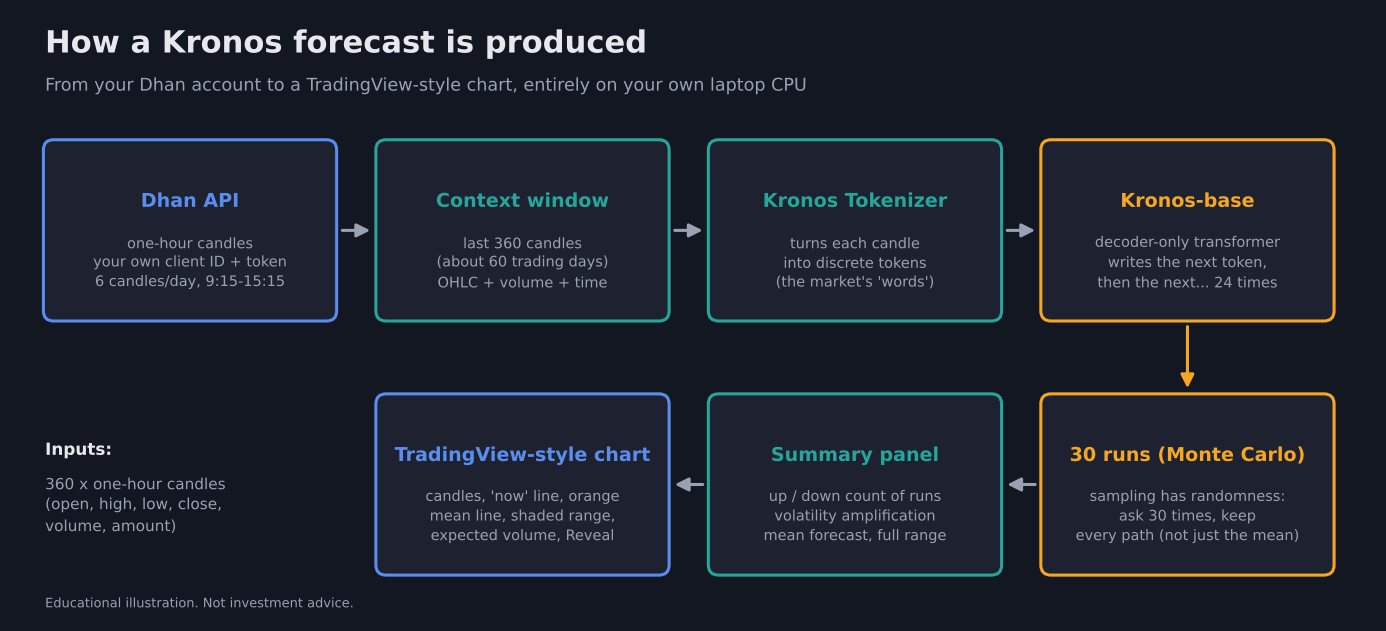
Figure 4: Architecture of the Kronos Forecast app. Dhan API candles feed a 360-candle context window, the tokenizer and Kronos-base write 24 candles, 30 runs are kept, and the summary panel and chart are built from them.
Tip: The stock Kronos code averages the 30 runs into a single line and throws the individual paths away. The app keeps all 30 runs, otherwise there would be no range and no up/down count. (See
kronos_paths.pyin the source files.)
4. Reading the Forecast: Direction, Range and Volatility
Every forecast answers three questions: which direction, how far, and by when.
| Panel | What it tells you | Example |
|---|---|---|
| Direction of the runs | How many of the 30 runs ended above / below the last close | 11 of 30 up, 19 of 30 down |
| Mean forecast | Where the average path ends after 24 candles | ₹1,224.29 (-2.37%) |
| Full range | Lowest run to highest run | ₹1,157.67 – ₹1,335.32 |
| Volatility amplification | How many runs swing harder over the next 24 candles than the last 24 real candles did | 13 of 30 = 43% |
| Time | The forecast covers exactly the next 24 one-hour candles | ~4 trading days |
Direction is a count, not a probability
In the video, one forecast showed 26 of 30 runs going up and only 4 going down (87% of runs). On Reliance, 97% of runs went up and 3% down. These numbers are useful as a weighting, but read them correctly:
Warning: “26 of 30 runs ended higher” is not “an 87% chance the stock will rise”. It only describes how the model’s own 30 runs ended. It is a probabilistic estimate, never a certainty.
Volatility amplification and options
In the video, 20 of 30 runs (67%) showed the market becoming more volatile than it currently is. This matters for options traders:
| If volatility is expected to expand | Effect |
|---|---|
| Option buyers | Generally favourable: rising volatility tends to lift option premiums |
| Option sellers | Generally unfavourable: expanding volatility can hurt short option positions |
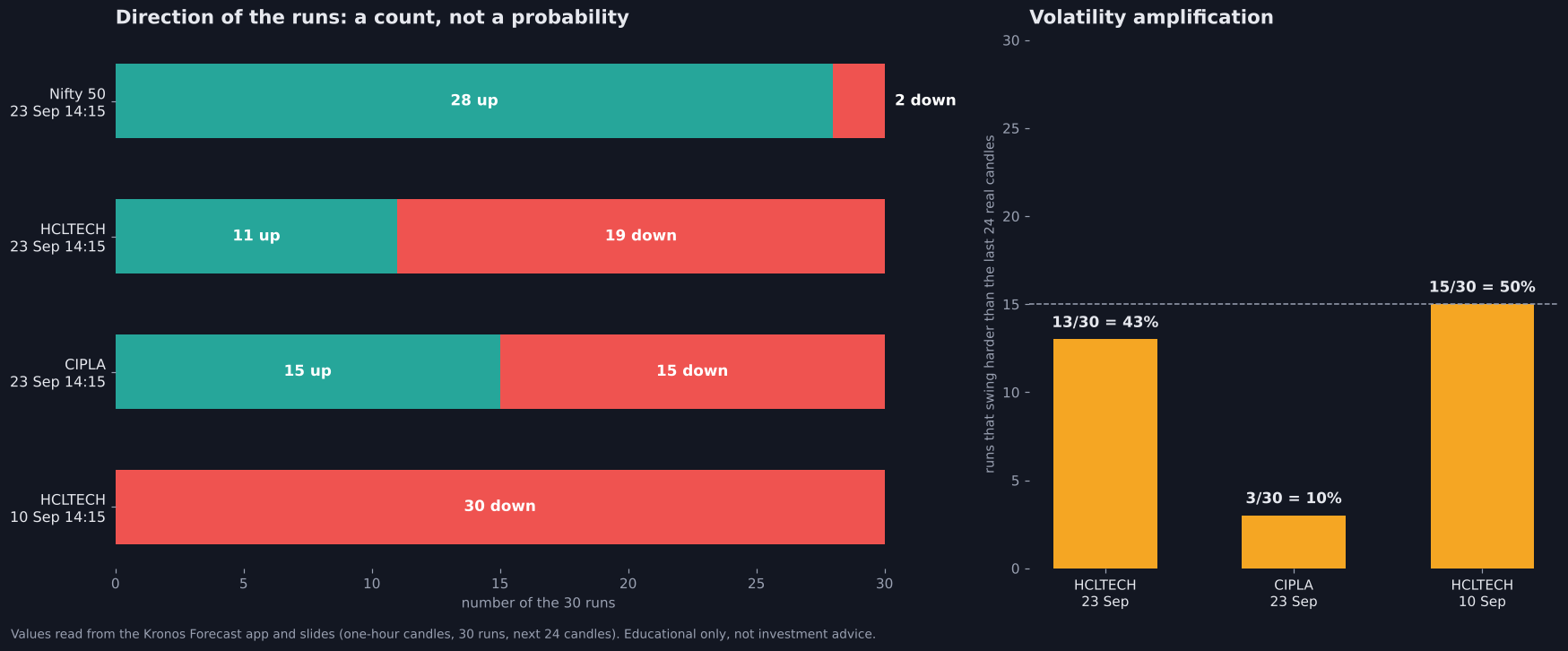
Figure 5: Run counts from real forecasts in the app. The left chart shows how direction is split across the 30 runs; the right chart shows how many runs swing harder than the last 24 real candles.
5. Kronos on Indian Stocks: Live Model Charts
The app applies Kronos to Nifty 50, Sensex and all NSE F&O stocks (212 symbols), pulling the latest one-hour candles from Dhan every time you pick a stock. In the video it is shown on stocks such as TCS, Reliance and others. Below are real forecasts from the app.
HCLTECH: forecast after 23 Sep, 14:15
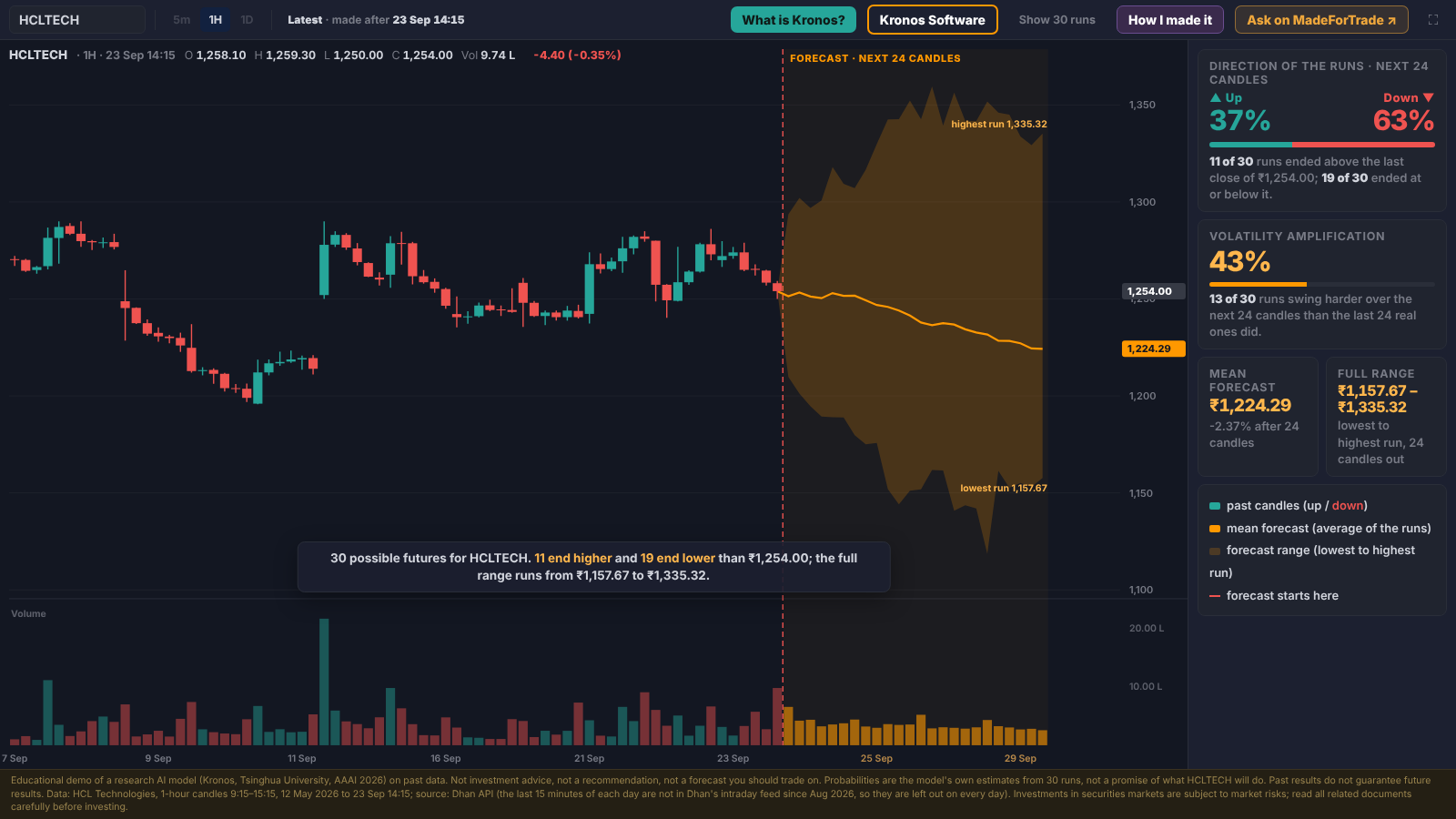
Figure 6: HCLTECH one-hour candles with the Kronos forecast. The red dashed line marks “now”. The orange line is the mean of 30 runs (₹1,224.29, -2.37%); the shaded band runs from ₹1,157.67 to ₹1,335.32. 11 runs ended higher and 19 lower. Expected volume is shown in orange below.
Show 30 runs
Press Show 30 runs to see every individual path instead of just the average and band.
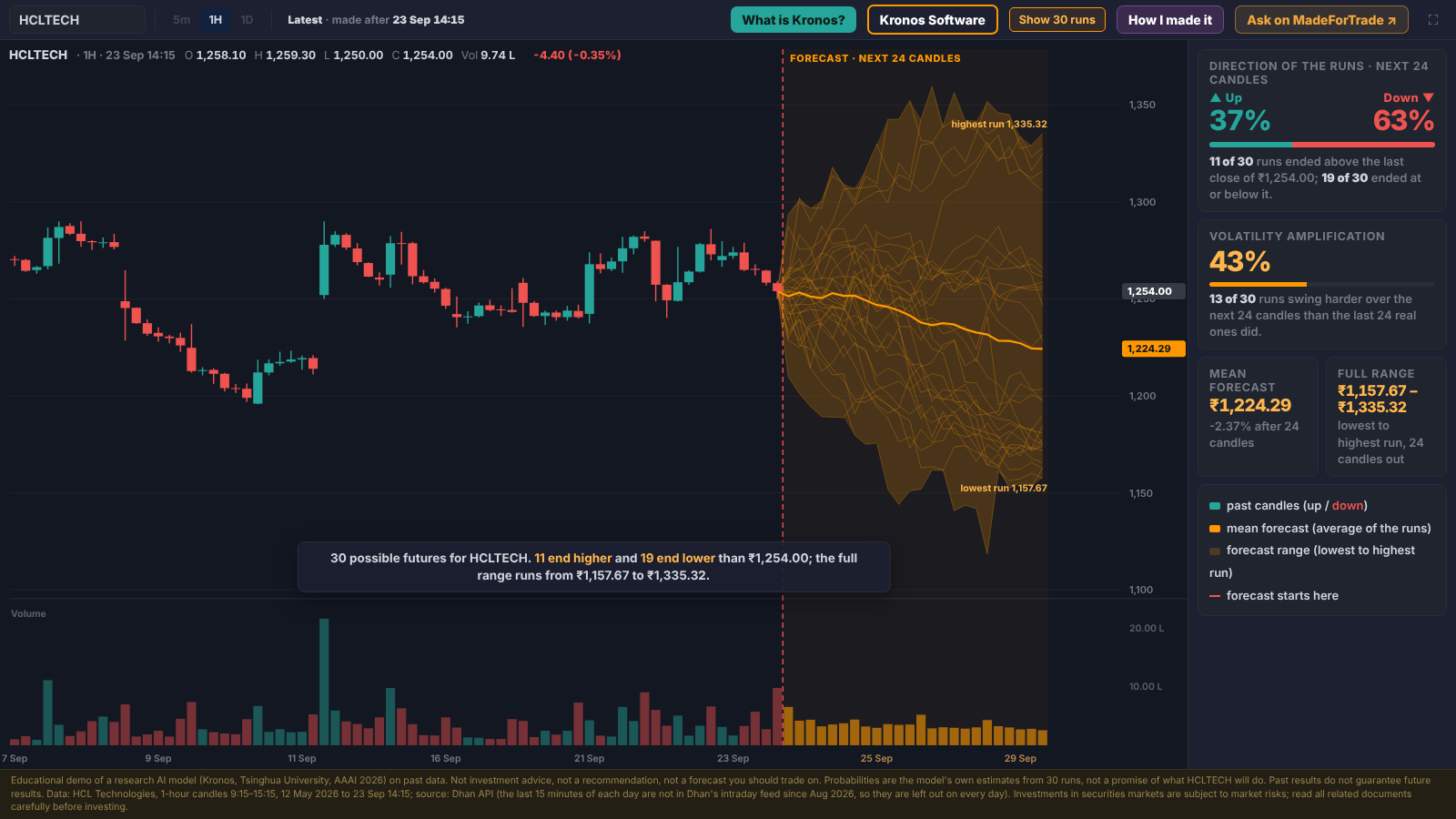
Figure 7: The same HCLTECH forecast with all 30 Monte Carlo paths drawn. This is what the shaded range is made of.
CIPLA: an undecided forecast
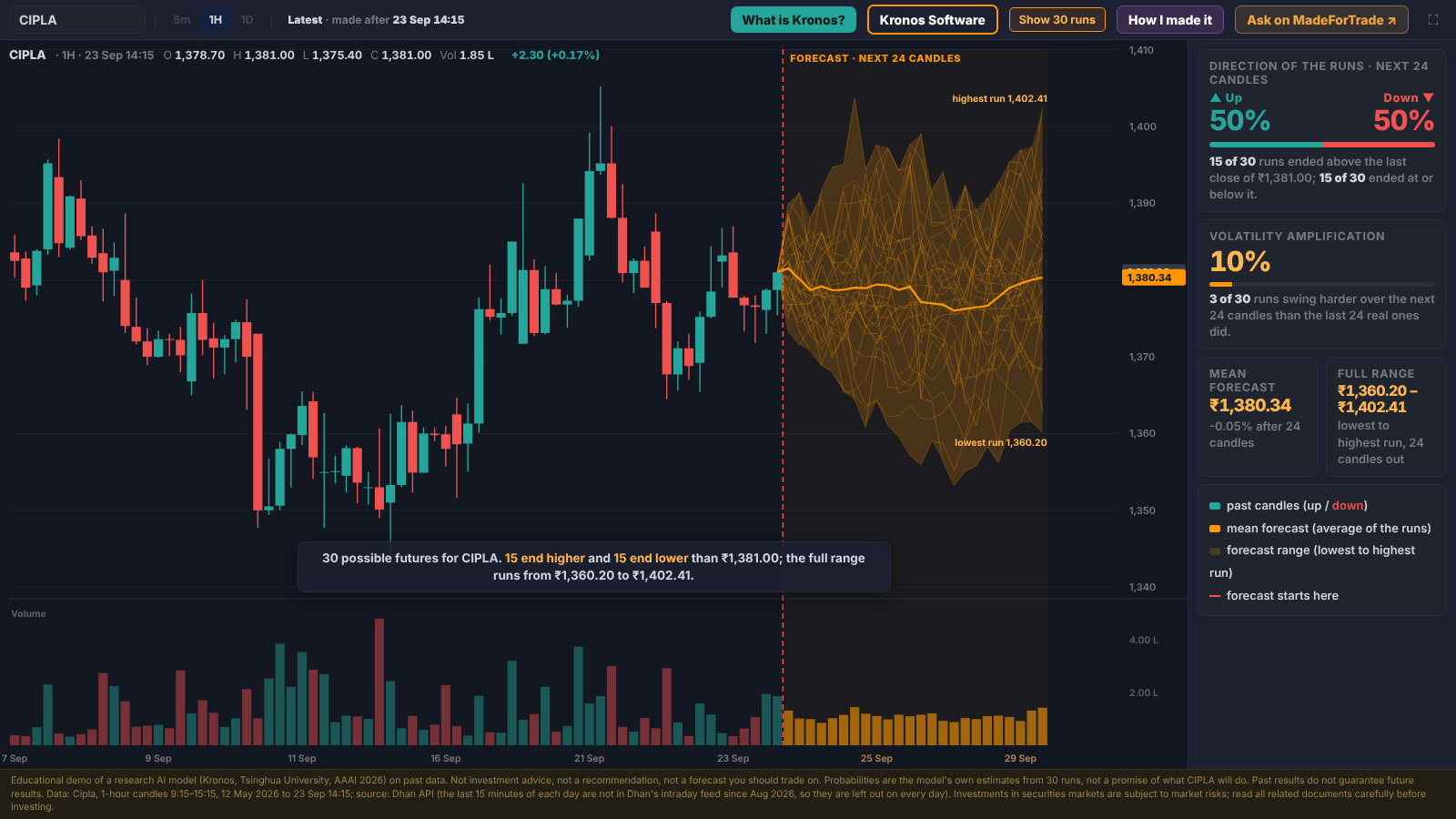
Figure 8: CIPLA after 23 Sep, 14:15. The runs split exactly 15 up / 15 down, the mean forecast is almost flat (₹1,380.34, -0.05%), and only 3 of 30 runs (10%) expect volatility to expand. When the model is undecided, it shows it.
Note: The chart is only a visual way to understand what Kronos is saying. In the video, the request was simply: “don’t give me numbers, give me a TradingView-style chart so I can see it.”
6. Testing It Honestly: Step Back and Reveal
A forecast is only worth something if you check it against reality. The app has two controls for this:
- Step back (
←key): move the “now” line back in time to an earlier forecast. - Reveal (
Rkey): draw what really happened after that forecast, one candle at a time.
Example: HCLTECH forecast made on 10 Sep, 14:15
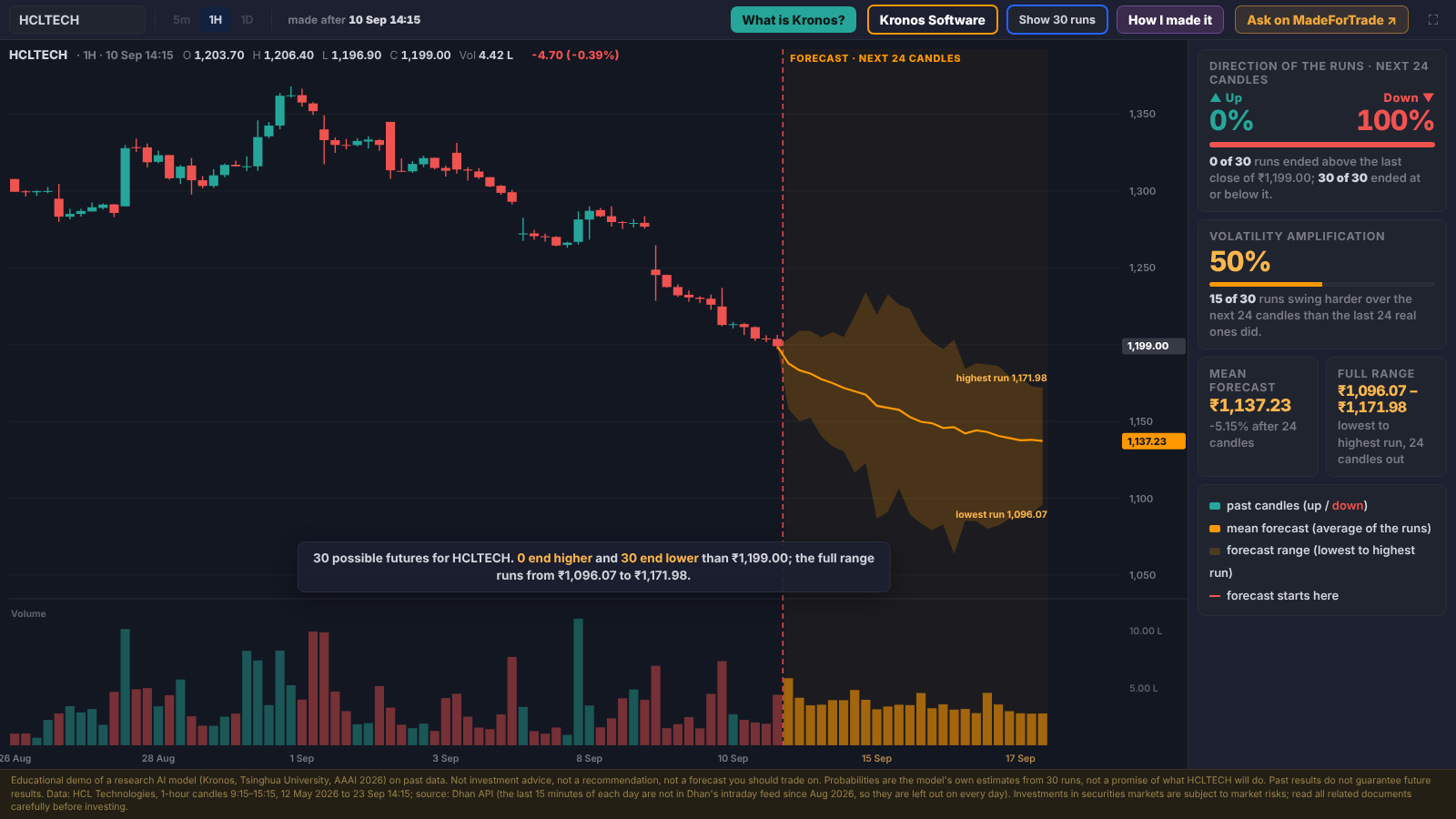
Figure 9: Stepping back to 10 Sep. All 30 runs ended lower (0 up / 30 down), with a mean target of ₹1,137.23 (-5.15%).
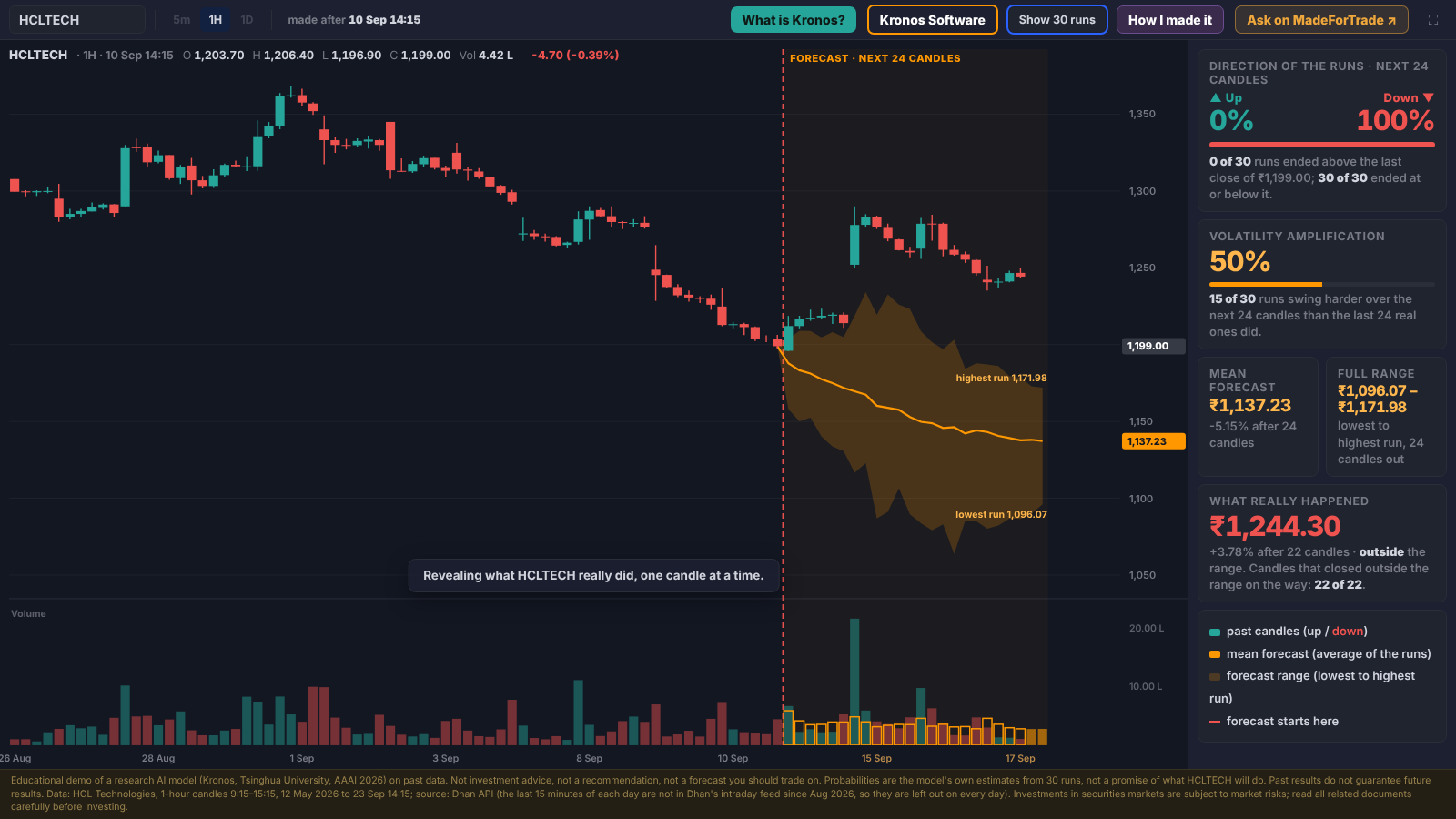
Figure 10: Reveal shows the real candles. HCLTECH actually closed at ₹1,244.30 (+3.78%), outside the forecast range on all 22 candles. A unanimous 30-of-30 forecast was still wrong.
What the backtests found
Before building the chart, Claude Code was asked to backtest the model: step back through past data, forecast each time and compare with what really happened.
| Test | Result |
|---|---|
| TCS, direction right? | 47.6% for Kronos vs 50.5% for random paths: about a coin flip |
| CIPLA, close inside the range? | The real close landed outside the range about 2 in 3 times: the range was too narrow |
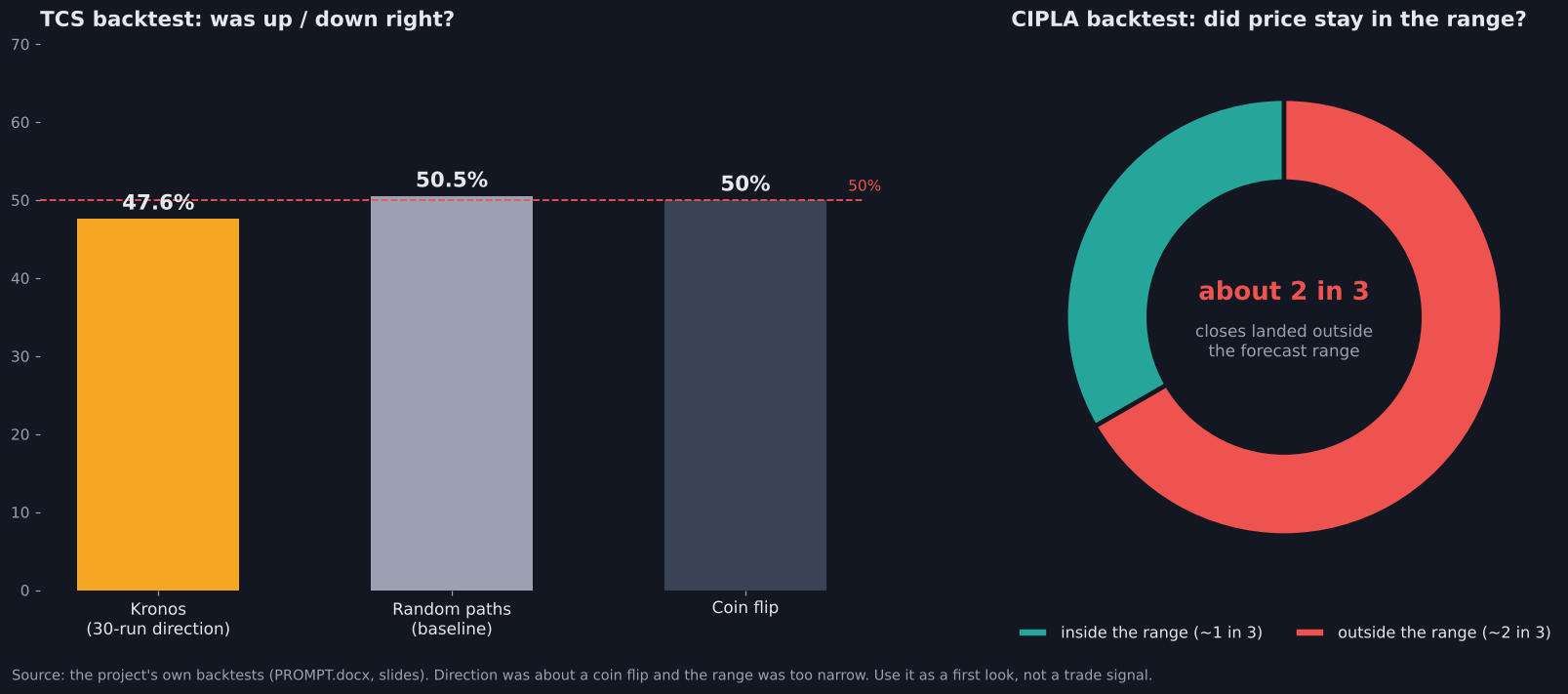
Figure 11: Honest backtest results. Direction was close to a coin flip, and the real price often moved outside the forecast range.
Warning: Use Kronos as a first look at the possible range, not as a buy or sell signal. This is just the start of AI forecasting for markets, and the honest numbers show why.
7. How the App Was Built with Claude Code
The entire software (chart, data pipeline and desktop app) was built by talking to Claude Code. It all started with one question.
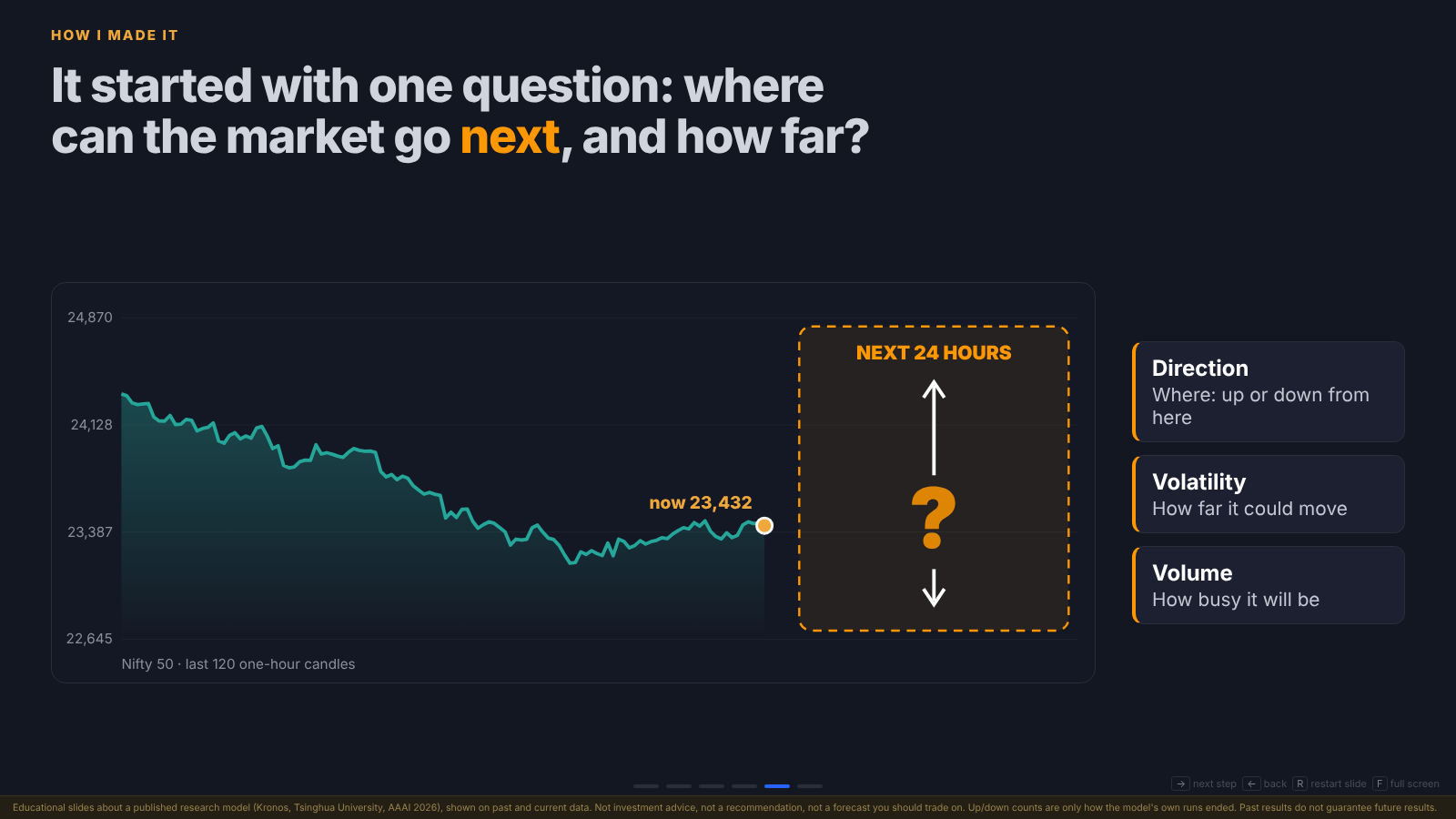
Figure 12: The starting question on Nifty 50: for the next 24 hours, what is the direction, the volatility and the volume?
Why Kronos and not ARIMA?
Forecasting models existed long before AI, for example ARIMA, a mathematical (statistical) model. The prompt specifically asked Claude for a post-AI-era foundation model, not an older statistical one. Claude suggested Kronos (2026), trained on candlestick data from 45 exchanges.
The build workflow
The approach was simple: start with one stock, prove it works, then expand the scope.
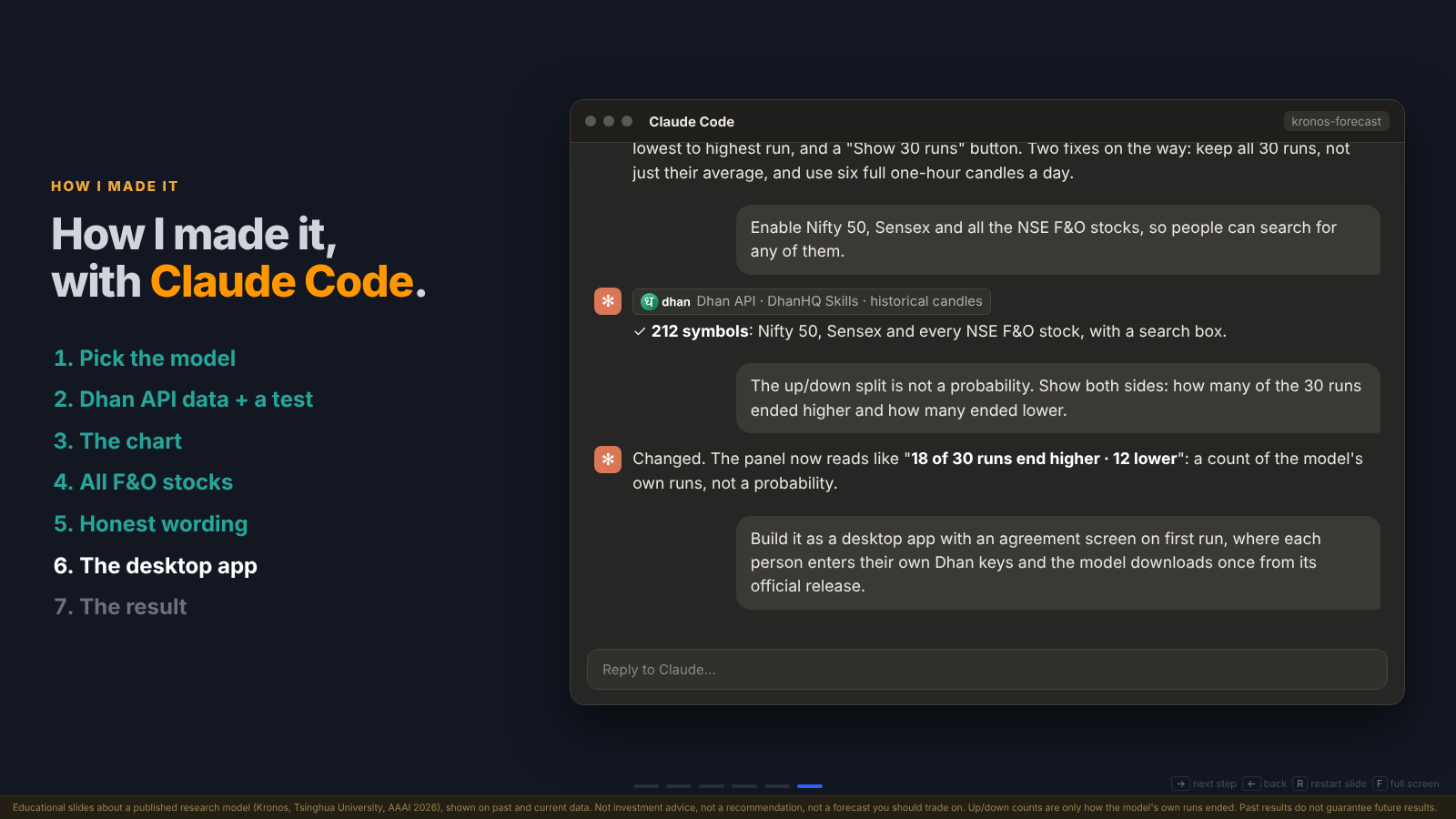
Figure 13: The eight prompts used to build the app, in order. Each result was checked before moving to the next prompt.
What you need before you start:
- Claude Code on a paid Claude plan
- DhanHQ Skills added to Claude Code, so it knows how to call the Dhan API
- Your own Dhan API keys (client ID and access token), kept private
- A normal laptop; no graphics card needed
The prompts
Paste these into Claude Code one at a time (the full set is in PROMPT.docx in the Drive folder).
Prompt 1: Understand the model first
Explain Kronos in simple words: the open-source AI model from Tsinghua University
(AAAI 2026, on GitHub at shiyu-coder/Kronos). What does it read, what does it
predict, and what inputs does it need?
Why: You must understand the concept before you implement it. Expected result: inputs are past OHLC + volume candles; output is the next candles’ price and volume, with many possible futures.
Prompt 2: Set it up
Set up Kronos on my computer from its official GitHub and Hugging Face release.
Use the Kronos-base model and run it on my CPU.
Prompt 3: Get the data
Using DhanHQ Skills and my own Dhan client ID and access token, download one-hour
candles for TCS for the last 180 days. Keep my token in a file, never in the code.
Why Dhan: You don’t have the market data yourself; the Dhan API provides it directly.
Prompt 4: First forecast
Give Kronos the last 360 one-hour candles and let it predict the next 24. It has
some randomness, so run it 30 times and keep all 30 runs. Show the average path,
the range from the lowest run to the highest, and how many runs ended higher and
how many lower.
Prompt 5: Test it honestly
Backtest it: step back through past data, forecast each time, and compare with
what really happened. How often was the direction right? How often did the real
price stay inside the range? Compare with random guesses.
Prompt 6: The chart
Show the forecast on a TradingView-style chart: the past candles, a line where
"now" is, the 30-run average, the range shaded, and the expected volume. Add a
"Show 30 runs" button, and a way to step back and reveal what really happened.
Prompt 7: More stocks, always fresh
Let me search Nifty 50, Sensex and all NSE F&O stocks. Each time I pick one, pull
its latest one-hour candles from Dhan, so the chart always ends at the latest candle.
Prompt 8: Make it an app
Package it as an app I can double-click. Ask for my Dhan client ID and access token
once, store them only on my computer, and send them only to Dhan. Download the model
once from its official release and check the files. Show "Educational only, not
investment advice" on every screen. It must never place an order.
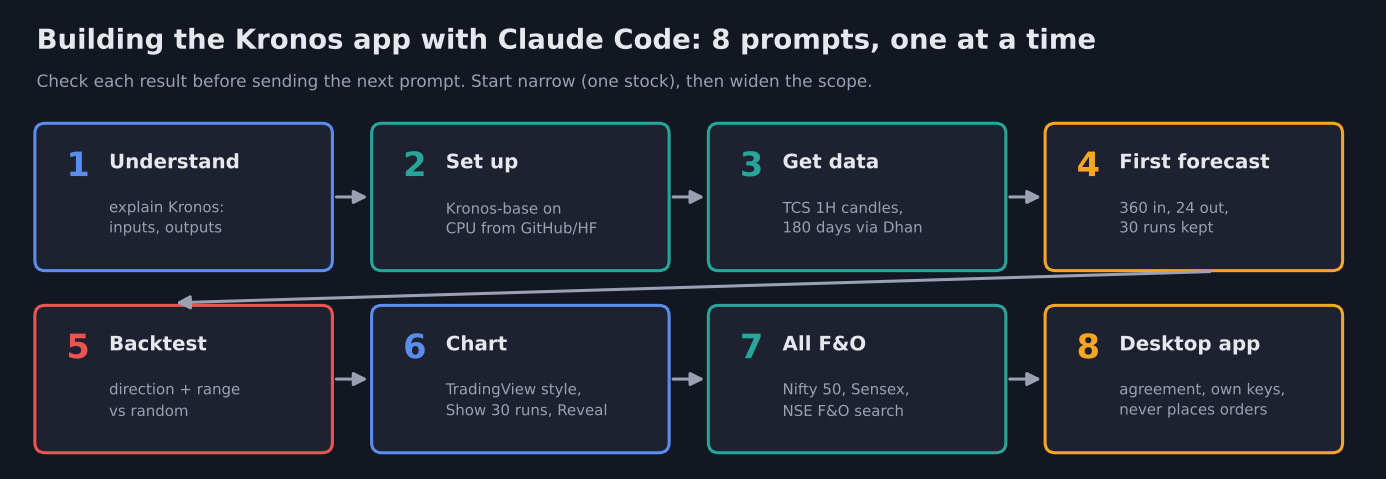
Figure 14: Part of the Claude Code conversation: adding all 212 F&O symbols, rewording up/down as a count of runs rather than a probability, and packaging the desktop app.
Tip: Your job is to understand the concepts deeply and know exactly what you are asking for. If you do, Claude can handle the software, the algo and the implementation for you.
8. Install and Run the Kronos Forecast App
Download the app from the Google Drive folder.
Step 1: Launch the app
| OS | How to run |
|---|---|
| Windows | Unzip KronosForecast-windows.zip, open the folder, double-click KronosForecast.exe. Your browser opens at http://localhost:8767. Close the black window to stop the app. |
| Mac | Open the source folder and double-click run_mac.command (first time: right-click → Open). |
| Linux | Run bash run_linux.sh in the source folder. |
On Mac and Linux, the first run sets up Python and PyTorch once (a few minutes). Python 3.10+ is required.
Step 2: First-run setup (one time)
The first time you open the app, it shows a setup page with three quick steps. After that, it opens straight to the chart.
2a. Accept the agreement
What: Read the user agreement and click I agree.
Why: It explains what the tool is: an educational tool that runs a published research model, not investment advice. Nothing works until you accept it.
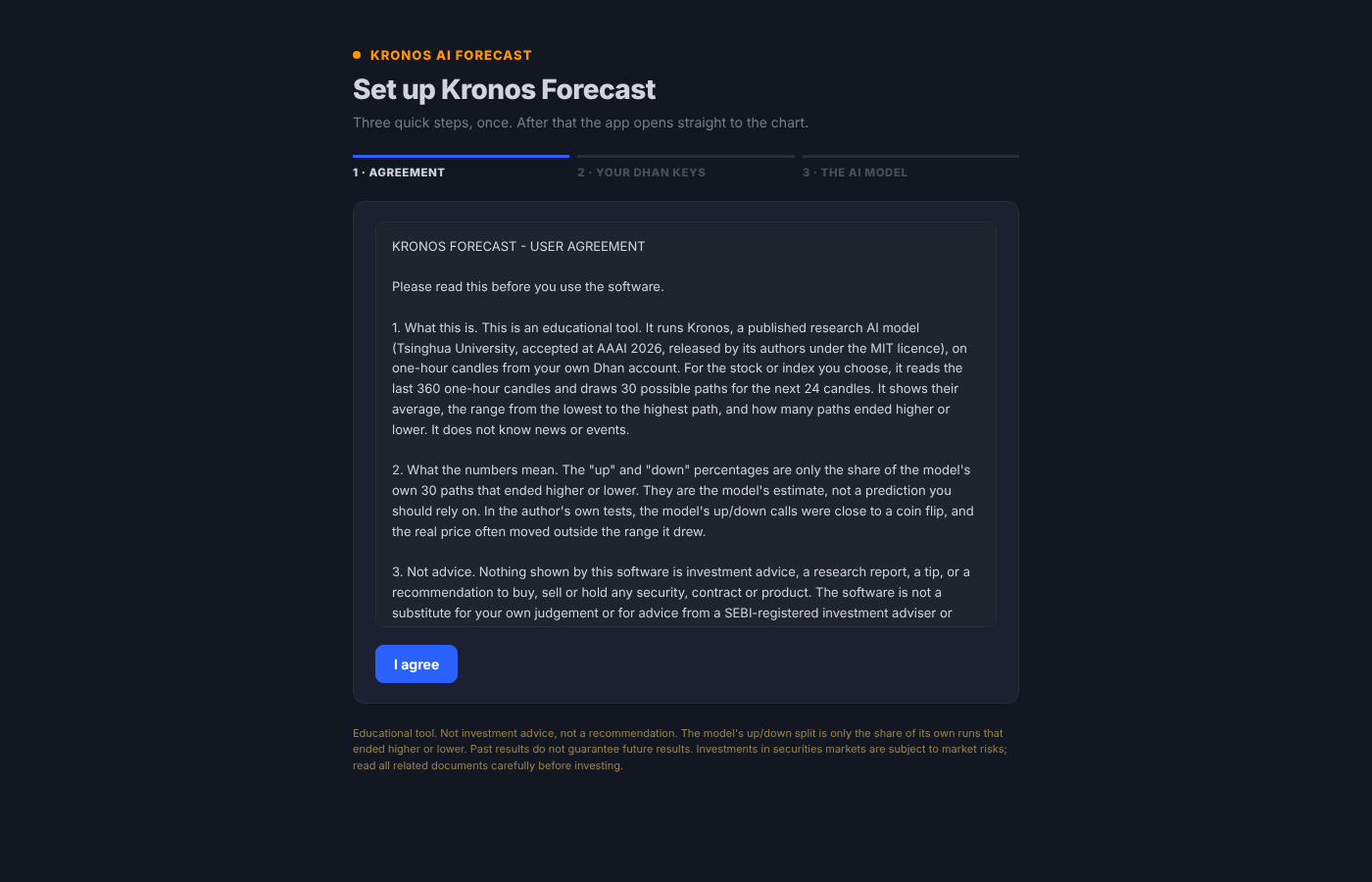
Figure 15: Step 1 of the first-run setup. The agreement explains what the numbers mean and that the software is educational only.
2b. Enter your Dhan client ID and access token
What: Enter your Dhan Client ID and Dhan Access Token, then click Check with Dhan and save.
Where to find them: In Dhan’s web app, go to Profile → DhanHQ Trading APIs. Copy your client ID and generate or copy an access token.
How it works: The app sends the keys to Dhan once to check that they work. If Dhan accepts them, you see “Dhan accepted the keys. Saved.” The keys are stored only on your computer and sent only to api.dhan.co, and only to fetch one-hour candles.
Expected result: A green confirmation message, and the setup moves on to step 3.
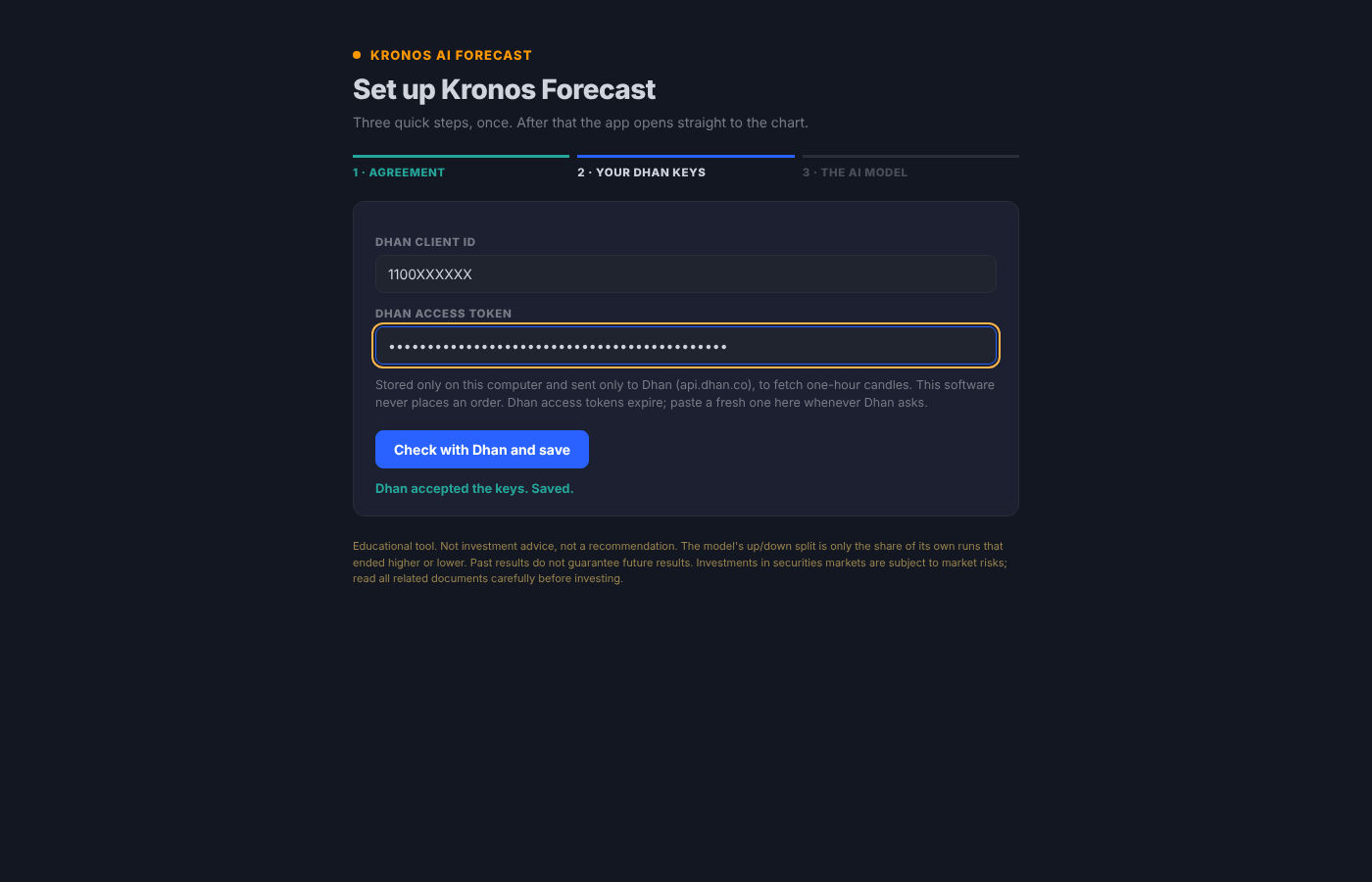
Figure 16: Step 2 of the first-run setup. Enter your Dhan client ID and access token; the app checks them with Dhan and confirms “Dhan accepted the keys. Saved.” (The client ID shown is a placeholder.)
Warning: Your access token works like a password for your Dhan API. Never share it, post it in screenshots, or paste it into code. The app never places an order with it.
2c. Download the AI model
What: Click Download the model.
How it works: Kronos-base (about 407 MB) downloads once from its authors’ official release on Hugging Face (NeoQuasar/Kronos-base). Every file is checked against the official release (size and SHA-256) before it is used.
Expected result: The progress bar fills, then shows “Downloaded and checked.” The app then opens the chart.
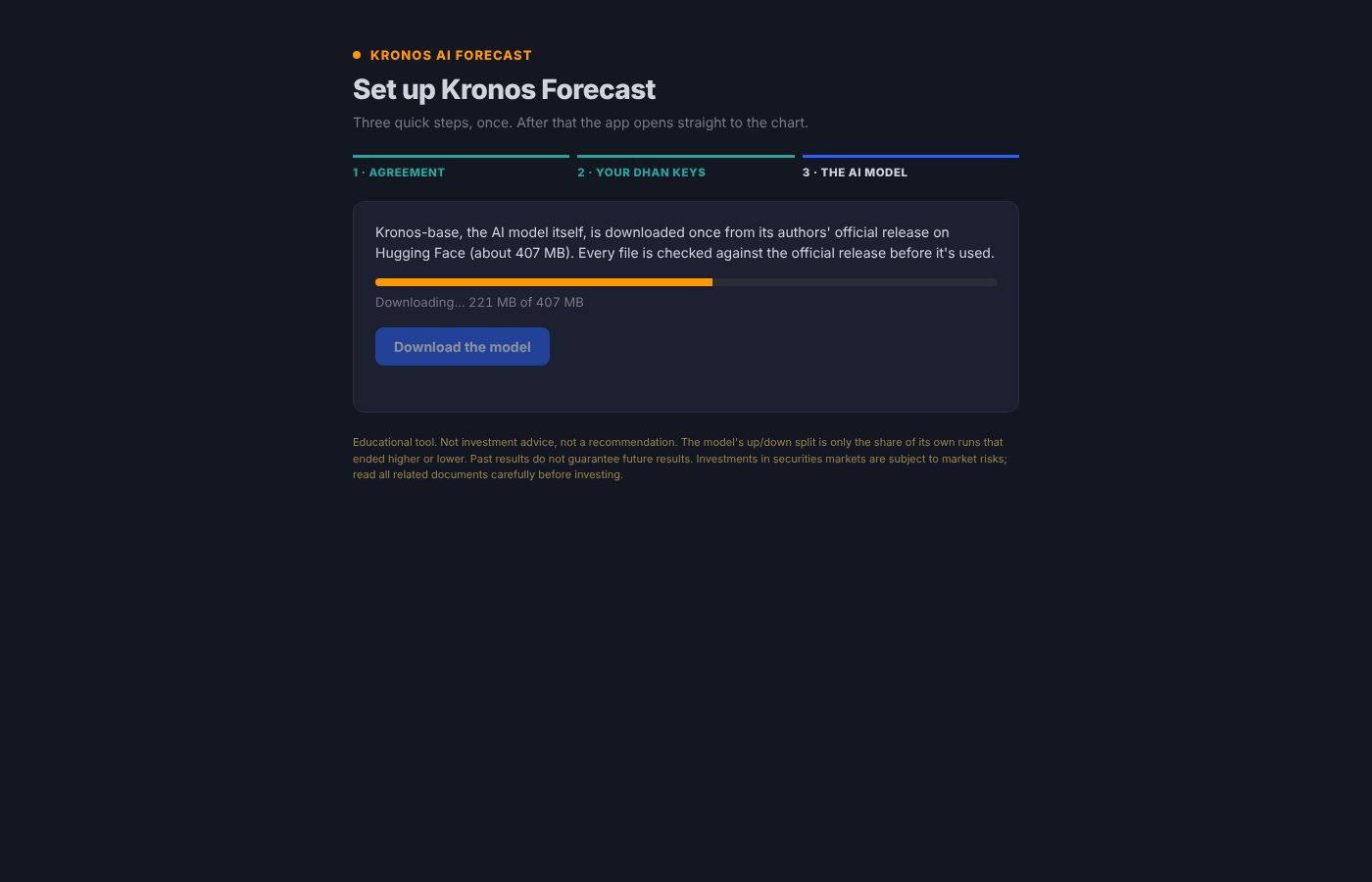
Figure 17: Step 3 of the first-run setup. The Kronos-base model downloads once (about 407 MB) and every file is verified.
Updating your Dhan token later
Dhan access tokens expire. When that happens, click  Settings at the top right of the chart, paste a fresh token, and click Save and update.
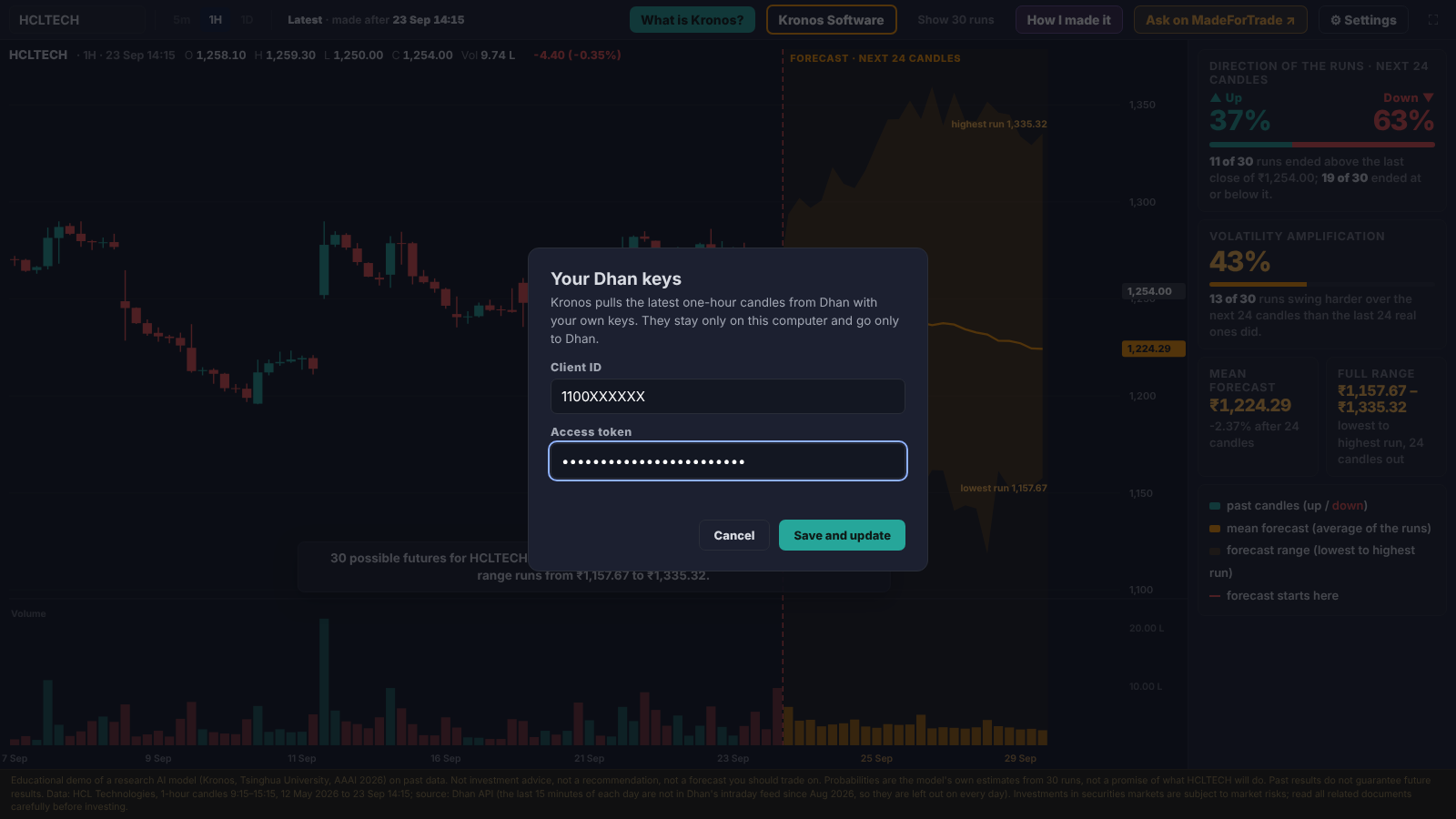
Figure 18: The “Your Dhan keys” box opened from Settings. Paste a fresh access token here whenever Dhan asks.
Step 3: Pick a stock and read the forecast
Type a symbol in the search box (top left). A new stock takes about 5 seconds on a normal laptop CPU; a stock you have already opened is instant. Then use:
| Control | Action |
|---|---|
| Search box | Pick any of the 212 symbols |
| Show 30 runs | Draw every Monte Carlo path |
← |
Step back to an earlier forecast |
R |
Reveal what really happened |
| Settings | Update your Dhan token |
Build it yourself (optional)
pip install -r requirements.txt pyinstaller
python build.py        # output: dist/KronosForecast/
PyInstaller builds for the machine it runs on. The Windows .exe gives exactly the same 30 runs as the Python version for the same stock and time.
Important: This is standalone software, not a feature inside the Dhan app. It never places an order. No Claude subscription is needed to run it.
9. Common Pitfalls
| Pitfall | Why it happens | Fix |
|---|---|---|
| The range disappears | Standard Kronos code averages the 30 runs into one line | Keep all 30 runs (kronos_paths.py) |
| Missing candles | Dhan’s one-hour stock data does not include the last 15 minutes (15:15–15:30) | Use six full one-hour candles a day, 9:15 to 15:15 |
| Reading counts as odds | “19 of 30 runs ended lower” sounds like a probability | Treat it as a count of the model’s runs, not a chance of profit |
| Token errors | Dhan access tokens expire | Paste a fresh token in Settings |
10. Summary
- Kronos is an open-source AI foundation model from Tsinghua University (AAAI 2026), trained on 12 billion candles from 45 exchanges.
- Like ChatGPT predicts the next word, Kronos predicts the next candle.
- It reads the last 360 one-hour candles, writes the next 24, and repeats this 30 times (Monte Carlo) to show direction, range, volatility and volume.
- The app runs it on Nifty 50, Sensex and all NSE F&O stocks using your own Dhan API keys, entirely on your laptop.
- It was built step by step with Claude Code: understand, set up, get data, forecast, backtest, chart, expand, package.
- Read it honestly: in testing, direction was about a coin flip (47.6% on TCS) and the real price often left the range (about 2 in 3 closes on CIPLA). It is a first look, not a trade signal.
This is only the beginning of AI forecasting. More open-source models trained on market candles will follow, and learning how to use them is a skill worth building now.
Get the software, code and prompts: Google Drive folder · Watch the video: YouTube
Further reading
- Kronos paper: Kronos: A Foundation Model for the Language of Financial Markets (AAAI 2026)
- Kronos on GitHub: github.com/shiyu-coder/Kronos
- Model on Hugging Face: NeoQuasar/Kronos-base
- DhanHQ API docs: dhanhq.co/docs/v2