Hi @Tradehull_Imran ,
Even is it not possible to fetch the Price of
Options strike as per the Order Id or order time …?
Please help me out…
Hi @Tradehull_Imran ,
Even is it not possible to fetch the Price of
Options strike as per the Order Id or order time …?
Please help me out…
Thanks @Tradehull_Imran. I see very few predefined intervals we can use. Can we give customized intervals? For example, 2min 3min or 2Hrs so on.
Could you please suggest the possible options to customized time interval.
Can we use all indexes. When I tried to pull data for FinNifty & MidCP.. It’s failed to fetch the data. Is there any limitation.
@Dhan
@Tradehull_Imran @RahulDeshpande sirs,
@Tradehull_Imran @RahulDeshpande Sirs,
Your patience and continuous support are truly admirable. Pls hold our hand few more days… I believe our batch is now very close to breaking through the wall of failures and entering a phase of consistently profitable trades. We just need your guidance for at least one more month to get there.
I’m currently testing one option Greeks-based strategy that sometimes requires placing orders almost every second—or sometimes it maybe 10 to 13 orders within 1-minute and 5-minute timeframes. I’m managing this with time.sleep intervals, but that sometimes leads to missed entries, especially at key Fibonacci levels.
I know you’ve already provided such logic in some of your codes, but I’m trying to implement it specifically on Nifty options and facing a few issues with the existing code functions.
Could you please let me know the maximum number of orders I can place within 1 minute, 5 minutes, and 15 minutes? ( Including entry order,sl modify order and target order)
Also, if you have a sample code for nifty options:
…it would be of great help. I feel I’m very close to deploying my first algo strategy.
If you’re unable to share this publicly, I’d be grateful to connect personally. Kindly share your contact number if you’re comfortable.
Thank you again for everything!
Hi, Very good Morning. Can you spare sometime and let me know how to integrate Telegram with Algo, to recieve alerts please.
I am held-up here. Please do support.
VBR Prasad, 9949324446
Hi @Tradehull_Imran sir,
If you could share some backtesting methods with us, it would be really beneficial.
@Qaisar tag your request to @RahulDeshpande and @Dhan as well
Hi @Tradehull_Imran @RahulDeshpande Sirs,
We sincerely request your guidance through a few lectures on algorithmic strategy backtesting. It would greatly help us in our journey to becoming professional algo traders.
Looking forward to your support and insights.
Best regards
@Tradehull_Imran @RahulDeshpande
Very Good Morning Imran sir. I have watched the last and latest Session 11, posted yesterday. All the members of this Forum are very lucky enough for being the students of this great series offering both initial and advanced Series of Algo Trading using Python 3.8.0 version.
While watching the Session 11, I (We all) felt, we are deserted at this stage, some people who are professionally Coders, might have learned it all with not feeling any further support from the Tradehull & Dhan Teams.
But there are several (more than 50%) students who are Non-Coders, seeking further support to become the succesfil Algo Traders.
I sincerely feel that some more explanatory sessions are required on this important subjects of application of Backtesting & Optimaization sir.
Even the Expert Coders in the Forum, can also support the Non-Coders to become the confident Algo Traders, In addition to the support from Tradehull & Dhan Teams.
Especially support from Imran Ali sir is requested.
I request for a separate Session on, how to integrate the Back tested and optimized results with actual Trading algo.
Yesterday, I myself have succeded in integrating Telegram alerts with my Algo Codes.
Thank you Sir
VBR Prasad
Hi,
You can use resampling feature of pandas to convert the time frame as per your need. 1 min data can be converted into 2/3/4/6/10/12… mins . similarly, 5 min can be converted into 10, 15, 20, 25, 30 40 45… mins. and 1 hre to 2/3/4 hrs timeframe… here is an example wher i have converted 1 min tf data to 3 mins data-
    data_1min = first_client.get_historical_data(stkname, exchange, "1")
    data_1min = data_1min[data_1min["timestamp"].dt.date == today]
    #print(f"Data: {data_1min.head(10)}")

    # Re sampling the data for 3 minutes, see 3T
    data_3min = data_1min.resample('3T', on='timestamp').agg({
            'open': 'first',
            'high': 'max',
            'low': 'min',
            'close': 'last'
        }).dropna().reset_index()


    data_3min["EMA20"]   = talib.EMA(data_3min["close"], 20)
on the 3rd line of code you will swee “3T” which tells to convert 1 min data into 3 min data. where 3 is the time value and T for minutes, if you want to convert this into 4 min tf data, then use “4T”
You can google “resampling in pnadas” to get more information..
HTH as a starter
Regards
Hi @Vasili_Prasad ,
Tagging @Dhan for the same.
Hi @Akshay_Bawane ,
No it is currently not possible.
Hi @Qaisar and @Ganesh_Surwase ,
Tagging @Dhan for your request on backtesting lectures.
ce_name, pe_name, ce_strike, pe_strike = tsl.ITM_Strike_Selection(tradingsymbol, expiry, ITM_count=1)
ce_name, pe_name, strike = tsl.ATM_Strike_Selection(tradingsymbol, expiry)
ce_name, pe_name, ce_strike, pe_strike = tsl.OTM_Strike_Selection(tradingsymbol, expiry, OTM_count=2)
Dear Sir
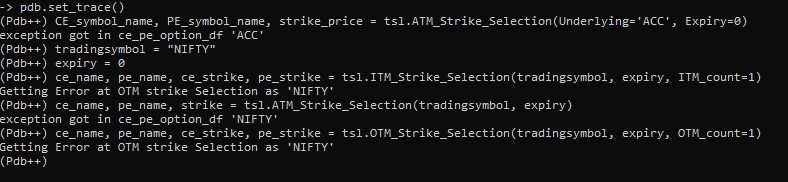
I am getting error in above code, today only i got the error, screen shot attached
hi,
I am getting below error when I am trying to run code. please help. are the APIs under any maintenance currently and when will they be available? thank you.
Blockquote
-----Logged into Dhan-----
reading existing file all_instrument 2025-04-10.csv
Got the instrument file
exception got in ce_pe_option_df ‘NIFTY’
Getting Error at Option Chain as ‘NIFTY’
Traceback (most recent call last):
File “8. Tick By TICK Option Chain_combo.py”, line 217, in
atm_strike, option_chain = tsl.get_option_chain(Underlying=index_1, exchange=“INDEX”, expiry=0, num_strikes=50) #get option chain data for current expiry(expiry=0) for 50 strikes above and below ATM
TypeError: cannot unpack non-iterable NoneType object
Weekends/Holiday no return data from DHAN API
Probably due to under maintenance
Your code is OK
Totally agreed
@Dhan Please arrange Back testing Video series for the algo traders.
Hi, thanks. @Tradehull_Imran , imo the APIs should work during weekends and holidays also. The dhan website or mobile app is showing LTP data, OI today. Hence, no reason for Dhan API not to show the data.
also, maintenance window timings for API should be published in advance so its users are not left high and dry when suddenly API stops working.
──────────────────────────────────────────────────
Getting Error at OTM strike Selection as 'NIFTY'
2025-04-10 13:46:19 | CALL for NIFTY APR FUT. Lets check for None         zerobot_v4.py:228
Exception in Getting OHLC data as 'NoneType' object has no attribute 'upper'
Getting Error at Option Chain as 'NIFTY'
==========================
Getting Error at Option Chain as 'NIFTY'
==========================
SAME SAME
tagging @Dhan @RahulDeshpande
Tried everything as given in Youtube & given here. It’s not working.
ce_strike, pe_strike, strike = tsl.ATM_Strike_Selection(Underlying = ‘NIFTY’, Expiry = 0 )
Codebase Version 2.8 : Solved - Strike Selection Issue
-----Logged into Dhan-----
reading existing file all_instrument 2025-04-10.csv
Got the instrument file
exception got in ce_pe_option_df ‘NIFTY’
Above statement gives same following error
Codebase Version 2.8 : Solved - Strike Selection Issue
-----Logged into Dhan-----
reading existing file all_instrument 2025-04-10.csv
Got the instrument file
exception got in ce_pe_option_df ‘ACC’
–Return–
[0] > ←[33;01mg:\pythonsam\sam_v2_get_historical_data.py←[00m(←[36;01m46←[00m)()->None
cause when market is open we don’t get time to check everything.
Thanks in Advance
Hi friends,
I have code for both real-time and back testing for my strategy. I will share it here, but with a simpler strategy—EMA Crossover. Though, it is a rough structure, but will guide you, help you to understand the difference between back testing and real time logic.
Real Time Code-
from Dhan_Tradehull_V2 import Tradehull
import pandas as pd
import talib
import time

client_code = "112233445566"
token_id = "anDB1234"
tsl = Tradehull(client_code, token_id)

stkname = "Reliance"
exchange = "NSE"
interval = "5"

in_position = False

while True:
    try:
        # Get latest 5-minute candles
        data = tsl.get_historical_data(stkname, exchange, interval)
        data["ema5"] = talib.EMA(data["close"], timeperiod=5)
        data["ema20"] = talib.EMA(data["close"], timeperiod=20)

        if len(data) < 21:
            print("Waiting for enough candles...")
            time.sleep(10)
            continue

        prev_ema5 = data["ema5"].iloc[-2]
        prev_ema20 = data["ema20"].iloc[-2]
        curr_ema5 = data["ema5"].iloc[-1]
        curr_ema20 = data["ema20"].iloc[-1]

        if not in_position and prev_ema5 < prev_ema20 and curr_ema5 > curr_ema20:
            print("Buy Signal Triggered")
            # tsl.order_placement(...) — implement buy here
            in_position = True

        elif in_position and prev_ema5 > prev_ema20 and curr_ema5 < curr_ema20:
            print("Sell Signal Triggered")
            # tsl.order_placement(...) — implement sell here
            in_position = False

        time.sleep(60 * 5)  # Run every 5 minutes

    except Exception as e:
        print(f"Error: {e}")
        time.sleep(30)
Back testing code-
import pandas as pd
import talib

# Load your data once
from Dhan_Tradehull_V2 import Tradehull

client_code = "112233445566"
token_id = "anDB1234"
tsl = Tradehull(client_code, token_id)

stkname = "Reliance"
data = tsl.get_historical_data(stkname, "NSE", "5")

data["ema5"] = talib.EMA(data["close"], timeperiod=5)
data["ema20"] = talib.EMA(data["close"], timeperiod=20)

in_position = False
entry_price = 0
trades = []

for i in range(1, len(data)):
    prev_ema5 = data["ema5"].iloc[i - 1]
    prev_ema20 = data["ema20"].iloc[i - 1]
    curr_ema5 = data["ema5"].iloc[i]
    curr_ema20 = data["ema20"].iloc[i]

    if not in_position and prev_ema5 < prev_ema20 and curr_ema5 > curr_ema20:
        entry_price = data["close"].iloc[i]
        entry_time = data["timestamp"].iloc[i]
        in_position = True

    elif in_position and prev_ema5 > prev_ema20 and curr_ema5 < curr_ema20:
        exit_price = data["close"].iloc[i]
        exit_time = data["timestamp"].iloc[i]
        pnl = exit_price - entry_price
        trades.append((entry_time, exit_time, entry_price, exit_price, pnl))
        in_position = False

# Result summary
for trade in trades:
    print(f"Entry: {trade[0]} @ {trade[2]}, Exit: {trade[1]} @ {trade[3]}, PnL: {trade[4]}")

# Save to CSV
pd.DataFrame(trades, columns=["Entry Time", "Exit Time", "Entry Price", "Exit Price", "PnL"]).to_csv("backtest_result.csv", index=False)
In real time we need to use a while loop & in back testing where the data is already available we iterate the data using for loop. As time permits, will add more information, by late night…
Hope this will help you