Learn Algo Trading with Python | Codes | Youtube Series

Getting Error at Option Chain as {'status': 'failure', 'remarks': {'error_code': None, 'error_type': None, 'error_message': None}, 'data': {'data': {'805': 'Too many requests. Further requests may result in the user being blocked.'}, 'status': 'failed'}}

@Tradehull_Imran As I’m calling inside the loop for each index. Getting above. So, what should be the ideal time difference between the current call & next call? OR is there a specific limit for it?

Very Good Morning Sir,
Thank you very much for your code with EMA Strategy & Back testing code.
Such Codes from Coding Experts will be very much helpful to the Non-Coders like me in the Group sir.

As you have suggested ‘In real time we need to use a while loop & in back testing where the data is already available we iterate the data using for loop. As time permits, will add more information, by late night…’

Truly speeking, if you can give the code with ‘while’ loop also, it will be really greatful.

Infact we appreciate all the Cooperative Coders, if they can provide ‘FULLY FUNCTIONAL ALGOS’ on this platform.

Thanks a lot again.
VBR Prasad

Very Good Afternoon, Can you please share your code on this platform, so that it will be very much useful for Non-Coders like me.

Thank You very much
VBR Prasad

your tsl.cancel_all_orders() is not working ! This function too is so intermittent, sometimes it suddenly stops working which is riciculous. The entire stop loss and exit logic is based on this and it is not working, resulting in problems.

The output of the call is just an empty set as below:
op = tsl.cancel_all_orders()
print("tsl opp: ", op)
→ tsl opp: {}

Please fix this asap

Hi @Tradehull_Imran ,

Can we get (2023-24) OHLC data 5 minute interval of Nifty in .csv ..?
And,
2025 Jan - Mar OHLC data 5 minute interval of Nifty in .csv ..?
Can you share that file here for all please.?

i didnt get this… still,
Real time example is with while loop…so which code are u asking with while loop?

Back testing is with for loop, the reason is that for any kind of looping, one need 3 input parameters, first where to start from, where to end , and increment factor… in a for loop all these three are mentioned in for statement, where as with while or do..while (an another form of looping) we need to mention these parameters at various stages in the loop, so it is easy to do with for loop. In real time, while is used because -

  • Because the market is running continuously.
  • You want to keep polling the API every few seconds or minutes to check for trade opportunities.
  • This creates an infinite loop that simulates continuous watching of the market during trading hours.

In back testing, you already have the full historical data in a DataFrame.-

  • You need to simulate what would happen if you were watching the market bar-by-bar.
  • So you loop for each row (or candle), one at a time, just like how the market would have behaved.

Hope, that why while and for is used is clear by now…

what does fully functional algos means in ur sense… does u mean with logging, multiple client handling, Excel entries etc etc…
It will take time… I can help you in this piece by piece or with a simpler example like i did with this back testing one, you will have to assemble it in your code… I am running my algo on 2-3 accounts… I can share the code with simple breakout example…

one more thing, I am not a good coder, but a good assembler and searcher(googler) … I very well know which piece of code is required to get my job done, then this piece i get it using google, then simply changing the names of variables my job is done.

You can ask for anything, if I had it will surely share… :slight_smile:

HI @Akshay_Bawane,

will it be ok if I share the 5 min data since 2020 till 07-Feb-2025..

get it from here -

Hope u know how to download from such sites…
Also, I will be having data for NIFTY, BNF, SNX, BANKEX, MIDCPNFTY since 2020- till apr 2025, in couple of days, mostly bt this week end…

Regards

2 Likes

Thank you very much for your quick response sir.

Just this morning, I have seen your code for real-time and back testing with the EMA Crossover Strategy.

I will comeback to you sir, in case of any help.
Thank you
VBR Prasad

Good Afternoon sir,
Can you please let me know, which is the algo you have deployed in getting this profits sir?

Thank you

Thanks a lot bro.. :innocent:

Hi @Akshay_Bawane ,

hahaha…I am not a bro :rofl:, rather u can call me uncle, really, no kidding… hv completed half century … trading since 2003…

1 Like

Thanks for sharing this useful data sir.
VBR Prasad

Very Good day Sir,

While testing the Algo ‘Download_Historical_data’ of Session 9, I am getting the error sir.

Plaese Suggest.`C:\Users\LENOVO PC\Desktop\RP\Dhan Algo\DHAN Advanced Algo Trading Series\Session 9\Session 9\Dhan Option Chain\Dhan Option Chain>py “1. Download_Historical_data.py”
Codebase Version 3
-----Logged into Dhan-----
This BOT Is Picking New File From Dhan
Got the instrument file
Traceback (most recent call last):
File “1. Download_Historical_data.py”, line 33, in
ATM_Strike = round(ATM_close/step)*step
NameError: name ‘ATM_close’ is not defined

C:\Users\LENOVO PC\Desktop\RP\Dhan Algo\DHAN Advanced Algo Trading Series\Session 9\Session 9\Dhan Option Chain\Dhan Option Chain>py “1. Download_Historical_data.py”
Codebase Version 3
-----Logged into Dhan-----
reading existing file all_instrument 2025-04-12.csv
Got the instrument file`

Hi @Tradehull_Imran Sir

Kindly provide dhan trading symbol names to get index values for:
NIFTYAUTO
NIFTYIT
NIFTYFMCG
NIFTYMETAL
NIFTYPHARMA
NIFTYREALTY
NIFTYMEDIA
NIFTYHEALTHCARE

Thanks Sir for generously providing this valuable info

1 Like

Hi Rahul,

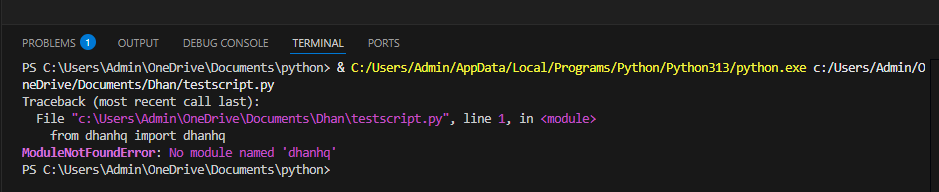
thanks for the reply, i have now switched to visual studio, i am now getting a different error as shown below in second screenshot. installation was successful for dhanhq as per steps followed in following api doc ( dhanhq ¡ PyPI )

**

regards,
Narayan

Exception in Getting OHLC data as 'NoneType' object has no attribute 'upper'
Getting Error at Option Chain as 'NIFTY'

Option chain is not working for none of the indices.. I don’t know why API’s doesn’t work on HOLIDAYS. :rage:

2 Likes

Hi,

In python, no module named ‘ModuleName’ means that python couldnt find this module, reason- 1. spelling mistake (not in ur case) 2. if not installed. I think, you need to install this module.
pls go thru this link, - https://private-poc.madefortrade.in/t/learn-algo-trading-with-python-codes-youtube-series/32718/136?u=anandc

Very Good Evening Sir, I would like to share my notes out of your Video series with all learners who are interested.

I need your verification of my ‘NOTES’ and permission for the same to share on this platform sir.

Herewith I am sending the abstract notes I have prepared from SESSION-10 and SESSION-11 sir. Please correct for any errors sir.

VBR Prasad

SESSION-10 - “RP-Tick by Tick data storage” Part-1

—Dt.03-04-2025—SESSION 10----

If you are a Scalper, you need Tick by Tick Data

Copy Files ‘Option_Selling_Algo’ and ‘Live_Trade_Data’ files from Session 8

Rename the file ‘Option_Selling_Algo’ as ‘Tick By Tick Data Storage’

import pdb
import time
import datetime
import traceback
from Dhan_Tradehull import Tradehull
import pandas as pd
from pprint import pprint
import talib
import pandas_ta as ta
import xlwings as xw
import winsound

client_code = “11111111”
token_id = “eeeeeeee”
tsl = Tradehull(client_code,token_id)

watchlist = [‘NIFTY’]

wb = xw.Book(‘Live Trade Data.xlsx’)
data_storage = wb.sheets[‘Data Storage’]

bot_token = “8059847390:AAECSnQK-yOaGJ-clJchb1cx8CDhx2VQq-M”

receiver_chat_id = “1918451082”

bot_token = “7570885801:AAGQoHl00ydQPCgldwXhu4Qn3A9HpnHG630”
receiver_chat_id = “6092170243”

Delete rest of all code lines of ‘Option_Selling_Algo’ file.

ce_strike, pe_strike, strike = tsl.ATM_Strike_Selection(Underlying=‘NIFTY’, Expiry=0)

all_strike = [strike + number*50 for number in range(-20, 20)] # 2. finds all 40 strikes
all_ce_names = [“NIFTY 17 APR " + str(strike) + " CALL” for strike in all_strike]
all_pe_names = [“NIFTY 17 APR " + str(strike) + " PUT” for strike in all_strike]
equity_names = [“ACC”, “CIPLA”, “GAIL”, “NIFTY”]

all_names = all_ce_names + all_pe_names + equity_names

data_storage.range(‘B1’).value = all_names

all_ltp = tsl.get_ltp_data(names=all_names)

while True: # Now let’s replace the ‘while True’ to ‘for’ loop

for row_no in range(2, 1000000):

try:

	current_time = datetime.datetime.now()
	print(current_time)


	if current_time.second % 5 == 0:  # 5 stands for value in seconds and Here % stands for 'REMAINDER' of the unit 'second'
		tsl.send_telegram_alert(message=f"{current_time} data storage is working fine ",receiver_chat_id=receiver_chat_id,bot_token=bot_token)

	all_ltp = tsl.get_ltp_data(names=all_names) # Rest of the lines need not be cycled.
	
	temp_dict = {}
	temp_dict[current_time] = all_ltp

	temp_dict = pd.DataFrame(temp_dict)  # I am getting error as 'temp_dict' is not defined.
	
	ltp_sequence = temp_dict.T[all_names].iloc[0].to_list()

	data_storage.range('B' + str(row_no)).value = ltp_sequence
	
	data_storage.range('A' + str(row_no)).value = str(current_time)


except Exception as e:
	print(e)
	tsl.send_telegram_alert(message="error in storing data",receiver_chat_id=receiver_chat_id,bot_token=bot_token)
	continue


# temp_dict[all_names]
# (pdb++) temp_dict
# ['NIFTY 09 APR 21900 CALL', 'NIFTY 09 APR 21950 CALL', 'NIFTY 09 APR 22000 CALL', 'NIFTY 09 APR 22050 CALL', 'NIFTY 09 APR 22100 CALL', 'NIFTY 09 APR 22150 CALL', 'NIFTY 09 APR 22200 CALL', 'NIFTY 09 APR 22250 CALL', 'NIFTY 09 APR 22300 CALL', 'NIFTY 09 APR 22350 CALL', 'NIFTY 09 APR 22400 CALL', 'NIFTY 09 APR 22450 CALL', 'NIFTY 09 APR 22500 CALL', 'NIFTY 09 APR 22550 CALL', 'NIFTY 09 APR 22600 CALL', 'NIFTY 09 APR 22650 CALL', 'NIFTY 09 APR 22700 CALL', 'NIFTY 09 APR 22750 CALL', 'NIFTY 09 APR 22800 CALL', 'NIFTY 09 APR 22850 CALL', 'NIFTY 09 APR 22900 CALL', 'NIFTY 09 APR 22950 CALL', 'NIFTY 09 APR 23000 CALL', 'NIFTY 09 APR 23050 CALL', 'NIFTY 09 APR 23100 CALL', 'NIFTY 09 APR 23150 CALL', 'NIFTY 09 APR 23200 CALL', 'NIFTY 09 APR 23250 CALL', 'NIFTY 09 APR 23300 CALL', 'NIFTY 09 APR 23350 CALL', 'NIFTY 09 APR 23400 CALL', 'NIFTY 09 APR 23450 CALL', 'NIFTY 09 APR 23500 CALL', 'NIFTY 09 APR 23550 CALL', 'NIFTY 09 APR 23600 CALL', 'NIFTY 09 APR 23650 CALL', 'NIFTY 09 APR 23700 CALL', 'NIFTY 09 APR 23750 CALL', 'NIFTY 09 APR 23800 CALL', 'NIFTY 09 APR 23850 CALL', 'NIFTY 09 APR 21900 PUT', 'NIFTY 09 APR 21950 PUT', 'NIFTY 09 APR 22000 PUT', 'NIFTY 09 APR 22050 PUT', 'NIFTY 09 APR 22100 PUT', 'NIFTY 09 APR 22150 PUT', 'NIFTY 09 APR 22200 PUT', 'NIFTY 09 APR 22250 PUT', 'NIFTY 09 APR 22300 PUT', 'NIFTY 09 APR 22350 PUT', 'NIFTY 09 APR 22400 PUT', 'NIFTY 09 APR 22450 PUT', 'NIFTY 09 APR 22500 PUT', 'NIFTY 09 APR 22550 PUT', 'NIFTY 09 APR 22600 PUT', 'NIFTY 09 APR 22650 PUT', 'NIFTY 09 APR 22700 PUT', 'NIFTY 09 APR 22750 PUT', 'NIFTY 09 APR 22800 PUT', 'NIFTY 09 APR 22850 PUT', 'NIFTY 09 APR 22900 PUT', 'NIFTY 09 APR 22950 PUT', 'NIFTY 09 APR 23000 PUT', 'NIFTY 09 APR 23050 PUT', 'NIFTY 09 APR 23100 PUT', 'NIFTY 09 APR 23150 PUT', 'NIFTY 09 APR 23200 PUT', 'NIFTY 09 APR 23250 PUT', 'NIFTY 09 APR 23300 PUT', 'NIFTY 09 APR 23350 PUT', 'NIFTY 09 APR 23400 PUT', 'NIFTY 09 APR 23450 PUT', 'NIFTY 09 APR 23500 PUT', 'NIFTY 09 APR 23550 PUT', 'NIFTY 09 APR 23600 PUT', 'NIFTY 09 APR 23650 PUT', 'NIFTY 09 APR 23700 PUT', 'NIFTY 09 APR 23750 PUT', 'NIFTY 09 APR 23800 PUT', 'NIFTY 09 APR 23850 PUT', 'ACC', 'CIPLA', 'GAIL', 'NIFTY']  
# (pdb++) temp_dict.T  


# pdb.set_trace()

If I want to store Tick by Tick Data for 40 strikes, Also Tick by Tick data for ACC, CIPLAand GAIL

1. Find ATM =

2. find_40_strikes =

3. get_call_and_put_names =

4. all_ltp_data =

5. store_ltp =

CE_symbol_name, PE_symbol_name, strike = tsl.ATM_Strike_Selection(Underlying=‘NIFTY’, Expiry=0)

(pdb++) CE_symbol_name, PE_symbol_name, strike_price = tsl.ATM_Strike_Selection(Underlying=‘NIFTY’, Expiry=0)

(pdb++) strike # 1. Finds the ATM

[x for x in range(-20, 20)]

(pdb++) [x for x in range(-20, 20)]

In Python: The Following Code line is called ‘LIST COMPREHENSION’, which offers a shorter syntax when you want to create a new list based on the values of an existing list. Example: Based on a list of fruits, you

[strike + x*50 for x in range(-20, 20)] # strike stands for strike, 50 stands for Nigty Lot size, ‘x’ stands for first number: -20

(pdb++) [strike + x*50 for x in range(-20, 20)]

(pdb++) strike + -20*50 # Gives the value at -20.

Now I want to rename the above line as below:

all_strike = [strike + number*50 for number in range(-20, 20)] # 2. finds all 40 strikes

all_ce_names = [strike for strike in all_strike]

(pdb++) all_ce_names = [strike for strike in all_strike]

(pdb++) all_ce_names

[21900, 21950, 22000, 22050, 22100, 22150, 22200, 22250, 22300, 22350, 22400, 22450, 22500, 22550, 22600, 22650, 22700, 22750, 22800, 22850, 22900, 22950, 23000, 23050, 23100, 23150, 23200, 23250, 23300, 23350, 23400, 23450, 23500, 23550, 23600, 23650, 23700, 23750, 23800, 23850]

all_ce_names = [str(strike) for strike in all_strike] # Now the above line is converted to get the sring values.

(pdb++) all_ce_names = [str(strike) for strike in all_strike]

(pdb++) all_ce_names

[‘21900’, ‘21950’, ‘22000’, ‘22050’, ‘22100’, ‘22150’, ‘22200’, ‘22250’, ‘22300’, ‘22350’, ‘22400’, ‘22450’, ‘22500’, ‘22550’, ‘22600’, ‘22650’, ‘22700’, ‘22750’, ‘22800’, ‘22850’, ‘22900’, ‘22950’, ‘23000’, ‘23050’, ‘23100’, ‘23150’, ‘23200’, ‘23250’, ‘23300’, ‘23350’, ‘23400’, ‘23450’, ‘23500’, ‘23550’, ‘23600’, ‘23650’, ‘23700’, ‘23750’, ‘23800’, ‘23850’]

all_ce_names = ["NIFTY 09 APR " + str(strike) for strike in all_strike] # Now I have added another string “NIFTY 10 APR” to the above line of code.

(pdb++) all_ce_names = [“NIFTY 09 APR” + str(strike) for strike in all_strike]

(pdb++) all_ce_names

[‘NIFTY 09 APR 21900’, ‘NIFTY 09 APR 21950’, ‘NIFTY 09 APR 22000’, ‘NIFTY 09 APR 22050’, ‘NIFTY 09 APR 22100’, ‘NIFTY 09 APR 22150’, ‘NIFTY 09 APR 22200’, ‘NIFTY 09 APR 22250’, ‘NIFTY 09 APR 22300’, ‘NIFTY 09 APR 22350’, ‘NIFTY 09 APR 22400’, ‘NIFTY 09 APR 22450’, ‘NIFTY 09 APR 22500’, ‘NIFTY 09 APR 22550’, ‘NIFTY 09 APR 22600’, ‘NIFTY 09 APR 22650’, ‘NIFTY 09 APR 22700’, ‘NIFTY 09 APR 22750’, ‘NIFTY 09 APR 22800’, ‘NIFTY 09 APR 22850’, ‘NIFTY 09 APR 22900’, ‘NIFTY 09 APR 22950’, ‘NIFTY 09 APR 23000’, ‘NIFTY 09 APR 23050’, ‘NIFTY 09 APR 23100’, ‘NIFTY 09 APR 23150’, ‘NIFTY 09 APR 23200’, ‘NIFTY 09 APR 23250’, ‘NIFTY 09 APR 23300’, ‘NIFTY 09 APR 23350’, ‘NIFTY 09 APR 23400’, ‘NIFTY 09 APR 23450’, ‘NIFTY 09 APR 23500’, ‘NIFTY 09 APR 23550’, ‘NIFTY 09 APR 23600’, ‘NIFTY 09 APR 23650’, ‘NIFTY 09 APR 23700’, ‘NIFTY 09 APR 23750’, ‘NIFTY 09 APR 23800’, ‘NIFTY 09 APR 23850’]

all_ce_names = [“NIFTY 09 APR " + str(strike) + " CALL” for strike in all_strike] # Now I have added another string “CALL” to the above line of code.

(pdb++) all_ce_names = [“NIFTY 10 APR” + str(strike) for strike in all_strike]

(pdb++) all_ce_names

[‘NIFTY 09 APR 21900 CALL’, ‘NIFTY 09 APR 21950 CALL’, ‘NIFTY 09 APR 22000 CALL’, ‘NIFTY 09 APR 22050 CALL’, ‘NIFTY 09 APR 22100 CALL’, ‘NIFTY 09 APR 22150 CALL’, ‘NIFTY 09 APR 22200 CALL’, ‘NIFTY 09 APR 22250 CALL’, ‘NIFTY 09 APR 22300 CALL’, ‘NIFTY 09 APR 22350 CALL’, ‘NIFTY 09 APR 22400 CALL’, ‘NIFTY 09 APR 22450 CALL’, ‘NIFTY 09 APR 22500 CALL’, ‘NIFTY 09 APR 22550 CALL’, ‘NIFTY 09 APR 22600 CALL’, ‘NIFTY 09 APR 22650 CALL’, ‘NIFTY 09 APR 22700 CALL’, ‘NIFTY 09 APR 22750 CALL’, ‘NIFTY 09 APR 22800 CALL’, ‘NIFTY 09 APR 22850 CALL’, ‘NIFTY 09 APR 22900 CALL’, ‘NIFTY 09 APR 22950 CALL’, ‘NIFTY 09 APR 23000 CALL’, ‘NIFTY 09 APR 23050 CALL’, ‘NIFTY 09 APR 23100 CALL’, ‘NIFTY 09 APR 23150 CALL’, ‘NIFTY 09 APR 23200 CALL’, ‘NIFTY 09 APR 23250 CALL’, ‘NIFTY 09 APR 23300 CALL’, ‘NIFTY 09 APR 23350 CALL’, ‘NIFTY 09 APR 23400 CALL’, ‘NIFTY 09 APR 23450 CALL’, ‘NIFTY 09 APR 23500 CALL’, ‘NIFTY 09 APR 23550 CALL’, ‘NIFTY 09 APR 23600 CALL’, ‘NIFTY 09 APR 23650 CALL’, ‘NIFTY 09 APR 23700 CALL’, ‘NIFTY 09 APR 23750 CALL’, ‘NIFTY 09 APR 23800 CALL’, ‘NIFTY 09 APR 23850 CALL’]

NOW LET’S GET THE LTP OF ALL CE NAMES

ltp = tsl.get_ltp_data(names=all_ce_names)

(pdb++) ltp = tsl.get_ltp_data(names=all_ce_names)

(pdb++) ltp

{‘NIFTY 09 APR 21900 CALL’: 986.1, ‘NIFTY 09 APR 21950 CALL’: 928.5, ‘NIFTY 09 APR 22000 CALL’: 898, ‘NIFTY 09 APR 22050 CALL’: 838.05, ‘NIFTY 09 APR 22100 CALL’: 795, ‘NIFTY 09 APR 22150 CALL’: 717.6, ‘NIFTY 09 APR 22200 CALL’: 705.7, ‘NIFTY 09 APR 22250 CALL’: 651.45, ‘NIFTY 09 APR 22300 CALL’: 607.1, ‘NIFTY 09 APR 22350 CALL’: 555, ‘NIFTY 09 APR 22400 CALL’: 508, ‘NIFTY 09 APR 22450 CALL’: 463.5, ‘NIFTY 09 APR 22500 CALL’: 407.45, ‘NIFTY 09 APR 22550 CALL’: 371.55, ‘NIFTY 09 APR 22600 CALL’: 328.45, ‘NIFTY 09 APR 22650 CALL’: 286.25, ‘NIFTY 09 APR 22700 CALL’: 247, ‘NIFTY 09 APR 22750 CALL’: 211.4, ‘NIFTY 09 APR 22800 CALL’: 175, ‘NIFTY 09 APR 22850 CALL’: 144, ‘NIFTY 09 APR 22900 CALL’: 115.7, ‘NIFTY 09 APR 22950 CALL’: 92.45, ‘NIFTY 09 APR 23000 CALL’: 71.55, ‘NIFTY 09 APR 23050 CALL’: 55.85, ‘NIFTY 09 APR 23100 CALL’: 43.15, ‘NIFTY 09 APR 23150 CALL’: 32.95, ‘NIFTY 09 APR 23200 CALL’: 25.05, ‘NIFTY 09 APR 23250 CALL’: 19.1, ‘NIFTY 09 APR 23300 CALL’: 15.15, ‘NIFTY 09 APR 23350 CALL’: 11.7, ‘NIFTY 09 APR 23400 CALL’: 9.15, ‘NIFTY 09 APR 23450 CALL’: 7.55, ‘NIFTY 09 APR 23500 CALL’: 6.3, ‘NIFTY 09 APR 23550 CALL’: 5.05, ‘NIFTY 09 APR 23600 CALL’: 4.15, ‘NIFTY 09 APR 23650 CALL’: 3.6, ‘NIFTY 09 APR 23700 CALL’: 3, ‘NIFTY 09 APR 23750 CALL’: 2.75, ‘NIFTY 09 APR 23800 CALL’: 2.4, ‘NIFTY 09 APR 23850 CALL’: 2.1}

NOW SIMILARLY LET’S GET THE LTP OF ALL PE NAMES

all_pe_names = [“NIFTY 09 APR " + str(strike) + " PUT” for strike in all_strike]

(pdb++) ltp = tsl.get_ltp_data(names=all_pe_names)

(pdb++) ltp

[‘NIFTY 09 APR 21900 PUT’, ‘NIFTY 09 APR 21950 PUT’, ‘NIFTY 09 APR 22000 PUT’, ‘NIFTY 09 APR 22050 PUT’, ‘NIFTY 09 APR 22100 PUT’, ‘NIFTY 09 APR 22150 PUT’, ‘NIFTY 09 APR 22200 PUT’, ‘NIFTY 09 APR 22250 PUT’, ‘NIFTY 09 APR 22300 PUT’, ‘NIFTY 09 APR 22350 PUT’, ‘NIFTY 09 APR 22400 PUT’, ‘NIFTY 09 APR 22450 PUT’, ‘NIFTY 09 APR 22500 PUT’, ‘NIFTY 09 APR 22550 PUT’, ‘NIFTY 09 APR 22600 PUT’, ‘NIFTY 09 APR 22650 PUT’, ‘NIFTY 09 APR 22700 PUT’, ‘NIFTY 09 APR 22750 PUT’, ‘NIFTY 09 APR 22800 PUT’, ‘NIFTY 09 APR 22850 PUT’, ‘NIFTY 09 APR 22900 PUT’, ‘NIFTY 09 APR 22950 PUT’, ‘NIFTY 09 APR 23000 PUT’, ‘NIFTY 09 APR 23050 PUT’, ‘NIFTY 09 APR 23100 PUT’, ‘NIFTY 09 APR 23150 PUT’, ‘NIFTY 09 APR 23200 PUT’, ‘NIFTY 09 APR 23250 PUT’, ‘NIFTY 09 APR 23300 PUT’, ‘NIFTY 09 APR 23350 PUT’, ‘NIFTY 09 APR 23400 PUT’, ‘NIFTY 09 APR 23450 PUT’, ‘NIFTY 09 APR 23500 PUT’, ‘NIFTY 09 APR 23550 PUT’, ‘NIFTY 09 APR 23600 PUT’, ‘NIFTY 09 APR 23650 PUT’, ‘NIFTY 09 APR 23700 PUT’, ‘NIFTY 09 APR 23750 PUT’, ‘NIFTY 09 APR 23800 PUT’, ‘NIFTY 09 APR 23850 PUT’]

NOW LET’S GET THE LTP OF ALL PE NAMES

ltp = tsl.get_ltp_data(names=all_pe_names)

(pdb++) ltp = tsl.get_ltp_data(names=all_pe_names)

(pdb++) ltp

{‘NIFTY 09 APR 21900 PUT’: 3.4, ‘NIFTY 09 APR 21950 PUT’: 3.7, ‘NIFTY 09 APR 22000 PUT’: 4.05, ‘NIFTY 09 APR 22050 PUT’: 4.55, ‘NIFTY 09 APR 22100 PUT’: 5.1, ‘NIFTY 09 APR 22150 PUT’: 5.95, ‘NIFTY 09 APR 22200 PUT’: 6.7, ‘NIFTY 09 APR 22250 PUT’: 7.55, ‘NIFTY 09 APR 22300 PUT’: 9.4, ‘NIFTY 09 APR 22350 PUT’: 11, ‘NIFTY 09 APR 22400 PUT’: 13.2, ‘NIFTY 09 APR 22450 PUT’: 16.7, ‘NIFTY 09 APR 22500 PUT’: 20.65, ‘NIFTY 09 APR 22550 PUT’: 25.9, ‘NIFTY 09 APR 22600 PUT’: 32.6, ‘NIFTY 09 APR 22650 PUT’: 40.6, ‘NIFTY 09 APR 22700 PUT’: 51.1, ‘NIFTY 09 APR 22750 PUT’: 64.75, ‘NIFTY 09 APR 22800 PUT’: 80, ‘NIFTY 09 APR 22850 PUT’: 99.2, ‘NIFTY 09 APR 22900 PUT’: 121.85, ‘NIFTY 09 APR 22950 PUT’: 147.15, ‘NIFTY 09 APR 23000 PUT’: 177.15, ‘NIFTY 09 APR 23050 PUT’: 211.25, ‘NIFTY 09 APR 23100 PUT’: 245.25, ‘NIFTY 09 APR 23150 PUT’: 285.85, ‘NIFTY 09 APR 23200 PUT’: 329, ‘NIFTY 09 APR 23250 PUT’: 372.65, ‘NIFTY 09 APR 23300 PUT’: 416.95, ‘NIFTY 09 APR 23350 PUT’: 467.35, ‘NIFTY 09 APR 23400 PUT’: 513, ‘NIFTY 09 APR 23450 PUT’: 560.75, ‘NIFTY 09 APR 23500 PUT’: 610.2, ‘NIFTY 09 APR 23550 PUT’: 656.2, ‘NIFTY 09 APR 23600 PUT’: 704.7, ‘NIFTY 09 APR 23650 PUT’: 757, ‘NIFTY 09 APR 23700 PUT’: 806.5, ‘NIFTY 09 APR 23750 PUT’: 858.15, ‘NIFTY 09 APR 23800 PUT’: 902.5, ‘NIFTY 09 APR 23850 PUT’: 962.1}

NOW LET’S COMBINE(MERGE) BOTH CE AND PE NAMES AS WELL AS EQUITY NAMES

all_ce_names = [“NIFTY 09 APR " + str(strike) + " CALL” for strike in all_strike]

all_pe_names = [“NIFTY 09 APR " + str(strike) + " PUT” for strike in all_strike]

equity_names = [“ACC”, “CIPLA”, “GAIL”, “NIFTY”]

all_names = all_ce_names + all_pe_names + equity_names

(pdb++) all_names = all_ce_names + all_pe_names + equity_names

(pdb++) all_names

[‘NIFTY 09 APR 21900 CALL’, ‘NIFTY 09 APR 21950 CALL’, ‘NIFTY 09 APR 22000 CALL’, ‘NIFTY 09 APR 22050 CALL’, ‘NIFTY 09 APR 22100 CALL’, ‘NIFTY 09 APR 22150 CALL’, ‘NIFTY 09 APR 22200 CALL’, ‘NIFTY 09 APR 22250 CALL’, ‘NIFTY 09 APR 22300 CALL’, ‘NIFTY 09 APR 22350 CALL’, ‘NIFTY 09 APR 22400 CALL’, ‘NIFTY 09 APR 22450 CALL’, ‘NIFTY 09 APR 22500 CALL’, ‘NIFTY 09 APR 22550 CALL’, ‘NIFTY 09 APR 22600 CALL’, ‘NIFTY 09 APR 22650 CALL’, ‘NIFTY 09 APR 22700 CALL’, ‘NIFTY 09 APR 22750 CALL’, ‘NIFTY 09 APR 22800 CALL’, ‘NIFTY 09 APR 22850 CALL’, ‘NIFTY 09 APR 22900 CALL’, ‘NIFTY 09 APR 22950 CALL’, ‘NIFTY 09 APR 23000 CALL’, ‘NIFTY 09 APR 23050 CALL’, ‘NIFTY 09 APR 23100 CALL’, ‘NIFTY 09 APR 23150 CALL’, ‘NIFTY 09 APR 23200 CALL’, ‘NIFTY 09 APR 23250 CALL’, ‘NIFTY 09 APR 23300 CALL’, ‘NIFTY 09 APR 23350 CALL’, ‘NIFTY 09 APR 23400 CALL’, ‘NIFTY 09 APR 23450 CALL’, ‘NIFTY 09 APR 23500 CALL’, ‘NIFTY 09 APR 23550 CALL’, ‘NIFTY 09 APR 23600 CALL’, ‘NIFTY 09 APR 23650 CALL’, ‘NIFTY 09 APR 23700 CALL’, ‘NIFTY 09 APR 23750 CALL’, ‘NIFTY 09 APR 23800 CALL’, ‘NIFTY 09 APR 23850 CALL’, ‘NIFTY 09 APR 21900 PUT’, ‘NIFTY 09 APR 21950 PUT’, ‘NIFTY 09 APR 22000 PUT’, ‘NIFTY 09 APR 22050 PUT’, ‘NIFTY 09 APR 22100 PUT’, ‘NIFTY 09 APR 22150 PUT’, ‘NIFTY 09 APR 22200 PUT’, ‘NIFTY 09 APR 22250 PUT’, ‘NIFTY 09 APR 22300 PUT’, ‘NIFTY 09 APR 22350 PUT’, ‘NIFTY 09 APR 22400 PUT’, ‘NIFTY 09 APR 22450 PUT’, ‘NIFTY 09 APR 22500 PUT’, ‘NIFTY 09 APR 22550 PUT’, ‘NIFTY 09 APR 22600 PUT’, ‘NIFTY 09 APR 22650 PUT’, ‘NIFTY 09 APR 22700 PUT’, ‘NIFTY 09 APR 22750 PUT’, ‘NIFTY 09 APR 22800 PUT’, ‘NIFTY 09 APR 22850 PUT’, ‘NIFTY 09 APR 22900 PUT’, ‘NIFTY 09 APR 22950 PUT’, ‘NIFTY 09 APR 23000 PUT’, ‘NIFTY 09 APR 23050 PUT’, ‘NIFTY 09 APR 23100 PUT’, ‘NIFTY 09 APR 23150 PUT’, ‘NIFTY 09 APR 23200 PUT’, ‘NIFTY 09 APR 23250 PUT’, ‘NIFTY 09 APR 23300 PUT’, ‘NIFTY 09 APR 23350 PUT’, ‘NIFTY 09 APR 23400 PUT’, ‘NIFTY 09 APR 23450 PUT’, ‘NIFTY 09 APR 23500 PUT’, ‘NIFTY 09 APR 23550 PUT’, ‘NIFTY 09 APR 23600 PUT’, ‘NIFTY 09 APR 23650 PUT’, ‘NIFTY 09 APR 23700 PUT’, ‘NIFTY 09 APR 23750 PUT’, ‘NIFTY 09 APR 23800 PUT’, ‘NIFTY 09 APR 23850 PUT’, ‘ACC’, ‘CIPLA’, ‘GAIL’]

NOW LET’S GET THE LTP OF ALL NAMES

all_ltp = tsl.get_ltp_data(names=all_names)

(pdb++) all_ltp = tsl.get_ltp_data(names=all_names)

(pdb++) all_ltp

{‘ACC’: 1966.3, ‘GAIL’: 176.61, ‘CIPLA’: 1415.25, ‘NIFTY 09 APR 21900 CALL’: 986.1, ‘NIFTY 09 APR 21900 PUT’: 3.4, ‘NIFTY 09 APR 21950 CALL’: 928.5, ‘NIFTY 09 APR 21950 PUT’: 3.7, ‘NIFTY 09 APR 22000 CALL’: 898, ‘NIFTY 09 APR 22000 PUT’: 4.05, ‘NIFTY 09 APR 22050 CALL’: 838.05, ‘NIFTY 09 APR 22050 PUT’: 4.55, ‘NIFTY 09 APR 22100 CALL’: 795, ‘NIFTY 09 APR 22100 PUT’: 5.1, ‘NIFTY 09 APR 22150 CALL’: 717.6, ‘NIFTY 09 APR 22150 PUT’: 5.95, ‘NIFTY 09 APR 22200 CALL’: 705.7, ‘NIFTY 09 APR 22200 PUT’: 6.7, ‘NIFTY 09 APR 22250 CALL’: 651.45, ‘NIFTY 09 APR 22250 PUT’: 7.55, ‘NIFTY 09 APR 22300 CALL’: 607.1, ‘NIFTY 09 APR 22300 PUT’: 9.4, ‘NIFTY 09 APR 22350 CALL’: 555, ‘NIFTY 09 APR 22350 PUT’: 11, ‘NIFTY 09 APR 22400 CALL’: 508, ‘NIFTY 09 APR 22400 PUT’: 13.2, ‘NIFTY 09 APR 22450 CALL’: 463.5, ‘NIFTY 09 APR 22450 PUT’: 16.7, ‘NIFTY 09 APR 22500 CALL’: 407.45, ‘NIFTY 09 APR 22500 PUT’: 20.65, ‘NIFTY 09 APR 22550 CALL’: 371.55, ‘NIFTY 09 APR 22550 PUT’: 25.9, ‘NIFTY 09 APR 22600 CALL’: 328.45, ‘NIFTY 09 APR 22600 PUT’: 32.6, ‘NIFTY 09 APR 22650 CALL’: 286.25, ‘NIFTY 09 APR 22650 PUT’: 40.6, ‘NIFTY 09 APR 22700 CALL’: 247, ‘NIFTY 09 APR 22700 PUT’: 51.1, ‘NIFTY 09 APR 22750 CALL’: 211.4, ‘NIFTY 09 APR 22750 PUT’: 64.75, ‘NIFTY 09 APR 22800 CALL’: 175, ‘NIFTY 09 APR 22800 PUT’: 80, ‘NIFTY 09 APR 22850 CALL’: 144, ‘NIFTY 09 APR 22850 PUT’: 99.2, ‘NIFTY 09 APR 22900 CALL’: 115.7, ‘NIFTY 09 APR 22900 PUT’: 121.85, ‘NIFTY 09 APR 22950 CALL’: 92.45, ‘NIFTY 09 APR 22950 PUT’: 147.15, ‘NIFTY 09 APR 23000 CALL’: 71.55, ‘NIFTY 09 APR 23000 PUT’: 177.15, ‘NIFTY 09 APR 23050 CALL’: 55.85, ‘NIFTY 09 APR 23050 PUT’: 211.25, ‘NIFTY 09 APR 23100 CALL’: 43.15, ‘NIFTY 09 APR 23100 PUT’: 245.25, ‘NIFTY 09 APR 23150 CALL’: 32.95, ‘NIFTY 09 APR 23150 PUT’: 285.85, ‘NIFTY 09 APR 23200 CALL’: 25.05, ‘NIFTY 09 APR 23200 PUT’: 329, ‘NIFTY 09 APR 23250 CALL’: 19.1, ‘NIFTY 09 APR 23250 PUT’: 372.65, ‘NIFTY 09 APR 23300 CALL’: 15.15, ‘NIFTY 09 APR 23300 PUT’: 416.95, ‘NIFTY 09 APR 23350 CALL’: 11.7, ‘NIFTY 09 APR 23350 PUT’: 467.35, ‘NIFTY 09 APR 23400 CALL’: 9.15, ‘NIFTY 09 APR 23400 PUT’: 513, ‘NIFTY 09 APR 23450 CALL’: 7.55, ‘NIFTY 09 APR 23450 PUT’: 560.75, ‘NIFTY 09 APR 23500 CALL’: 6.3, ‘NIFTY 09 APR 23500 PUT’: 610.2, ‘NIFTY 09 APR 23550 CALL’: 5.05, ‘NIFTY 09 APR 23550 PUT’: 656.2, ‘NIFTY 09 APR 23600 CALL’: 4.15, ‘NIFTY 09 APR 23600 PUT’: 704.7, ‘NIFTY 09 APR 23650 CALL’: 3.6, ‘NIFTY 09 APR 23650 PUT’: 757, ‘NIFTY 09 APR 23700 CALL’: 3, ‘NIFTY 09 APR 23700 PUT’: 806.5, ‘NIFTY 09 APR 23750 CALL’: 2.75, ‘NIFTY 09 APR 23750 PUT’: 858.15, ‘NIFTY 09 APR 23800 CALL’: 2.4, ‘NIFTY 09 APR 23800 PUT’: 902.5, ‘NIFTY 09 APR 23850 CALL’: 2.1, ‘NIFTY 09 APR 23850 PUT’: 962.1}

ltp_temp_dict.T[all_names].iloc[0].to_list()

ltp = tsl.get_ltp_data(names=[‘NIFTY 09 APR 22900 CALL’, ‘NIFTY 09 APR 22900 PUT’])

SESSION-10 - PART-2 - ‘RP-How to deploy Algo on the Server’

—Session 10 — Part 2 ------

Deployment of Algo on server

  1. Overheat of Laptop
  2. Fluctuations in Internet Broad Band
  3. You need peace after deploying Algo without any hurdles.

What’s a Server?
(Kampstaal)

There will be 7 passes to reach Server
Bnaks, Colleges, Hospitals and several companies use Server

Dhan also uses remote Server, located in Data Centres.

You also call it as Cloud.

Several Companies like AWS by Amazon, Google, Microsoft, Azure are all exmaples of Cloud Computing Platforms.

Now let’s start using AWS beloging to Amazon here.

Sign into the console.amazon

Search for lightstall

Browser window will open for lightstall

Click on ‘create instance’ button, means a computer / server.amazon

Select your platform as Windows

Click on ‘Windows Server 2019’

Now select the size of Server you require.

Positively Select 2GB Memory , 60GB SSD Storage (90 days free), which costs $22/- per month.

Then Click on ‘Create instance’ button at the bottom

For the first time it takes few minutes to get your ‘Server’ ready.

Wait until it indicates the stage of ‘Running’.

Now click on the ‘Server’ window.

At the bottom of the window,
You will be provided with ID & Address, in the left side box.
You will be provide with Userbane & Password in the rigt side box.

Also don't forget to retrieve the default password and save it for further usage.

Next Step is to Connect Remote Desktop

Which gives you a box in which you have to fill all the credentials,
Save the connection settings.

Once again get the Remote Desktop, and click on ‘Connect’.

It will ask for the password, which you have to fill in and get connected.

And click on ‘Remember me’ , to get automatically get connected.

Now your server is ready to use.

Downlod Google Chrome on your laptop and paste in the server

ChromeSetup box will appear on the Server desk

Right click and ‘Rin it as Administrator’

Now copy and install all files to run the algo

Install Python and required libraries, including sublime text

Copy and paste the required Session file to run your algo

You can procede to run your algo by using ‘cmd’ propt

After starting the algo, you can close your server, but remember your algo keeps running

NOTE: REMEMBER THE ALGO IN THE CLOSED SERVER WILL KEEP RUNNING, EVEN AFTER YOU CLOSE THE SERVER

if you want to open the server again at your convenient time, you can open it with your credentials

NOW LET US TAK ABOUT BILLING

Remember that as long as your Server is in the state of ‘Running’ you will be billed

AWS will charge around Rs.3,500/- per month for a 4GB Memory Server

Say , if you want to save on the Monthly Flat charges of Rs.3,500, You can do it

Say if you can start and stop the Sever as per the trading hours:

Hourly Cost = Monthly Cost / Total Hours in a month = Rs.3500 / 720 Hours = Rs.4.86/- per Hours

Now if you calculate for actual usage hours:

Final Cost = Hourly Cost x Hours used = Rs.4.86 x 132 Hours = Rs.642/- per month  # 22 Days x 6 hours per day = 132 Hours

Remember instead of paying RS.3,500/-, you can only pay Rs.642/- per month, provided you start and stop the server every day after market hours

This matters a lot to every small trader investing small capital initially

Remember to take a snapshot after stopping the server, which will be utilized to start on next days

EXAMPLE:

    This is a one time process
    
        Monday - Install --- Complete algo.. (Store ID and Password)

            Monday : 3:30 pm :  |  stop the server and take snapshot

            Choose 'Snapshots' from the available Menu and click on 'Create snapshot' and Name it

            Monday : 4:00 pm :  | Delete your server by Clicking on the top right hand corner, you can choose the delete option

    Further Daily process: 

        Create instance from your snapshot
        Now the server will start by filling our credentials
        Use the server during the market hours and delete the srver 

    REMEMBER THAT THERE IS NO NEED TO TAKE SNAPSHOT EVERYDAY, THE SAME SNPSHOT WILL BE USEFUL EVERY DAY

    THIS PROCEDURE SHOULD CONTINUE ON ALL TRADING DAYS, AS PER YOUR WISH

DO REMEMBER THAT YOU CAN CHOOSE A BETTER SUBSCRIPTION OF 8GB WILL BE BETTER, AS YOU CAN SAVE ON THE ABOVE METHOS


NOW LET US KNOW ABOUT HYPERCARE

  1. develop the Algo
  2. pdb level testing
  3. Test the algo atleast for 14 consecutive days
  4. If any error occurs during the testing period, resolve it start Re-Testing process

1 Like

D:\stocks\session_3 codebase\Dhan codebase>py Dhan_websocket.py
Reading existing file all_instrument 2025-04-14.csv
Watchlist changed. Reconnecting the feed…
Disconnected from WebSocket feed.
Authorizing…
Authorization successful!

what is missing here?
please help…