Learn Algo Trading with Python | Codes | Youtube Series

Thanks@Imran,

After modifying to chart = tsl.get_historical_data(stock_name, ‘NSE’, 15) .

Now i am getting below error

-----Logged into Dhan-----
reading existing file all_instrument 2025-12-10.csv
Got the instrument file
Exception in Getting OHLC data as 'int' object has no attribute 'upper'
Traceback (most recent call last):
  File "D:\Dhan\6. Session6- 1st Live Algo\6mylivealgo.py", line 30, in <module>
    chart['rsi'] = talib.RSI(chart['close'], timeperiod=14) #pandas
                             ~~~~~^^^^^^^^^
TypeError: 'NoneType' object is not subscriptable

Also can you share me systax code for indicator CCI instead of RSI.

Hi @Tradehull_Imran

I’m facing issue while running codebase usage file

import pdb
import time
import datetime
import traceback
from Dhan_Tradehull import Tradehull
import pandas as pd
from pprint import pprint
import talib


client_code = "*******"
token_id    = "*******"
tsl         = Tradehull(client_code,token_id)

available_balance = tsl.get_balance()
print("available_balance", available_balance)

Error

Microsoft Windows [Version 10.0.26200.7309]
(c) Microsoft Corporation. All rights reserved.

C:\Users\OneDrive\Documents\DHAN\3.1 Codebase Upgrade\3.1 Codebase Upgrade>py “How to use updated codebase.py”
Codebase Version 2.8 : Solved - Strike Selection Issue
-----Logged into Dhan-----
This BOT Is Picking New File From Dhan
<urlopen error [Errno 2] No such file or directory>
‘Tradehull’ object has no attribute ‘response’
Traceback (most recent call last):
File “C:\Users\AppData\Local\Programs\Python\Python38\lib\urllib\request.py”, line 1317, in do_open
h.request(req.get_method(), req.selector, req.data, headers,
File “C:\Users\AppData\Local\Programs\Python\Python38\lib\http\client.py”, line 1230, in request
self._send_request(method, url, body, headers, encode_chunked)
File “C:\Users\AppData\Local\Programs\Python\Python38\lib\http\client.py”, line 1276, in _send_request
self.endheaders(body, encode_chunked=encode_chunked)
File “C:\Users\AppData\Local\Programs\Python\Python38\lib\http\client.py”, line 1225, in endheaders
self._send_output(message_body, encode_chunked=encode_chunked)
File “C:\Users\AppData\Local\Programs\Python\Python38\lib\http\client.py”, line 1004, in _send_output
self.send(msg)
File “C:\Users\AppData\Local\Programs\Python\Python38\lib\http\client.py”, line 944, in send
self.connect()
File “C:\Users\AppData\Local\Programs\Python\Python38\lib\http\client.py”, line 1399, in connect
self.sock = self._context.wrap_socket(self.sock,
File “C:\Users\AppData\Local\Programs\Python\Python38\lib\ssl.py”, line 500, in wrap_socket
return self.sslsocket_class._create(
File “C:\Users\AppData\Local\Programs\Python\Python38\lib\ssl.py”, line 1040, in _create
self.do_handshake()
File “C:\Users\AppData\Local\Programs\Python\Python38\lib\ssl.py”, line 1309, in do_handshake
self._sslobj.do_handshake()
FileNotFoundError: [Errno 2] No such file or directory

During handling of the above exception, another exception occurred:

Traceback (most recent call last):
File “C:\Users\OneDrive\Documents\DHAN\3.1 Codebase Upgrade\3.1 Codebase Upgrade\Dhan_Tradehull.py”, line 80, in get_login
self.instrument_df = self.get_instrument_file()
File “C:\Users\OneDrive\Documents\DHAN\3.1 Codebase Upgrade\3.1 Codebase Upgrade\Dhan_Tradehull.py”, line 112, in get_instrument_file
instrument_df = pd.read_csv(“https:// images.dhan. co/api-data/api-scrip-master. csv”, low_memory=False)
File “C:\Users\AppData\Local\Programs\Python\Python38\lib\site-packages\pandas\io\parsers\readers.py”, line 912, in read_csv
return _read(filepath_or_buffer, kwds)
File “C:\Users\AppData\Local\Programs\Python\Python38\lib\site-packages\pandas\io\parsers\readers.py”, line 577, in _read
parser = TextFileReader(filepath_or_buffer, **kwds)
File “C:\Users\AppData\Local\Programs\Python\Python38\lib\site-packages\pandas\io\parsers\readers.py”, line 1407, in init
self._engine = self._make_engine(f, self.engine)
File “C:\Users\AppData\Local\Programs\Python\Python38\lib\site-packages\pandas\io\parsers\readers.py”, line 1661, in _make_engine
self.handles = get_handle(
File “C:\Users\AppData\Local\Programs\Python\Python38\lib\site-packages\pandas\io\common.py”, line 716, in get_handle
ioargs = _get_filepath_or_buffer(
File “C:\Users\AppData\Local\Programs\Python\Python38\lib\site-packages\pandas\io\common.py”, line 368, in _get_filepath_or_buffer
with urlopen(req_info) as req:
File “C:\Users\AppData\Local\Programs\Python\Python38\lib\site-packages\pandas\io\common.py”, line 270, in urlopen
return urllib.request.urlopen(*args, **kwargs)
File “C:\Users\AppData\Local\Programs\Python\Python38\lib\urllib\request.py”, line 222, in urlopen
return opener.open(url, data, timeout)
File “C:\Users\AppData\Local\Programs\Python\Python38\lib\urllib\request.py”, line 525, in open
response = self._open(req, data)
File “C:\Users\AppData\Local\Programs\Python\Python38\lib\urllib\request.py”, line 542, in _open
result = self._call_chain(self.handle_open, protocol, protocol +
File “C:\Users\AppData\Local\Programs\Python\Python38\lib\urllib\request.py”, line 502, in _call_chain
result = func(*args)
File “C:\Users\AppData\Local\Programs\Python\Python38\lib\urllib\request.py”, line 1360, in https_open
return self.do_open(http.client.HTTPSConnection, req,
File “C:\Users\AppData\Local\Programs\Python\Python38\lib\urllib\request.py”, line 1320, in do_open
raise URLError(err)
urllib.error.URLError: <urlopen error [Errno 2] No such file or directory>

During handling of the above exception, another exception occurred:

Traceback (most recent call last):
File “C:\Users\OneDrive\Documents\DHAN\3.1 Codebase Upgrade\3.1 Codebase Upgrade\Dhan_Tradehull.py”, line 53, in init
self.get_login(ClientCode,token_id)
File “C:\Users\OneDrive\Documents\DHAN\3.1 Codebase Upgrade\3.1 Codebase Upgrade\Dhan_Tradehull.py”, line 85, in get_login
print(self.response)
AttributeError: ‘Tradehull’ object has no attribute ‘response’
available_balance ****

C:\Users\OneDrive\Documents\DHAN\3.1 Codebase Upgrade\3.1 Codebase Upgrade>
Hi @Krushna_Rout ,

Do share the code.

Hi @Krushna_Rout ,

Do upgrade the codebase version you are using.

We’ve made several improvements to the Dhan_TradeHull codebase, and here’s a quick overview of what’s new:

  1. Long-term historical data
    You can now pull multi-year data easily using:
data = tsl.get_long_term_historical_data(
    tradingsymbol="NIFTY",
    exchange="NSE",
    timeframe="5",
    from_date="2022-01-01",
    to_date="2025-12-03"
)
  1. Sector-wise historical data (Intraday)
    This helps when analysing broader market sectors.
data = tsl.get_historical_data("NIFTY 100", "NSE", timeframe="1", sector="YES")

data = tsl.get_long_term_historical_data(
    tradingsymbol="NIFTY 100",
    exchange="NSE",
    timeframe="5",
    from_date="2022-01-01",
    to_date="2025-12-03",
    sector="YES"
)
  1. Expired options data
    You can now fetch historical option data even after expiry.
data = tsl.get_expired_option_data(
    tradingsymbol="RELIANCE",
    exchange="NSE",
    interval=1,
    expiry_flag="MONTH",
    expiry_code=1,
    strike="ATM",
    option_type="CALL",
    from_date="2024-10-10",
    to_date="2024-11-10"
)
  1. Market depth data for multiple instruments
    Useful when you need full-depth snapshots for different symbols.
symbol_list = [
    ("RELIANCE", "NSE"),
    ("NIFTY 09 DEC 26000 CALL", "NFO"),
    ("NIFTY 09 DEC 25500 PUT", "NFO")]

depth_data = tsl.full_market_depth_data(symbol_list)

for key, depth_client in depth_data.items():
    bid_df, ask_df = tsl.get_market_depth_df(depth_client)
  1. Fetching historical Data for 90 days
    The tsl.get_historical_data() function is now updated to return candle data for the past 90 days.

  2. Strike selection issue fixed
    Strikes for symbols now resolve correctly without mismatch.

To use all these updates:

• Install the required dhanhq version

pip install dhanhq==2.1.0

• Upgrade to the latest Dhan-Tradehull

pip install --upgrade Dhan-Tradehull

• Confirm the version’s for dhanhq if 2.1.0 and Dhan-Tradehull is 3.1.2

pip show dhanhq
pip show Dhan-Tradehull

You can check the full documentation here:
https://pypi.org/project/Dhan-Tradehull/

Thank@Imran, Now I am getting below error ,kindly guide me with proper code.

watchlist = ['360ONE','ABB','ABCAPITAL','ADANIENSOL','ADANIENT','ADANIGREEN','ADANIPORTS','ALKEM','AMBER','AMBUJACEM','ANGELONE','APLAPOLLO','APOLLOHOSP','ASHOKLEY','ASIANPAINT','ASTRAL','AUBANK','AUROPHARMA','AXISBANK','BAJAJ-AUTO','BAJAJFINSV','BAJFINANCE','BANDHANBNK','BANKBARODA','BANKINDIA','BANKNIFTY','BDL','BEL','BHARATFORG','BHARTIARTL','BHEL','BIOCON','BLUESTARCO','BOSCHLTD','BPCL','BRITANNIA','BSE','CAMS','CANBK','CDSL','CGPOWER','CHOLAFIN','CIPLA','COALINDIA','COFORGE','COLPAL','CONCOR','CROMPTON','CUMMINSIND','CYIENT','DABUR','DALBHARAT','DELHIVERY','DIVISLAB']

traded_wathclist = [] #which ever script buy or sell will kept here


while True:
	for stock_name in watchlist:
		# print(stock_name)

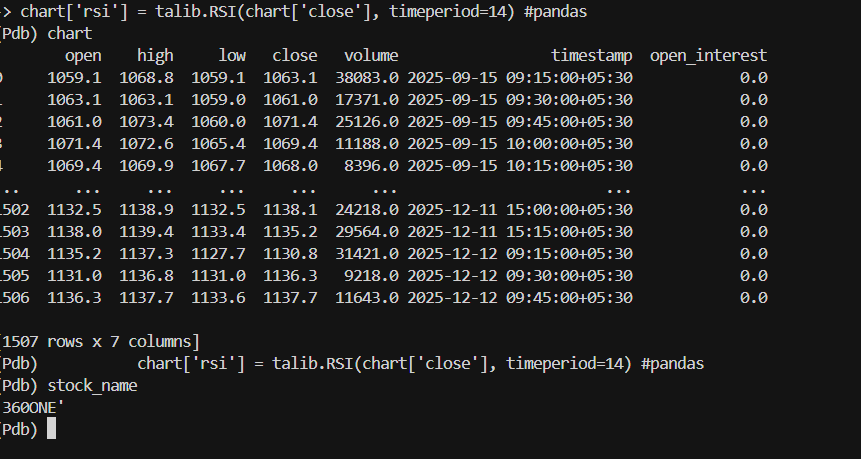
		chart = tsl.get_historical_data(tradingsymbol=stock_name, exchange='NSE', timeframe="15")
		chart['rsi'] = talib.RSI(chart['close'], timeperiod=14) #pandas


		bc = chart.iloc[-2] #pandas  breakout candle
		ic = chart.iloc[-3] #pandas  inside candle
		ba_c = chart.iloc[-4] #pandas  base candle

		uptrend = bc['rsi'] > 60
		# uptrend1=orderbook[name]['traded'] is None

		downtrend = bc['rsi'] < 40
		# downtrend1=orderbook[name]['traded'] is None
		
		inside_candle_formed = (ba_c['high'] > ic['high']) and (ba_c['low'] < ic['low'])


		upper_side_breakout = bc['high'] > ba_c['high']
		down_side_breakout  = bc['low']  < ba_c['low']

		no_repeat_order = stock_name not in traded_wathclist # one buy or sell condition share should not come repetedly

		max_order_limit = len(traded_wathclist) <= max_trades


		if uptrend and inside_candle_formed and upper_side_breakout and no_repeat_order and max_order_limit:
			print(stock_name, "is in uptrend, Buy this script")
			qty = int(per_trade_margin/bc['close'])
			buy_entry_orderid = tsl.order_placement(stock_name,'NSE', 1, 0, 0, 'MARKET', 'BUY', 'MIS')
			traded_wathclist.append(stock_name)


D:\Dhan\6. Session6- 1st Live Algo>py algo2.py
Codebase Version 3.1.2
-----Logged into Dhan-----
reading existing file all_instrument 2025-12-11.csv
Got the instrument file
Exception in Getting OHLC data as {'status': 'failure', 'remarks': {'error_code': 'DH-905', 'error_type': 'Input_Exception', 'error_message': 'System is unable to fetch data due to incorrect parameters or no data present'}, 'data': ''}
Traceback (most recent call last):
  File "D:\Dhan\6. Session6- 1st Live Algo\algo2.py", line 32, in <module>
    chart['rsi'] = talib.RSI(chart['close'], timeperiod=14) #pandas
                             ~~~~~^^^^^^^^^
TypeError: 'NoneType' object is not subscriptable

yep. same with me.

{'status': 'failure', 'remarks': {'error_code': 'DH-901', 'error_type': 'Invalid_Authentication', 'error_message': 'Client ID or user generated access token is invalid or expired.'}, 'data': ''}
Exception in Getting OHLC data as {'status': 'failure', 'remarks': {'error_code': 'DH-901', 'error_type': 'Invalid_Authentication', 'error_message': 'Client ID or user generated access token is invalid or expired.'}, 'data': ''}

Getting this, it started all of a sudden though token is newly created
@Tradehull_Imran @Tradehull_Priya
I hope it’s not related to new versions.

Hi @Krushna_Rout ,

The code seems to be working fine, do retry after sometime. Once also regenerate the access token-

Hi @Rajashekhar_Rangappa ,

This error is not caused due to new version, regenerate the access token and retry once more.

Sorted. Not sure what was the issue.

one more, Exit check failed for SENSEX_DEC_FUT_PUT: ‘NoneType’ object has no attribute ‘iloc’

Hi @Rajashekhar_Rangappa ,

Could you elaborate your query?

Hi@Imran,

I am getting below error while while running 13. option buying algo.I think few codes have been updated since last year in dhan trade hull but your lecture session codes ,old coding is available. Is it possible ,your team can update with proper syntax.

ie all_ltp = tsl.get_ltp_data(names = watchlist) is not taking so we need to update as all_ltp = tsl.get_historical_data(tradingsymbol = name,exchange = exchange,timeframe=“15”).

Can you guide for below errors: why its asking ‘qty’

watchlist = ['NIFTY','360ONE','ABB','ABCAPITAL','ADANIENSOL','ADANIENT','ADANIGREEN'] 

single_order     = {'name':None, 'date':None , 'entry_time': None, 'entry_price': None, 'buy_sell': None, 'qty': None, 'sl': None, 'exit_time': None, 'exit_price': None, 'pnl': None, 'remark': None, 'traded':None}
orderbook        = {}
wb               = xw.Book('Live Trade Data.xlsx')
live_Trading     = wb.sheets['Live_Trading']
completed_orders_sheet = wb.sheets['completed_orders']
reentry          = "yes" #"yes/no"
completed_orders = []

live_Trading.range("A2:Z250").value = None
completed_orders_sheet.range("A2:Z250").value = None

for name in watchlist:
	orderbook[name] = single_order.copy()


while True:

# all_ltp = tsl.get_ltp_data(names = watchlist)
		
		# if name == "NIFTY":
		#  		exchange = "INDEX"
		#  	else:
		# 		exchange = "NSE"

		# all_ltp = tsl.get_historical_data(tradingsymbol = name,exchange = exchange,timeframe="15")

		symbol = name.strip().upper()

		if symbol in ("NIFTY", "BANKNIFTY"):
    			exchange = "INDEX"
		else:
    			exchange = "NSE"
    			all_ltp = tsl.get_historical_data(tradingsymbol = name,exchange = exchange,timeframe="15")

	    		# pdb.set_trace()


		for name in watchlist:


				orderbook_df                       = pd.DataFrame(orderbook).T
				live_Trading.range('A1').value     = orderbook_df

				completed_orders_df                =  pd.DataFrame(completed_orders)
				completed_orders_sheet.range('A1').value = completed_orders_df


				# current_time          = datetime.datetime.now()
				# print(f"Scanning        {name} {current_time}")

		try:

				if name == "NIFTY":
					exchange = "INDEX"
				else:
					exchange = "NSE"

				chart                 = tsl.get_historical_data(tradingsymbol = name,exchange = exchange,timeframe="15")
				chart['rsi']          = talib.RSI(chart['close'], timeperiod=14)


Codebase Version 3.1.2
-----Logged into Dhan-----
reading existing file all_instrument 2025-12-14.csv
Got the instrument file
'qty'
'qty'

Hi @Krushna_Rout ,

The ltp can be fetched using the below code, it is not required to use tsl.get_historical_data(tradingsymbol = name,exchange = exchange,timeframe=“15”) function to fetch ltp-

   data = tsl.get_ltp_data(names=['CRUDEOIL', 'NIFTY'])
   crudeoil_ltp = data['CRUDEOIL']

Kindly refer the below documentation to check the updated functions-
Dhan-Tradehull · PyPI

@Tradehull_Imran
Exception at calling ltp as {‘status’: ‘failure’, ‘remarks’: {‘error_code’: None, ‘error_type’: None, ‘error_message’: None}, ‘data’: ‘’}

exception got in ce_pe_option_df ‘SENSEX’

Exception in Getting OHLC data as Check the Tradingsymbol or Exchange

Can you check for me, plz?

  1. self.tsl.ATM_Strike_Selection(‘SENSEX‘, 0)

  2. self.tsl.get_historical_data(“SENSEX DEC FUT”, “BFO”, “5”)

    both are failing in latest release

Hi @Rajashekhar_Rangappa ,

If you encounter an exception where error_message is None, please restart the application or regenerate the access token and try again.

Hi @Tradehull_Imran

Thank you for your reply,

In the above queries,can be tell me ,why i am getting ‘qty’ only?

Hi @Krushna_Rout ,

The code you have shared seems to be incomplete, do share complete code to review.

Yep. working. May I know the reason behind failure?

Hi @Rajashekhar_Rangappa ,

Tagging @Hardik for the same.

Encountering the same issue again. @Tradehull_Imran @Hardik

ERROR:2025-12-17 10:58:18,357:MainThread:Exception at calling ltp as {‘status’: ‘failure’, ‘remarks’: {‘error_code’: None, ‘error_type’: None, ‘error_message’: None}, ‘data’: ‘’}

Traceback (most recent call last):

File “/home/ubuntu/zerobot/venv/lib/python3.10/site-packages/Dhan_Tradehull/Dhan_Tradehull.py”, line 247, in get_ltp_data

raise Exception(data)

Exception: {‘status’: ‘failure’, ‘remarks’: {‘error_code’: None, ‘error_type’: None, ‘error_message’: None}, ‘data’: ‘’}

ERROR:2025-12-17 10:58:18,486:MainThread:Exception in Getting OHLC data as Check the Tradingsymbol or Exchange

Traceback (most recent call last):

File “/home/ubuntu/zerobot/venv/lib/python3.10/site-packages/Dhan_Tradehull/Dhan_Tradehull.py”, line 530, in get_historical_data

raise Exception("Check the Tradingsymbol or Exchange")

Exception: Check the Tradingsymbol or Exchange

DEBUG:2025-12-17 11:00:21,818:MainThread:

Update:

Tried with new token