Hi @Sindhulok ,
Do run the commands on the cmd terminal and then run the code -
pip install Dhan-Tradehull==3.3.1
pip install pandas
pip install TA-Lib
Hi @Sindhulok ,
Do run the commands on the cmd terminal and then run the code -
pip install Dhan-Tradehull==3.3.1
pip install pandas
pip install TA-Lib
Hi Sir,
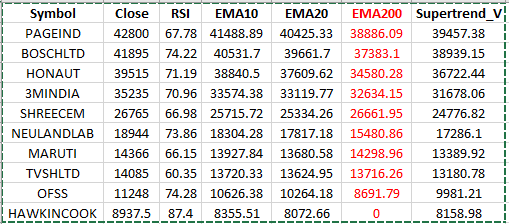
I am getting all values correct except ema 200 why sir?
Hi Sir, Thank you,
After running the commands, it showed “requirements already satisfied” for all three commands.
And after that, when I run the code, the program stops with the same error.
Thank you.
गुरुदेव, चरण स्पर्श।
आपके आशीर्वाद से डेटा बैकटेस्ट करने तक पहुंच गया हूं |
इस बैकटेस्ट डेटा पर मार्ग दर्शन करें , क्या यह ट्रेड के लिए ठीक है?
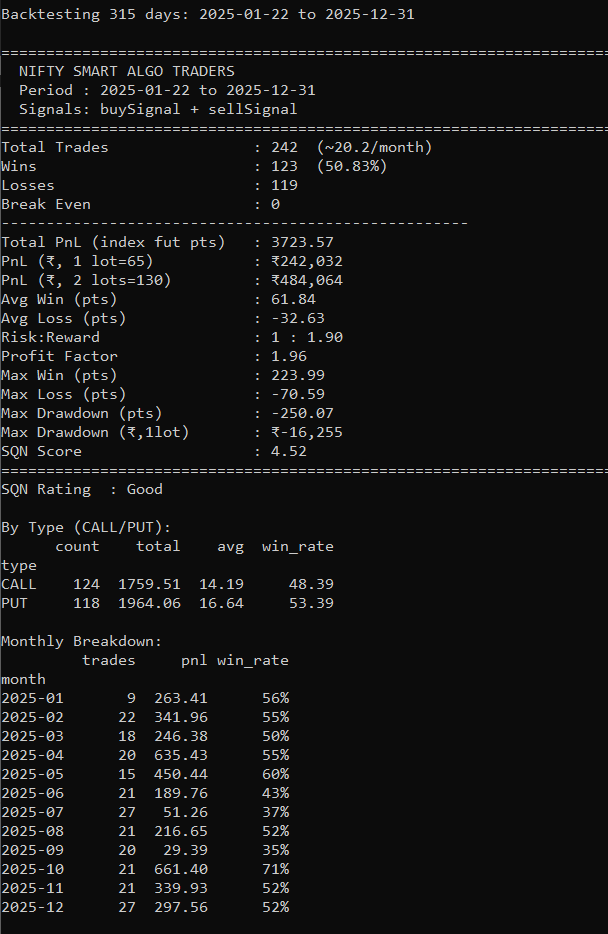
Backtesting 315 days: 2025-01-22 to 2025-12-31

====================================================================
  NIFTY SMART ALGO TRADERS
  Period : 2025-01-22 to 2025-12-31
  Signals: buySignal + sellSignal
====================================================================
Total Trades                : 242  (~20.2/month)
Wins                        : 123  (50.83%)
Losses                      : 119
Break Even                  : 0
----------------------------------------------------
Total PnL (index fut pts)   : 3723.57
PnL (₹, 1 lot=65)           : ₹242,032
PnL (₹, 2 lots=130)         : ₹484,064
Avg Win (pts)               : 61.84
Avg Loss (pts)              : -32.63
Risk:Reward                 : 1 : 1.90
Profit Factor               : 1.96
Max Win (pts)               : 223.99
Max Loss (pts)              : -70.59
Max Drawdown (pts)          : -250.07
Max Drawdown (₹,1lot)       : ₹-16,255
SQN Score                   : 4.52
====================================================================
SQN Rating  : Good

By Exit Reason:
               count    total    avg  win_rate
reason
ATR SL           108 -3759.17 -34.81       0.0
SL/TSL Exit        1    27.00  27.00     100.0
Square Off        36   765.50  21.26      75.0
TSL Activated      2   -43.50 -21.75       0.0
Target            95  6733.74  70.88     100.0

By Signal:
        count    total    avg  win_rate
signal
S1         62  1100.07  17.74     51.61
S2         50   751.55  15.03     50.00
S3         56   464.31   8.29     46.43
S4         22   657.05  29.87     63.64
S5         52   750.59  14.43     50.00

By Type (CALL/PUT):
      count    total    avg  win_rate
type
CALL    124  1759.51  14.19     48.39
PUT     118  1964.06  16.64     53.39

Monthly Breakdown:
         trades     pnl win_rate
month
2025-01       9  263.41      56%
2025-02      22  341.96      55%
2025-03      18  246.38      50%
2025-04      20  635.43      55%
2025-05      15  450.44      60%
2025-06      21  189.76      43%
2025-07      27   51.26      37%
2025-08      21  216.65      52%
2025-09      20   29.39      35%
2025-10      21  661.40      71%
2025-11      21  339.93      52%
2025-12      27  297.56      52%
Hello Imran Sir,
I am trying to run the code on Dhan cloud
and getting this error below
›[2026-07-06 00:00:17 IST] ==================== SCRIPT OUTPUT START ====================
›[2026-07-06 00:00:19 IST] Codebase Version 3.3.0
›[2026-07-06 00:00:19 IST] Traceback (most recent call last):
›[2026-07-06 00:00:19 IST] File “/tmp/script.py”, line 11, in
›[2026-07-06 00:00:19 IST] tsl = Tradehull(ClientCode=client_code, mode=“pin_totp”, pin=pin, totp_secret=totp_secret)
›[2026-07-06 00:00:19 IST] ^^^^^^^^^^^
›[2026-07-06 00:00:19 IST] NameError: name ‘client_code’ is not defined
›[2026-07-06 00:00:19 IST] ==================== SCRIPT OUTPUT END ====================
›[2026-07-06 00:00:19 IST] Execution failed with exit code: 1
Can you please share the basic code as well required dependencies along with versions?
I am using following CODE
ppandas==2.2.0
scipy==1.13.0
dhanhq==2.2.0
Dhan-Tradehull==3.3.0
rich==14.1.0
Code script as sample to test that code runs
# Python Strategy Template
from Dhan_Tradehull import Tradehull
#import talib
#from rich import print
import time
import datetime
#import json
#from datetime import datetime
tsl = Tradehull(ClientCode=client_code, mode=“pin_totp”, pin=pin, totp_secret=totp_secret)
available_balance = tsl.get_balance()
watchlist = [“BEL”, “RELIANCE”]
# Getting tick data in algo
ltp_data = tsl.get_ltp_data(names=watchlist)
print(ltp_data)
Hi @Sindhulok ,
Check once whether the line is there on code -
from Dhan_Tradehull import Tradehull
client_code = ""
tsl = Tradehull(client_code, mode="pin_totp", pin="", totp_secret="")
Share the code so that it can be checked.
Hi @vinay_kumaar ,
Good to see you after a long time
The back test analysis looks in-depth and good.
Check for below items -
Rest the back test looks good with 50pct win rate and 1:2 rr
Hi @ROCKY2 ,
If any details are still pending, share them so that we can provide an appropriate answer.
Hi @praveen_kumar_kaka1 ,
Check the Historical Data once and try running it again. If the issue still persists, share the code so that it can be verified.
Back test result dashboard
https://claude.ai/public/artifacts/8626183f-926c-4675-951f-b2d8cc2b2784
Hi @vinay_kumaar ,
The backtesting does not currently include transaction costs.
Thank you very much sir. For your guidance.
Sir a sab karne keliye konda thik rahega laptop ya dekstop.
Or kaisa configuration sala plz sir reply dena thank you.
Sir a sab karne keliye konda thik rahega laptop ya dekstop.Or kaisa configuration sala plz sir reply dena thank you.
Backtesting dashboard looks too good  @vinay_kumaar
Hi @Manish_Biswas ,
It depends on your requirements and the type of application you plan to run. For algorithm development and testing, both a laptop and a desktop are suitable.
However, if your objective is to place orders through the API, a static IP is required. In that case, you can either use a server with a static IP or a broadband connection that provides a static IP.
Imran Sir Demo Algo.py not running… Module not found error : No Module Name ‘Dhan_Tradehull’
Kindly guide me…. Thanks & Rgds
Hi @Tradehull_Imran Sir,
I am trying to download daily historical data using tradehull, but it’s going up to 5 years only.
But as per dhanapi docs, daily data is available from the date of inception. Please help