The Problem
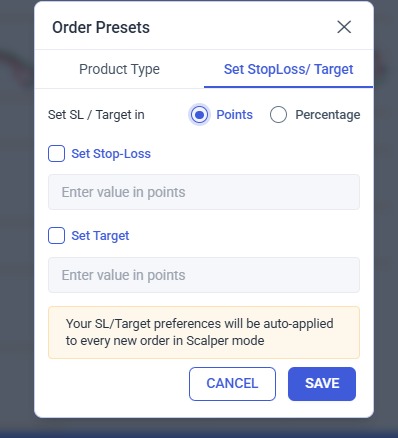
Currently, most “Super Order” or “Quick Order” default settings are based on percentages (%). While this works for long-term investors, active traders (Intraday/Scalping) calculate risk and targets in index points or stock price points.
- Example: In Nifty Options, a trader wants a 5-point Stop Loss. Calculating what percentage 5 points is of a ₹143.55 premium during a fast move causes unnecessary mental fatigue and delay.
The Proposed Solution
Add a “Toggle” in the Dhan Order Settings (under Super Orders/Scalping) to switch the default unit for Stop Loss and Take Profit.
-
Unit Selection: A simple toggle between [%] and [Points].
-
Global Defaults: Allow users to set a default “Points” value for specific segments (e.g., 10 points for Nifty, 20 points for Bank Nifty).
-
Execution: When a Super Order is opened, the SL/TP fields should pre-fill with the “Point” value relative to the LTP (Last Traded Price).
Why This Benefits Dhan Users
-
Speed: No more manual math. Just “Click and Fire” with a pre-set 5 or 10-point risk.
-
Precision: Percentages result in “odd” decimal numbers. Points provide clean, round-number exits.
-
Scalper Friendly: This feature would solidify Dhan as the go-to platform for serious scalpers who mirror the workflow of professional terminal software (like NEST or ODIN).