Sorry for typing I’m also referred to holding listing page. There is no sort route to set forever order in dhan. User new take described long manually stepd route
Thank you for the mention. It’s encouraging to see that user feedback is being actively considered and incorporated into product enhancements. The recent updates to Super Orders are a positive step forward, and I appreciate the team’s continued efforts to improve the trading experience.
After reviewing the recent Super Orders enhancements, I appreciate the addition of multiple exits, Super Trail, and the other improvements. However, there are a few capabilities that would significantly improve usability and make Super Orders more practical for my trading workflow.
1. Super Orders for Existing Delivery Holdings
Based on the discussion and my understanding of the current implementation, it appears that I still cannot place a Super Order (with predefined target and stop-loss) against my existing delivery holdings. This is a feature I have requested multiple times because it would allow investors and positional traders to manage risk directly on stocks already held in the portfolio.
While FOREVER Orders can be used as an alternative, I find the workflow less intuitive and not as seamless as creating a Super Order directly from existing holdings. It would be extremely useful if Super Orders could support delivery holdings by allowing users to attach stop-loss and target levels to positions they already own.
2. Customizable Exit Legs and Saved Presets
The newly introduced multiple-exit functionality is a welcome addition. However, the current predefined allocation structure (for example, 2 legs of 50% each or 3 legs of approximately 33% each) may not suit every trader’s risk-management strategy.
It would be beneficial if users could:
-
Customize the percentage allocation for each exit leg (e.g., 20%-30%-50%, 25%-25%-50%, etc.).
-
Modify the allocation percentages even after the order has been created, where technically feasible.
-
Save custom allocation templates or presets for future use.
-
Have the system remember the last-used allocation configuration and automatically prepopulate it when creating the next Super Order.
Since every trader manages positions differently, greater flexibility in exit distribution would make this feature significantly more useful.
3. Custom Default Stop-Loss and Target Percentages
Another enhancement that could substantially improve order-entry efficiency is the ability to define default stop-loss and target percentages.
For example, users could configure preferred values such as:
-
Stop-loss: 2%
-
Target 1: 3%
-
Target 2: 5%
-
Target 3: 8%
When creating a new Super Order, these values could be automatically prefilled while still allowing users to modify them before placing the order.
This would reduce repetitive manual inputs, especially for traders who consistently follow a predefined risk-reward framework.
Overall Benefit
The enhancements suggested in points 2 and 3 would help traders place Super Orders more quickly during market hours while still retaining the flexibility to fine-tune their positions later. Together with support for existing delivery holdings, these additions would make Super Orders more efficient, customizable, and better aligned with diverse trading and investment styles.
2 Likes
+1
Super Orders for Existing Delivery Holdings is such a valuable feature for Swing and Positional Traders.
Hi @Naman, & team
Looks like only Dhan has the ‘Trail Jumps’ on the OCO part of Super Orders. Kudos to the team!
Can someone explain how the 2nd leg would work on a 365-Days Investing Sell Super Trail Order (image below)? It been pending with support for multiple days, probably rare use-case.
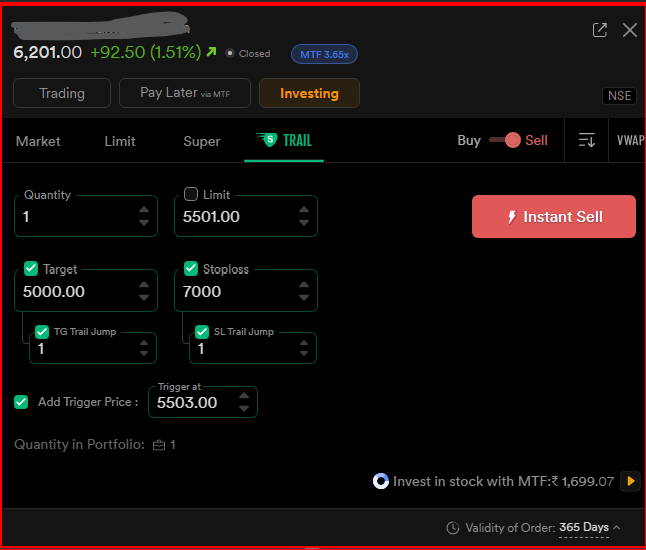
Is it possible to mimic functionality of a Forever OCO sell order but with benefit of Trail Jumps?
On days when stock drop 5+%, this will be a life saver.
Now we have such drops on result days (or when someone downgrades Accenture TCS drop 8%)
Few enhancement requests on Super Trail orders
- Please provide an ability to Sort on B/S, Name, P&L%.

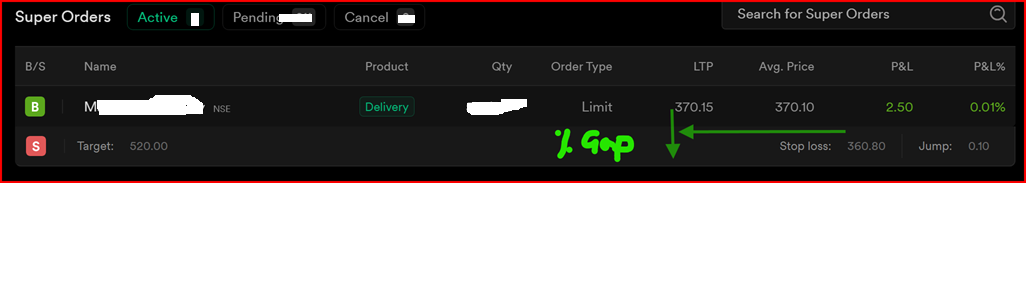
this feature is very important specially for option buyers to do pyramiding and booking profits to reduce/lock loss profit as well. it’s awesome!
Hi Could you please Explain this with Example How Exactly it will be worked on Target Side because While the Trail Stop loss is understandable When Market move in our direction the SL will be Trail as per given value For Example : Entry :100 SL : 90 Trail : 1 means if market moves 101 the SL will be at 91. Thank you
Hi,
What is the use case of forever order? Now that the super order buy has validity of 365 days. Help me to understand please
Hey Shridhar, that’s a very valid question since the latest update extended the validity of Super Order’s entry leg to 365 days as well! However, their core use cases remain completely distinct:
-
Forever Order (GTT): Built primarily for investors and passive swing traders. It’s a simpler, single or double-leg order (OCO) meant for a ‘set-and-forget’ entry without dynamic or multi-level risk management.
-
Super Order (v2.0): Built for active positional and swing traders who want a structured, high-control trade plan. It doesn’t just hold the entry for 365 days; it allows you to simultaneously set up to 4 multiple target profit exits and an automated trailing stop-loss (Super Trail) in one single workflow.
In short: Use Forever Order for simple long-term accumulation or straightforward entries. Use Super Order when you want an automated, multi-exit trading strategy that manages your risk across multiple sessions without manual intervention.
Another concern I have regarding FOREVER orders is that neither I can place FOREVER order on DEXT terminal nor I can see those orders on DEXT terminal. This is a major issue in my opinion and I will be happy to stand corrected.
Atleast if we can make them see on DEXT terminal and make it easy to create a FOREVER order from DEXT terminal (an option to create a FOREVER order when we right click on a stock in watchlist or portfolio), that will help a lot and reduce the friction.
Interesting perspective, @ekveer , but looking at it from a core platform psychology, DEXT T3 and Forever (GTT) orders serve two entirely different worlds.
DEXT T3 is a high-speed workspace custom-built for scalpers and active intraday traders where execution speed is everything. On the other hand, Forever orders are structurally meant for long-term investors and passive accumulation—features already optimized on the main Dhan app and web. Overloading a pure scalping terminal like DEXT with long-term order sync might just add unnecessary data weight, compromising the signature speed that active traders need here. Keeping the core utilities distinct for investors and scalpers actually makes perfect sense.
would like a detailed explanation of how the Trail Profit and Trail Stop Loss features work in Dhan Super Orders.
While I understand the basic concept, I would appreciate a complete explanation with numerical examples so that there is no ambiguity regarding how the Target and Stop Loss levels are adjusted during a trade.
Scenario 1: Trail Profit Only (No Stop Loss)
Please explain what happens in the following example:
-
Buy Price = ₹100
-
Initial Target = ₹105
-
Profit Trail Jump = ₹1
-
No Stop Loss
Questions:
-
When the price reaches ₹105, what exactly happens?
-
Does the target automatically move to ₹106?
-
If the price reaches ₹106, does the target move to ₹107?
-
Does the order continue indefinitely until the price reverses, or is there any exit condition?
-
How does Dhan determine when to book profits in this case?
-
Please provide a step-by-step illustration showing how the target changes as the market moves from ₹100 to ₹110.
Scenario 2: Trail Profit with Trail Stop Loss
Please explain what happens in the following example:
-
Buy Price = ₹100
-
Initial Target = ₹105
-
Initial Stop Loss = ₹95
-
Profit Trail Jump = ₹1
-
Stop Loss Trail Jump = ₹1
Questions:
-
When the price reaches ₹105, how are the Target and Stop Loss modified?
-
Does the Stop Loss move from ₹95 to ₹96, or does it move by some other calculation?
-
When the price reaches ₹106, ₹107, ₹108, etc., how are both the Target and Stop Loss adjusted?
-
Is the Stop Loss always maintained at a fixed distance from the current market price, or does it move only after each trail jump is triggered?
-
If the price rises to ₹110 and then falls, at what price would the position be exited?
-
Please provide a complete step-by-step table showing the revised Target and Stop Loss after each ₹1 upward movement.
This was explained here - How trailing target works - #3 by Mohseen_Usmani
If we put buy at 100 and profit target of 105 with profit trail of re 1 . stop loss 95 with trail of re 1
so when the price LTP reaches 105 . target goes 106 . and then ltp goes 106 and profit target goes 107 . BUt now from here ltp from 106 go down to 105 .
would the order execute or would it hit when it reaches stop loss
Once the LTP touches 105, it will be considered as the base profit target at every 1 point upwards move it will trail by 1 points, so it price reaches at 107 base profit will be updated to 106 and so on, it will be excecuted at the 1rs fall here in this example 106.
For stoploss the base will always be the entry price which is 100 in your case so when price reaches 107, 7 points above your enter price trailing stoploss will be 102.
Hope this helps @SUPERNOVA we will make a Youtube video to demonstrate this, so more users can understand this better.
so practically once the first set profit target is reached then the stop loss becomes irrelevant
Is the trailing profit available on DEXT
It’s available on dhan app/web only
In DEXT t3 , an option comes TRAIL JUMP besides the target option while placing super order . Is this not trailing profit ?