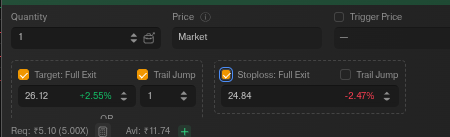
Hi @NAYAK @Goal_Archiver as @SUPERNOVA mentioned you can set Trail Jump on both SL and Target on DEXT T3. please refer to below screenshot for reference.
1 Like
I understand the rationale behind keeping DEXT optimized for speed and avoiding unnecessary complexity. However, I think this assumes that investors and active traders are always two separate user groups, which is often not the case.
Many market participants wear both hats. A trader may use DEXT for active execution during market hours while also maintaining long-term positions and Forever (GTT) orders. In the current setup, that user is forced to switch between two different applications just to monitor or manage different parts of the same portfolio, which feels counterintuitive from a workflow perspective.
I agree that Forever orders are not something users modify frequently. However, they are definitely something users would want visibility into multiple times during the trading session. For example, a trader may want to quickly verify pending buy levels, stop-loss triggers, or accumulation orders without leaving their primary trading workspace.
I’m not necessarily suggesting that DEXT should replicate the full Forever Orders experience. Even lightweight visibility—such as displaying existing Forever orders within DEXT—or a simple option to create a Forever order from the watchlist, portfolio, or right-click menu would significantly reduce friction while preserving the platform’s speed-first philosophy.
In my view, visibility and accessibility are different from feature bloat. Providing seamless access to Forever orders within DEXT would improve the user experience for those who actively invest and trade, without materially impacting the core purpose of the terminal.
Thanks for the point, @ekveer . If a lot of users are asking for it, maybe a small, lightweight section next to Positions or Orders just to track pending Forever levels could be considered. But looking at the bigger picture, the primary focus for a workspace like DEXT T3 must remain heavily on implementing brand-new, cutting-edge tools.
DEXT T3 is recently launched and it should be known for next-gen innovation, just like how the team brought Order Flow recently. If we keep cluttering every new specialized terminal by repeating the same old features that are already perfectly available on the primary Dhan app, we kill the excitement and demand for true innovation. The trading ecosystem stagnates if users stop looking forward to disruptive tools.
To truly elevate our trading setups and make executing complex strategies simpler for everyone, we need fresh features built for the future, not a loop of old ones. Would love to know your thoughts on this product direction, @PravinJ .
This is a massive upgrade for active traders. The Multiple Targets feature solves a real problem because many traders scale out of positions instead of exiting everything at one level. Being able to define the entire trade plan in a single order makes execution much cleaner.
The feature that stands out most to me is the Trailing Target. We often see trades hit a fixed target and then continue much further. Allowing profits to run while still having an automated exit mechanism is a very interesting addition.
One suggestion for future updates: it would be great to have detailed analytics for Super Orders, such as win rate by target level, average R:R achieved, trailing target performance, and partial exit statistics. That would help traders optimize their trade management process using actual data rather than assumptions.
Great work by the Dhan team and looking forward to seeing how traders use these new capabilities.
That would be great. This way, atleast we dont need to navigate to another UI for keeping a tab on orders.
Is there a way I can change preset percentages for Super orders when I select 2/3/4 leg super order with stop loss? When I try to create a super order, those %ages are defaulting to the multiples of 2.5%. Can I change those? Stop loss is defaulting to 10%.
These defaults are different on Dhan web app and Dext windows app.
Please advise.
For this, @Mohsin_Usmani is the right person to answer. The product team needs to look into why these default locks are different on Web and Dext, and if they can allow custom inputs.
When adding a Super Order to an existing position, what is the hard deadline?
For Delivery (CNC,MTF), can we add it up until the midnight EOD batch processing before it transfers over to Holdings?
Hi @jaison, you can convert any normal order into a super order during market hours of the script.
1 Like
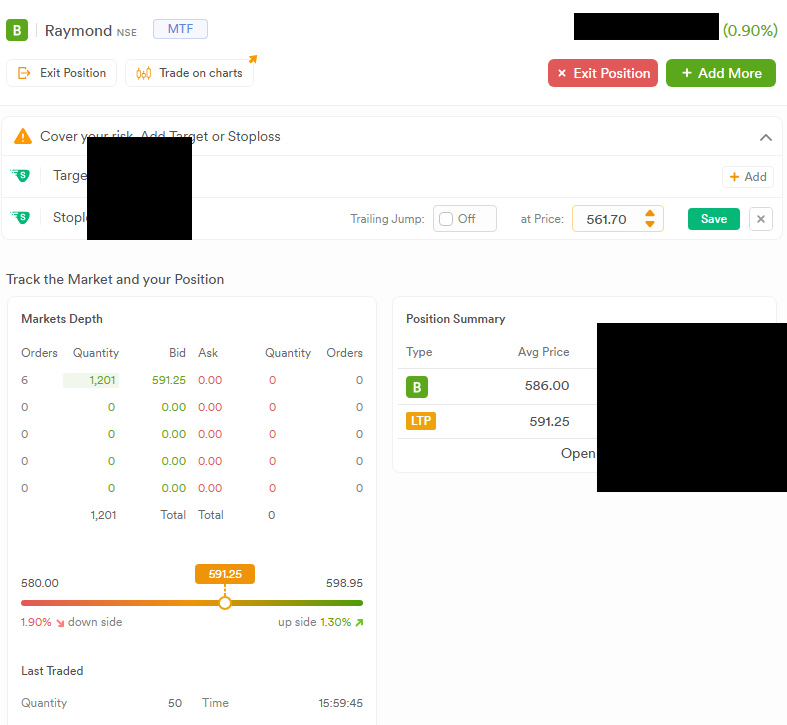
Hi @Mohseen_Usmani I just verified that the system allows adding a Super Order stop-loss to an MTF position after market hours.
To clarify the mechanics: What is the exact daily cutoff time for this? Can users attach a Super Order to an open MTF position up until the midnight EOD batch processing runs? example screenshot taken just now.
Hi @Naman @Mohseen_Usmani @PravinJ
Yesterday I converted all my MTF positions to Super Orders after 11 PM, and it worked. Nice feature. it means users don’t have to rush before market close.
Could someone officially confirm the conversion deadline? I’m assuming it’s possible until the morning EOD batch processing starts.
Hi,
Can anyone from Dhan team confirm whether un-exectued super order gets cancelled at the end of the day or will it remain active for 365 days?
I have created a Super Order with targets and stop loss on June 29th and the order was cancelled at the end of the day.
I am confused. Thanks in advance.
Hi @ekveer, please check the order type you have selected, as for intraday or trading order type, it will be cancelled at the end of the day. Also, to check this further, please share your registered account details via DM.
@jaison, thank you for confirming this. Sorry for the misinterpretation earlier. You can add TG | SL to your Delivery/MTF position till EOD, however, this EOD time is dynamic in nature and usually ends at 1 AM. It’s always better to add TG|SL post 4 pm in case you were not able to add during Market hours.
1 Like
Sorry for the late reply. Sent a DM to you.
Having said that, I have noticed a couple of issues with the DEXT terminal.
1. Super Order – Multiple Targets
When creating a Super Order with multiple targets, I try to enter the target price after selecting the number of targets radio button and then click 1, 2, 3, or 4, it changes the number of targets Instead of accepting the number as part of the price input. DEXT treats it as a keyboard shortcut and changes the number of targets. As a result, I am unable to enter target prices properly and have to switch to the Dhan web app to create Super Orders. I’m not sure if anyone else has reported this issue.
2. Widget Color Sync
Earlier, when I selected a symbol on the chart, it would automatically sync with all widgets linked to the same color. This no longer seems to work. For example, if I change the symbol in the chart, it is not reflected in the Depth widget, from which I usually click BUY to create a Super Order. I now have to manually change the symbol in the Depth widget each time.
Hii
Hi @ekveer, sorry for missing this earlier, and thank you for highlighting these points.
Regarding the Super Order multiple targets, we have already optimized the target-setting flow. Keyboard shortcuts now require the Shift key to be pressed along with the number key, which prevents accidental changes to the number of targets while entering target prices.
As for the widget color sync behavior, our team is already working on optimizing this. The improvements are currently in progress and are expected to be rolled out by this weekend.
We appreciate your detailed feedback and continued support in helping us improve DEXT.
1 Like
Hi @Naman , @RahulDeshpande , @PravinJ
Currently, in Power Scalper’s Super Order settings (gear icon, top right), the Add Target and Add Stoploss options only support percentage values (1%, 1.5%, 2%, etc.).
Requesting an additional option to set these in absolute points as well – e.g., Target of 10/12/13 pts and Stoploss of 8/15 pts, instead of only percentage-based values. This would really help scalpers who prefer fixed point-based risk management.
I’ve already raised this with Dhan Support via email.
1 Like
Hello @Naman
Can we have super orders using Webhooks also..
Tradingview Webhooks would be a game changer as placing orders automatically using Pinecodes will be cool..
Hi @Bishnoi ,
Currently, while creating the JSON for order placement through TradingView Webhooks, only MARKET and LIMIT order types are available. Super Orders are not currently supported through Webhooks.
Hi Dhan team,
cc @PravinJ
I noticed an issue where Delivery Super Orders placed on Dhan Web using the “Book Profits in Steps” (Multiple Targets) feature do not appear in the official Developer API GET /v2/super/orders endpoint.
Steps to Reproduce:
-
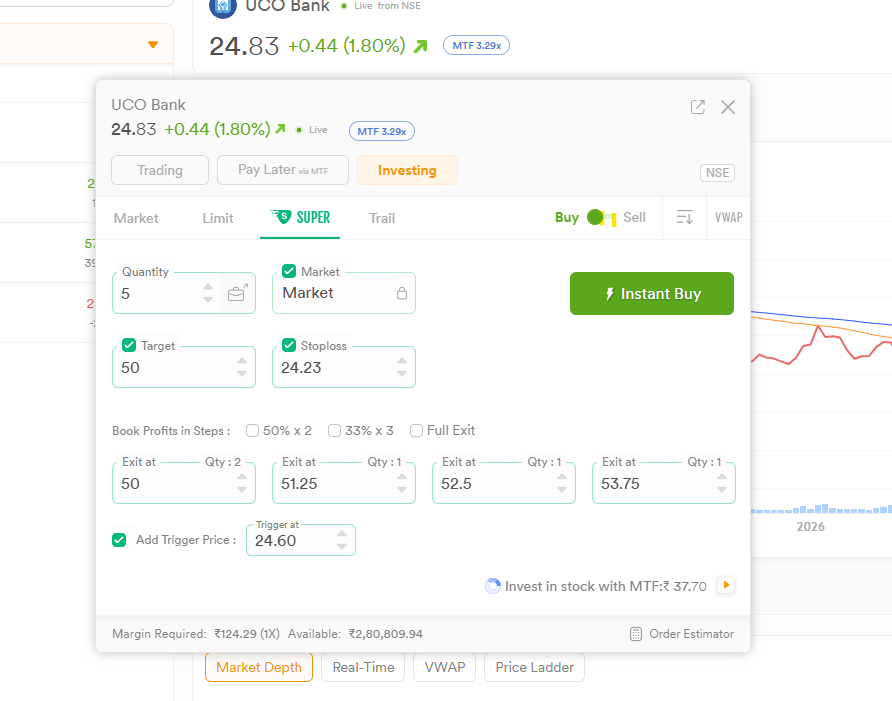
On Dhan Web, place an Equity Delivery (CNC) Super Order on any stock (e.g. UCO Bank).
-
Configure a Stoploss (e.g., ₹24.19) and check “Book Profits in Steps” with multiple targets (e.g., Exit 1: 2 qty @ 25.43, Exit 2: 2 qty @ 26.07, etc.).
-
Execute the order.
-
On Dhan Web under Orders →→ Super, the order appears active with the stop loss and all target steps.
-
Make an authenticated API request:
bashcurl --request GET \
--url https://api.dhan.co/v2/super/orders \
--header ‘access-token: YOUR_JWT_TOKEN’ \
--header ‘Content-Type: application/json’
Expected Behavior:
The active Super Order should be returned in the GET /v2/super/orders response with its corresponding STOP_LOSS_LEG and target legs inside legDetails, just like standard single-target Super Orders (e.g. MARINE).
Actual Behavior:
- The entry order shows as a normal standalone order in
GET /v2/orders(withboProfitValue: 0.0andboStopLossValue: 0.0). - The
GET /v2/super/ordersendpoint completely omits the order (returns empty / only older legacy orders). - The stop-loss and stepped targets appear to be served via
tv-ws.dhan.co/trade/GetVttOrdersinternally, but are not bridged to the public REST API.
Could you please look into exposing these stepped-target Super Orders in the GET /v2/super/orders endpoint so API integrations and trade journals can track active stop losses and targets accurately?
Hello @jaison ,
Currently, the Multiple Target feature in Super Orders is not available through the API. Therefore, multiple targets placed through the Dhan App or Dhan Web will not be returned when you fetch the Super Order details through the API.
We have taken this as feedback and will consider making the Multiple Target feature available through the API in upcoming builds.
1 Like