Hi @Everyone,
Manual options trading works only as long as you can watch the screen every second. The moment your entry condition triggers, you need to identify the right strike, size the position correctly, and place the order with a stop-loss and target attached — all before the price moves away from you. This is exactly where an algorithmic approach pays off.
This post is a continuation of the Complete Algo Series, where we have been building an algorithmic trading system step by step — from writing basic entry conditions to placing live orders. If you’re new here, it’s worth going through the earlier parts of the series first, since this post builds directly on the equity order-placement logic already covered.
In this part, we extend that same equity algo to trade options. Instead of buying or selling the underlying stock, the algo will automatically select an At-the-Money (ATM) option, work out the correct lot size, and fire a Super Order — a single order that carries the entry, stop-loss, and target together.
Recap: What This Post Covers
- How an existing entry condition (trend, momentum, and gap-up) triggers an options trade instead of an equity trade
- How the algo automatically identifies the ATM Call or Put for a stock
- How the algo fetches the correct lot size before placing the order
- How a Super Order bundles entry, stop-loss, and target into one order
- What the deployed algo looks like running live on Dhan Cloud, with real trades on ICICI Bank and Infosys
Step 1: The Entry Condition Stays the Same
The options logic sits on top of an entry condition that has already been built in the earlier parts of this series. In this example, a trade is considered valid when all of the following are true for a stock:
| Condition | What It Checks |
|---|---|
| Price above EMA | Confirms the stock is in an uptrend |
| Momentum present | Confirms the move has strength behind it |
| Gap-up on the day | Confirms a fresh directional push |
| No existing position | Ensures the algo hasn’t already entered this stock today |
Note: These four conditions are just one example used to demonstrate the workflow. Your own entry logic can be completely different — the options-order-placement layer described below will work with any entry condition you build.
Once all four conditions are true for a stock, the algo moves from “I have a signal” to “I need to place an options order” — and that’s where the new logic begins.
Step 2: Identify the ATM Option Strike
The first job of the options layer is to work out which strike to trade. Rather than trading the stock itself, the algo looks up the At-the-Money (ATM) option for the current month’s expiry — the strike price closest to where the stock is currently trading.
Using the Dhan API’s Trade Support Library, the algo passes in the stock symbol and asks for the ATM strike with the current month’s expiry. For example, when Adani Enterprises meets the entry condition:
- The stock’s last traded price (LTP) is around 2966
- The nearest available strike is 2960
- The algo therefore selects the 2960 Call for the current month’s expiry
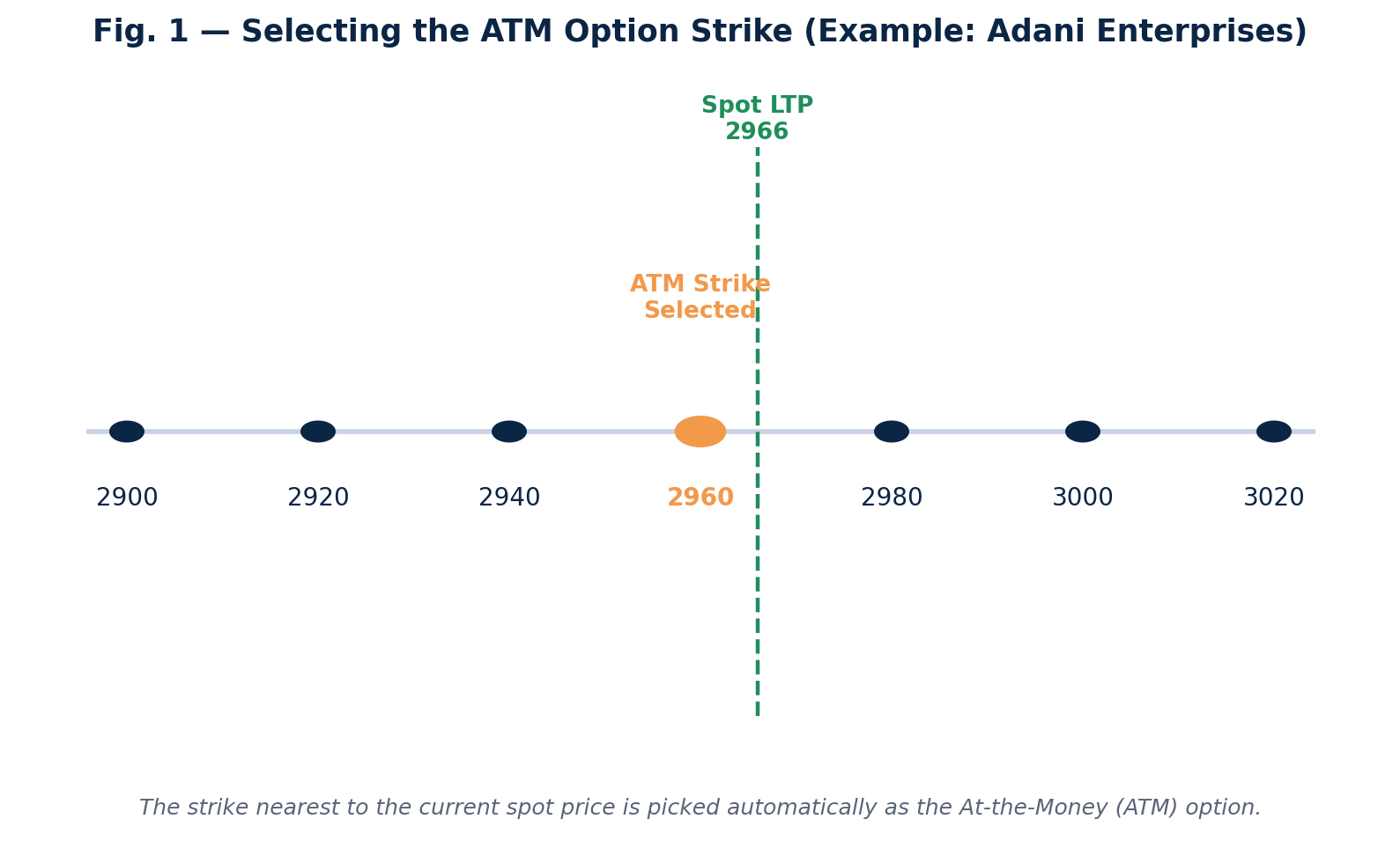
Selecting the ATM Option Strike (Example: Adani Enterprises)
Once the ATM strike is identified, the algo takes the LTP of that specific option — not the stock — because that option’s premium is what will actually be bought and sold.
Step 3: Fetch the Correct Lot Size
Options in India trade in lots, not single shares, and lot sizes differ from stock to stock. Before an order can be placed, the algo needs to know exactly how many units make up one lot for that particular option.
This is handled with a single call to the Trade Support Library’s lot-size function. Continuing the example above, the lot size for the selected option comes back as 39. If this step is skipped, the quantity field in the order would default to a raw number rather than a valid multiple of the lot size, and the order would get rejected by the exchange.
Tip: Always fetch the lot size programmatically rather than hardcoding it. Lot sizes are revised periodically by the exchange, and a hardcoded value will silently go stale.
Step 4: Place the Order Using Super Order
This is where the actual trade gets executed. Instead of placing three separate orders (entry, stop-loss, target), the algo uses Dhan’s Super Order — a single API call that bundles all three together.
The order carries:
- Instrument: the ATM option identified in Step 2 (NFO segment, not equity)
- Transaction type: Buy
- Quantity: the lot size fetched in Step 3
- Order type: Limit
- Product: MIS (intraday)
- Entry price, stop-loss price, and target price: all calculated and passed together
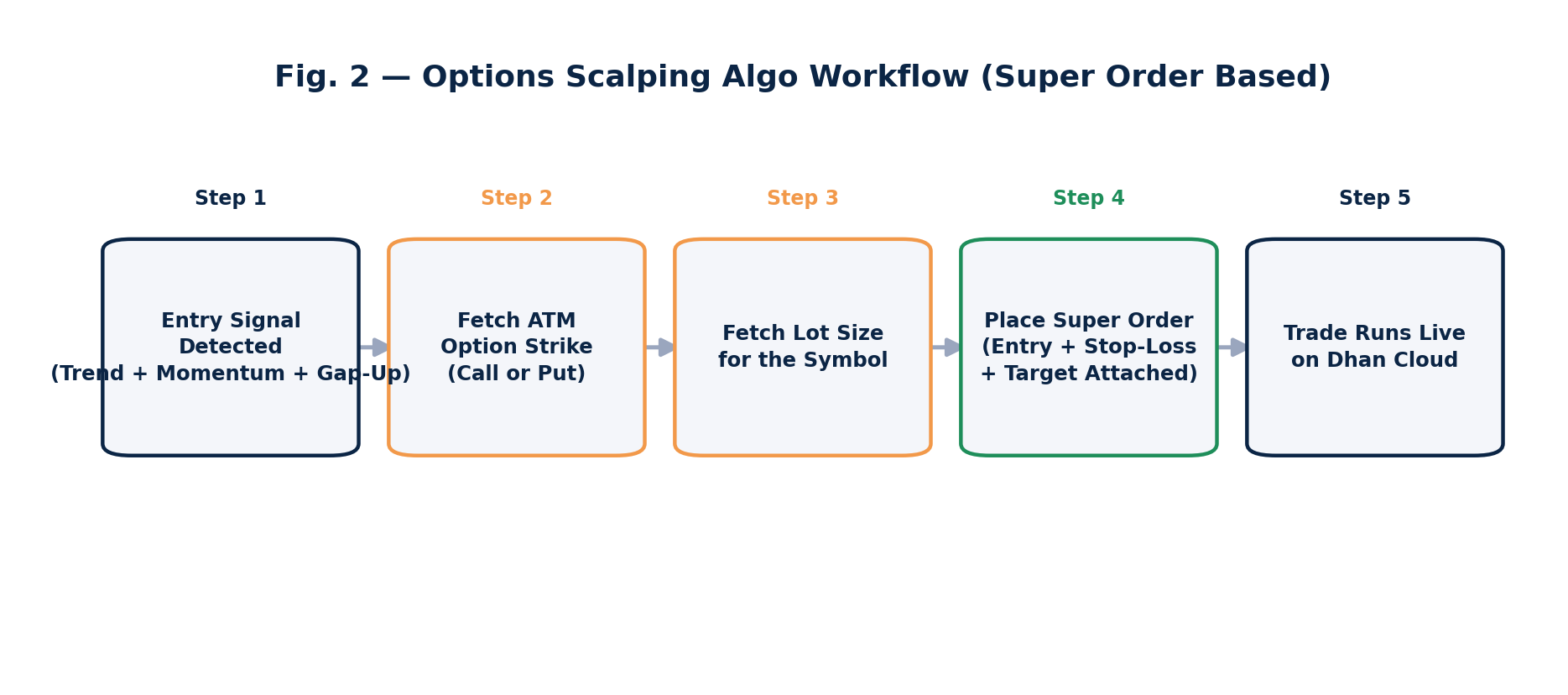
Options Scalping Algo Workflow (Super Order Based)
Why Super Order matters: Once this single order is fired, the stop-loss and target are already attached and tracked by the exchange-side order engine. The algo doesn’t need to keep polling the position and manually manage the exit — the Super Order takes care of entry, stop-loss, and target internally, and even trails the position where applicable.
The Complete Code Addition
The entire options layer is a small addition on top of the existing equity algo — just four functional steps:
# Step 1: Get the ATM option for the current month's expiry
atm_option = trade_support.get_atm_strike(
    symbol=stock_symbol,
    expiry="current_month"
)

# Step 2: Get the lot size for that option
lot_size = trade_support.get_lot_size(symbol=atm_option)

# Step 3: Calculate stop-loss and target from the option's LTP
entry_price = atm_option.ltp
stop_loss   = round(entry_price * 0.88, 2)   # example logic
target      = round(entry_price * 1.18, 2)   # example logic

# Step 4: Fire the Super Order (entry + SL + target together)
dhan.place_super_order(
    security_id=atm_option.security_id,
    exchange_segment="NSE_FNO",
    transaction_type="BUY",
    quantity=lot_size,
    order_type="LIMIT",
    product_type="MIS",
    price=entry_price,
    target_price=target,
    stop_loss_price=stop_loss
)
Note: The stop-loss and target percentages above are placeholders for illustration. In practice, these should be derived from your own risk-management rules — for example, a fixed percentage of premium, a multiple of Average True Range, or a fixed rupee risk per trade.
Everything else — the scanner, the entry condition, the watchlist, and the scheduling — is exactly the same code that was already built for the equity version of this algo in the earlier parts of the series. Only these four steps are new.
Deploying the Options Algo on Dhan Cloud
With the options logic added, the algo is deployed to Dhan Cloud the same way the equity version was — the client code is picked up automatically from the platform, the watchlist of stocks to scan is provided, and the algo can be scheduled to run on trading days (Monday through Thursday, or any custom schedule).
Once running, the deployed algo continuously scans the watchlist. When the entry condition is met for any stock in the list, it automatically:
- Selects the ATM option (Call or Put, depending on the entry direction)
- Fetches the lot size
- Fires the Super Order with stop-loss and target attached
No manual intervention is required once the algo is live.
Live Trade Walkthrough: ICICI Bank and Infosys
Here’s what this looked like on a live trading day. The scanner picked up a sell-side condition on ICICI Bank and a buy-side condition on Infosys. In both cases, the algo automatically selected the corresponding ATM option and fired the Super Order — a Put for the ICICI Bank setup, and a Call for the Infosys setup.
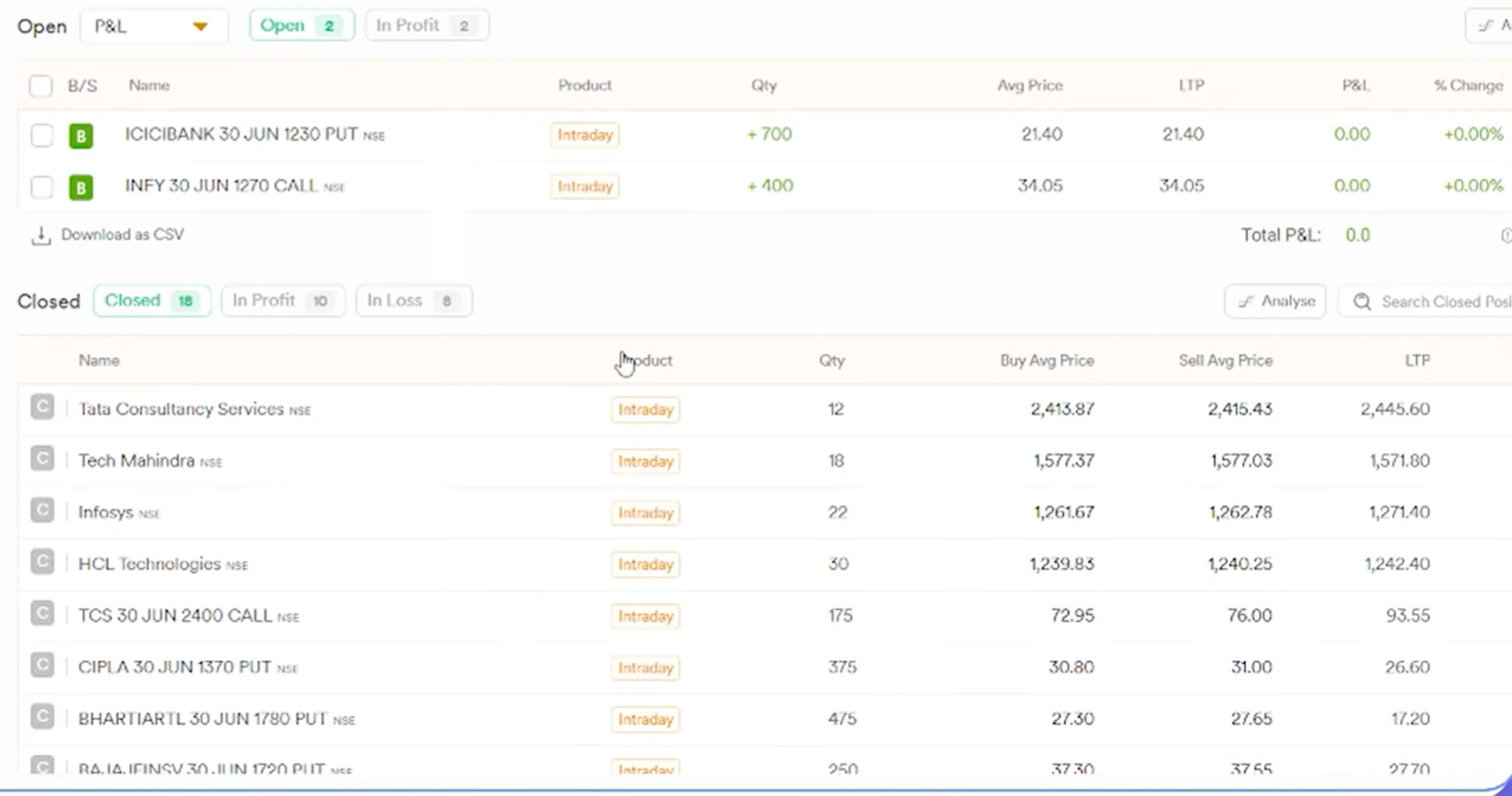
Open Positions on Dhan: ICICI Bank 1230 PUT and Infosys 1270 CALL, both entered automatically by the algo with zero live P&L at the moment of entry.
Both positions show up identically to how they would if placed manually — with the buy quantity, average price, and live LTP all reflecting the option, not the underlying stock.
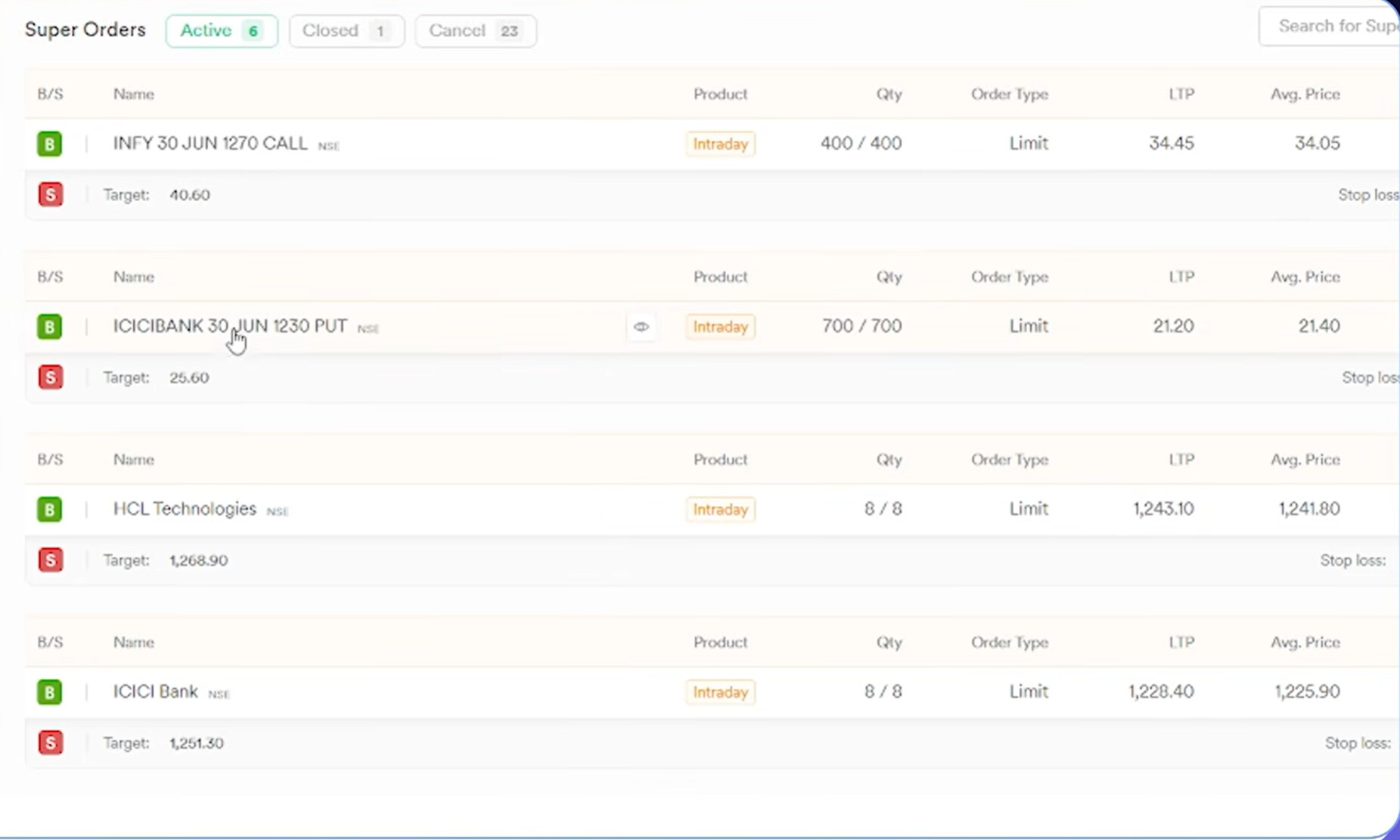
Active Super Orders on Dhan: each entry carries its own attached target and stop-loss, fired as a single order rather than three separate ones.
Because these are Super Orders, the entry, stop-loss, and target are all tracked internally by the order engine. There was no need to separately monitor these trades tick by tick — the stop-loss and target were already fitted to each position the moment it was opened, and the chart for each symbol showed the stop-loss and target lines plotted automatically.
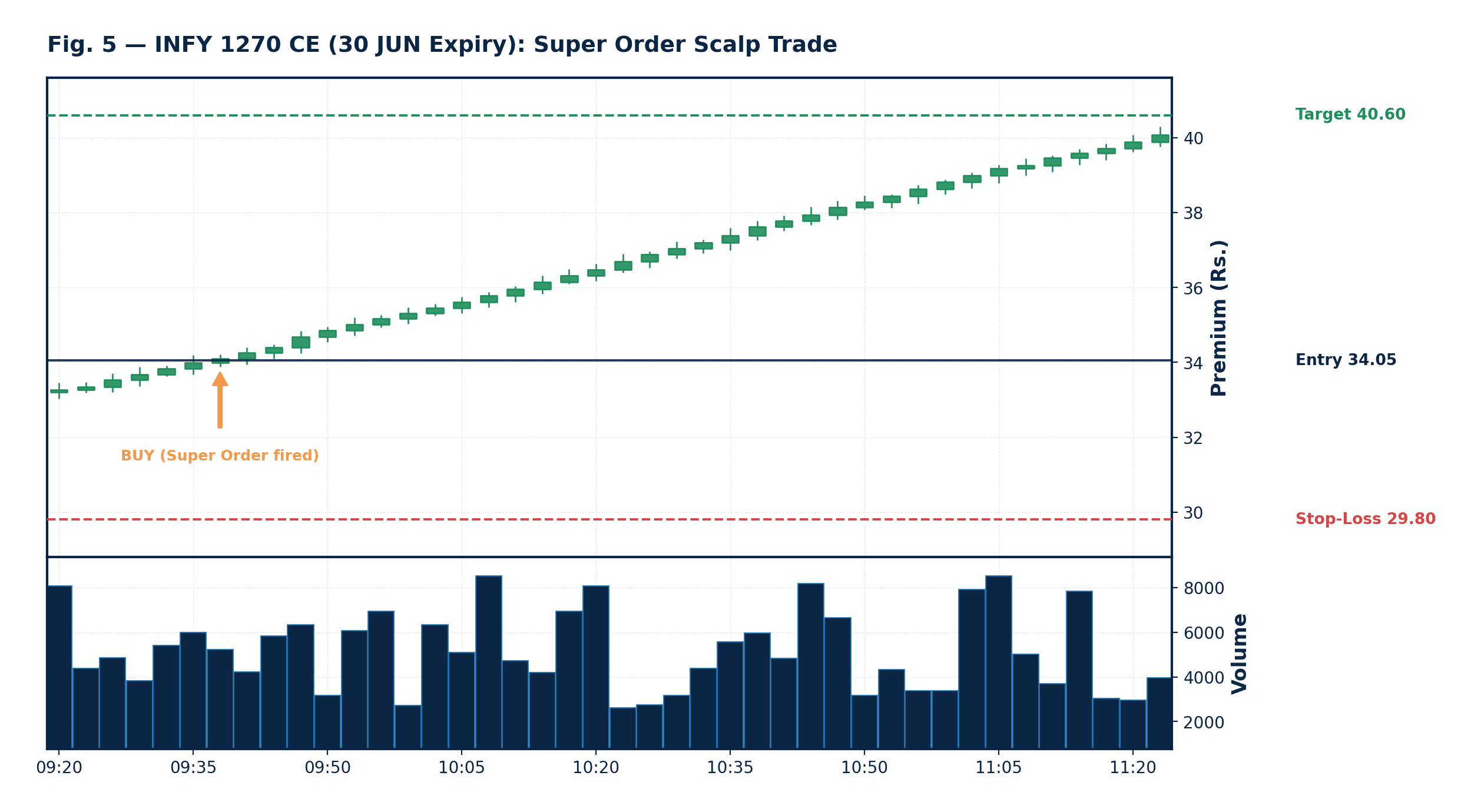
INFY 1270 CE (30 JUN Expiry): illustrative premium chart showing the option price moving from the Super Order entry toward the target, with the stop-loss level marked below.
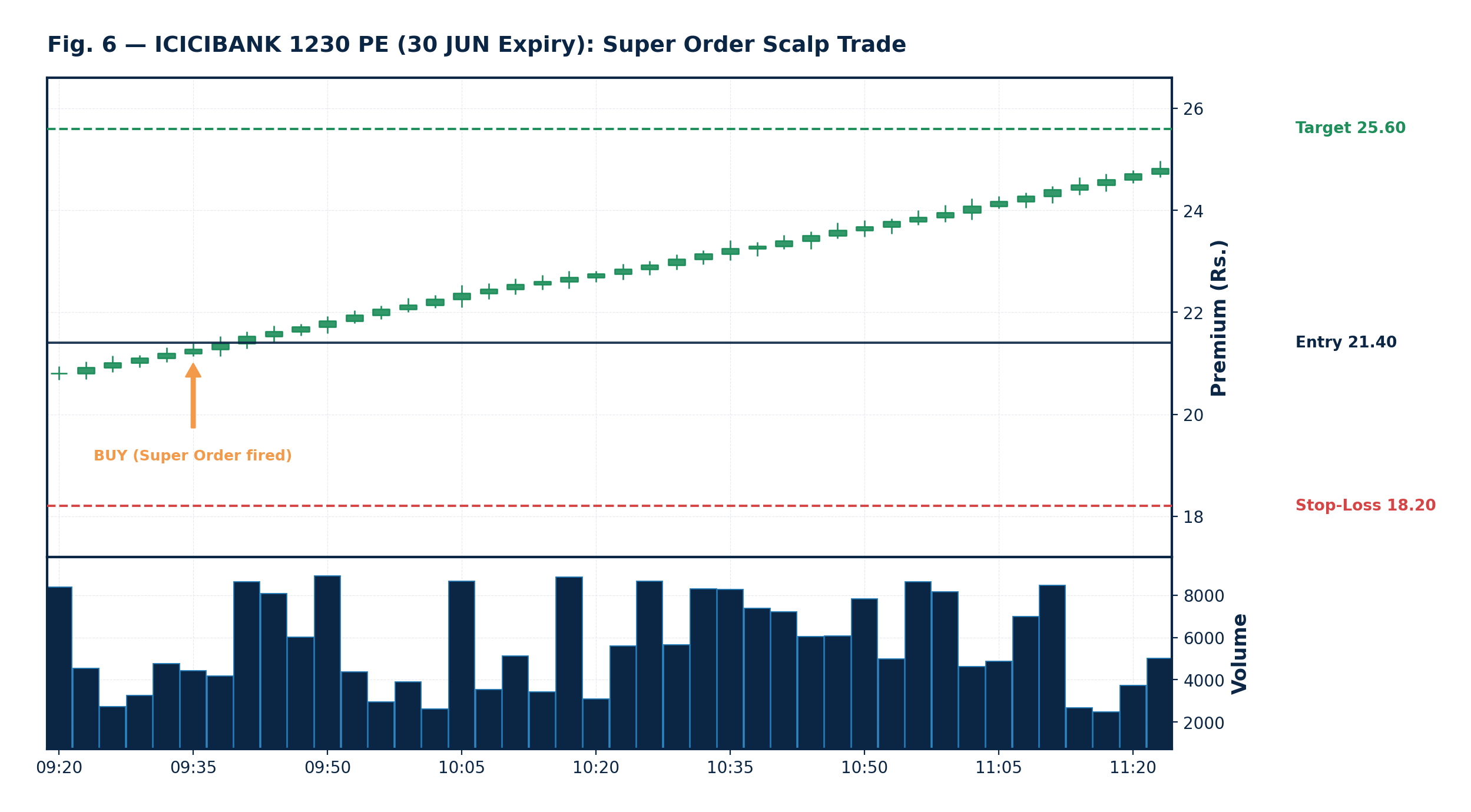
ICICIBANK 1230 PE (30 JUN Expiry): illustrative premium chart for the Put side, showing the same entry–stop-loss–target structure in place.
Note: The candle charts above (Fig. 5 and Fig. 6) are illustrative models built to show how the entry, stop-loss, and target levels sit relative to price action on a Super Order trade — not a live data feed.
Customizing Your Own Entry Conditions
The entry condition used throughout this example — price above EMA, momentum, and a gap-up — is only one possible setup, chosen to keep the demonstration simple. Your own entry logic can be built around completely different ideas: RSI-based mean reversion, VWAP crossovers, breakout levels, or any combination of indicators that fits your strategy.
The important part is the separation of concerns:
- Build your scanner — whatever logic decides when to enter is entirely up to you.
- Attach the order-placement layer — the four steps covered in this post (ATM strike → lot size → Super Order) plug into any scanner output.
- Deploy — schedule the combined algo to run on Dhan Cloud.
Once the scanner and the order-placement logic are connected, the rest of the pipeline — ATM selection, lot sizing, and Super Order execution — works the same regardless of what triggers the entry.
Summary
- Options algos don’t need to be built from scratch — the same equity entry-condition logic can be extended with just a few additional steps.
- The ATM strike is identified automatically based on the stock’s current LTP and the selected expiry.
- Lot size must always be fetched programmatically, since it varies by symbol and changes periodically.
- A Super Order bundles entry, stop-loss, and target into a single order, removing the need for manual trade management.
- The same pipeline — scanner, ATM selection, lot size, Super Order — works with any entry condition, not just the trend/momentum/gap-up example used here.
Resources
- YouTube Video: Watch on YouTube
- Code Files: Download from Google Drive