Codebase Update: New Features Added in Dhan_TradeHull

We’ve made several improvements to the Dhan_TradeHull codebase, and here’s a quick overview of what’s new:

  1. Long-term historical data
    You can now pull multi-year data easily using:
data = tsl.get_long_term_historical_data(
    tradingsymbol="NIFTY",
    exchange="NSE",
    timeframe="5",
    from_date="2022-01-01",
    to_date="2025-12-03"
)
  1. Sector-wise historical data (Intraday)
    This helps when analysing broader market sectors.
data = tsl.get_historical_data("NIFTY 100", "NSE", timeframe="1", sector="YES")

data = tsl.get_long_term_historical_data(
    tradingsymbol="NIFTY 100",
    exchange="NSE",
    timeframe="5",
    from_date="2022-01-01",
    to_date="2025-12-03",
    sector="YES"
)
  1. Expired options data
    You can now fetch historical option data even after expiry.
data = tsl.get_expired_option_data(
    tradingsymbol="RELIANCE",
    exchange="NSE",
    interval=1,
    expiry_flag="MONTH",
    expiry_code=1,
    strike="ATM",
    option_type="CALL",
    from_date="2024-10-10",
    to_date="2024-11-10"
)
  1. Market depth data for multiple instruments
    Useful when you need full-depth snapshots for different symbols.
symbol_list = [
    ("RELIANCE", "NSE"),
    ("NIFTY 09 DEC 26000 CALL", "NFO"),
    ("NIFTY 09 DEC 25500 PUT", "NFO")]

depth_data = tsl.full_market_depth_data(symbol_list)

for key, depth_client in depth_data.items():
    bid_df, ask_df = tsl.get_market_depth_df(depth_client)
  1. Fetching historical Data for 90 days
    The tsl.get_historical_data() function is now updated to return candle data for the past 90 days.

  2. Strike selection issue fixed
    Strikes for symbols now resolve correctly without mismatch.

To use all these updates:

• Install the required dhanhq version

pip install dhanhq==2.1.0

• Upgrade to the latest Dhan-Tradehull

pip install --upgrade Dhan-Tradehull

• Confirm the version’s for dhanhq if 2.1.0 and Dhan-Tradehull is 3.1.2

pip show dhanhq
pip show Dhan-Tradehull

You can check the full documentation here:
https://pypi.org/project/Dhan-Tradehull/
5 Likes

Thanks for your replay, excellent way you had given your session, its really nice

As a retail’s user ,i am getting error while doing some testing. Is any alternate way shall we discuss while we will run our queries in live trading. shall anyone help in this regard.

I had gone through your installation steps and as per code define in dhan tradehull

but getting below version ,is this correct or need to down load python 3.1.2.

C:\Windows\System32>pip show dhanhq
Name: dhanhq
Version: 2.0.2
Summary: The official Python client for communicating with the DhanHQ API
Home-page: https://dhanhq.co/
Author: Dhan
Author-email: dhan-oss@dhan.co
License: MIT LICENSE
Location: C:\Users\HP\AppData\Local\Programs\Python\Python312\Lib\site-packages
Requires: pandas, pyOpenSSL, requests, websockets
Required-by: Dhan_Tradehull

Very Useful!
Thanks @Tradehull_Imran

1 Like

does Dhan_Tradehull_V2.py needed upgrade am getting error @Tradehull_Imran

Hi @Krushna_Rout ,

Firstly upgrade dhanhq version by running the following code in cmd terminal-

pip install dhanhq==2.1.0

• Upgrade to the latest Dhan-Tradehull

pip install --upgrade Dhan-Tradehull

• Confirm the version’s for dhanhq if 2.1.0 and Dhan-Tradehull is 3.1.2

pip show dhanhq
pip show Dhan-Tradehull

Hi @Nishad ,

Yes, do upgrade the codebase by installing the latest version using pip. Follow the above steps.

there was an offline file Dhan_Tradehull_v2.py not required? @Tradehull_Imran

Hi @Nishad ,

No Dhan_Tradehull_v2.py file wont be required once upgraded to pypi verion.

Exception in Getting OHLC data as {'status': 'failure', 'remarks': {'error_code': 'DH-905', 'error_type': 'Input_Exception', 'error_message': 'Missing required fields, bad values for parameters etc.'}, 'data': ''}

i get this error AFTER upgrade i use

        chart_DAY = safe_fetch(tsl.get_historical_data,
                               tradingsymbol=stock_name,
                               exchange='NSE',
                               timeframe="DAY")

@Tradehull_Imran it was working till yesterday night ,now i have removed offlinle dhan_tradehull_v2.py

Hi @Nishad ,

For which stock are you facing the issue?

all stocks @Tradehull_Imran

Hi @Nishad ,

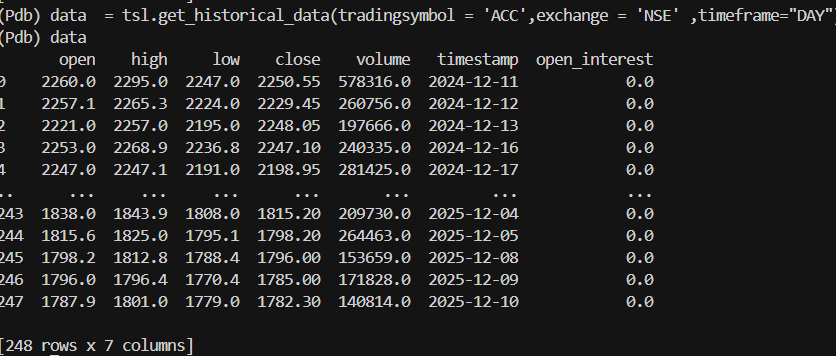
The code seems to be working fine-

Refer the below code-

import pdb
import pandas as pd
from Dhan_Tradehull import Tradehull
import time


client_code = "110284XXXX"
token_id = "eyJ0eXAiOiJKV1QiLCJhbGciOi..."

tsl   = Tradehull(client_code,token_id)

data  = tsl.get_historical_data(tradingsymbol = 'ACC',exchange = 'NSE' ,timeframe="DAY")

If you are still facing issues, share your code to review

am facing issue with this simple code too!!

Hi @Nishad ,

  1. In command prompt run the below commands and share screenshot-
pip show dhanhq
pip show Dhan-Tradehull
  1. Do share your code to review the same.
pip show dhanhq
Name: dhanhq
Version: 2.1.0
Summary: The official Python client for communicating with the DhanHQ API
Home-page: https://dhanhq.co/
Author: Dhan
Author-email: dhan-oss@dhan.co
License: MIT LICENSE
Location: c:\users\nishad\appdata\local\programs\python\python38\lib\site-packages
Requires: pandas, pyOpenSSL, requests, websockets
Required-by: Dhan_Tradehull

C:\Users\nishad\Desktop\yest>pip show Dhan-Tradehull
Name: Dhan_Tradehull
Version: 3.1.2
Summary: A Dhan Codebase from TradeHull
Home-page: https://github.com/TradeHull/Dhan_Tradehull
Author: TradeHull
Author-email: contact.tradehull@gmail.com
License:
Location: c:\users\nishad\appdata\local\programs\python\python38\lib\site-packages
Requires: dhanhq, mibian, numpy, pandas, pytz, requests, websocket-client
Required-by:

C:\Users\nishad\Desktop\yest>pip show Dhan-Tradehull
Name: Dhan_Tradehull
Version: 3.1.2
Summary: A Dhan Codebase from TradeHull
Home-page: https://github.com/TradeHull/Dhan_Tradehull
Author: TradeHull
Author-email: contact.tradehull@gmail.com
License:
Location: c:\users\nishad\appdata\local\programs\python\python38\lib\site-packages
Requires: dhanhq, mibian, numpy, pandas, pytz, requests, websocket-client
Required-by:

@Tradehull_Imran

@Tradehull_Imran any update

Hi @Nishad ,

Share the code which you have been using to review. And make sure you do not have older codebase files present in the same folder named as Dhan_Tradehull.py.

am using the one u pasted here to test know i removed old files…let me reinstall again adn will see

Exception in Getting OHLC data as {'status': 'failure', 'remarks': {'error_code': 'DH-905', 'error_type': 'Input_Exception', 'error_message': 'Missing required fields, bad values for parameters etc.'}, 'data': ''}

same issue even after deleting python itself

reinstalled all

using this to test

import pdb
import pandas as pd
from Dhan_Tradehull import Tradehull
import time


client_code = "110284XXXX"
token_id = "eyJ0eXAiOiJKV1QiLCJhbGciOi..."

tsl   = Tradehull(client_code,token_id)

data  = tsl.get_historical_data(tradingsymbol = 'ACC',exchange = 'NSE' ,timeframe="DAY")

@Tradehull_Imran