Hi @Tradehull_Imran , Good evening. After upgrading the versions, I am getting this error. Exception at getting Expiry list as ‘Tradehull’ object has no attribute ‘Dhan’
Unable to find the correct Expiry for NIFTY
Getting Error at OTM strike Selection as local variable ‘strike’ referenced before assignment
An error occurred: too many values to unpack (expected 2). The code was working well today, till the end of the market hours. But now, I am getting the error. Please suggest what to do.
u need to remove offline dhan_tradehull.py file
1 Like
its working now, every month for a day i face this issue strange
2 Likes
Thanks for the feedback dear. But if I will remove the offline file, then how I can run the code. Please share if it is ok for you.
I tried removing this file and run. But it is not working for me.
pip show dhanhq
pip show Dhan-Tradehull
if u have succesuflly installed above pip, u need to remove the offline one
Hi @bhavesh ,
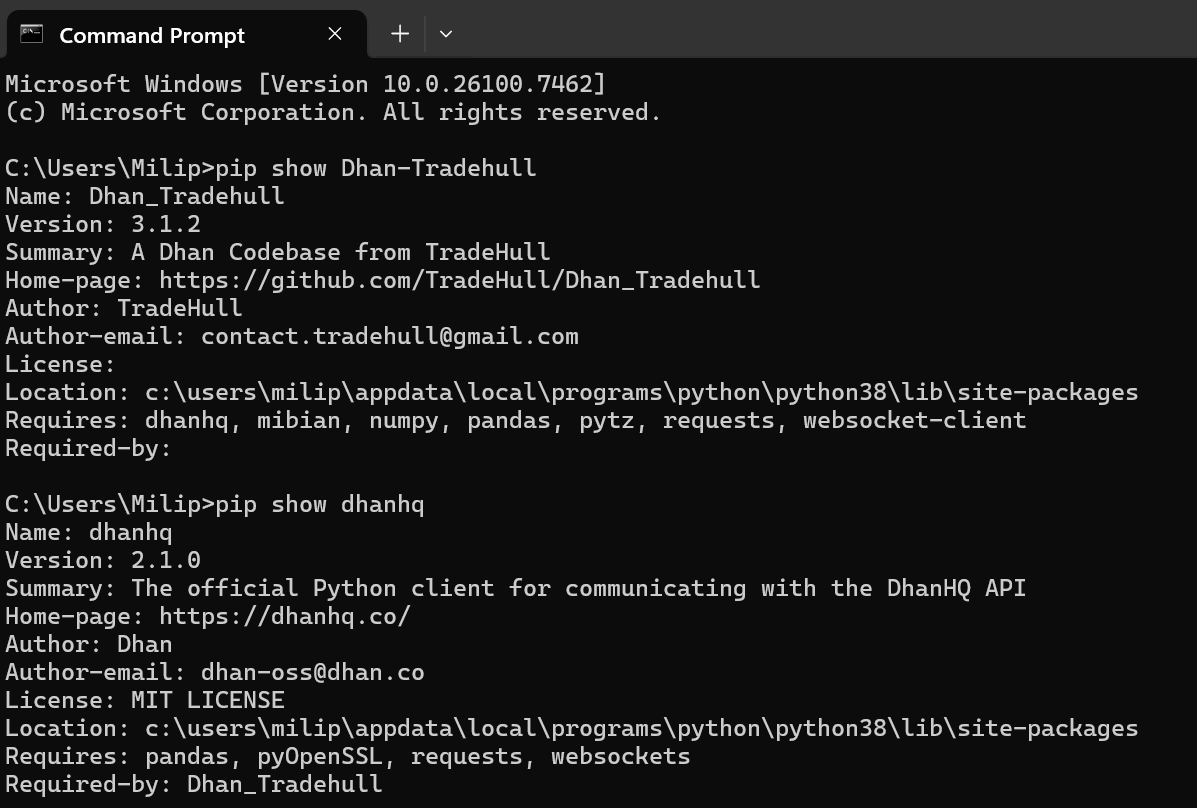
Let me know which version of codebase you have been using by running the following command in cmd terminal-
pip show dhanhq
pip show Dhan-Tradehull
ihAVE issue with get_intraday_data ,remaining all works
                        df5 = safe_fetch(
                            tsl.get_intraday_data,
                            tradingsymbol=symbol,
                            exchange='NSE',
                            timeframe=5
    data  = tsl.get_intraday_data(tradingsymbol = 'ACC',exchange = 'NSE' ,timeframe="5")
AttributeError: 'Tradehull' object has no attribute 'get_intraday_data'
so u have depreciated it and use get_historcal data by default
Hi @Nishad ,
tsl.get_intraday_data() is deprecated, to get candle data do use tsl.get_historical_data() function.
Get Historical Data
- tsl.get_historical_data(tradingsymbol: str, exchange: str, timeframe: str, sector: str = “NO”, debug: str = “NO”)
- Arguments:
- tradingsymbol (str): The trading symbol for the instrument you want to fetch data for (e.g., ‘NIFTY’, ‘ACC’).
- exchange (str): The exchange where the instrument is traded (e.g., ‘NSE’, ‘INDEX’).
- timeframe (str): The timeframe for the data. It can be:
- ‘1’ for 1-minute candles
- ‘5’ for 5-minute candles
- ‘15’ for 15-minute candles
- ‘25’ for 25-minute candles
- ‘60’ for 60-minute candles
- ‘DAY’ for daily candles
- sector (optional, str): Set to “YES” to fetch sector data(e.g., ‘Nifty Healthcare’, ‘NIFTY 100’). Default is “NO”.
- debug (optional, str): Set to “YES” to enable detailed API response logging. Default is “NO”.
- Sample Code:
- Arguments:
data = tsl.get_historical_data(tradingsymbol='NIFTY', exchange='INDEX', timeframe="DAY")
data = tsl.get_historical_data(tradingsymbol='ACC', exchange='NSE', timeframe="1")
Refer the below documentation on how to use updated codebase-
Dhan-Tradehull · PyPI
Hello Ji,I successfully upgraded two libraries as you saidMy algo were working before upgrading this librariesBut now I got following error
Codebase Version 3.1.2
Codebase Version 2.8 : Solved - Strike Selection Issue
-----Logged into Dhan-----
name 'dhanhq' is not defined
'Tradehull' object has no attribute 'response'
Traceback (most recent call last):
  File "C:\Users\chhahb00\Desktop\Buying_Tested_Final_Hemal_151125\Bhavesh Buying_Tested_Final_Hemal_151125\Hemal Buying_Dhan\Dhan_Tradehull_V2.py", line 113, in get_login
    self.Dhan = dhanhq(self.ClientCode, self.token_id)
NameError: name 'dhanhq' is not defined

During handling of the above exception, another exception occurred:

Traceback (most recent call last):
  File "C:\Users\chhahb00\Desktop\Buying_Tested_Final_Hemal_151125\Bhavesh Buying_Tested_Final_Hemal_151125\Hemal Buying_Dhan\Dhan_Tradehull_V2.py", line 73, in __init__
    self.get_login()
  File "C:\Users\chhahb00\Desktop\Buying_Tested_Final_Hemal_151125\Bhavesh Buying_Tested_Final_Hemal_151125\Hemal Buying_Dhan\Dhan_Tradehull_V2.py", line 120, in get_login
    print(self.response)
AttributeError: 'Tradehull' object has no attribute 'response'
Problem in exit trade after closing exit time or check exit time is greater than current time
GO FOR THE STRIKE SELECTION
Telegram message response: 400 - {"ok":false,"error_code":400,"description":"Bad Request: chat not found"}
Message sent on Telegram: GO FOR THE STRIKE SELECTION
An error occurred: 'Tradehull' object has no attribute 'Atm_itm_otm_selection'
Telegram message response: 400 - {"ok":false,"error_code":400,"description":"Bad Request: chat not found"}
Message sent on Telegram: 'Tradehull' object has no attribute 'Atm_itm_otm_selection'
[1] > c:\users\chhahb00\desktop\buying_tested_final_hemal_151125\bhavesh buying_tested_final_hemal_151125\hemal buying_dhan\dhan_tradehull_v2.py(294)watchlist_strikes()
-> sys.exit()
(Pdb++)
Please Help @Tradehull_Imran
Hi @Tradehull_Imran ,
I am using the updated version of dhanhq (2.1.0) and
Dhan_Tradehull (3.1.2), as suggested by you.
Still facing the same issue
‘Tradehull’ object has no attribute ‘Atm_itm_otm_selection’
Same Here Bro @bhavesh
If you got any solution, please let me know
Hi @Hemal_Chhatrala @bhavesh ,
It looks like the older codebase version 2.8 is still present in your folder. Please remove the offline file Dhan_Tradehull_V2.py from the same directory and ensure that you are importing only the PyPI-installed Dhan-Tradehull package.
To verify the installed library versions, run the following commands in the command prompt:
pip show dhanhq
pip show Dhan-Tradehull
For the latest function definitions and usage, please refer to the official documentation here:
data = tsl.get_long_term_historical_data( tradingsymbol="NIFTY SMLCAP 400", exchange="NSE", timeframe="5", from_date="2022-01-01",to_date="2025-12-03", sector="YES")
WHICH all indices currently supprts
Hi @Nishad ,
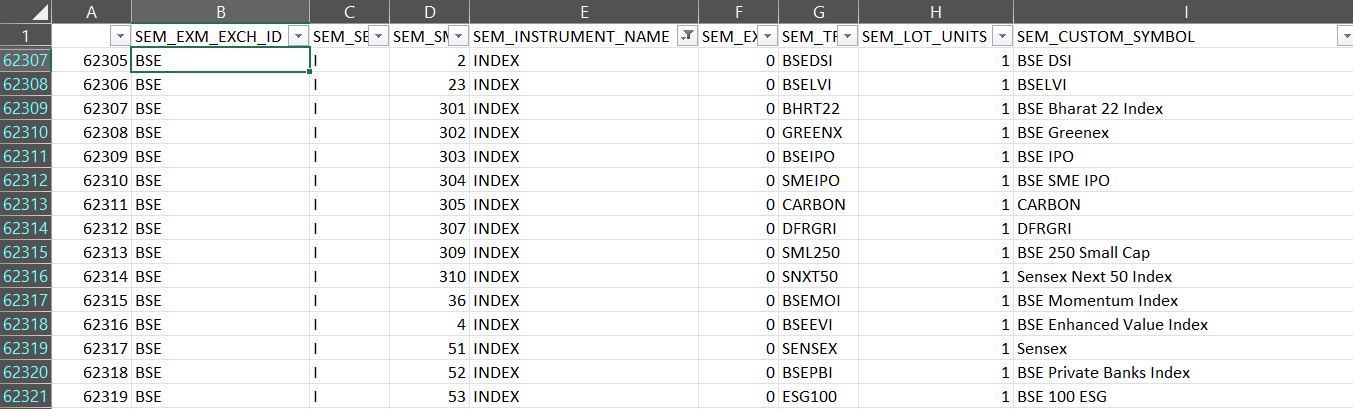
To view the list of supported sector instruments, go to the Dependencies folder in your working directory.
The latest instrument file (downloaded for the current day) will be available there.
Open the Excel file and apply a filter on the SEM_INSTRUMENT_NAME column for INDEX.
From the filtered results, you can identify the supported sector/index names using the SEM_CUSTOM_SYMBOL or SEM_TRADING_SYMBOL columns, along with their respective exchanges from the SEM_EXM_EXCH_ID column.
1 Like
Hi @bhavesh ,
It appears that the packages have been updated. Please ensure that the old offline Dhan_Tradehull.py or Dhan_Tradehull_V2.py file is not present in the same folder, and then try running the program again.
Hello @Tradehull_Imran
Thank you for the updated code,
Could you please check the latest released (Codebase Version 3.1.2) get_ltp_data function seems like changes are made there however I have made change in my get_ltp_data function based on compare btw previous and latest get_ltp_data function
Thank you
@Tradehull_Imran can you please point it to the latest commit changes for this library on github? without a verified commit release, I do not think I would consider it to be safe to just install and load the libraries even from pypy/wheel stuff. This is a red flag actually.
Hi @raj001 ,
The get_ltp_data function has been updated to align with the latest version and is working as expected. Please let me know if you encounter any issues.

1 Like