Codebase Update: New Features Added in Dhan_TradeHull

BAJAJ-AUTO Option Chain Data Not Available via Dhan Tradehull API

Error Details / Error Code

  • Repeated response while fetching option chain for BAJAJ-AUTO

  • Error output observed:

No option chain data available for the BAJAJ-AUTO
{'status': 'failure',
 'remarks': {'error_code': None, 'error_type': None, 'error_message': None},
 'data': ''}

Final logged error:

❌ OptionChain failed for BAJAJ-AUTO.
Last error: BAJAJ-AUTO got None (exchange=NFO, expiry=2)
  1. Exchange used: NFO
  2. Expiry index tried: 0, 1, 2, -1 (via retry logic)
  3. Result: Option chain API consistently returns None or status: failure only for BAJAJ-AUTO, while other F&O stocks work normally.

Code Used to Fetch Option Chain Data

resp = tsl.get_option_chain(
    Underlying="BAJAJ-AUTO",
    exchange="NFO",
    expiry=expiry_no,
    num_strikes=8
)

if resp is None:
    print("No option chain data available for BAJAJ-AUTO")
elif isinstance(resp, dict) and resp.get("status") == "failure":
    print(resp)
else:
    atm_strike, option_chain_df = resp

Library Versions Used (for Debugging Reference)

dhanhq
Version: 2.1.0
Summary: Official Python client for DhanHQ API

Dhan_Tradehull
Version: 3.1.2
Summary: TradeHull wrapper over DhanHQ

Concern
BAJAJ-AUTO is an active F&O stock on NSE, but option chain data is consistently unavailable through the API, without any error code or message. This makes it difficult to handle programmatically or diagnose whether the issue is symbol-specific, expiry-specific, or a backend data issue.

@Tradehull_Imran @Dhan Requesting clarification or a fix for BAJAJ-AUTO option chain availability in the API.

Hi @Hemal_Chhatrala ,

We are checking on it.

Hi @Hemal_Chhatrala ,

  • Open your command prompt
  • Run the following command to find where the Dhan_Tradehull.py file is located:
pip show Dhan-Tradehull
  • Look for the line starting with Location: in the output.
  • Example:
Location: C:\Users\<username>\AppData\Local\Programs\Python\Python311\Lib\site-packages
  • Inside that folder, navigate to:
Dhan_Tradehull.py
  • Scroll or search (Ctrl + F) for:
self.stock_step_df = self.dhan_equity_step_creation()

Add the below code in the next line as shown below-

self.stock_step_df = self.dhan_equity_step_creation()
self.stock_step_df.update({'BAJAJ-AUTO': 100})
  • Save the file after making the change.
  • Restart your Python script or application that imports Dhan_Tradehull.py.

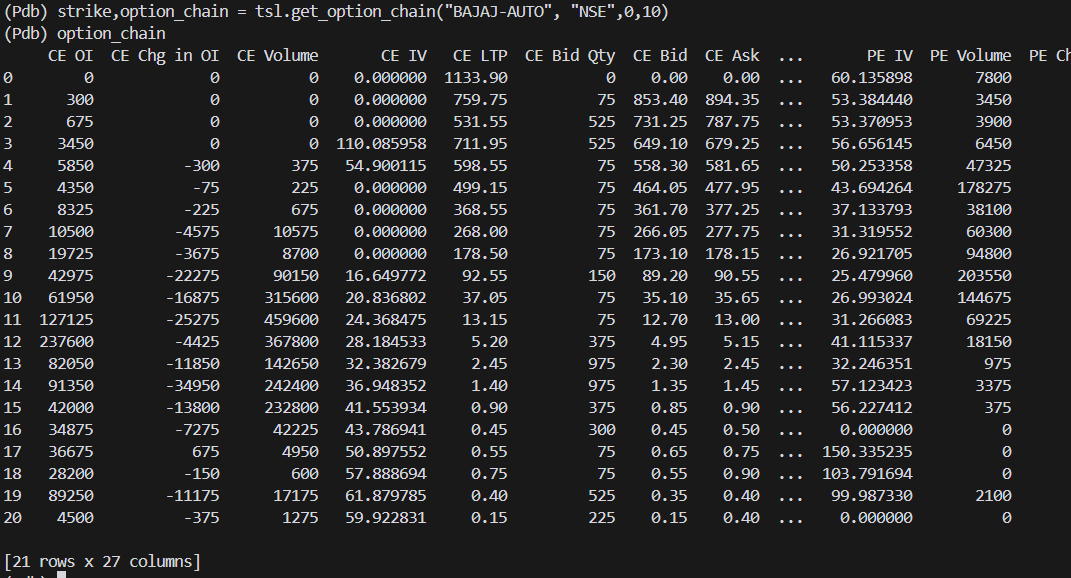
Use the below code to fetch option chain for Bajaj- Auto-

strike,option_chain = tsl.get_option_chain(Underlying="BAJAJ-AUTO", exchange="NSE",0,10)

1 Like

Special thanks to Mr. Imran Ali @Tradehull_Imran :folded_hands:

Truly appreciate your support and guidance. The way you are always available for us is a very big thing and honestly rare to see.
As always, you provided a perfect, dot-to-dot solution that worked exactly as explained.

Thanks for taking the time to identify the root cause and sharing a clear fix. This kind of support makes a huge difference for developers working with the API.

Much respect and gratitude, Imran ji.
Love you for the continuous help and commitment. :raising_hands:

1 Like

Hi @Tradehull_Imran Sir,

I have a requirement where I need to check data of Nifty futures for every 3 min candle close and in the current code versions I see we can only pull historical data and that too there is no 3 min timeframe option.

Can you please suggest me some option to pull this data. I used below code for the same but timeframe is 5 mins.

I have completed the beginner series for algo trading and still learning to try new things here.

Thanks

chart = tsl.get_historical_data(tradingsymbol = ‘NIFTY FEB FUT’, exchange = ‘NFO’,timeframe=“5”)
print(chart.iloc[-1][‘close’])

Output

chart = tsl.get_historical_data(tradingsymbol = ‘NIFTY FEB FUT’, exchange = ‘NFO’,timeframe=“5”)
(Pdb++) chart
open high low close volume timestamp
0 26280.8 26489.0 26280.8 26489.0 3250.0 2025-11-26 09:15:00+05:30
1 26480.0 26495.0 26476.5 26483.0 2275.0 2025-11-26 09:20:00+05:30
2 26484.9 26494.0 26471.5 26490.0 1755.0 2025-11-26 09:25:00+05:30
3 26489.2 26519.8 26489.2 26519.8 2730.0 2025-11-26 09:30:00+05:30
4 26517.9 26517.9 26500.0 26500.0 780.0 2025-11-26 09:35:00+05:30
… … … … … … …
3370 25397.0 25420.1 25388.4 25416.0 87490.0 2026-01-30 15:05:00+05:30
3371 25415.0 25433.7 25413.0 25417.5 143715.0 2026-01-30 15:10:00+05:30
3372 25416.0 25445.0 25411.3 25421.1 175695.0 2026-01-30 15:15:00+05:30
3373 25421.1 25428.3 25401.0 25404.0 153595.0 2026-01-30 15:20:00+05:30
3374 25404.0 25426.4 25403.4 25424.5 240760.0 2026-01-30 15:25:00+05:30

[3375 rows x 6 columns]
(Pdb++) print(chart.iloc[-1][‘close’])
25424.5

Hi @Dipika_Bajaj ,

You can fetch 1 min data and resample the data, refer the below code-

chart = tsl.get_historical_data(tradingsymbol = ‘NIFTY FEB FUT’, exchange = ‘NFO’,timeframe=“1”)
resampled_data = tsl.resample_timeframe(chart , '3T')

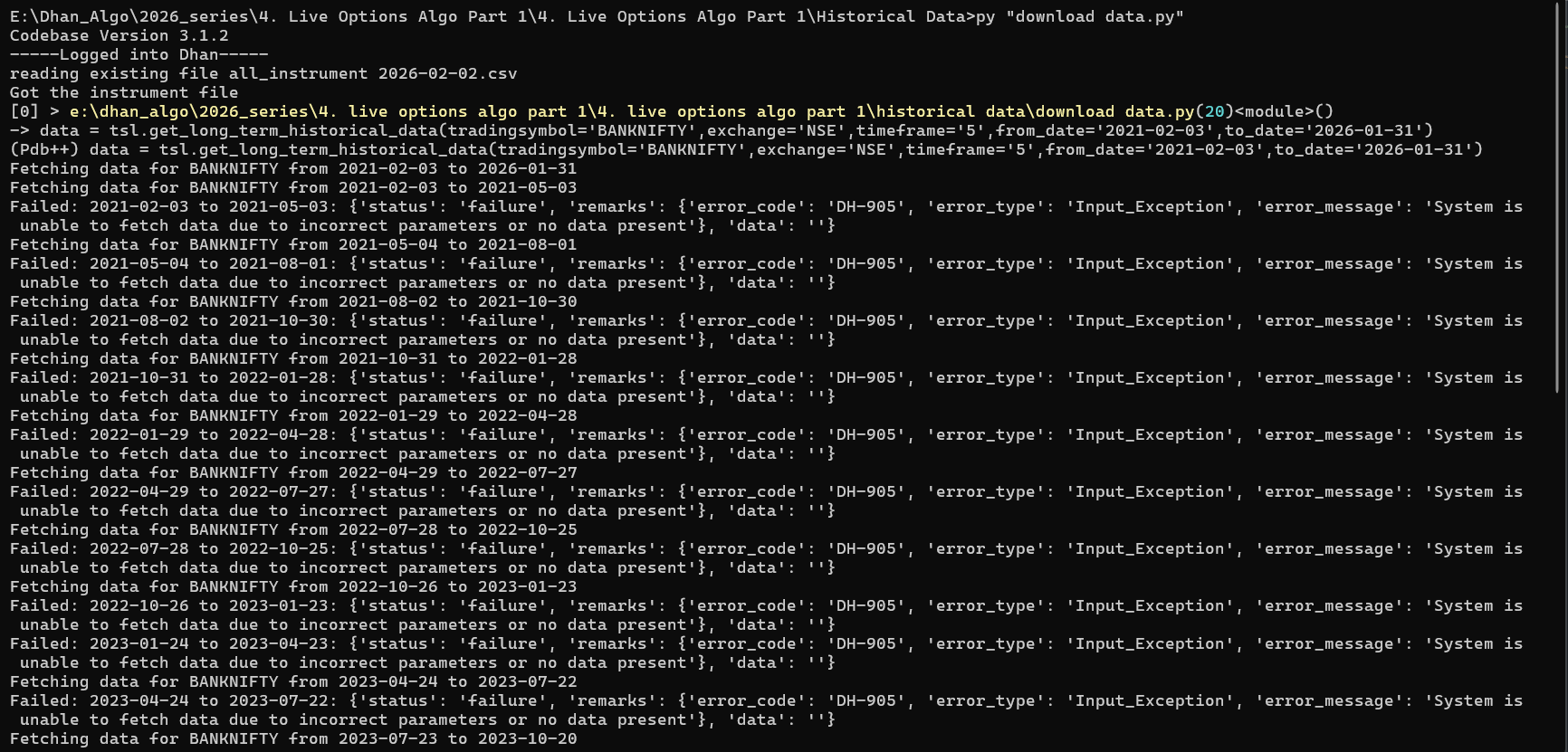
getting this error after upgrading to even after upgrading to tradehull both Name: dhanhq
Version: 2.1.0
Summary: The official Python client for communicating with the DhanHQ API
Home-page: https://dhanhq.co/
Author: Dhan and Name: Dhan_Tradehull
Version: 3.1.2
Summary: A Dhan Codebase from TradeHull
Home-page: https://github.com/TradeHull/Dhan_Tradehull
Author: TradeHull
error :

Warning: from_date2021-01-01 exceeds Dhan’s 5-year limit. Resetting to 2021-02-03
Fetching data for BANKNIFTY from 2021-02-03 to 2026-01-31
Fetching data for BANKNIFTY from 2021-02-03 to 2021-05-03
Failed: 2021-02-03 to 2021-05-03: {‘status’: ‘failure’, ‘remarks’: {‘error_code’: ‘DH-905’, ‘error_type’: ‘Input_Exception’, ‘error_message’: ‘System is unable to fetch data due to incorrect parameters or no data present’}, ‘data’: ‘’}
Fetching data for BANKNIFTY from 2021-05-04 to 2021-08-01
Failed: 2021-05-04 to 2021-08-01: {‘status’: ‘failure’, ‘remarks’: {‘error_code’: ‘DH-905’, ‘error_type’: ‘Input_Exception’, ‘error_message’: ‘System is unable to fetch data due to incorrect parameters or no data present’}, ‘data’: ‘’}
Fetching data for BANKNIFTY from 2021-08-02 to 2021-10-30
Failed: 2021-08-02 to 2021-10-30: {‘status’: ‘failure’, ‘remarks’: {‘error_code’: ‘DH-905’, ‘error_type’: ‘Input_Exception’, ‘error_message’: ‘System is unable to fetch data due to incorrect parameters or no data present’}, ‘data’: ‘’}
Fetching data for BANKNIFTY from 2021-10-31 to 2022-01-28
Failed: 2021-10-31 to 2022-01-28: {‘status’: ‘failure’, ‘remarks’: {‘error_code’: ‘DH-905’, ‘error_type’: ‘Input_Exception’, ‘error_message’: ‘System is unable to fetch data due to incorrect parameters or no data present’}, ‘data’: ‘’}
Fetching data for BANKNIFTY from 2022-01-29 to 2022-04-28
Failed: 2022-01-29 to 2022-04-28: {‘status’: ‘failure’, ‘remarks’: {‘error_code’: ‘DH-905’, ‘error_type’: ‘Input_Exception’, ‘error_message’: ‘System is unable to fetch data due to incorrect parameters or no data present’}, ‘data’: ‘’}
Fetching data for BANKNIFTY from 2022-04-29 to 2022-07-27
Failed: 2022-04-29 to 2022-07-27: {‘status’: ‘failure’, ‘remarks’: {‘error_code’: ‘DH-905’, ‘error_type’: ‘Input_Exception’, ‘error_message’: ‘System is unable to fetch data due to incorrect parameters or no data present’}, ‘data’: ‘’}
Fetching data for BANKNIFTY from 2022-07-28 to 2022-10-25
Failed: 2022-07-28 to 2022-10-25: {‘status’: ‘failure’, ‘remarks’: {‘error_code’: ‘DH-905’, ‘error_type’: ‘Input_Exception’, ‘error_message’: ‘System is unable to fetch data due to incorrect parameters or no data present’}, ‘data’: ‘’}
Fetching data for BANKNIFTY from 2022-10-26 to 2023-01-23
Failed: 2022-10-26 to 2023-01-23: {‘status’: ‘failure’, ‘remarks’: {‘error_code’: ‘DH-905’, ‘error_type’: ‘Input_Exception’, ‘error_message’: ‘System is unable to fetch data due to incorrect parameters or no data present’}, ‘data’: ‘’}
Fetching data for BANKNIFTY from 2023-01-24 to 2023-04-23
Failed: 2023-01-24 to 2023-04-23: {‘status’: ‘failure’, ‘remarks’: {‘error_code’: ‘DH-905’, ‘error_type’: ‘Input_Exception’, ‘error_message’: ‘System is unable to fetch data due to incorrect parameters or no data present’}, ‘data’: ‘’}
Fetching data for BANKNIFTY from 2023-04-24 to 2023-07-22
Failed: 2023-04-24 to 2023-07-22: {‘status’: ‘failure’, ‘remarks’: {‘error_code’: ‘DH-905’, ‘error_type’: ‘Input_Exception’, ‘error_message’: ‘System is unable to fetch data due to incorrect parameters or no data present’}, ‘data’: ‘’}
Fetching data for BANKNIFTY from 2023-07-23 to 2023-10-20
Failed: 2023-07-23 to 2023-10-20: {‘status’: ‘failure’, ‘remarks’: {‘error_code’: ‘DH-905’, ‘error_type’: ‘Input_Exception’, ‘error_message’: ‘System is unable to fetch data due to incorrect parameters or no data present’}, ‘data’: ‘’}
Fetching data for BANKNIFTY from 2023-10-21 to 2024-01-18
Failed: 2023-10-21 to 2024-01-18: {‘status’: ‘failure’, ‘remarks’: {‘error_code’: ‘DH-905’, ‘error_type’: ‘Input_Exception’, ‘error_message’: ‘System is unable to fetch data due to incorrect parameters or no data present’}, ‘data’: ‘’}
Fetching data for BANKNIFTY from 2024-01-19 to 2024-04-17
on’, ‘error_message’: ‘System is unable to fetch data due to incorrect parameters or no data present’}, ‘data’: ‘’} Fetching data for BANKNIFTY from 2024-04-18 to 2024-07-16
Failed: 2024-04-18 to 2024-07-16: {‘status’: ‘failure’, ‘remarks’: {‘error_code’: ‘DH-905’, ‘error_type’: ‘Input_Excepti
on’, ‘error_message’: ‘System is unable to fetch data due to incorrect parameters or no data present’}, ‘data’: ‘’} Fetching data for BANKNIFTY from 2024-07-17 to 2024-10-14
Failed: 2024-07-17 to 2024-10-14: {‘status’: ‘failure’, ‘remarks’: {‘error_code’: ‘DH-905’, ‘error_type’: ‘Input_Excepti
on’, ‘error_message’: ‘System is unable to fetch data due to incorrect parameters or no data present’}, ‘data’: ‘’} Fetching data for BANKNIFTY from 2024-10-15 to 2025-01-12
Failed: 2024-10-15 to 2025-01-12: {‘status’: ‘failure’, ‘remarks’: {‘error_code’: ‘DH-905’, ‘error_type’: ‘Input_Excepti
on’, ‘error_message’: ‘System is unable to fetch data due to incorrect parameters or no data present’}, ‘data’: ‘’} Fetching data for BANKNIFTY from 2025-01-13 to 2025-04-12
Failed: 2025-01-13 to 2025-04-12: {‘status’: ‘failure’, ‘remarks’: {‘error_code’: ‘DH-905’, ‘error_type’: ‘Input_Excepti
on’, ‘error_message’: ‘System is unable to fetch data due to incorrect parameters or no data present’}, ‘data’: ‘’} Fetching data for BANKNIFTY from 2025-04-13 to 2025-07-11
Failed: 2025-04-13 to 2025-07-11: {‘status’: ‘failure’, ‘remarks’: {‘error_code’: ‘DH-905’, ‘error_type’: ‘Input_Excepti
on’, ‘error_message’: ‘System is unable to fetch data due to incorrect parameters or no data present’}, ‘data’: ‘’} Fetching data for BANKNIFTY from 2025-07-12 to 2025-10-09
Failed: 2025-07-12 to 2025-10-09: {‘status’: ‘failure’, ‘remarks’: {‘error_code’: ‘DH-905’, ‘error_type’: ‘Input_Excepti
on’, ‘error_message’: ‘System is unable to fetch data due to incorrect parameters or no data present’}, ‘data’: ‘’} Fetching data for BANKNIFTY from 2025-10-10 to 2026-01-07
Failed: 2025-10-10 to 2026-01-07: {‘status’: ‘failure’, ‘remarks’: {‘error_code’: ‘DH-905’, ‘error_type’: ‘Input_Excepti
on’, ‘error_message’: ‘System is unable to fetch data due to incorrect parameters or no data present’}, ‘data’: ‘’} Fetching data for BANKNIFTY from 2026-01-08 to 2026-01-31
Failed: 2026-01-08 to 2026-01-31: {‘status’: ‘failure’, ‘remarks’: {‘error_code’: ‘DH-905’, ‘error_type’: ‘Input_Excepti
on’, ‘error_message’: ‘System is unable to fetch data due to incorrect parameters or no data present’}, ‘data’: ‘’}

Hi @SF_F ,

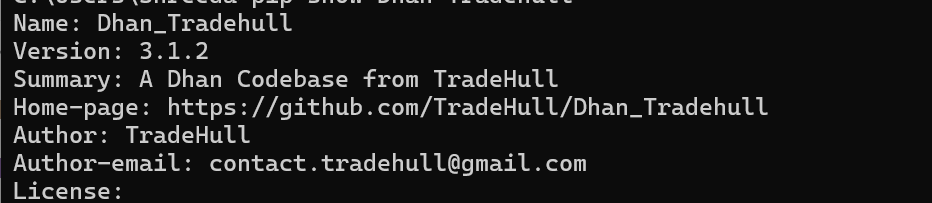
Run the below commands in cmd and do share screenshot

pip show dhanhq
pip show Dhan-Tradehull

Also share the code which you have been using.

tsl = Tradehull(client_id, access_token)

data = tsl.get_long_term_historical_data(tradingsymbol=‘BANKNIFTY’,exchange=‘NSE’,timeframe=‘5’,from_date=‘2021-02-03’,to_date=‘2026-01-31’) code i am using the same explained in video only changed it as BANKNIFTY..

screen shot

Hi @SF_F ,

Use the below code-

df = tsl.get_long_term_historical_data(tradingsymbol = 'BANKNIFTY', exchange = 'INDEX', timeframe = '1', from_date = '2021-01-01', to_date = '2025-06-17')
1 Like

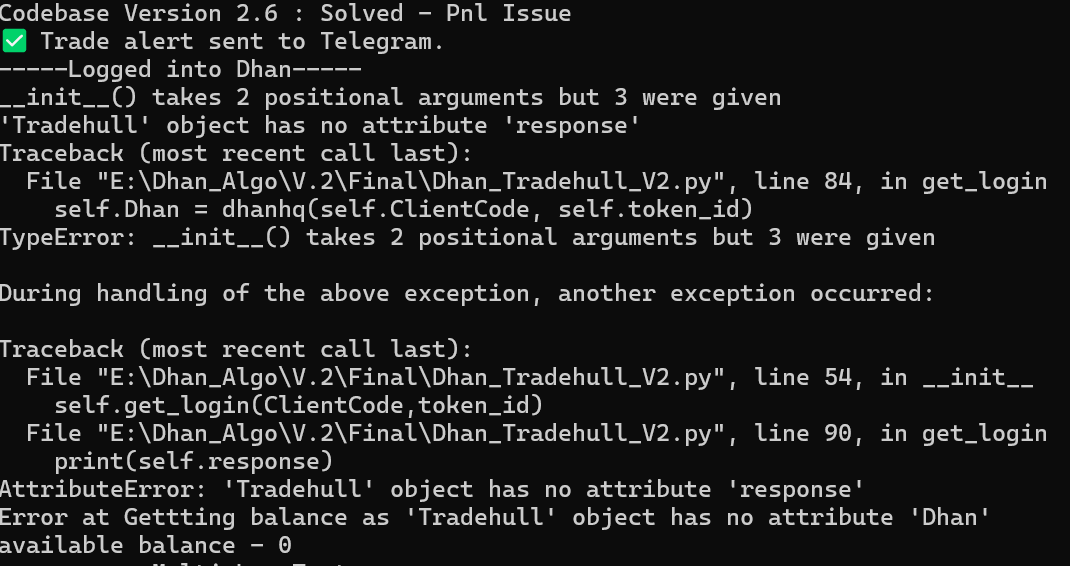
thank you so much it worked… but after updating Tradehull my old code stopped working and facing login issue since morning.. any quick fix.. which i can apply here ..

code lines are below – import pdb
import time
import datetime
import traceback
import talib
from Dhan_Tradehull_V2 import Tradehull
import pandas as pd
import numpy as np
import logging
from pprint import pprint
import os
import pandas_ta as ta
import xlwings as xw
import urllib.parse
import requests
from copy import deepcopy
from urllib.parse import quote_plus
from dotenv import load_dotenv
load_dotenv()

client_code = os.getenv(‘client_code’)
token_id = os.getenv(‘token_id’)

tsl = Tradehull(client_code,token_id) # tradehull_support_library

available_balance = tsl.get_balance()
print(f"available balance - {available_balance}")

Hi @SF_F ,

The old code is still using codebase version 2.6 which is outdated. So modify the the functions as per the latest version.

1 Like

thank you for your reply.. i have implemented a strategy after doing tested of 6 month data in live market after watching your last algo series but now started showing negative result. yesterday i did back testing of the same on last 5 years data and that is also not good after deduction of fees. so doesn’t make any sense thank you so much in helping to download bank nifty data from 2021. and providing valuable knowledge which is important. please help in reviewing this code or anybody else have suggestion to improve this strategy to reduce drawdown and good equity curve. import pandas as pd

=========================

CONFIG

=========================

CSV_FILE = “Historical Data/BANKNIFTY_1M_clean.csv”
QTY_PER_LEG = 30
TRADE_START_TIME = “09:45”
NO_TRADE_AFTER = “14:00”
FORCE_EXIT_TIME = “15:10”
EXIT_TIME = “15:15”
RISK_REWARD = 3

=========================

LOAD DATA

=========================

df = pd.read_csv(CSV_FILE)

for c in [“open”, “high”, “low”, “close”, “volume”]:
df[c] = df[c].astype(str).str.replace(“,”, “”).astype(float)

df[“timestamp”] = pd.to_datetime(df[“timestamp”])
df.set_index(“timestamp”, inplace=True)
df[“date”] = df.index.date

activity_log =
orderbook =

=========================

LOGGER

=========================

def log_activity(ts, row, day, activity, trade_side,break_side, ref_high, ref_low, step, active_legs, unrealized):

position_qty = sum(l["qty"] for l in active_legs if l["active"])

activity_log.append({
    "timestamp": ts,
    "date": day,
    "open": row["open"],
    "high": row["high"],
    "low": row["low"],
    "close": row["close"],
    "activity": activity,
    "trade_side": trade_side,
    "break_side" :break_side,
    "ref_high": ref_high,
    "ref_low": ref_low,
    "step": step,
    "active_legs": ",".join(f"L{l['leg']}" for l in active_legs if l["active"]),
    "position_qty": position_qty,
    "unrealized_pnl": unrealized
})

def all_legs_closed(legs):
return all(not l[“active”] for l in legs) if legs else False

=========================

BACKTEST

=========================

for day, day_df in df.groupby(“date”):

active_trade = None
active_legs = []
next_leg = 0
trade_done = {"BUY": False, "SELL": False}

# ---- Reference candle (09:30–09:44) ----
ref = day_df.between_time("09:30", "09:44")
if ref.empty:
    continue

ref_high = ref["high"].max()
ref_low = ref["low"].min()

adj_range = round(min(max(ref_high - ref_low, 50), 150),2)
step = adj_range / 4

for ts, row in day_df.iterrows():

    sl_hits = []
    high, low, close = row["high"], row["low"], row["close"]
    activity = "WAIT"
    break_side = None

    # ---- PRE MARKET ----
    if ts.strftime("%H:%M") < TRADE_START_TIME:
        log_activity(ts, row, day, "PRE_MARKET_WAIT", None, break_side, ref_high, ref_low, step, [], 0)
        continue

    # ---- ENTRY DIRECTION ----
    if active_trade is None and ts.strftime("%H:%M") < NO_TRADE_AFTER:

        if not trade_done["BUY"] and high > ref_high:
            active_trade = "BUY"
            trade_done["BUY"] = True
            next_leg = 0
            activity = "BUY_BREAK"
            break_side = "BUY_BREAK"

        elif not trade_done["SELL"] and low < ref_low:
            active_trade = "SELL"
            trade_done["SELL"] = True
            next_leg = 0
            activity = "SELL_BREAK"
            break_side = "SELL_BREAK"

    # ---- PYRAMID ADD ----
    if active_trade == "BUY" and next_leg < 4:
        entry = ref_high + next_leg * step
        if high >= entry:
            #sl = ref_low if next_leg == 0 else active_legs[-1]["entry"]
            sl = entry - (adj_range * 0.7)
            risk = entry - sl
            tp = entry + (risk * RISK_REWARD)
            active_legs.append({
                "side": "BUY", "leg": next_leg + 1,
                "entry": entry, "sl": sl, "tp": tp,
                "rr": RISK_REWARD, "qty": QTY_PER_LEG, "active": True
            })
            activity = f"BUY_L{next_leg+1}"
            next_leg += 1

    if active_trade == "SELL" and next_leg < 4:
        entry = ref_low - next_leg * step
        if low <= entry:
            #sl = ref_high if next_leg == 0 else active_legs[-1]["entry"]
            sl = entry + (adj_range * 0.7)
            risk = sl - entry
            tp = entry - (risk * RISK_REWARD)
            active_legs.append({
                "side": "SELL", "leg": next_leg + 1,
                "entry": entry, "sl": sl, "tp": tp,
                "rr": RISK_REWARD, "qty": QTY_PER_LEG, "active": True
            })
            activity = f"SELL_L{next_leg+1}"
            next_leg += 1

    # ---- SL / TP CHECK (SL FIRST) ----
    for leg in active_legs:
        if not leg["active"]:
            continue

        # SL
        if leg["side"] == "BUY" and low <= leg["sl"]:
            leg["active"] = False
            pnl = (leg["sl"] - leg["entry"]) * leg["qty"]
            orderbook.append({
                "date": day, "side": "BUY", "leg": leg["leg"],
                "entry": leg["entry"], "sl": leg["sl"],
                "tp": leg["tp"], "exit": leg["sl"],
                "rr": leg["rr"], "exit_reason": "SL", "pnl": pnl
            })
            sl_hits.append(f"L{leg['leg']}_SL_HIT")
            continue

        if leg["side"] == "SELL" and high >= leg["sl"]:
            leg["active"] = False
            pnl = (leg["entry"] - leg["sl"]) * leg["qty"]
            orderbook.append({
                "date": day, "side": "SELL", "leg": leg["leg"],
                "entry": leg["entry"], "sl": leg["sl"],
                "tp": leg["tp"], "exit": leg["sl"],
                "rr": leg["rr"], "exit_reason": "SL", "pnl": pnl
            })
            sl_hits.append(f"L{leg['leg']}_SL_HIT")
            continue

        # TP
        if leg["side"] == "BUY" and high >= leg["tp"]:
            leg["active"] = False
            pnl = (leg["tp"] - leg["entry"]) * leg["qty"]
            orderbook.append({
                "date": day, "side": "BUY", "leg": leg["leg"],
                "entry": leg["entry"], "sl": leg["sl"],
                "tp": leg["tp"], "exit": leg["tp"],
                "rr": leg["rr"], "exit_reason": "TP", "pnl": pnl
            })
            sl_hits.append(f"L{leg['leg']}_TP_HIT")

        if leg["side"] == "SELL" and low <= leg["tp"]:
            leg["active"] = False
            pnl = (leg["entry"] - leg["tp"]) * leg["qty"]
            orderbook.append({
                "date": day, "side": "SELL", "leg": leg["leg"],
                "entry": leg["entry"], "sl": leg["sl"],
                "tp": leg["tp"], "exit": leg["tp"],
                "rr": leg["rr"], "exit_reason": "TP", "pnl": pnl
            })
            sl_hits.append(f"L{leg['leg']}_TP_HIT")
                # ---- FORCE EXIT AT 15:10 ----

        #if ts.strftime("%H:%M") >= FORCE_EXIT_TIME:

    # ---- FORCE EXIT AT 15:10 (ONLY IF STILL ACTIVE) ----
    if ts.strftime("%H:%M") >= FORCE_EXIT_TIME:
        for leg in active_legs:
            if not leg["active"]:
                continue

            leg["active"] = False

            if leg["side"] == "BUY":
                pnl = (close - leg["entry"]) * leg["qty"]
            else:
                pnl = (leg["entry"] - close) * leg["qty"]

            orderbook.append({
                "date": day,
                "side": leg["side"],
                "leg": leg["leg"],
                "entry": leg["entry"],
                "sl": leg["sl"],
                "tp": leg["tp"],
                "exit": close,
                "rr": leg["rr"],
                "exit_reason": "TIME_EXIT_1510",
                "pnl": pnl
            })

            sl_hits.append(f"L{leg['leg']}_TIME_EXIT")


    if sl_hits:
        activity = " | ".join(sl_hits)


    # ---- CHECK IF TRADE COMPLETED ----
    if active_trade is not None and all_legs_closed(active_legs):
        active_trade = None
        active_legs = []
        next_leg = 0


    # ---- UNREALIZED ----
    unrealized = 0
    for leg in active_legs:
        if leg["active"]:
            unrealized += (
                (close - leg["entry"]) * leg["qty"]
                if leg["side"] == "BUY"
                else (leg["entry"] - close) * leg["qty"]
            )

    log_activity(ts, row, day, activity, active_trade,break_side, ref_high, ref_low, step, active_legs, unrealized)

=========================

EXPORT

=========================

pd.DataFrame(activity_log).to_csv(“BANKNIFTY_activity_log.csv”, index=False)
pd.DataFrame(orderbook).to_csv(“BANKNIFTY_orderbook.csv”, index=False)

print(“:white_check_mark: Backtest completed successfully”)
Hi @SF_F ,

For getting a good strategy, we take take reference from strategy books.

try for the strategy idea from this book. Its for options volaality trading
Volatility trading by euan sinclair

1 Like

Thanks a lot @Tradehull_Imran

Hi @Tradehull_Imran Sir,

I have my code which sometimes does not run properly and sometimes runs fine. Not sure if the issue is with the functions as ltp calls do not work seamlessly.

I want the code to run continuously and break after placing an order successfully.

Can you take a look at my code and see if I am missing anything .

import pdb
from Dhan_Tradehull import Tradehull
import pandas as pd
from pprint import pprint
import talib
import sys

API Login Details

client_code = “”
token_id = “eyJ0Cbnqoy7AoSiramOcWFgbdsKLCCOZhaBBOoQ”
tsl = Tradehull(client_code,token_id)

Taking argument for live number

if name == “main”:
if len(sys.argv) > 1:
goldenno = sys.argv[1]
else:
print(“Usage: python script.py <live_number>”)
sys.exit(1)

gno = int(goldenno)
ugn = int(gno+6)
lgn = int(gno-6)

print(“Live No”, goldenno)

#pdb.set_trace()

while True:
ce_name, pe_name, ce_strike, pe_strike = tsl.ITM_Strike_Selection(Underlying=‘NIFTY’, Expiry=0, ITM_count=1)
atm_pe_ltp = tsl.get_ltp_data(pe_name) # First command works
atm_ce_ltp = tsl.get_ltp_data(ce_name) # Gives exception
print("ATM CE STRIKE : ", ce_name , " - ATM CE LTP : ", atm_ce_ltp) # to get LTP only use [ce_name]
print("ATM PE STRIKE : ", pe_name , " - ATM PE LTP : ", atm_pe_ltp)

chart = tsl.get_historical_data(tradingsymbol='NIFTY FEB FUT', exchange='NFO', timeframe="1")
chart_3 = tsl.resample_timeframe(chart , '3T') # code to convert 1 min to 3 min timeframe
ltp = chart_3.iloc[-1]['close']
	    
print("Nifty Futures LTP Value is : ", ltp)
#pdb.set_trace()	
if (ltp > ugn) and (ltp < gno +20):
	print(" Lets buy call option")
	print("ATM", ce_name , atm_ce_ltp)
	entry_orderid  = tsl.order_placement(tradingsymbol= ce_name ,exchange='NFO', quantity=65, price=0, trigger_price=0, order_type='MARKET', transaction_type='BUY', trade_type='MIS')
	print(" Order Id : ", entry_orderid)
	break

if (ltp < lgn) and (ltp > gno -20):
	print("Lets buy put option") 
	print("ATM", pe_name , atm_pe_ltp[pe_name]) # This statement does not work sometimes due to []
	entry_orderid  = tsl.order_placement(tradingsymbol= pe_name ,exchange='NFO', quantity=65, price=0, trigger_price=0, order_type='MARKET', transaction_type='BUY', trade_type='MIS')
	print(" Order Id : ", entry_orderid)
	break

print(“process complete”)

In order to run this code I just pass Nifty futures number which is in 20 point range from LTP.

Sample below how it runs and the output.

py LiveAlgo1.py 25705 (LTP is 25720)
Codebase Version 3.1.2
-----Logged into Dhan-----
reading existing file all_instrument 2026-02-05.csv
Got the instrument file
Live No 25705
Exception at calling ltp as {‘status’: ‘failure’, ‘remarks’: {‘error_code’: None, ‘error_type’: None, ‘error_message’: None}, ‘data’: ‘’}
ATM CE STRIKE : NIFTY 10 FEB 25600 CALL - ATM CE LTP : {}
ATM PE STRIKE : NIFTY 10 FEB 25700 PUT - ATM PE LTP : {‘NIFTY 10 FEB 25700 PUT’: 158.7}
Nifty Futures LTP Value is : 25720.0
Lets buy call option
ATM NIFTY 10 FEB 25600 CALL {}
'Got exception in place_order as {‘status’: ‘failure’, ‘remarks’: {‘error_code’: ‘DH-906’, ‘error_type’: ‘Order_Error’, ‘error_message’: ‘Market is Closed! Want to place an offline order?’}, ‘data’: ‘’}
Order Id : None
process complete

Hi All,

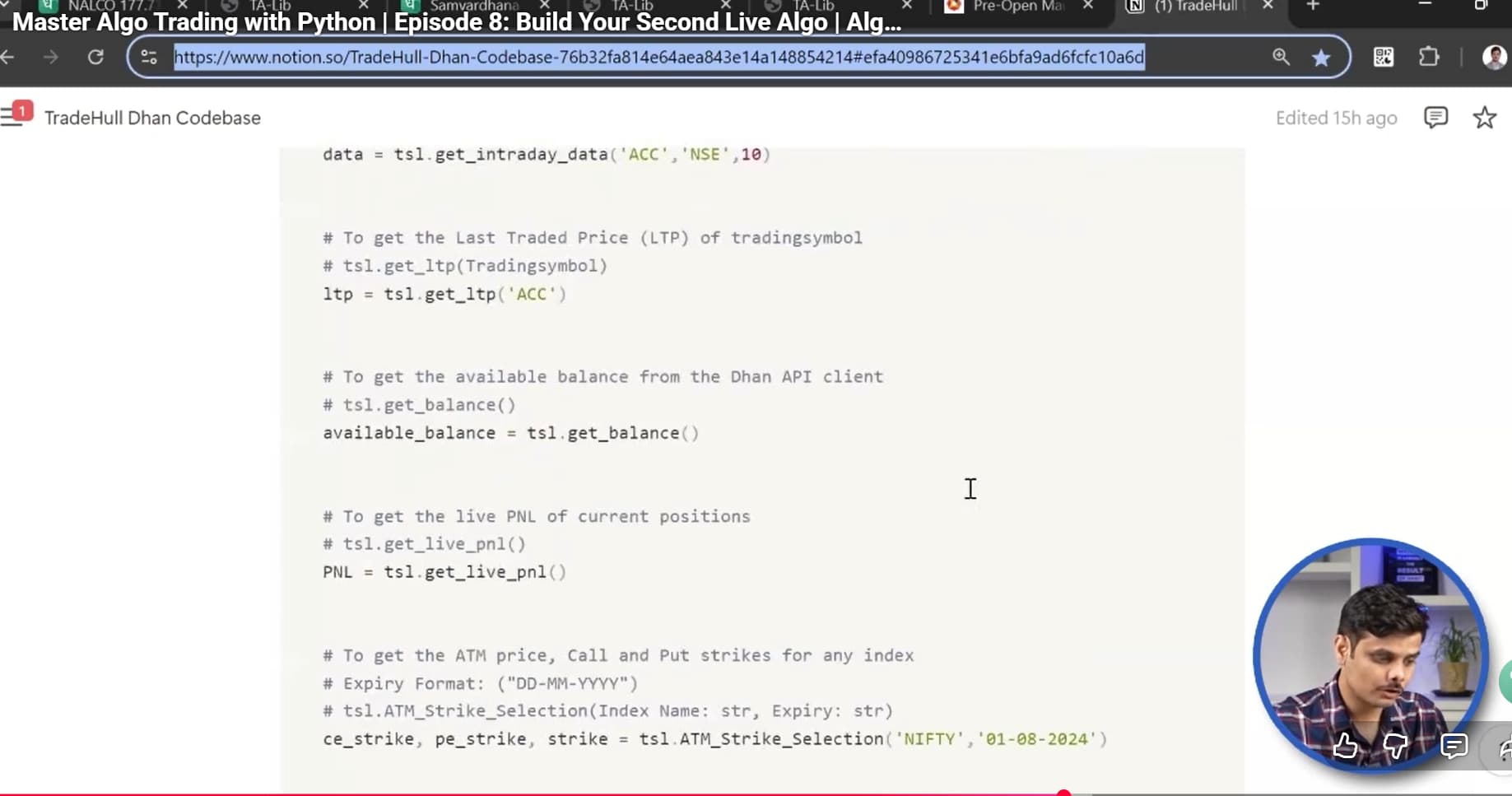
Can someone please provide me the link or code where we have details and usage of all functions available in Dhan code base. In one of the video session it was shown but I am not able to find the links.

That document had comments for all the data that a function returns and how to pass values to that function.

Attaching screen shot for reference.

Thanks

Hi @Dipika_Bajaj ,

Itseems code is ok, but order was not placed because the program was executed after the market hours.
'Got exception in place_order as {‘status’: ‘failure’, ‘remarks’: {‘error_code’: ‘DH-906’, ‘error_type’: ‘Order_Error’, ‘error_message’: ‘Market is Closed! Want to place an offline order?’}, ‘data’: ‘’}

Also we have updated our codebase, do check the below thread -

You can refer the below pypi link for documentation -
Dhan-Tradehull · PyPI

(tradehull_test) sahilmalhotra@Sahils-MacBook-Air Price action strategies % python updated_tradehull_test.py

Mibian requires scipy to work properly

Codebase Version 3

-----Logged into Dhan-----

dhanhq._init_() takes 2 positional arguments but 3 were given

‘Tradehull’ object has no attribute ‘response’

Traceback (most recent call last):

File “/Users/sahilmalhotra/Documents/Sahil/Price action strategies/tradehull_test/lib/python3.13/site-packages/Dhan_Tradehull/Dhan_Tradehull.py”, line 74, in get_login

self.Dhan = dhanhq(self.ClientCode, self.token_id)

            \~\~\~\~\~\~^^^^^^^^^^^^^^^^^^^^^^^^^^^^^^^^

TypeError: dhanhq._init_() takes 2 positional arguments but 3 were given

During handling of the above exception, another exception occurred:

Traceback (most recent call last):

File “/Users/sahilmalhotra/Documents/Sahil/Price action strategies/tradehull_test/lib/python3.13/site-packages/Dhan_Tradehull/Dhan_Tradehull.py”, line 52, in _init_

self.get_login(ClientCode,token_id)

\~\~\~\~\~\~\~\~\~\~\~\~\~\~^^^^^^^^^^^^^^^^^^^^^

File “/Users/sahilmalhotra/Documents/Sahil/Price action strategies/tradehull_test/lib/python3.13/site-packages/Dhan_Tradehull/Dhan_Tradehull.py”, line 80, in get_login

print(self.response)

      ^^^^^^^^^^^^^

AttributeError: ‘Tradehull’ object has no attribute ‘response’

> /Users/sahilmalhotra/Documents/Sahil/Price action strategies/updated_tradehull_test.py(15)()

-> pdb.set_trace()

(Pdb) available_balance = tsl.get_balance()

Error at Gettting balance as ‘Tradehull’ object has no attribute ‘Dhan’

(Pdb)

I am getting this error. looks like not logging in as unable to fetch balance.

using dhanhq 2.1.0 and Dhan-Tradehull 3.0.6 with python 3.13.2.