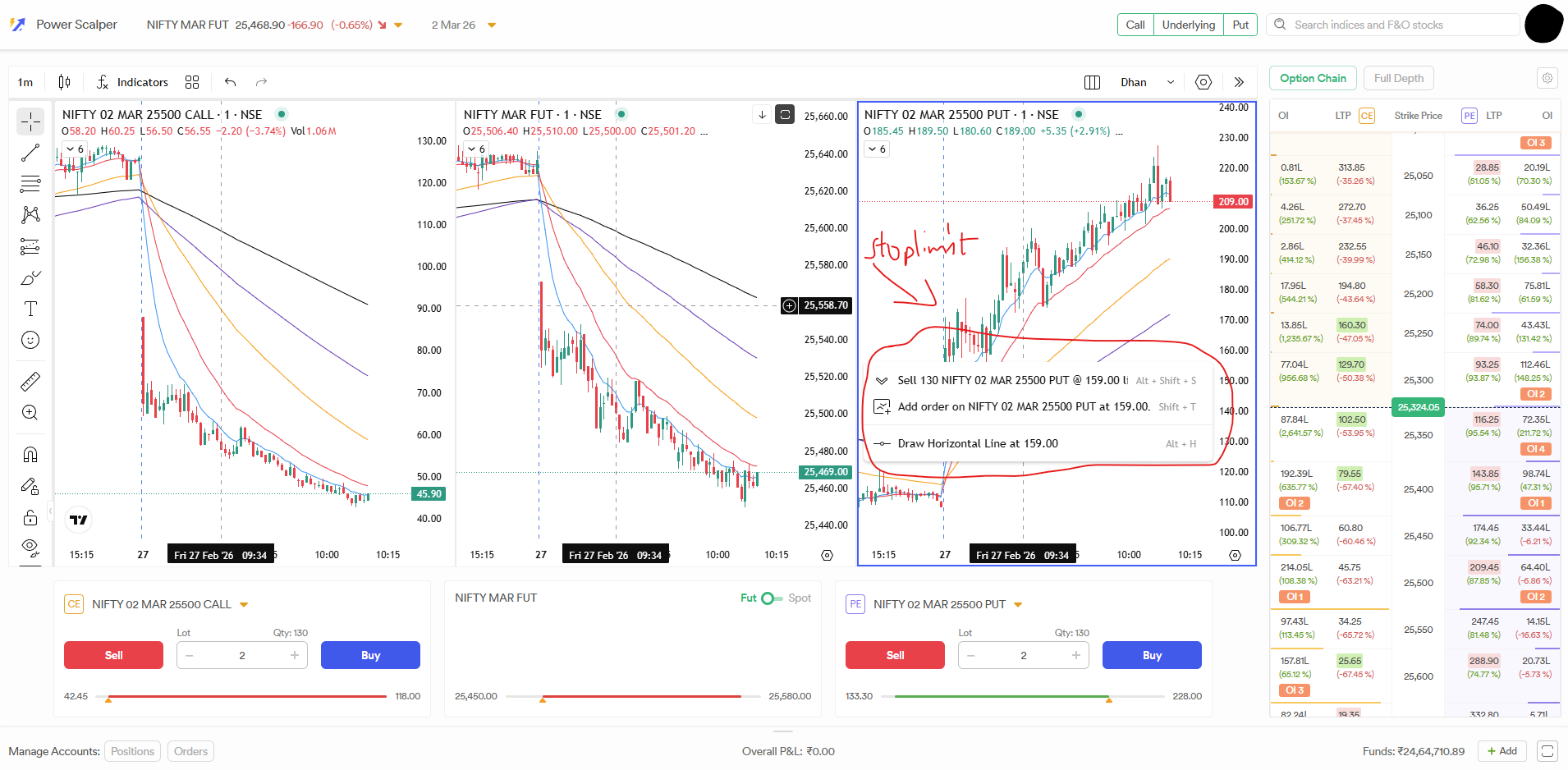
Provide “Stop Limit Order” (with Super Orders) in order placement section, via Plus button or Right Click Layout.
Layout selection option horizontal or vertical in case only call and put are selected.
Hide Option for Trade, Option Chain, Full Depth section. So user can use it whenever he wants to use. It will save space and provide more space for charting.
Reduce space used for “Trade/Option Chain/Full Depth section” section, make it little bit compact by reducing font size.
Shift “Manage Accounts” section below Option Chain, So we can see Option chain as well as orders/positions same time.
@Hardik I’ve noticed that the tradingview charts are not synced with power scalper charts the drawing in Nifty Feb Fut is not visible on Nift feb fut on power scalper are both terminal work independently ? if that is the case then it would be not of much use. It should sync ideally is there any limitation as of now? Will it work in future if yes then by when?
The idea is to keep Dhan Web and Power Scalper separate. The only reason of building Power Scalper as a separate tool is to ensure core scalping is optimised for performance. The value of adding watchlist is low compared to the performance cost and clutter it would create. For now, we will keep both of these separate.
Yes, Power Scalper will work independently from the Dhan Charts but your drawings on both windows will stay saved independently. There are two reasons for this - the layout on power scalper is auto created and limits on the number of chart windows open at once. If this changes, then the scalper won’t work as expected. Second, these charts are optimised specifically for Scalping - not all features from main charts will be made available here
We are looking into bringing this here
Will check this out, it should ideally work for this scenario
For 3rd and 4th, we are already doing optimisation and bringing more things there. On 5th, you can still do the same but we are working on an enhanced version of this as well.
@abhiramskrishna This is a scalping tool and I doubt a scalper has time to put 2 put options or 2 sell options. If you still need to go ahead with 2 put options or 2 sell options which is ideally a Condor or Fly then Dhan’s Option trader is the tool for you.
@Hardik Hey, an it’s awesome feature. It’s seamless and convenient; no need to setup the charts daily morning. But I have a doubt and I’m trying to understand whether what I’m seeking is impossible or it’s technically not feasible.
Let’s say I’m buying. Now the next moment I need to set the SL. TP is the last thing in mind.
Now Power scalper let’s me buy instantly, but not letting me protect instantly.
I understand I can choose this following way :
Click plus button
Add order
Select super order
Set SL
Click “Instant buy”
Instead Why can’t I just use
Click BUY under the trade tab
On respective chart drag my SL and TP?
It’s done with 2 steps. Isn’t this a real power scalper? Scalp away, protect in second mouse move?
Kindly Add STOP LIMIT order also in power scalper in plus button and right click. If this stoplimit order is provided again with 0.05rs price difference it would be of no use, Could you provide a setting for the user to pre-set this price difference between trigger price and limit price so that it creates stoplimit order everytime with user pre-set value(Eg 1rs or 2rs or 1% or 5% etc)?
In Dhan web TV Charts, With plus button and right click - STOP LIMIT order is still created with 0.05rs price difference only and doesnt have any fill guarantee, so if you could provide user to set this difference as requested above would allow to trade fast in seconds when instant order placement is enabled.
All other brokers are providing bracket orders only for 2 Entry types - Market and Limit , if Dhan could provide bracket order for STOP LIMIT order entry type as well, only then it would feel complete. For breakout traders, most entries are done with Buy Stop limit order as shown in the above image.
Additional Feature requests in Power Scalper:
Delta value Column in option chain
Predefined Quantity , Predefined TP and SL
Drag and Drop to adjust TP and SL after order is executed
Keyboard shortcuts for placing all types of orders (Market , Limit and StopLimit) on the focused chart, if the crosshair is above LTP the keyboard shortcuts should work as (Sell Market, Sell Limit and Buy Stoplimit) and if the cross hair is below LTP then (Buy Market, Buy Limit and Sell StopLimit)
Suggestions for keyboard and mouse shortcuts
(Ctrl + single click ) for placing Stoplimit order
(Ctrl + double click) for placing Limit order
(Ctrl + mousewheel click) for placing Market order
Depending on where crosshair is wrt LTP the above combinations of orders would be created . For Example,
Crosshair above LTP with (Ctrl + single click) would create Buy Stoplimit order with predefined Quantity, TP and SL
Crosshair below LTP with (Ctrl + mousewheel click) would create Buy Market order with predefined Quantity , TP and SL and so on
Predefined Quantity, TP and SL frees up order form filling time, Keyboard and mouse shortcuts speeds up order placing time. If Dhan could provide these features , Dhan would add tremendous value to traders and differentiate itself from other broker scalper platforms that are providing incomplete set of features.
Please include volume data for the indices. Its very much needed.
An option for fullscreen. Maximise the view for chart.
An option for preferred order placement when you click on plus sign for order placement from chart. (example - if I need only super order, the option to select it as the prefered order type).
We now have Enhanced Power scalper - Power Scalper gets new additions for Options Traders, request you all to try the new power scalper mode and let us know if you have any suggestions. Thank you for your valueable Inputs.
Please guys let us place Intraday orders on Power scalper. It is the most basic thing which should have been implemented. Currently, we can only place Delivery orders. This is a fundamental and basic major flaw because we cant even trade on the expiry day. Because Delivery orders are blocked on expiry day. I don’t understand how could you miss such a simple and the most important thing. It defies the whole purpose of Power Scalper which is to scalp on expiry day.