HI @Rakesh_Durgam ,
Refer this video for creating Static IP and Setting it up -
@Tradehull_Imran how do i call the data of sectorial indices :- Nifty IT , Nifty Pharma, Nifty Auto, Nifty Consumption, Nifty Energy, and more such like these?
Hi @Harry ,
You can retrieve historical data as usual, but to fetch Sectoral Indices, you need to include an additional parameter: sector = 'Yes'. Using this parameter allows you to access data for Sectoral Indices.
Get Historical Data
Refer the below code -
# sector data

data = tsl.get_historical_data(tradingsymbol="NIFTY AUTO", exchange="NSE", timeframe="DAY", sector="YES")
@Tradehull_Imran The code you gave me for fetching the secotorial indices is giving error:
(Pdb++) data = tsl.get_historical_data(tradingsymbol=“NIFTY AUTO”, exchange=“NSE”, timeframe=“DAY”, sector=“YES”)
*** TypeError: Tradehull.get_historical_data() got an unexpected keyword argument ‘sector’
I thought its the version problem, so i upgraded the dhan_tradehull but it seems that its already up to date
I also tried different syntaxes, changing the exchange from NSE to INDEX but then i am only able to fetch the nifty and banknifty data
Please suggest a solution to this
ERROR: Could not find a version that satisfies the requirement pandas-ta (from versions: none)
ERROR: No matching distribution found for pandas-ta
please help to resolve this error
Hi @kasi_viswanath ,
We have updated the Dhan_Tradehull Codebase ,
Do refer this link to upgrade the Dhan_Tradehull Codebase -
Hi @Harry ,
Do run the below commands in cmd terminal and share screenshot-
where python
pip show dhanhq
pip show Dhan-Tradehull
Hi @Tradehull_Imran Sir,
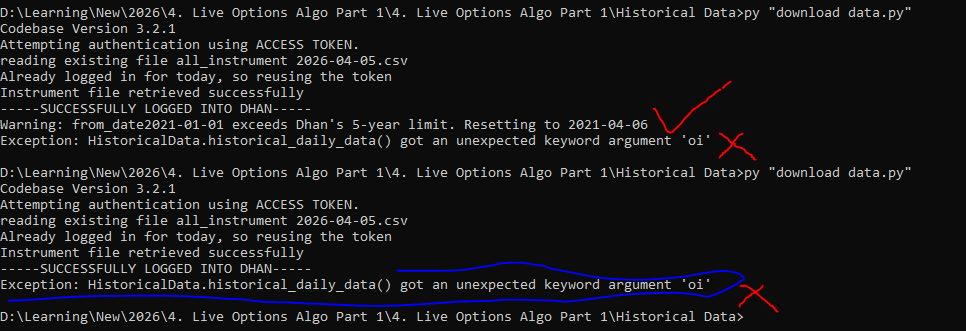
Exception in Getting OHLC data as HistoricalData.intraday_minute_data() got an unexpected keyword argument ‘oi’
Do share the code that is being used here.
Hi @Tradehull_Imran Sir,
from Dhan_Tradehull import Tradehull
client_code = “”
token_id = “”
tsl = Tradehull(client_code,token_id)
data = tsl.get_long_term_historical_data(tradingsymbol=‘NIFTY’,exchange=‘INDEX’,timeframe=‘5’,from_date=‘2022-01-01’,to_date=‘2026-04-02’)
data.to_csv(‘NIFTY 5 mins.csv’)
Hi @Tradehull_Imran Sir,
from Dhan_Tradehull import Tradehull
client_code = “”
token_id = “”
tsl = Tradehull(client_code,token_id)
data = tsl.get_long_term_historical_data(tradingsymbol=‘NIFTY’,exchange=‘INDEX’,timeframe=‘5’,from_date=‘2022-01-01’,to_date=‘2026-04-02’)
data.to_csv(‘NIFTY 5 mins.csv’)
link not opening
Hi @Tradehull_Imran Sir,
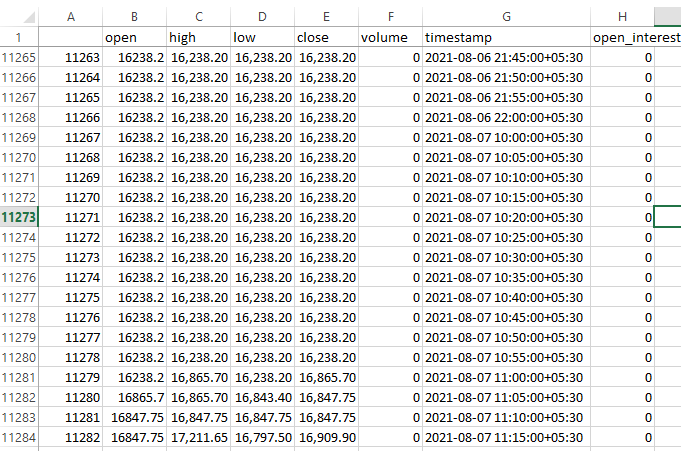
I was working on the Directional Edge (Live Options Algo Part 1) file where we are using historical Nifty data for testing. During my analysis, I found some unexpected issues, which also impacted the DD.
The dataset you shared — Nifty 5-Minute Historical data for 5 years — contains candle details even on market-closed dates. For example, on 07-Aug-2021, the market was closed (it was a Saturday), and no special trading session took place. However, the data shows a 15% market move in a single session on that day, which is clearly incorrect.
Please check at your end and confirm why such inaccurate historical data is appearing. I am relying on your dataset since I’m unable to download the data myself. I have already shared related details with you in another chat.
Thank you,
Bikesh
| name | date | entry_time | entry_price | buy_sell | qty | sl | exit_time | exit_price | pnl | remark | traded |
|---|---|---|---|---|---|---|---|---|---|---|---|
| NIFTY | 07-Aug-21 | 12:50 | 15,727.50 | SELL | 75 | 17,669.99 | 07-Aug-21 | 17,669.99 | -1,45,686.93 | sell_stop_loss_hit | yes |
Tagging @Dhan for the same
@Tradehull_Imran Sir- Please suggest on this too
Hi @Tradehull_Imran sir,
In my code I have this :
put_buy_order = tsl.order_placement(pe_buy_name, ‘NFO’, qty, 0, 0, ‘MARKET’, ‘BUY’, ‘MARGIN’)
(I tried ‘CNC’ insted ‘MARGIN’ as well but I faced an error, so I stick with ‘MARGIN’ which workig well for carry forward.)
But it executed as a limit order attaching screen shot below
please do let me know how can I write code to execute order type as market.
in screen shot order type market showing one I manually traded not using python
Hi @Rakesh_Durgam ,
As per SEBI’s new guidelines, MARKET orders will not be sent from the API.
For all limit orders, if a price higher than the current Last Traded Price (LTP) is specified for a buy order, it is automatically executed as a market order.
For buy orders, the limit price can be set as:
Price = LTP × 1.03 (variable)
When such a limit order is placed, it effectively behaves like a market order and gets executed immediately.
Similarly, for sell orders, if the limit price is set lower than the LTP, it will also be treated as a market order and executed instantly.
Can you elaborate your query ?
Hi @Tradehull_Imran sir,
Is it possible to run more than 2 algos without any errors(rate limits & strike selction errors)?
Pls advise how to run more than 2 algos at the same time.