Request Improvement on Some Features to improve user experience

Thanks Dhan Team for making this user friendly app. However, i feel there are some areas where following improvements are needed and these can make Dhan even more user friendly and in line with other competitors.

  1. Earlier switch accounts was working seamlessly, but now it is asking for otp every time, which is really frustrating. This should be roll back to work seamlessly as marketed by Dhan.
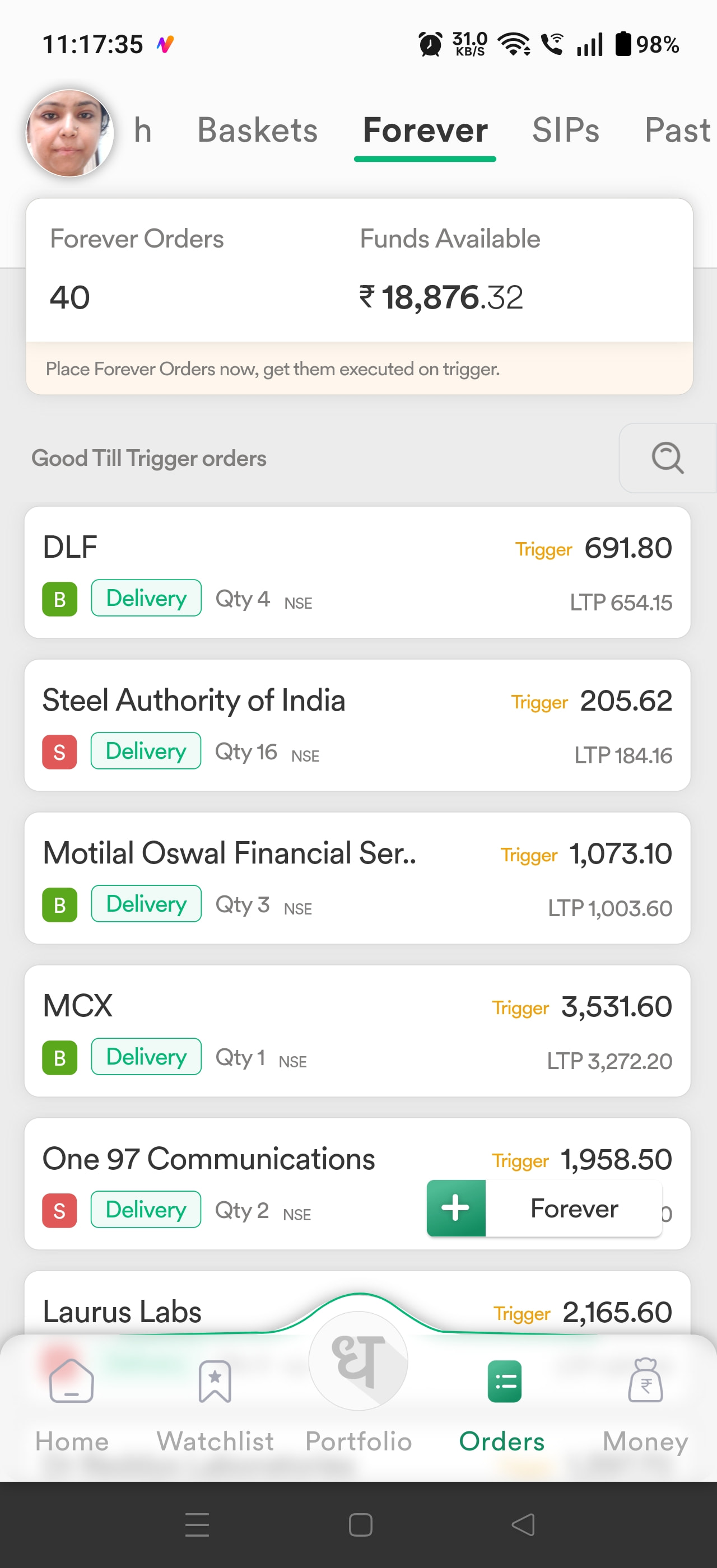
  2. I have turned on Display smbols for stocks instead of scrips, even then, in forever order section, it is showing stock / etf names instead of symbol which makes it more difficult to interpret which stock is this. This gets even worse in case of long ETF Names. Please allow symbols of stocks / etf to show instead of names in forever order section.
  3. Also, in forever order section, suppose i have created gtt for 50 scrips, then there should be a search symbol which helps me to find that particular forever order, so that i can quickly modify or delete the same. Right now, i have to manually scroll to get the desired forever order, and search feature only search scrips to place new forever orders.
  4. When i click statements, and then profit & loss statement, it emails the same for desired period, instead it should show on screen for the desired period, as other brokers do. Whereas your other statements like ledger summary and tax report show the data instantly on screen. Make it same for P&L also to show the data instantly on screen.

I hope you will understand these features, and your team will implement them soon. Thanks in advance.

3 Likes

I can tag one good and helpful person from Dhan team @Radhika

Hi @Tanuja_Vasuja, thank you for taking the time to share such detailed feedback. We appreciate it.

Here are clarifications on your points:

  1. The switch account flow has been modified in line with recent exchange guidelines, which is why OTP authentication is now required.

  2. The symbol name display currently works on specific sections like Watchlist and Positions. This behavior has remained the same since the feature was introduced, including in the Forever Orders section.

  3. While we understand the request for search within existing Forever Orders, most users typically do not maintain a very large number of such orders, so this enhancement is unlikely to be taken up at the moment.

  4. We are actively working on improving the overall reporting experience through the Dhan Journal, which will address usability and visibility aspects of reports over time.

Thanks sir for giving reply. However for a Feature first company like DHAN, i was not expecting this response. However dont take it otherwise but,

  1. Otp is required, that i understand, and will get used to it.
  2. if i have changed to display the symbol instead of name, it should be applied to everywhere in each section. If DHAN is so feature-first company this is very basic feature and available in all brokers. Hope this will be implemented soon.
  3. If long etf name or stock names are visible in forever section and if i am following a conditional buy order that needs to be modified daily, or if i am following trailing stop loss that also needs to be modified daily, then i think this feature is a must which is a very basic feature and available with almost every broker.
  4. Also if i want to see my p&l, i dont want to download the report, open the email, then open the pdf attatchment, it should be handy just like ledger statments which is again very basic feature and available with almost every broker.

Hope i was able to clear my feature request. I seriously love your app and features, but due to above areas, i feel somewhat disappointing. Thanks

Atleast allow user to use Dhan clone app .

It was a relief before Switch account notanki.

I also requested for point no.3 search from forever order, pls implement it.

1 Like

No response from DHAN Team within 8 days. Thanks. Also i noticed that, in forever order section, there is a search bar which helps to find scrips to place forever order, and there is a + plus button also in the bottom which also does the same thing. Don’t you think that search bar should search the orders placed instead of new scrips to place forever order. also, i dont understand what is the problem in showing instant P&L on screen feature.

1 Like

Hi @Tanuja_Vasuja We have your feedback and that has been shred with our teams.

Thanks. Hope the required improvements will be live soon for the betterment of users..

2 Likes

yes definitely requirement for 3rd & 4th point for many users.

Feature Request: Make “Display Name = Symbol” Consistent Across the Entire App (High Priority)

First of all, thank you to the Dhan team for building such a user-friendly and feature-rich trading platform. It’s evident that a lot of thought has gone into creating a great experience for traders.

That said, after using the app extensively, I’ve come across a few areas where some improvements could make the platform even more intuitive, consistent, and competitive with other leading brokerage apps. I believe the following suggestions would significantly enhance the overall user experience.

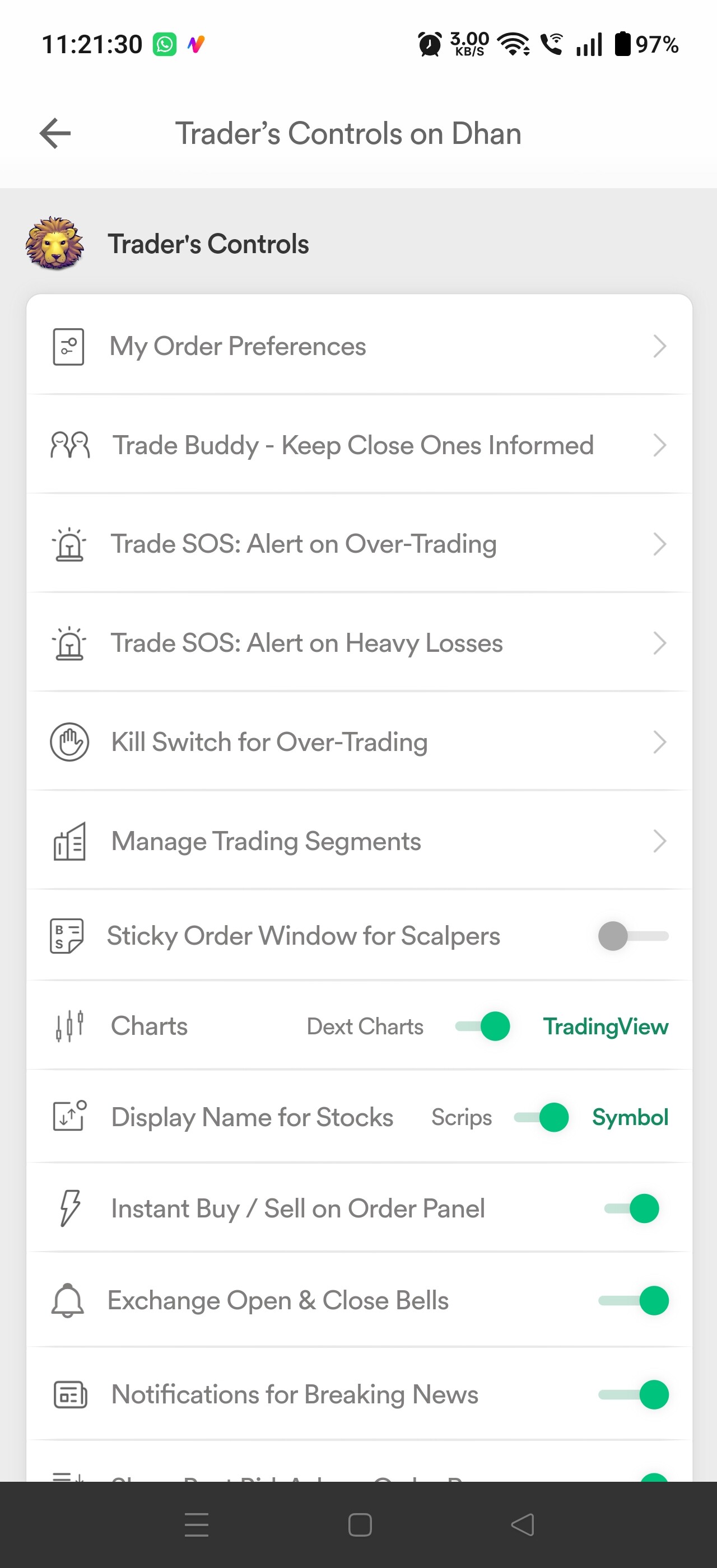
I have enabled “Symbol” as the Display Name for stocks in the Dhan app because I prefer identifying stocks and ETFs by their trading symbols rather than their full names.

However, this setting is currently applied inconsistently across different sections of the app:

  • :white_check_mark: Watchlist section shows symbols.

  • :white_check_mark: Positions section show symbols.

  • :white_check_mark: Orders section show symbols.

  • :cross_mark: Forever Orders section still display the full stock/ETF names instead of symbols.
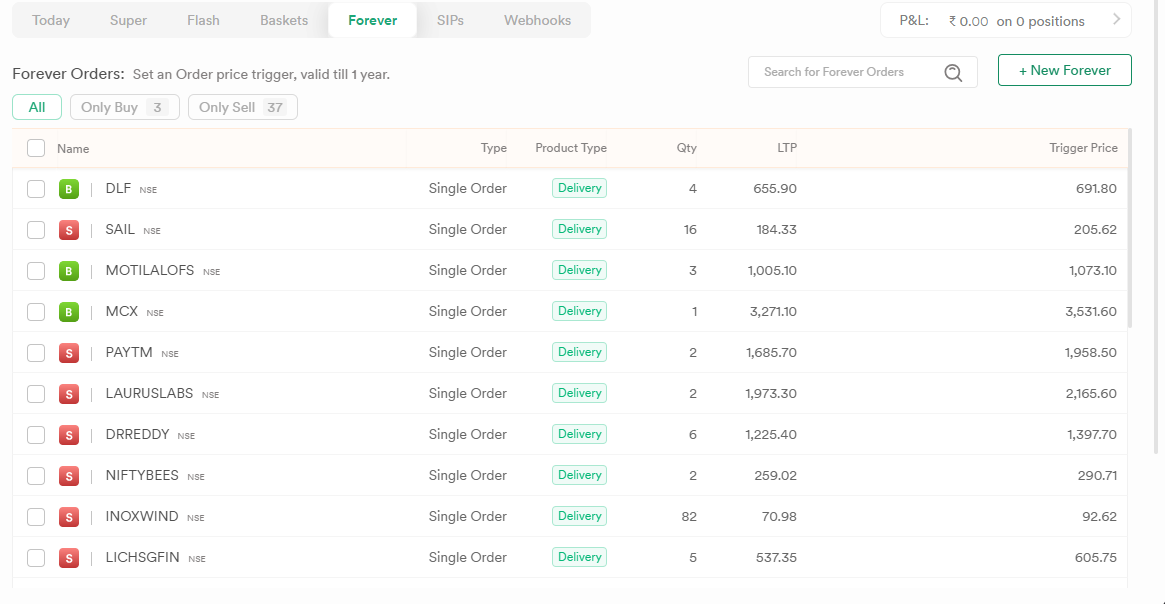
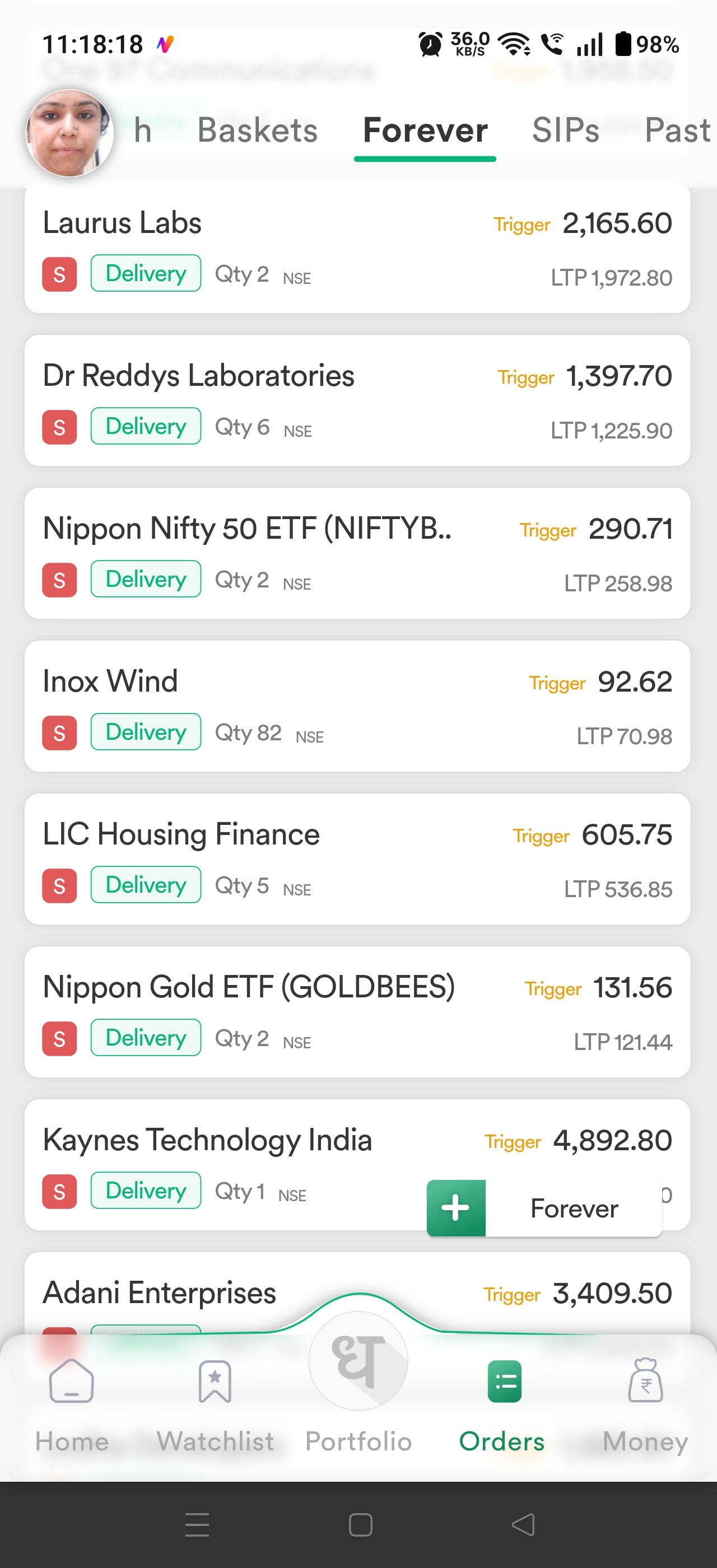
If a user explicitly chooses Symbol as their preferred display format, that preference should be respected throughout the entire app. Switching between symbols and full names in different sections creates an inconsistent experience and slows down order management, especially for active traders.

Another issue with Watchlist sorting

My watchlist when contains only ETFs, and the display shows ETF symbols as expected. However, when I sort the watchlist by Name, the sorting is not performed using the displayed symbols. Instead, it appears to be sorting by the ETF’s underlying full name (often beginning with the AMC name), which results in an order that looks incorrect to the user.

For example:

  • The UI displays ETF symbols.

  • But the sorting is based on the hidden full ETF names, making the displayed order confusing.

The sorting logic should always follow what the user actually sees on the screen. If the display name is set to Symbol, then Sort by Name should sort using the displayed symbols—not the hidden underlying names.

Why this is important

This is more than a cosmetic issue. It impacts usability by:

  • Creating an inconsistent experience across different sections.

  • Making it harder to quickly identify instruments while managing Forever Orders.

  • Producing confusing watchlist sorting that doesn’t match what’s displayed.

  • Increasing cognitive load for users who rely on ticker symbols for faster decision-making.

Please consider making this a high-priority UI/UX improvement. The “Display Name” preference should be treated as a global setting and applied consistently across every module, including Forever Orders, search results, holdings, positions, order book, and watchlists. Similarly, all sorting operations should respect the active display format shown to the user.

This would significantly improve consistency and the overall trading experience. I hope you will understand these features, and your team will implement them soon. Thanks in advance.

Hi @Naresh_Vasuja ,

Welcome to MadeForTrade!

In the app, Watchlist sorting is currently based on scrip names, while Symbols are available in Orders, Watchlists, Positions & Portfolio.

We have your feedback on making this consistent across sections and will look into it to improve your experience.

"Could you please provide a timeline for when we can expect ETF symbols to be displayed instead of full ETF names within the ‘Forever Orders’ section? Additionally, we need the option to sort our ETF watchlists alphabetically by their symbol names.

For swing traders who daily manage, track, and update multiple orders directly from their watchlists, having the full name instead of the ticker symbol significantly slows down execution and create confusion. Ticker symbols are the standard anchor for technical analysis and order placement. Making these basic yet critical sorting and display adjustments available soon would vastly improve platform usability and trading efficiency. Thank you for your attention to this highly requested optimization."


Hey @Naresh_Vasuja,

Following our detailed discussion over the call regarding Forever Orders and Watchlists, we understand your requirements we have noted this for future enchancement.

Dear dhan team,

I want to share a feedback / feature request regarding the dhan app. Whenever I click on portfolio and select a stock for selling it by default show one quantity. Actually it must show the quantity I am holding so that I am not required to type manually every time whenever I am existing my holdings.

Secondly whenever I click any stock in forever order, I can’t se the market depth and today’s ohlc data in the same screen. Also I can’t see any option to directly go to chart of that stock. For this again I have to go to watchlist type or select the stock for seeing ohlc or chart.

I request you to kindly consider these feature request and incorporate them in your future updates at the earliest

Any body from Dhan Team can respond the above. Also one thing i have noticed that in forever orders only symbols are displayed on dhan web but on app it is showing full names for etfs and stocks (i have switched the option for symbol instead of names)

Hi @Naresh_Vasuja

We had received feedback from the community earlier that the total portfolio quantity should not be pre-filled while selling holdings. This was fair feedback, as there were cases where investors, in a rush, ended up selling more quantity than intended.

It is therefore better to manually enter the quantity you wish to sell. This adds a small step, but helps users take a more deliberate action and reduces the chances of an unintended sell.

Hi @nkvasuja

Both Symbol and Scrip Name work on Dhan Web and Dhan App. This depends on the preference selected under Trader’s Control, Scrip Name or Symbol.

I just tested it for the Forever Order window on both Dhan Web and Dhan App, and it is working as expected. Your feedback regarding showing the Symbol in the Forever Order List on Dhan App is noted.

i understand regarding default sell qty set to 1 but what about this - Secondly whenever I click any stock in forever order, I can’t se the market depth and today’s ohlc data in the same screen. Also I can’t see any option to directly go to chart of that stock. For this again I have to go to watchlist type or select the stock for seeing ohlc or chart.

Also forever order window on dhan app and web is not working as expected. in app it is showing full names of stocks and etf whreas in web it is showing symbol even when i have switched to symbol in traders control section. also in dhan web there is an option to see only buy or sell forever orders i have attached the screenshots for your ready reference.

Screenshot 2026-09-30 112017

Screenshot_2026-09-30-11-18-18-20_2386960be2916ef4f1c727ff61ed171f

Screenshot_2026-09-30-11-17-54-51

Screenshot_2026-09-30-11-21-30-49_2386960be2916ef4f1c727ff61ed171f

Even after sending screenshots, there is no response from dhan team. Also may i know besides lacking these basic features, does dhan has a plan to launch feature of custom indicators like sahi broker, where we can create our custom indicator using pine script.